Kolibri: Two document_epub_render issues
Observed behavior
While previewing new ePubs from GDL, see here, I noticed some usability issues:
- reader defaults to two-page view and shows blank page in right half of pane
- clicking the back button on page N shows a blank page (with page number N-1), then a second click shows the actual content of page N-1
Better explained in this video:
https://www.youtube.com/watch?v=431Z8qpQo2g
Expected behavior
- User should be able to choose one-page or two-page view for reading (currently this is done automatically based on viewport)
- Clicking back on page N should bring me to page N-1
User-facing consequences
Degraded reading experience for ePub.
Steps to reproduce
Go to http://35.196.115.213/learn/#/topics/c/1793d71957ac58e598db240cf477f0c0 and flip through pages
Context
- Kolibri version: v0.11
- Operating system: Mac
- Browser: Chrome
 ivanistheone
All 3 comments
So what appears to be a change from 1 page to 2 page view at initial load is actually just a delayed resize. Meaning that on initial load, epubjs incorrectly sizes the epub (part of it is offscreen), so I do a manual resize. However for some reason, there is a race condition, so I added a delay. See:
And regarding adding a 1 vs 2 page setting, it is possible. It would require modifying the spread settings
Seeing the inconsistent empty pages was a epubjs issue.
 christianmemije
on 9 Nov 2018
christianmemije
on 9 Nov 2018
I was looking into this today and found the spread option that @christianmemije pointed to:
http://epubjs.org/documentation/0.3/#layoutspread
- "auto" (current)
- "none" (single page)
- "always" (two-page layout)
This might require UI + new settings option like this:
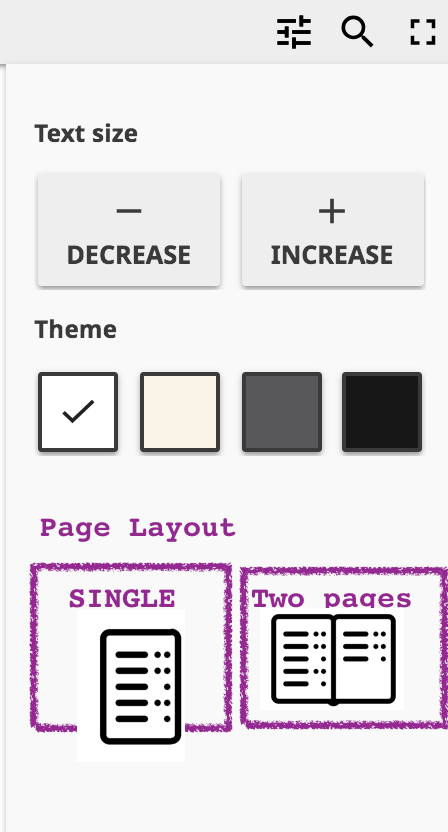
^^ Or could be three options single|double|auto with auto chosen by default to keep current behaviour. To avoid need for inventing an "auto" icon, maybe UI could be just text.
IMHO could be a good option to give readers, but not high priority.
ivanistheone
on 2 Jan 2019
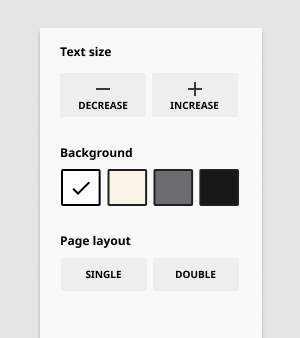
@indirectlylit @ivanistheone I don't think we'll need to commit to anything fancy -- the defaults and breakpoints function well to me. I like you suggestion to keep the buttons just textbuttons. We can develop some custom iconography when the time comes. Here's an example mock:
Notes:
- Epub is still defaulted to double page layout on load
- Transition to single page layout on smaller breakpoints as current behavior
 khangmach
on 20 Feb 2019
khangmach
on 20 Feb 2019
Related issues
 jonboiser
·
5Comments
jonboiser
·
5Comments
 indirectlylit
·
3Comments
indirectlylit
·
3Comments
 radinamatic
·
6Comments
radinamatic
·
6Comments
 mrpau-julius
·
4Comments
radinamatic
·
3Comments
mrpau-julius
·
4Comments
radinamatic
·
3Comments
Most helpful comment
I was looking into this today and found the
spreadoption that @christianmemije pointed to:http://epubjs.org/documentation/0.3/#layoutspread
This might require UI + new settings option like this:
^^ Or could be three options
single|double|autowith auto chosen by default to keep current behaviour. To avoid need for inventing an "auto" icon, maybe UI could be just text.IMHO could be a good option to give readers, but not high priority.