Klipper: MKS Robin Nano v1.2 support
I read the issue awhile back asking for MKS Robin Nano v1.1 support and you decided against it due to the close source nature of the board.
MKS has decided to open source the v1.2 board (https://github.com/makerbase-mks/MKS-Robin-Nano). The display still has a closed source firmware, but Klipper doesn't play nicely with TFT style displays anyhow.
I know someone with a Nano v1.2 who would be willing to test configs for us, I can write the pin assignment config, but I don't know if/what needs to be done for the MCU itself. Is this something that might be supported? A large number of new CoreXY printers are starting to show up with this board.
 slavedas
All 35 comments
Hi @slavedas,
It did not look like there was a Klipper log file attached to this ticket. The log file has been engineered to answer common questions the Klipper developers have about the software and its environment (software version, hardware type, configuration, event timing, and hundreds of other questions).
Unfortunately, too many people have opened tickets without providing the log. That consumes developer time; time that would be better spent enhancing the software. If this ticket references an event that has occurred while running the software then the Klipper log must be attached to this ticket. Otherwise, this ticket will be automatically closed in a few days.
For information on obtaining the Klipper log file see: https://github.com/KevinOConnor/klipper/blob/master/docs/Contact.md
The log can still be attached to this ticket - just add a comment and attach the log to that comment.
Best regards,
~ Your friendly GitIssueBot
PS: I'm just an automated script, not a human being.
 klipper-gitissuebot
on 15 Jan 2020
klipper-gitissuebot
on 15 Jan 2020
looks like this board.. https://wiki.fysetc.com/Cheetah_Board/
https://github.com/KevinOConnor/klipper/blob/master/config/generic-fysetc-cheetah-v1.2.cfg
sort of...
same-ish MCU and USB-controller..
 Hywelmartin
on 15 Jan 2020
Hywelmartin
on 15 Jan 2020
FYI, it's fine if someone wishes to add support for the nano (and similar). My comments in #878 were just to indicate that I, personally, am not planning to work on it.
-Kevin
 KevinOConnor
on 15 Jan 2020
KevinOConnor
on 15 Jan 2020
So in #878 you mentioned you would need to support 28k offset and UART3. It looks like both of those have already made it into the codebase if I'm looking at it correctly. So I would just need to handle whatever XOR is required?
slavedas
on 15 Jan 2020
It looks like the key derived before is still in use.
XOR Key is: A3BDAD0D4111BB8DDC802DD0D2C49B1E26EBE3334A15E40AB3B13C93BBAFF73E
And it starts 320 bytes into the firmware. The firmware also needs to be renamed to Robin_nano35.bin (despite their own instructions to name it Robin_nano.bin
slavedas
on 16 Jan 2020
I think the encrypting could be handled with this https://github.com/jmz52/MKS-Robin-Bootloader/blob/master/Robin/PlatformIO/scripts/mks_robin.py but me is laking time to tinker and test right now...
 greyhound3
on 17 Jan 2020
greyhound3
on 17 Jan 2020
Ohh, good find. I was working on the python script for this and had no idea it stopped XORing. The only note I would say is that from my experience, the Robin Nanos at least actually don't flash Robin_nano.bin but Robin_nano35.bin
slavedas
on 17 Jan 2020
And don't forget to fix RAM size in ld script and disable FSMC at sysinit.
 berghauz
on 18 Jan 2020
berghauz
on 18 Jan 2020
@berghauz I've been trying to understand what you are telling me to do. The STM32F1 boards don't seem to have their own .ld file, they seem to use the generic armcm-link.ld, is that correct? This one seems to have the expected 0x5000 memory length in it.
As for how to disable FSMC at sysinit, are you talking about line 165 of stm32f1.c where SystemInit() is called?
slavedas
on 26 Jan 2020
@slavedas the are many types of mcu's within stm32f1 family, robin nano in particular uses stm32f103vet6, this mcu in turn have 512k of rom and 64k of ram memory, but this is not the main reason to modify ld script, all robin boards is uses custom bootloader. Any robin mcu is RDP enabled, so we have two options:
- keep bootloader in place, to save friendly upgradability (via SD card)
- wipe all rom data and use SWD any time you want to change firmware
The size of this bootloader is 0x7000 and it's set VTOR to 0x08007000 by default, so you need to tinker ld script or Kconfig file of klipper. In genereal - yes, ld script is correct. You may refer to https://github.com/berghauz/klipper/tree/mks-robin-support where i have made changes (there is a binary prebuilt, you could only rename it for nano board and it should work)
About FSMC https://github.com/berghauz/klipper/blob/mks-robin-support/src/stm32/stm32f1.c
p.s. sorry, i have mix up rom and ram in my reply above
berghauz
on 26 Jan 2020
Thank you, I tried your .bin file with a printer.cfg file I ginned up and it seemed to work well. I didn't have anything but thermistors to plug in and test, but those worked.
I've distributed it as a test to a few other people with the printer I have still running the stock board.
slavedas
on 27 Jan 2020
Any further updates on this?
-Kevin
KevinOConnor
on 14 Feb 2020
Testing has been successful with the prebuilt binary and config file I put together through another party. It works for both the Nano v1.1 and v1.2 though the 1.2 has a few more pins available (for things like a BLTouch). At least one user with a fully connected Nano board has gotten their printer working as expected. I need to look at how you like Pull requests formatted, however I would need @berghauz to provide the pull request for the changes require for compilation.
slavedas
on 14 Feb 2020
Does it not work with stock Klipper after running the image through https://github.com/berghauz/klipper/blob/mks-robin-support/scripts/mks_robin_xor.py ? The only code change that I can see that has a direct impact is the resetting of the AHB2ENR register. (The memory changes and flash size changes shouldn't be needed as Klipper never uses that much ram or flash.)
-Kevin
KevinOConnor
on 14 Feb 2020
@KevinOConnor I'm not clear enough on if anything else had to be done on the STM side or not. It had looked to me that only the python script was necessary. I can try that this weekend and confirm if it works without any other modifications.
slavedas
on 14 Feb 2020
Any further updates on this?
-Kevin
KevinOConnor
on 5 Mar 2020
@KevinOConnor I tried to build, run through the python tool and install. It looks like the install occured, and I got a serial port when I hooked up to it, but I couldn't connect to it. I may have made a mistake in the menuconfig and it was late so I'll try a couple more times before I say it isn't working.
slavedas
on 6 Mar 2020
@slavedas what do you mean "python tool and install"?
berghauz
on 6 Mar 2020
@slavedas have you managed to do any more testing? I just received a Sapphire Pro which apparently uses the Robin Nano as well. I’d love to keep the board and not have to tear the old trusty Ramps board out of my Prusa clone.
 thucar
on 19 Mar 2020
thucar
on 19 Mar 2020
I can confirm that the binary file from @berghauz works perfectly. I had my printer up and running Klipper in no time.
thucar
on 20 Mar 2020
@berghauz maybe it is best to move the config discussion over to this issue, to avoid confusion between Robin Nano and Alfawise platforms.
I just tried something - I checked out a clean version of your repo, switched to robin-nano-support branch, checked that my .config file was identical to yours after running make menuconfig and built the firmware using make && make robin_nano
After uploading the firmware, klipper is once again not able to connect to the printer. Also, what I noticed is that the firmware I built was slightly larger than your prebuilt one.
-rw-r--r-- 1 pi pi 17008 märts 22 04:43 robin_nano.bin
-rw-r--r-- 1 pi pi 16604 märts 22 03:31 ../precompiled/flsun_qq_s/robin_mini.bin
@thucar - can you try with the work-stm32f1-20200321 branch?
cd ~/klipper ; git fetch ; git checkout origin/work-stm32f1-20200321 ; sudo service klipper restart ; make menuconfig ; make
Build for the stm32f103 with a 28KiB bootloader. After building the image, run: ~/klipper/scripts/update_mks_robin.py out/klipper.bin robin_nano.bin. Then copy the robin_nano.bin file to the printer's SD card to flash it.
If it does not work, let the host code retry for a couple of minutes and then attach the resulting Klipper log file here.
-Kevin
KevinOConnor
on 24 Mar 2020
Flashing gets stuck on 100%. Rebooting the printer using power switch props a "Booting..." message on the TFT that just stays on there indefinitely.
thucar
on 24 Mar 2020
@thucar check please, after update bin file on your sd card did change name to *.cur?
berghauz
on 24 Mar 2020
@berghauz yes, it did
thucar
on 24 Mar 2020
IIRC, the mks robin boards do not use serial port 1. During "make menuconfig" select low-level options and choose USART3. Build, run the update_mks_robin.py script, and reflash. Again, if it fails, please allow the host software a couple of minutes to retry, and then attach that Klipper log file here.
-Kevin
KevinOConnor
on 24 Mar 2020
I can not select any other serial ports during menuconfig. USART1 is selected and I get no other options when hitting space or Enter key while on Serial Port configuration line.
But I think you are on to something here. On the Robin Nano board pinout it specifically mentions to use USART3
thucar
on 24 Mar 2020
The "make menuconfig" screen should look like:
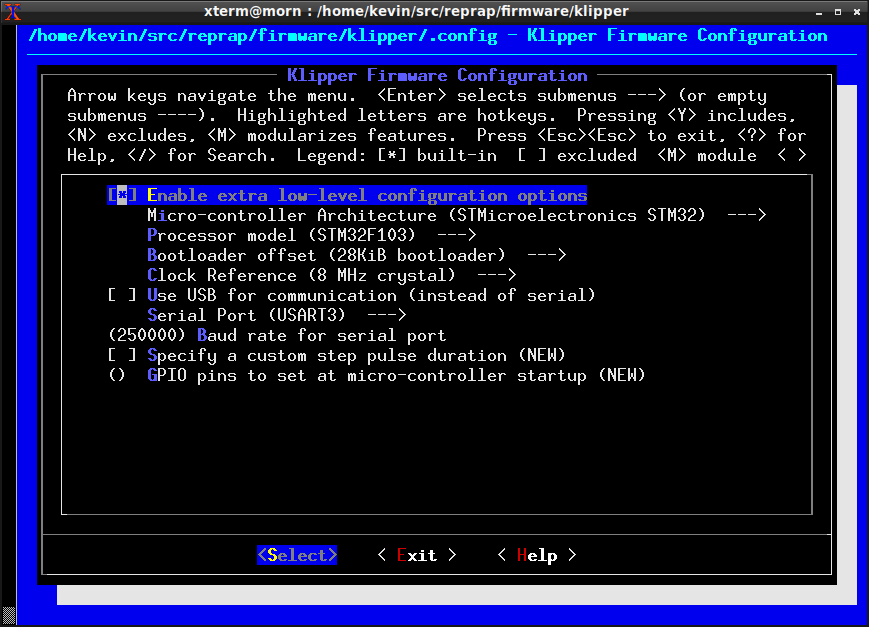
If you can't get it to look like that - attach a screenshot of what you do see. (Also, make sure you're on the work-stm32f1-20200321 branch.)
-Kevin
KevinOConnor
on 24 Mar 2020
Progress! Is it possible that my previous .config file was causing issues for the menuconfig? Anyways, I opened up the file, looked up the Serial conf section and changed it to USART3. After that I built and flashed the firmware.
The screen still got stuck on 100% (did not reset after flashing was complete) but Klipper can connect and communicate with the printer correctly.
Now when I ran make menuconfig again, I saw the USART3 as selected serial port and also it allowed me to change my selection this time. So now my menuconfig looks exactly like your screenshot.
thucar
on 24 Mar 2020
IIRC, the mks robin boards do not use serial port 1. During "make menuconfig" select low-level options and choose USART3. >
-Kevin
Damn, you are right, i'm totally forgot this moment, shame on me...
berghauz
on 24 Mar 2020
The screen still got stuck on 100% (did not reset after flashing was complete) but Klipper can connect and communicate with the printer correctly.
If you want to reset the display, it looks like you would add the following to the printer.cfg file:
[static_digital_output display_reset]
pins: !PC6, !PD13
(And/Or, set the equivalent in the "GPIO pins to set at micro-controller startup" section of "make menuconfig" - it's in the low-level options.)
-Kevin
KevinOConnor
on 24 Mar 2020
@KevinOConnor Thanks! That did it!
I can now enjoy the up to date version of Klipper on my Sapphire Pro. :+1:
thucar
on 25 Mar 2020
It would be great to add an example config file to the Klipper repo for this board.
-Kevin
KevinOConnor
on 25 Mar 2020
@KevinOConnor I'm on it. Will the need to manually run ~/klipper/scripts/update_mks_robin.py after compiling the firmware remain? Or will it be incorporated into makefile to run as part of the build process?
Please take a look at the file headers if the guides there will be valid for actual implementation:
https://github.com/KevinOConnor/klipper/pull/2647
thucar
on 26 Mar 2020
I'm going to close this as it looks like support is now available in Klipper.
-Kevin
KevinOConnor
on 8 Apr 2020
Related issues
 talfari
·
5Comments
talfari
·
5Comments
 sapell
·
3Comments
sapell
·
3Comments
 speendo
·
3Comments
speendo
·
3Comments
 LazaroFilm
·
6Comments
KevinOConnor
·
5Comments
LazaroFilm
·
6Comments
KevinOConnor
·
5Comments