Klipper: DUMP_TMC not working on MKS SBase
Hello!
I have the most recent klipper installed on my Raspberry Pi 2b and on my MKS SBase. Using these expension boards, I connected TMC2130 drivers.
I connected the TMC's pins like this:
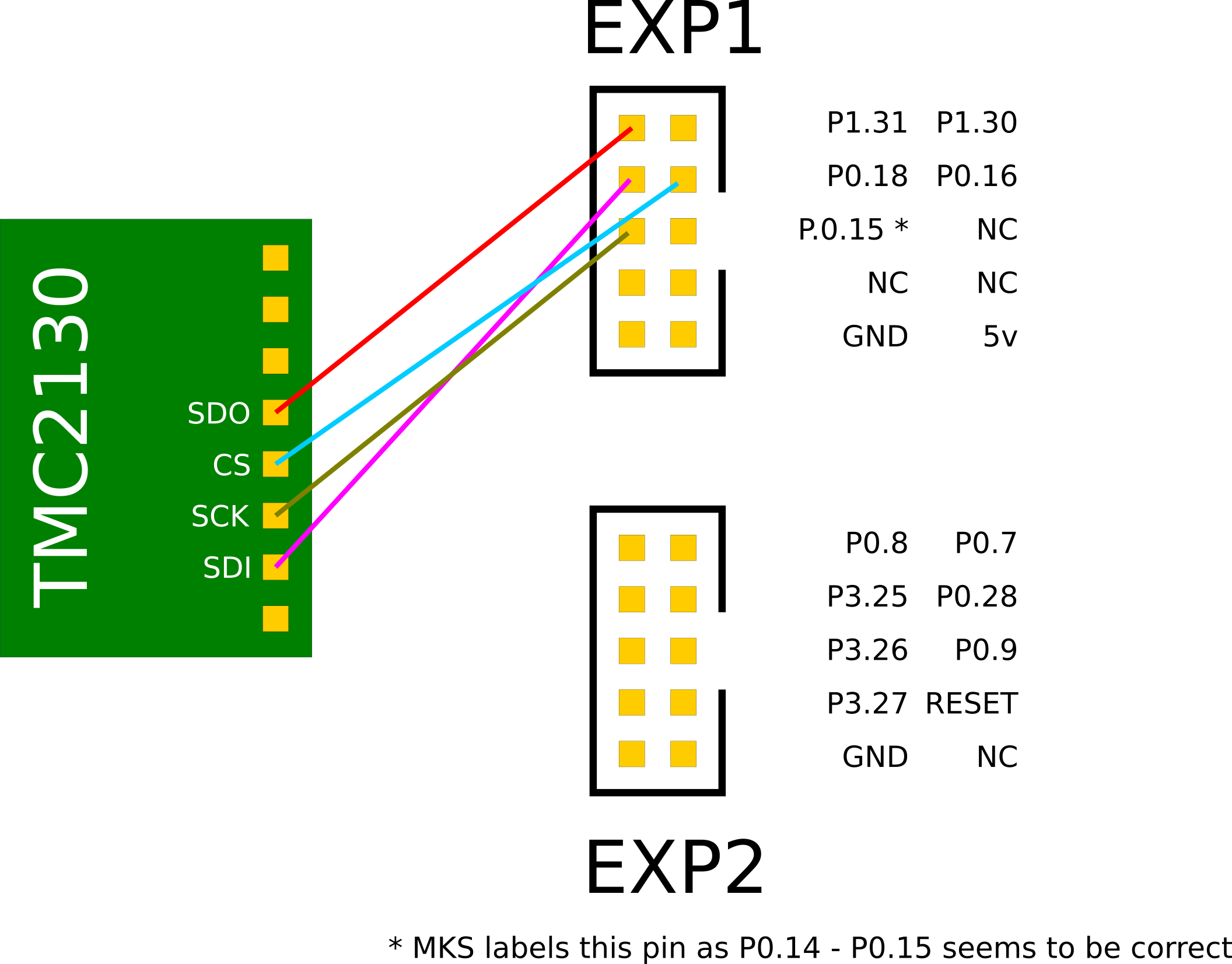
--> except the CS cables that go to P1.22, P1.23, P2.12 and P2.11 <--
My config looks like this (for the x axis driver)
[stepper_x]
step_pin: P2.0
# dir_pin: P0.5 # without TMC2130
dir_pin: !P0.5
enable_pin: !P0.4
step_distance: 0.00625
endstop_pin: ^!P1.24
# endstop_pin: tmc2130_stepper_x:virtual_endstop
position_endstop: -23.5
position_min: -23.5
position_max: 240
homing_speed: 70
homing_retract_dist=0

[tmc2130 stepper_x]
cs_pin: P1.22
microsteps: 32
interpolate: True
run_current: 0.8
hold_current: 0.133194589
#sense_resistor: 0.110
stealthchop_threshold: 100
#driver_IHOLDDELAY: 8
#driver_TPOWERDOWN: 0
#driver_BLANK_TIME_SELECT: 1
#driver_TOFF: 4
#driver_HEND: 7
#driver_HSTRT: 0
#driver_PWM_AUTOSCALE: True
#driver_PWM_FREQ: 1
#driver_PWM_GRAD: 4
#driver_PWM_AMPL: 128
driver_SGT: 4
diag1_pin: ^!P1.25 # currently not in use
Everything seems to work as desired, except for the DUMP_TMC command.
When I use it in the console, this is the output I get:
Send: DUMP_TMC STEPPER=stepper_x
Recv: // GCONF:          00000000
Recv: // GSTAT:          00000000
Recv: // IOIN:           00000000
Recv: // TSTEP:          00000000
Recv: // XDIRECT:        00000000
Recv: // MSCNT:          00000000
Recv: // MSCURACT:       00000000
Recv: // CHOPCONF:       00000000
Recv: // DRV_STATUS:     00000000
Recv: // PWM_SCALE:      00000000
Recv: // LOST_STEPS:     00000000
Recv: ok
In other words: no response.
If this makes a difference: I have the printer powered on and made sure to move the x axis before issuing DUMP_TMC.
@gorbi87 had the same experience (see here).
Do I have a wiring mistake or is this a bug?
Please find the log attached.
 speendo
All 3 comments
The MISO pin on the lpc176x is P0.17 (not P1.31). So, you'll need to route the "SDO" wire on the tmcs to P0.17.
-Kevin
 KevinOConnor
on 13 Jan 2019
KevinOConnor
on 13 Jan 2019
Thanks! That works!
I am sure I read somewhere, that it should be P1.31. But P0.17 is correct. How did you find that out (just for future requests)?
So the correct wiring should look like this:

This issue is solved :)
speendo
on 13 Jan 2019
FYI, I looked up the pins from the LPC176x specification.
-Kevin
KevinOConnor
on 21 Jan 2019
Related issues
 amaximchuk
·
6Comments
amaximchuk
·
6Comments
 leungtech
·
4Comments
leungtech
·
4Comments
 krpepe
·
5Comments
krpepe
·
5Comments
 sapell
·
3Comments
sapell
·
3Comments
 LazaroFilm
·
6Comments
LazaroFilm
·
6Comments
Most helpful comment
FYI, I looked up the pins from the LPC176x specification.
-Kevin