Klipper: Adafruit Grand Central (SAMD51) for RAMPS
Process to get this far:
1) Updated Raspbian and Klipper to latest.
2) Built Klipper and flashed MCU using make clean, make, make install
3) Setup a "basic" RAMPS config
4) Referenced: https://github.com/KevinOConnor/klipper/issues/1673 for issue and mapped out pins based on board header, which matches MEGA 2560, to chipset pins (See Pin Mapping.xlsx file for pinouts that I'm using).
From looking at klippy.log, some of pins, pa6, pa7 and pa22 ( stopped there ) are not valid?
I understand that the Adafruit Grand Central M4 would be in "low volume" use right now, but since it's a darn fast board and made to be a direct replacement for the MEGA I thought it would be a good upgrade board. I'm willing to work with anyone on getting this MCU functional under Klipper.
Please review logs and provide some feedback when possible.
 jalanjarosz
All 67 comments
The pin names are case sensitive (eg, use PA7 not pa7) and don't use leading zeros (eg, use PA7 not PA07).
-Kevin
 KevinOConnor
on 27 Jul 2019
KevinOConnor
on 27 Jul 2019
Updated pins. Have a couple thermistors on a RAMPS 1.6 board with a 12864 display.
MCU is connecting, but the thermistors are not reporting temperature, and there is nothing on the display.
jalanjarosz
on 28 Jul 2019
Unfortunately, you've hit the same issue described in #1673 - the micro-controller is responding with nonsensical messages (MCU 'mcu' is_shutdown: ?0) which indicates some sort of severe corruption of the micro-controller state. We've tested a number of the SAMD51 chips (I have the SAMD51G19 and SAMD51J19 chips and I know of several users using the SAMD51N19) - there must be something wrong with the SAMD51P20 support, but it is unclear what that is.
Best advice is at https://github.com/KevinOConnor/klipper/issues/1673#issuecomment-496745686
-Kevin
KevinOConnor
on 28 Jul 2019
Thanks for reviewing this. I'll see if I can get someone at Adafruit to assist us on this. I have a couple days next week I can put in before some Scout summer camp.
I'll keep and update on my interaction with Adafruit.
-James
jalanjarosz
on 28 Jul 2019
I created a post on the Adafruit board: https://forums.adafruit.com/viewtopic.php?f=63&t=154576
Will keep updating as more is discovered.
jalanjarosz
on 28 Jul 2019
Submitted a ticket to Adafruit/uf2-samdx1 repo: https://github.com/adafruit/uf2-samdx1/issues/79
jalanjarosz
on 30 Jul 2019
this code is a completely new implementation for SAMD so no Adafruit code is used here. Its almost certainly some misaligned or overflowed buffer due to an incorrect line of code. Which one? who knows!
Y'all need to plug in a JLink and gdb and watch memory locations until you see where its being corrupted https://learn.adafruit.com/debugging-the-samd21-with-gdb
 ladyada
on 30 Jul 2019
ladyada
on 30 Jul 2019
@ladyada, thanks for the recommendation and debugging reference link. Much appreciated.
@KevinOConnor I'll look into the needed debugging HW/SW stack when I get back in.
jalanjarosz
on 30 Jul 2019
its not my business but i would strongly recommend building this project on top of arduino IDE & BSP rather than hand-creating BSP's for all these different boards....it would save you a lot of heartache with multiple board support long term and PlatformIO is popular for such things
ladyada
on 30 Jul 2019
@jalanjarosz - could you pull the latest code and retry with the "internal clock" selected (instead of the 32Khz clock) in "make menuconfig"? I'm able to reproduce instability (though not identical symptoms) on my SAMD51J19 with your config when using the external crystal.
Also, your logs indicate you have a thermistor defined that isn't getting valid data - you'll need to address that before moving forward. Either connect a thermistor, comment out the config section defining that thermistor, or make sure the min_temp/max_temp range is large enough that an error isn't reported.
-Kevin
KevinOConnor
on 30 Jul 2019
its not my business but i would strongly recommend building this project on top of arduino IDE & BSP rather than hand-creating BSP's for all these different boards....it would save you a lot of heartache with multiple board support long term and PlatformIO is popular for such things
Thanks for reviewing. It certainly would be nice to deploy a library to avoid low-level board bringup. Unfortunately, we haven't found a library suitable for the range of boards of interest. (We have some exotic targets - for example 8bit avr, beaglebone pru, linux rt.) So, the choice has been, use many different libraries or code it manually.
Klipper primarily uses a "bare metal" approach today. We're averaging ~1500 lines of C code per chip architecture. So, the benefits of smaller code and high performance have made the trade-off with 3rd party libraries less straight forward. To be clear, writing low-level C code is not a goal - the whole purpose of Klipper is to enable synchronized control of multiple micro-controllers via code written in Python. The low-level C code is just a means to that end.
As observed, the SAMD51 support is pure Klipper code and any problems in that support is for Klipper developers to tackle.
Cheers,
-Kevin
KevinOConnor
on 30 Jul 2019
yah i totally understand ... given the samd51 can run at 200mhz, optimization is not essential :) i think you could maybe turn Klipper into an arduino library for that platform (at least) - C code is arduino compatible - and scrap the hardware interface.
ladyada
on 30 Jul 2019
yah i totally understand ... given the samd51 can run at 200mhz, optimization is not essential :) i think you could maybe turn Klipper into an arduino library for that platform (at least) - C code is arduino compatible - and scrap the hardware interface.
I'm with you in theory. Unfortunately, my experience with the Arduino API hasn't been positive. Too much code disables irqs or busy waits for extended periods. A primary goal of Klipper is to provide precise timing of events. I fear the effort to diagnose latency in 3rd party code (and then work around it) is greater than the cost of going "bare metal". As for performance - we're regularly issuing hundreds of thousands of steps per second on these micro-controllers - it's not clear to me (even at 120Mhz) that the Arduino GPIO API is up to that task. We could certainly work around that - but that further reduces the incentive to adopt a 3rd party library.
Separately, I thought the SAMD51 line maxed at 120Mhz? A faster SAMD51 chip would certainly be interesting. (My recent work on the 180Mhz STM32F4 chips have shown good performance in our benchmarks.)
Cheers,
-Kevin
KevinOConnor
on 30 Jul 2019
you dont have to use the GPIO API, you would toggle gpioset registers directly, the use a timer IRQ for triggering your gpio calls.
you can overclock the samd51 to 200mhz very easily, we do it all the time now...
ladyada
on 30 Jul 2019
Good news is there is no ambiguous shutdown in the klippy.log
klippy(1).log
I set the thermistor to the 104GT-2, which I have several of them. These two I have on the RAMPS board do test out at 100k Ohms. They are still reading near -100C though. VCC is 3.75v. Looks like I need to set a different pullup_resistor: ?
12864 display still does not display any graphics.
jalanjarosz
on 30 Jul 2019
you dont have to use the GPIO API, you would toggle gpioset registers directly, the use a timer IRQ for triggering your gpio calls.
Right - that's what Klipper does today. It's part of the ~1500 lines of C code that is specific to each chip architecture. Since we'd still need to do that with Arduino libraries, there wouldn't be much savings to adopting that library. And we'd still have the downsides of integration with the library - for example, on the ARM cortex-m3/m4 chips we utilize a combination of SysTick and Debug Watch Trace (DWT) timers to deliver high performance timed events - having to audit/modify Arduino so that none of its code uses those blocks could be a significant development cost.
Again, I'm with you in theory. In practice, the trade-offs have been less clear.
you can overclock the samd51 to 200mhz very easily, we do it all the time now...
Ah, that's interesting. Thanks.
-Kevin
KevinOConnor
on 30 Jul 2019
ok best of luck - its a good chip, if its coming up, probably some simple misconfig somewhere. let us know if we can send you any SAMD51 boards to test against, we'd love to see these replace the Due, as its much faster and has better I2C for sure :)
ladyada
on 30 Jul 2019
@jalanjarosz - Your latest log indicates Klipper is now operating normally. The initial indication is that noise on the 32K crystal is the root cause (I also found a reference to this in the spec - some pins such as PA2, PB3, PC0 need to be static to prevent jitter on the crystal). You should be okay with selecting the internal clock (which also enables USB "clock recovery").
Your ADC errors are indicative of the wrong pin being configured - double check your configuration and wiring.
-Kevin
KevinOConnor
on 31 Jul 2019
@KevinOConnor - I did notice this issue in the Adafruit repo: https://github.com/adafruit/uf2-samdx1/issues/38 . I was going to try using the internal clock but you suggested it before I found the time to just do it. Thanks!
I'll be away for a few days. I'll pull the schematics and review the pins next week. Of course I will document the setup and a generic config and share with the group.
jalanjarosz
on 31 Jul 2019
@KevinOConnor
Pins -
I've re-reviewed pins using ATSAMD51P20A schematic and Metro M4 schematic - https://learn.adafruit.com/adafruit-grand-central/downloads
Based on what I've read here: https://learn.adafruit.com/adafruit-grand-central/pinouts the Metro M4 follows the same pins as the Arduino MEGA, which Arduino pins are not supported in Klipper for this MCU. These also match the GPIO pin numbers:
example: Arduino pin AR16 = Metro M4 GPIO D16.
Following the board schematic for GPIO D16, it maps to UART2_TX on the SAMD51P20A which is on the chip as PC22/16/SERCOM1.0_3.1/TCC0.6. For my klipper.cfg, I've used PC22 as the pin. Is this the correct pin mapping?
3.3v Logic and Thermistor -
This MCU has 3.3v logic, like the Arduino DUE. Does the thermistors pull-up resistor need to be adjusted to compensate for less voltage?
Thanks!
jalanjarosz
on 5 Aug 2019
Attached is new Excel file for the PINS. I'll try to make it a little more "graphical" once we get this working.
I attempted to drive the RRD st7920 display like @KevinOConnor has for a DUE https://github.com/KevinOConnor/klipper/issues/814 however I'm still not having success.
I'll look at the RE-ARM setup for RAMP boards. It looks like they split the EXP1 cable for +5v. http://panucattdevices.freshdesk.com/support/solutions/articles/1000243195-lcd-display-installation I'll confirm if the Grand Central is delivering +5v, which by the spec, the header has two 5v headers.
The display is illuminated, but does not display any graphics.
jalanjarosz
on 6 Aug 2019
Hi,
I am also using the Adafruit Grand Central M4, but with the RADDS board. I have not encountered any corruption issue with it. I have mine configured with “Internal clock”.
I found out that I need to config “GPIO pins to set at micro-controller startup”, or the printer do all sorts strange things until the printer.cfg is loaded. Main pins to set is the motor power pins, should be set to disable.
My startup GPIO values for the RADDS board is “!PB17,!PC19,!PC18,!PD12,!PC22,!PC23,!PA12,!PA15,!PC17,!PB5,!PC3,!PB4,!PB8,!PB6,!PB7,!PC5,!PD10,!PD8,!PA16,!PA20,!PA18,!PA22,!PA13,!PB19,!PA6,!PB9,!PA4,PC16”
Here is sets the initial values for each of all GPIO pins for each stepper drivers, it may be different for the RAMPS board.
The SAMD51 is doing some activities on some of the GPIO pins doing startup, and on RADDS board it is STEP pins, so the stepper motor is moving uncontrolled if motor power is enabled during startup.
Hope the info can help others with wired behaviors.
Best regards
 popshansen
on 6 Aug 2019
popshansen
on 6 Aug 2019
@popshansen Can you upload your printer.cfg file? There may be some things that I can combine into my config.
Were you able to get a display to work?
Thanks!
jalanjarosz
on 6 Aug 2019
Here is my printer.cfg and a excel document with pinouts for the RADDS v1.6 with the Extension board V3. The printer.cfg is for an V-King core XY printer.
No I don't have any plans to fit a display on the radds. For the moment it will be a thouch display for the raspberry pi, if any.
SAMD51 Pinout.xlsx
popshansen
on 6 Aug 2019
@jalanjarosz - voltage does not impact the pullup configuration. The symptoms in your log indicate the wrong pin was configured (one that isn't routed to a thermistor at all).
-Kevin
KevinOConnor
on 7 Aug 2019
@KevinOConnor - After doing more research, there may be some HW related challenges. I reviewed both the RAMPS and RADDS schematics, focusing on thermistors:
RAMPS: https://github.com/bigtreetech/ramps-1.6/blob/master/Ramps1.6/hardware/R6Schematic%20diagram.pdf
RADDS: https://reprap.org/mediawiki/images/8/81/RADDS_26_sch.pdf
On the RADDS board, which is made for a 3.3v DUE, there is a 220mF cap between 3.3v VCC and ground (on the back side of the 4.7k pull-up resistor). The RAMPS board does not. This could explain the funky results (-94.5C where it should be about +25C ) since the Grand Central is 3.3v logic? I have confirmed when I put a lighter under the thermistor, temp values do increase. This confirms that I have the correct pin selected.
I'm curious how much voltage is across thermistors pins when a RAMPS in on Panuchatt's Re-ARM board?
Would a custom thermistor be the way to go? Resistance would remain the same but ADC values would change based on voltage differences, no?
On to the display - I've double checked all pins, comparing what I already found to what @popshansen has done for his GC/RADDS configuration, then cross-referenced with the RRD 12864 schematics, and I believe I have the correct pins, but no display as of yet. I have confirmed that the RESET pin on the display functions is only illuminated by the back-light. SCLK = PA15, SID = PC23, and CS = PC22.
jalanjarosz
on 7 Aug 2019
Continuing investigation:
Arduino Due + RAMPS has similar issues with thermistors. Apparently pins A13-A15 are not ADC. Will look at GC to see if same. Potential fox for thermistors are here: https://reprap.org/forum/read.php?219,479626
Due + RAMPS has had similar issue with RRD 12864, see Rep-Rap link above. Looks like @KevinOConnor has had success with RRD 12864 on Due, but I’m not able to replicate. Even with direct wiring: https://github.com/KevinOConnor/klipper/issues/814 Will need further assistance here.
jalanjarosz
on 8 Aug 2019
@KevinOConnor is there a way to default pins as analog like setting PWM state in the make makemenu app? I
I see CircuitPython routines of setting a pin as an analog input: https://learn.adafruit.com/adafruit-grand-central/circuitpython-analog-in
jalanjarosz
on 8 Aug 2019
I have testet the RRD 12864 (st7920) on my Grand Central, and I can get some garbage on the screen by issue "M73 P20", and I can use the encoder and button. It is working thru the default menu, but it is garbage on the screen where it change the garbage when change menu and it change back when I am change to previous menu. So looks like somekind of timing issue.
popshansen
on 8 Aug 2019
Just received in a Re-ARM board. This design has thermistors pins on the Re-Arm itself. Because of this, it does not look like using thermistors directly on a RAMPS is possible: ie its a HW issue.
Is there some expansion boards that can be used?
jalanjarosz
on 9 Aug 2019
Continuing investigation:
Arduino Due + RAMPS has similar issues with thermistors. Apparently pins A13-A15 are not ADC. Will look at GC to see if same. Potential fox for thermistors are here: https://reprap.org/forum/read.php?219,479626Due + RAMPS has had similar issue with RRD 12864, see Rep-Rap link above. Looks like @KevinOConnor has had success with RRD 12864 on Due, but I’m not able to replicate. Even with direct wiring: #814 Will need further assistance here.
This was my issue, and if you read through you'll see that the only reason the screen didn't work for me is because I had a separate, unrelated error caused by a mistake in my config. If you have any unresolved issues in your config that produce any kind of error, even non-critical errors, you will not get a display. I'm not currently using my Due, but I ran it with a 12864 screen for more than 6 months with no issues. If you have no errors in your log, and you still aren't getting a display with your Due, then you have a mistake in your pin configuration or wiring.
 jakep82
on 9 Aug 2019
jakep82
on 9 Aug 2019
@jakep82 Right now, I have just a real basic config. X, Y, Z and E steppers, no errors in config and I've reviewed the PINS multiple times, and not getting any display.
My board is the Adafruit Grand Central, which is the same footprint as the Arduino MEGA and DUE, however using the ATSAMD51 chip.
I think there is something more involved here regarding the display. Although I haven't looked beyond pin; direct wiring, and using the smart adapter.
I believe my thermistor issue is either a HW issue on the RAMPS or ADC issue. This too is outside my current understanding.
My next item to check is steppers, which I'll get to in the next week or so.
jalanjarosz
on 9 Aug 2019
It is not valid to use an unmodified RAMPS board with either the Due or the SAMD51. These chips are 3.3V where the RAMPS is 5V. Routing 5V power to these chips is likely to result in damage to them.
Does the thermistors pull-up resistor need to be adjusted to compensate for less voltage?
No. The thermistor circuit works the same when the pullup is tied to 3.3V. However, if the ramps has not been modified and there is a pullup to 5V, then that is not valid and is likely to damage the micro-controller.
is there a way to default pins as analog like setting PWM state in the make makemenu
The mcu either supports analog or does not support analog on a given pin. If it does support analog, Klipper automatically places it in analog mode when it is configured as an analog source.
I think there is something more involved here regarding the display.
It's possible there is a timing issue with LCD updates on the SAMD51 (the st7920 chip requires an arcane bit-banging protocol that can be finicky). I recommend putting the display aside until you have everything else working.
-Kevin
KevinOConnor
on 10 Aug 2019
@KevinOConnor The display was easy to fix: According to the datasheat of the st7920 the rise and fall is 0.2us and when messured the sclk pin in a logic analyzer I could see that it was way to fast.
I modified the lcd_st7920.c file where I added "nsecs_to_ticks" function and modificed the "st7920_xmit_byte" to have a 0.2us (200ns) delay between those 2 "gpio_out_toggle(sclk);" lines, the "data <<= 1;" is not enough time on the SAMD51.
I am not expert on github but I have tried to make a pull request with the fix.
popshansen
on 10 Aug 2019
@KevinOConnor Thanks for your review and input. I know the chip/board is on the bleeding edge (it's a beta board) and I'm also learning micro-controllers on the fly, something my years of mechanical design engineering, application programming, and limited electronics cannot prepare me for. I'm willing to research, learn, help, test, and provide feedback as much as needed.
Related, my RAMPS v1.6 board is currently modified for 24v, so it will not back-feed +5v to the MCU. At the moment, the MCU is powering the RAMPS with only a display and thermistors connected.
Next steps, which I"ll start the week of Aug 19th:
1) Update Klipper for code related to @popshansen st7920 timing and report back. - Proposed changes in: https://github.com/KevinOConnor/klipper/pull/1874 appear to correct display issue.
Note: RAMPS board needs be physically modified to 3.3v logic. This will cause issues with RRD voltage. will need an alternate solution to provide +5v to RRD display.
8/19/2019 - RRD no longer works after 3.3v modifications. Step-Up converters are on order.
9/6/2019 - RRD functions with DC-DC Step-Up converter after using new RAMPS board. Configured MKS Mini 12864 v2.1 display with functioning NeoPixels under 3v3.
2) Make a thermistor breakout board and test if GC has similar issue as Due pins A13, A14, and A15 by using alternate analog pins:
Note: Thermistor may be corrected after board conversion to 3.3v
8/19/2019 - RAMPS 3.3v modifications correct ADC issue regarding Thermistors. GC does not appear to have same issue as Arduino Due. This step will not be done.
3) Review RAMPS electrical mods for DUE and apply as needed.
RAMPS mods for GC: (to be tested)
- JM5: pin 3 needs to be removed: cut or de-solder.
- JM5: Bridge Pin 2 to Pin 3 to supply 3.3v from GC to RAMPS.
- SIP36: pins 35 and 36 need to be removed: cut or de-solder
- Optionally remove diode D1 so RAMPS will not power GC. Only needed for 24v printers
- Optionally remove jumper from J5 Pin2 and 3. This disables 3.3v power for servos. Leave jumper if servers can run on 3.3v
8/19/2019 - 3.3v conversion has been completed and tested with continuity tests. More logic testing is still needed for below items.
4) Install cooling fan and validate
9/6/2019 - Further research found that the MOSFETS on the RAMPS board may not function properly or long with 3v3 gate voltage. MOSFETS are a 10v gate logic and work "good enough" under 5v. Further research is needed and replacement MOSFETS are needed in order to have a single board option.
9/12/2019 - Validated that all Fan/Heater FET STP55NF06 and Heated Bed FET WSK220N04 will switch on/off under 3v3 gate voltage. CAUTION: there is no info on datasheets with using these FET's with 3v3 gate voltage, so it's highly recommend to use place loads on properly rated external MOSFETS
5) Install endstops and validate
9/6/2019 - Optical Endstops function w/o issue. Micro switch end yet to be tested, but expected to work without issue.
6) Install DRV8825 steppers drivers and steppers.
9/12/2019 - Installed and validated RAMPS X, Y, Z, E0, and E1 positions with Klipper STEPPER_BUZZ
7) validate operation of heaters.
9/6/2019 - Further research found that the MOSFETS on the RAMPS board may not function properly or long with 3v3 gate voltage. MOSFETS are a 10v gate logic and work "good enough" under 5v. Further research is needed and replacement MOSFETS are needed in order to have a single board option.
9/12/2019 - Validated that all Fan/Heater FET STP55NF06 and Heated Bed FET WSK220N04 will switch on/off under 3v3 gate voltage. CAUTION: there is no info on datasheets with using these FET's with 3v3 gate voltage, so it's highly recommend to use place loads on properly rated external MOSFETS
8) BLTouch (3.3v mode) - install and validate.
This would give a good working start. I have a TMC2130 that I can add and test after getting things operational.
jalanjarosz
on 10 Aug 2019
Modified RAMPS v1.6 board for 3.3v logic by:
1) Cutting JM5 - pin 3 on bottom of shield
2) Solder bridging JM5 - pins 2 and 3
3) Desoldering and removing J1 - pins 35 and 36
4) Leaving J5 w/o jumpers (would only supply 3.3v to SERVOS)
Validated that JM5 pin2 would supply logic voltage into RAMPS shield by:
1) Using continuity test from JM5 pin 2 to all pins that would normally be +5v.
2) Placed shield on un-powered Arduino MEGA 2564 and validated that the normally +5v rail on the RAMPS does not have continuity to +5v rail on MEGA 2564.
Assembled RAMPS to Adafruit Grand Central with only two thermistors on T0 and T1 with matching configuration in Klipper and RRD 12864 display. Powered up GC via USB and made successful connection to Klipper.
Both thermistors are reporting proper temps in OctoPrint. Temps will change when heat is applied and then go back down to nominal room temp. at about 21-22C.
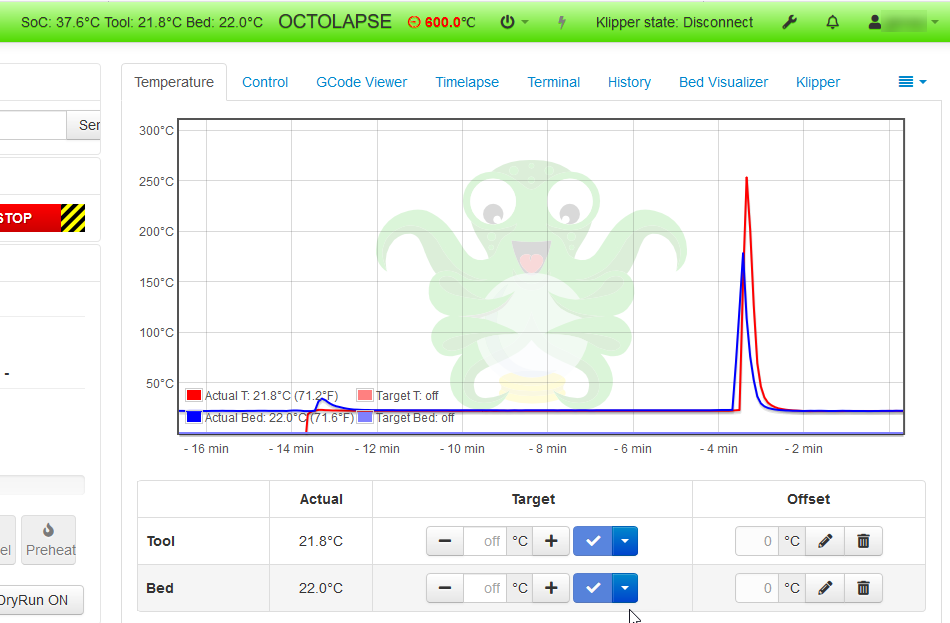
RRD 12864 no longer displays graphics, as this is expected due to lack of voltage. I have some "Step up" converters that I'll try to use to increase RRD voltage.
At this time, the RAMPS 3.3v conversion looks promising.
I will not be validating #2 above as it does not appear the Adafruit GC does not have same ADC issue as Arduino DUE.
jalanjarosz
on 20 Aug 2019
@KevinOConnor @popshansen looking for some insight:
When using a 5v un-modified RAMPS board, my RRD 12864 (st7920) works just fine.
When using a 3v3 modified RAMPS board with injecting 5v via step-up converter to the display, I get no graphics.
I modified the EXP1 ribbon cable by pulling pin 9 (gnd) and pin 10 (vcc) out to insert the step-up converter in-line. I've even used a RE-ARM ribbon cable for EXP1, which pin 10 has been removed for 5v supply to display. I've attempted with and w/o EXP2 cable attached.
According to RAMPS 1.6 schematic, all other pins should be direct to MCU.
I will try wired direct w/o the smart break-out board to see if there is something causing an issue there.
Here is my display settings:
[display]
lcd_type: st7920
cs_pin: PC22
sclk_pin: PA15
sid_pin: PC23
encoder_pins: ^PA20, ^PA22
click_pin: ^!PA18
kill_pin: ^!PC12
Thanks!
jalanjarosz
on 23 Aug 2019
Alas, I don't have much insight. Some random notes: 1 - you shouldn't need a step-up - you should be able to just wire the display's 5V source to 5V on the board. 2 - if you can get the display working on any board, you could always go multi-mcu and not worry about the main board having the display.
-Kevin
KevinOConnor
on 23 Aug 2019
I would check that the step-up can deliver enough current for the display, I'll guess that the backlight use alot of milliamps. The is a loss of current to do the step-up to 5v from the 3v3.
popshansen
on 23 Aug 2019
@KevinOConnor @popshansen looking for some insight:
When using a 5v un-modified RAMPS board, my RRD 12864 (st7920) works just fine.
When using a 3v3 modified RAMPS board with injecting 5v via step-up converter to the display, I get no graphics.I modified the EXP1 ribbon cable by pulling pin 9 (gnd) and pin 10 (vcc) out to insert the step-up converter in-line. I've even used a RE-ARM ribbon cable for EXP1, which pin 10 has been removed for 5v supply to display. I've attempted with and w/o EXP2 cable attached.
According to RAMPS 1.6 schematic, all other pins should be direct to MCU.
I will try wired direct w/o the smart break-out board to see if there is something causing an issue there.
Here is my display settings:
[display]
lcd_type: st7920
cs_pin: PC22
sclk_pin: PA15
sid_pin: PC23
encoder_pins: ^PA20, ^PA22
click_pin: ^!PA18
kill_pin: ^!PC12
Thanks!
I have a RAMPS 1.6 board and the GC on order. My email is [email protected] - Jalan, mind getting in touch so we can join our efforts?
 CalielOfSeptem
on 27 Aug 2019
CalielOfSeptem
on 27 Aug 2019
@CalielOfSeptem - sent you an email.
jalanjarosz
on 27 Aug 2019
Will be getting back to this now that I’m back from vacation.
Had a minor issue with a blown fuse on the high voltage rail on the RAMPS board. A replacement board just arrived.
jalanjarosz
on 6 Sep 2019
Using new BIGTREETECH RAMPS v1.6, modified to 3v3 logic I was able to get two different displays working:
First Display Option:
RepRap 12864 Smart Graphic Board. EXP1 cable was modified with a DC to DC Boost Converter.
Example products
RRD: https://www.amazon.com/gp/product/B076WQQX5K
Boost Converter: https://www.amazon.com/gp/product/B01N6EKHZR
Second Display Option:
MKS Mini 12864 OLED v2.1. This display works when powered by 3v3. The only difference is the EXP1 and EXP2 cables need to be reversed in their respective socket when using a RRD Display Adapter. ie: pin 1 from the RAMPS is pin 10 on the MKS Mini display.
Example Product:
MKS Mini v2.1: https://www.amazon.com/gp/product/B07S1S8PMK
RRD Display Adapter: https://www.amazon.com/Connector-Printer-LCD12864-Controller-Electronic/dp/B07X7M5BBM
Validated Thermistors ATC Semitec 104GT-2 are functioning.
Validated Optical Endstops work: https://www.amazon.com/gp/product/B071KBC3P8
Validated Adafruit Grand Central M4 onboard NeoPixel works
Validated MKS Mini NeoPixels work.
jalanjarosz
on 7 Sep 2019
9sept2019 - Configured DRV8825 step-stick drivers. Set vref on driver and installed stepper. Validated that stepper_buzz stepper=stepper_x moved the stepper.
Will continue to validate that Y, Z, E1, and E2 function as well with additional DRV8825 drivers.
jalanjarosz
on 9 Sep 2019
As I wait to get my own Grand Central board, and as I have, for some time now, been working on a new RAMPS shield design (that, among other things, should address any 3V <-> 5V issues) (https://github.com/MrAlvin/RAMPS-1.4.4), I have a couple of questions about some of the Grand Central pin functionality.
Can the A0 (supposedly D54) and A1 (supposedly D55) pins also function as Digital pins?
Does Klipper use hardware or software PWM on pin D10?
(on a RAMPS 1.4 shield D10 controls the Heated Bed mosfet)
Or is hardware/software PWM selectable in Klipper?
[Edit] And as I was going away from the screen, I came to think of a way to test A0 and A1, without an actual AGCM4 board to test on: Do a test sketch with pinMode set to OUTPUT on all pins D54-D69 - And the test sketch compiles just fine.
So to answer my own question: A0 (D54) and A1 (D55), on the AGCM4 board is fine for the RAMPS 1.4 pin configuration.
So now on to discovering details about D10 and PWM options
 MrAlvin
on 10 Sep 2019
MrAlvin
on 10 Sep 2019
yes, A0 and A1 are digital in/out as well as analog in/out
ladyada
on 10 Sep 2019
FYI, Klipper uses software PWM by default for all functions (heaters, fans, servos, etc.). So, unless you are doing something special, you can use any digital output pin with Klipper.
-Kevin
KevinOConnor
on 10 Sep 2019
FYI, Klipper uses software PWM by default for all functions (heaters, fans, servos, etc.). So, unless you are doing something special, you can use any digital output pin with Klipper.
Super.
Then my shield should be all set, to also work with Klipper and the AGCM4 controller.
MrAlvin
on 10 Sep 2019
Be aware about the SPI bus on the Grand Central, as it is shared with pin 50, 51 and 52. It is not a standalone SPI bus.
I use the RADDS board with the Grand Central and if I want to use the hardware SPI for controlling TMC’s, I cannot use E3 as it use pin 51 for step.
No problem with software SPI.
On Arduino Due the SPI bus is not exposed on other pins. I do not know if it is the case with Arduino Mega and Re-Arm.
popshansen
on 11 Sep 2019
@MrAlvin Do you have any 1.4.4 boards available for testing or purchase? I'd be willing to provide some feedback with Klipper on a CoreXY.
jalanjarosz
on 12 Sep 2019
@jalanjarosz Yes, I do have a few boards available. Please contact me via [email protected] and we can make arrangements.
For now I only have what I would consider pre-release versions, as I have almost daily been tweaking minor details on the design. But all the main functionality is tested to be fully functioning as intended and expected, and I consider them locked in and done.
Also, all detailed information about any pre-release shield will be shared with recipients of such shields.
MrAlvin
on 12 Sep 2019
Be aware about the SPI bus on the Grand Central, as it is shared with pin 50, 51 and 52. It is not a standalone SPI bus.
I use the RADDS board with the Grand Central and if I want to use the hardware SPI for controlling TMC’s, I cannot use E3 as it use pin 51 for step.No problem with software SPI.
I do not know if it is the case with Arduino Mega and Re-Arm.
The Mega has SPI on both the D50-D52 pins, as well as the central SPI conncetor. Just like the AGCM4 does.
The Re-ARM has SPI on pins D50-D52 only.
In order to make shields usable on several different controller boards, I would suggest to not use D50-D52 for any other standard functions, but SPI. And only leave them as Aux pins, in case one were to use the shield with DUE.
MrAlvin
on 12 Sep 2019
Just received in a Re-ARM board. This design has thermistors pins on the Re-Arm itself. Because of this, it does not look like using thermistors directly on a RAMPS is possible: ie its a HW issue.
The Re-ARM board does indeed have its own implementation of thermistor pins, as it has proven to be a better design, with less noise issues, compared to using the RAMPS thermistor option.
On the Re-ARM it should however be possible to select between using the on-board or the RAMPS thermistor circuits, by setting some solder jumpers on the Re-ARM board.
See this post for details: http://panucattdevices.freshdesk.com/support/solutions/articles/1000256380-using-on-board-thermistor-analog-ports
MrAlvin
on 12 Sep 2019
hiya - to clarify, we tried to mimic the Mega as much as possible so we put the SPI pins on the same 50/51/52 set + ISP-6 header, just as the Mega.
ladyada
on 12 Sep 2019
Completed the following validations successfully:
Stepper moving using Klippers "STEPPER_BUZZ" for RAMPS stepper positions: X, Y, Z, E0, and E1
Configured AGCM4 SERCOM7 successfully and used to drive a MKS Mini 12864 v2.1 display with SPI using the following config:
SAMD SERCOM
[samd_sercom sercom7]
tx_pin: PD8  #D51
rx_pin: PD11 #D50
clk_pin: PD9 #D52
Validated MOSFET B55NF06 (used on RAMPS 1.6 and 1.6+ for fan/hot end) will turn on/off with 3v3 logic for a fan. This may work-ish albeit the datasheets have no reference for 3v3 gate voltage. It was noted that when lowering the fan % down, there was noticeable noise (like a rattle) in the fan and RAMPS fan LED went dimmer as fan % (and voltage) decreased. With that being noted, one should ERR. on the side of caution and use an external MOSFET for the loads.
Validated MOSFET WSK220N04 (used on RAMPS 1.6 and 1.6+ for heated bed) will turn on/off with 3v3 logic for a fan. Again the datasheets have no reference for 3v3 gate logic, but other makers have had success driving low wattage devices like a hot end with this MOSFET. IT IS NOT RECOMMENDED to directly drive a heated bed as the heat dissipation may result in fire. ERR to the side of caution and use an EXTERNAL MOSFET to drive a heated bed in this location. It was noticed that as the fan % went down, the LED also dimmed and noise increased in the fan.
Fan noise was greater in 24v axial fans. nose level was less in 24v radial fan. Noise could be mainly due to fan being run on lower voltages.
I will source some external MOSFETS in two types: PWM an a typical bed heater FET. Will test the fans again and hopefully a heater when they arrive.
Based on electrical schematic, RAMPS Heater/Fan LED's are powered by the "High Voltage Rail" and the DRAIN side of the FET, so brightness would be expected to change with voltage changes from +24v down to 0v.
jalanjarosz
on 12 Sep 2019
Any further updates on this? It sounds like everything is now running.
-Kevin
KevinOConnor
on 8 Oct 2019
I have a basic config operating. I’m in process of documenting what was done to the board and displays for anyone else to use.
Thanks for checking in on the progress.
jalanjarosz
on 9 Oct 2019
Okay, thanks. It sounds like we should close this ticket as it doesn't look like we are currently tracking any open items in Klipper.
-Kevin
KevinOConnor
on 30 Oct 2019
I’m about ready to post documentation. I expect to post and close tomorrow.
Thanks!
jalanjarosz
on 30 Oct 2019
Attached is a single document that encapsulates the noted changes of this thread.
@KevinOConnor thanks for all your help and support along the way! Next step is going to overclock the AGCM4.
jalanjarosz
on 31 Oct 2019
Thanks!
-Kevin
KevinOConnor
on 1 Nov 2019
nice, have you gotten RAMPS working successfully then? we would document this, perhaps we should make a fork/PR for RAMPS?
ladyada
on 3 Nov 2019
@jalanjarosz Awesome document and comprehensive. It will be useful for someone. May be me :-) I have another AGCM4 where I need to replace the SAMD51 as the USB doesn't work in the chip and RAMPS 1.4, so it will be a good reference. The overclocking part could be nice, I have been looking in to how it is done in Arduino IDE and it dosen't look that hard to implement in samd51_clock. Might give it a go, I have the equipment to reflash the GC if I bricks it ;-)
popshansen
on 3 Nov 2019
@ladyada - Yes I have a modified RAMPS 1.6 (Bigtreetech) board on the Grand Central M4 running Klipper. My bench has the following working:
- 5 steppers,
- Heater/Fans are controllable (should use external MOSFETS for safety.
- AGCM4 Neopixel
- Filament Runout
- End Stops - Optical and mechanical
- Rep Rap Smart controller (modified with 5v step-up converter
- MKS Mini display with Neopixels (not in photo)
Let me know what you need and I'd be happy to supply what I can.

Thanks to @MrAlvin I'll be working on one of his RAMPS 1.4.4 shields next. I've been going though the schematic and this board is a much safer version to use going forward.
@popshansen - Thanks! I was hoping my efforts will be helpful to somebody. Enjoy.
jalanjarosz
on 5 Nov 2019
did you have to make hardware adjustments like cutting traces? we tried to make the PCB RAMPS compatible
ladyada
on 5 Nov 2019
Due to AGCM logic being 3v3, I had essentially cut the three 5v pins off the RAMPS and jumper the 3v3 pin to one of the 5v pins.
My first attempt was putting an unmodified RAMPS 1.6 board on the AGCM with just thermistors, and the temperature conversions were all messed up. I didn't want to add any other accessories without finding out of the SAMD51 pins were 5v tolerant. After confirming they were not, I looked at modifying the RAMPS shield similarly to how people have modified it for the Arduino DUE. After the board was modified, the temperature was calculating properly and I felt comfortable adding other components.
jalanjarosz
on 5 Nov 2019
@jalanjarosz For your record I am testing a 200MHz overclocked AGCM, most work is done in Kconfig in atsamd folder. I need to figureout how this console.py works to make some measurement to compare against the default 120MHz. But I think it is up to Kevin to deside if Klipper should have the option for overclock the SAMD51.
popshansen
on 5 Nov 2019
Related issues
 amaximchuk
·
6Comments
amaximchuk
·
6Comments
 speendo
·
3Comments
speendo
·
3Comments
 aegelsky
·
3Comments
KevinOConnor
·
6Comments
aegelsky
·
3Comments
KevinOConnor
·
6Comments
 BlackStump
·
3Comments
BlackStump
·
3Comments