Klipper: Temperature stability issues
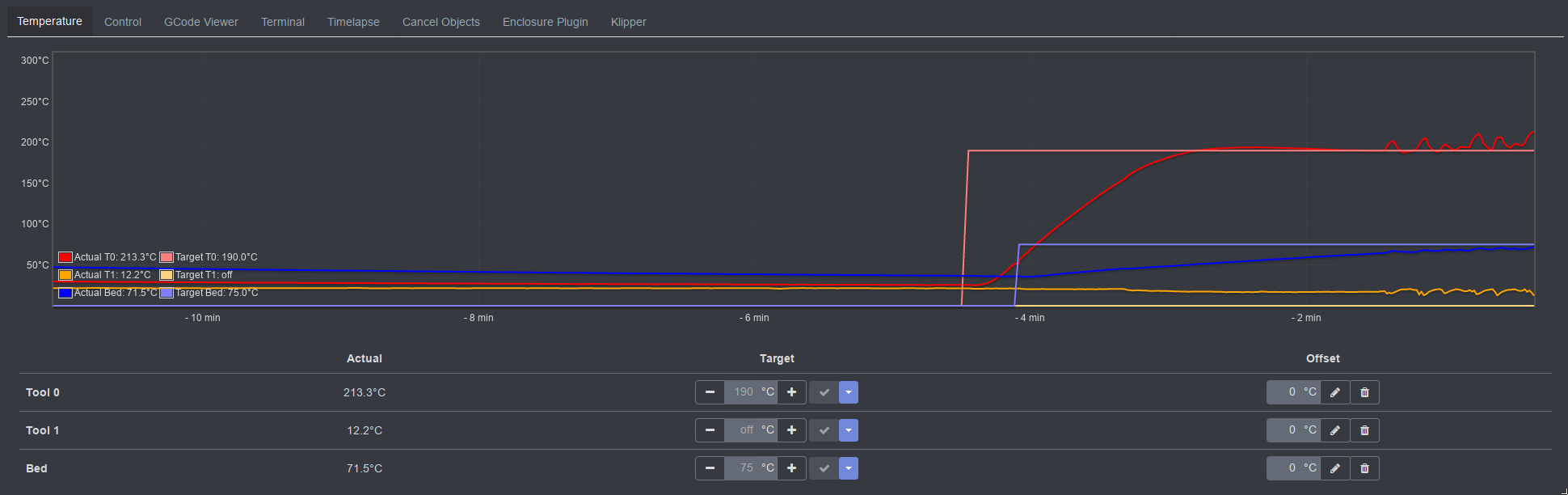
I'm printing with PETG at 235°C, and I'm observing the following: The temperature is pretty stable for few first few minutes of the print, then it starts fluctuating. Here is a screen shot from Octoprint showing the issue:

Eventually, for longer prints, they sometimes fail with "Heater extruder not heating at expected rate" (in the case of the graph above, the print failed with this message about 5 minutes after the screen shot was taken).
I've tried the PID calibration for the heater (calibrated for 235°C), but am still seeing this kind of fluctuation. Would appreciate any points on how to further investigate. Here is my klippy log file (the last print there is the one that failed with the heather error):
 urish
urish
All 14 comments
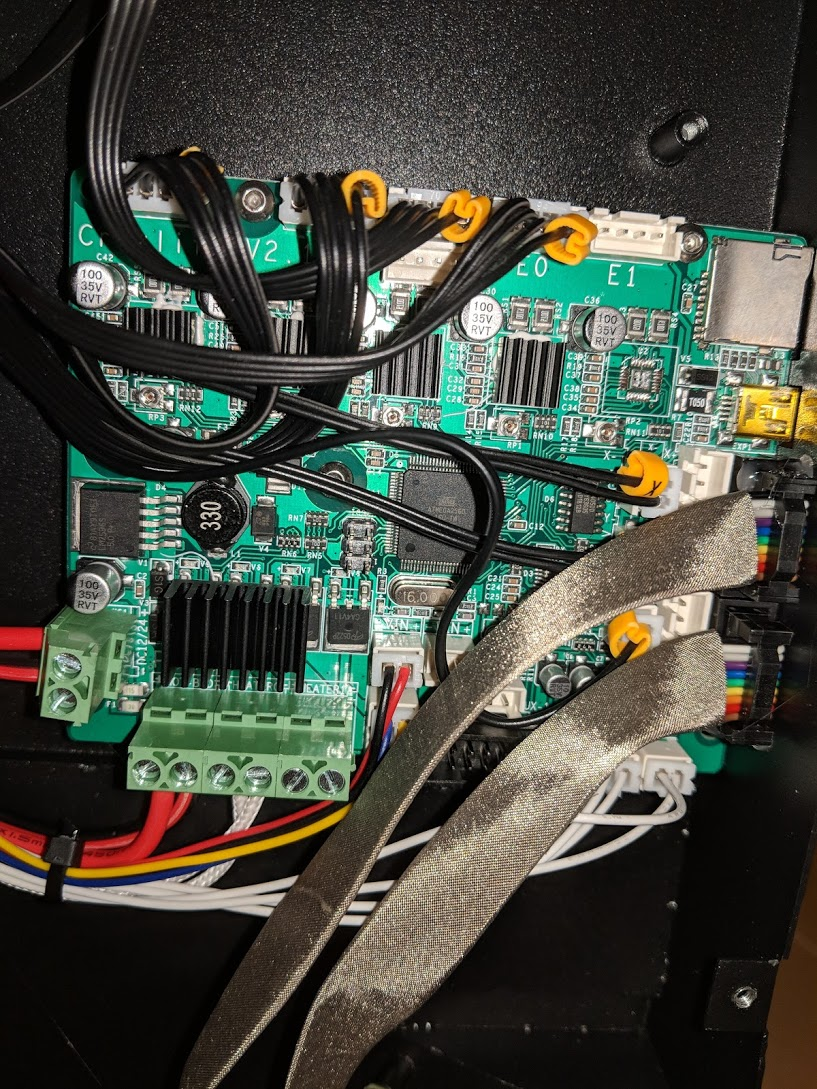
What main board do you have?
 cosminr86
on 17 Jul 2019
cosminr86
on 17 Jul 2019
CR-20 with Creality V2.1 main board:
urish
on 17 Jul 2019
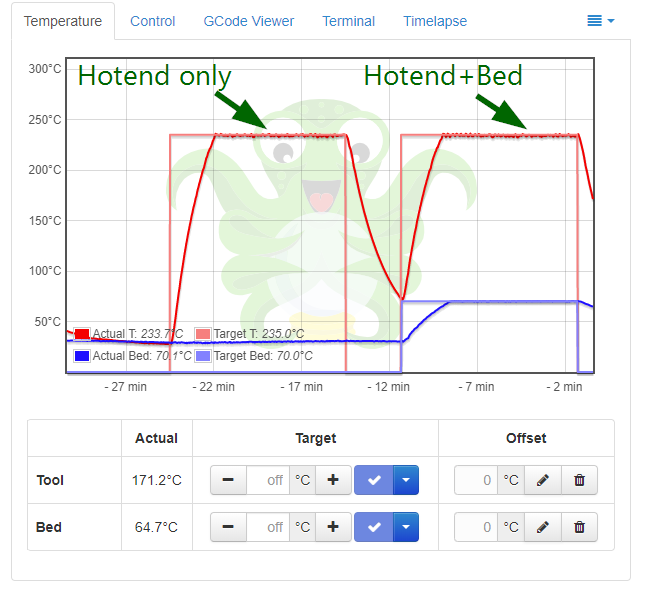
So far, I compared printing with heated bed and without heated bed, and it seems like the hotend temperature is much more stable when heated bed is off:

Both prints were done without actual filament in the extruder (just to save on plastic)
strangely enough, when I turn both the hotend and heated bed on manually, not during print, it seems to keep the temperature pretty stable:
urish
on 17 Jul 2019
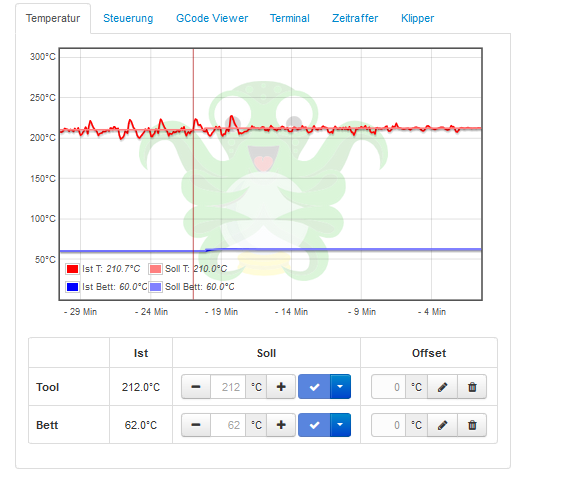
Have the same problems here, after some time of printing the temperature suddenly is not stable...

Soon after the print cancels with error "Heater extruder not heating at expected rate" and printing stops.
If i manually increase the temperature a little when it beginns to swap, the print continues without a problem...
 stegmanno1
on 17 Jul 2019
stegmanno1
on 17 Jul 2019
Okay, this is very strange - I took one of my GCode files,
and manually sent the commands from the beginning of the file to the printer:
M140 S70
M105
M190 S70
M104 S235
M105
M109 S235
The printer heats up and keeps the temperature stable for 10 minutes without a problem:

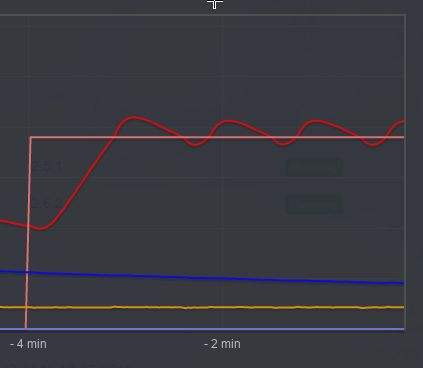
However, when printing the, temperature starts to fluctuate after 3-4 minutes or so (that's the graph on the right side):

Finally, after canceling the gcode print, I ran the first experiment again (sending the heather gcode command from the beginning of the file manually), and it seems to be able to keep the temperature stable (graph on the right side):

@KevinOConnor I'd love to get some ideas how to further debug this...
urish
on 18 Jul 2019
I did another experiment, adding 5 minute wait (M4 S300) inside the gcode file, just after the code that sets the heater temperature:
;FLAVOR:Marlin
;TIME:1918
;Filament used: 1.29036m
;Layer height: 0.2
;MINX:85.85
;MINY:97.1
;MINZ:0.2
;MAXX:134.15
;MAXY:122.9
;MAXZ:39.9
;Generated with Cura_SteamEngine 4.1.0
M140 S70
M105
M190 S70
M104 S235
M105
M109 S235
G4 S300
M105
M82 ;absolute extrusion mode
...
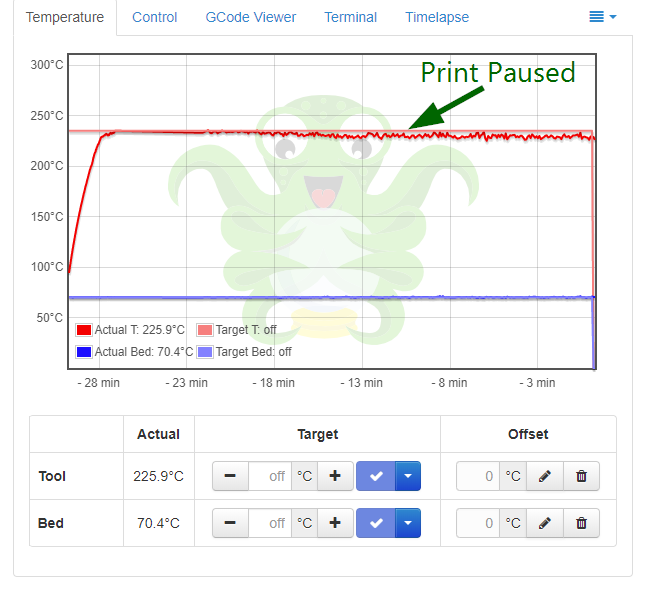
This seems to delay the temperature fluctuations by several minutes:

Later, I tried pausing mid-print and waiting for ~10 minutes to see if the fluctuations stop, but they continue even after pausing (and keeping the heater on, of course):
urish
on 18 Jul 2019
This looks like line noise on the thermistor wires and/or power supply voltage fluctuations.
To reduce thermistor wire line noise, avoid running the thermistor wires next to the stepper motor and heater wires. Some people add a capacitor to the thermistors as well.
If the power supply is struggling to keep up, it may help to reduce the power to the heaters - for example, by adding max_power: 0.3 to the bed_heater section and max_power: 0.7 to the extruder.
-Kevin
 KevinOConnor
on 18 Jul 2019
KevinOConnor
on 18 Jul 2019
I had similar issue, it turned out to be hardware problem. Recently I changed nozzle in my extruder and after calibrating PID for extruder for target 220 this is what I was getting when heating the extruder to 190 (30 degrees below target, this made the issue more pronounced):
Fluctuations of temperature shown above started before printing even started - the bed was still heating up to the target temperature.
When I tried to use watermark control I was getting this:
In my case the issue turned out to be that ground connection between Maple Mini and RAMPS wasn't good enough - I accidentally discontented one of ground wires and this caused more noise in the thermistors. For me the issue was fixed by improving ground connection (in my case by connecting the wire I accidentally disconnected). But there maybe other reasons why there is too much noise in the thermistors even if ground connection is good especially if thermistor wires are long and unshielded.
 Lissanro
on 18 Jul 2019
Lissanro
on 18 Jul 2019
Thanks for all the input!
As for the power supply - I connected it to a multimeter, and it seems like the voltage is fluctuating between 23.95v and 24.2v while printing - this happens both while the temperature is stable and when it start fluctuating. The idle voltage of the printer is 24.2, and then voltage drops to 23.96v when I ask the printer to heat both the nozzle and the bed at the same time. Does this sound like the expected behavior?
urish
on 18 Jul 2019
If you have 24V power supply and under load your multimeter shows you as little as 3.95V or 4.2V then something is very wrong. Perhaps some capacitors failed in your power supply and do not filter switching noise anymore under load - in this case typical multimeter will show low voltage because of high frequency noise, even if real voltage is still sufficiently high to drive heaters. Obviously, so much noise in power supply is not good and very likely to cause issues.
When voltage is actually low this would be different issue. For example, recently I had a problem with power supply of my printer - normally it was 12V but under load it became 8-9V and my printer was still working but bed could not reach high temperatures to print ABS and struggled to reach temperatures even for printing PLA. There was no high frequency noise in this case - the voltage was really this low. After I replaced power supply everything started to work normally - under load it was almost 12V. I think that 24V power supply under load should maintain voltage within 22V-24V range and high frequency noise should be filtered good enough so you can see 22V-24V under load on your multimeter.
Another possible cause of noise in thermistors is bad ground connection (or lack of it) in power supply. You can check this by switching your multimeter to measure AC voltage and touching power supply's metal case with one probe of your multimeter while the other probe touches nothing or your body - if you notice AC voltage like few volts or more, ground connection of power supply is bad. This actually can cause issues including additional noise in thermistors so power supply needs to be grounded properly.
Lissanro
on 19 Jul 2019
@Lissanro thanks for your very detailed comment! I just noticed I wrote 3.95 and 4.2 instead of 23.95 and 24.2, I was probably too tired and frustrated at the time when I wrote this comment. I have edited it now to reflect the actual numbers. Sorry for the confusion!
urish
on 19 Jul 2019
My suggestion to check if power supply grounded properly is still relevant. I know from experience that 3D printer with ungrounded power supply may work unpredictably.
You previously mentioned that with bed turned off temperature appears to be more stable and that suggests you have hardware issue. If your power supply is grounded properly then issue is caused by something else but finding exact cause is not always easy so you may want to try some workarounds, for example KevinOConnor already suggested to try to limit max power or add capacitor to the thermistor.
Lissanro
on 19 Jul 2019
Thanks for the suggestion, I will try to check the ground of the PSU!
urish
on 20 Jul 2019
Update: I have been printing in lower temperatures since (200-220deg), and it seems like the temperature consistency is much better at this range:
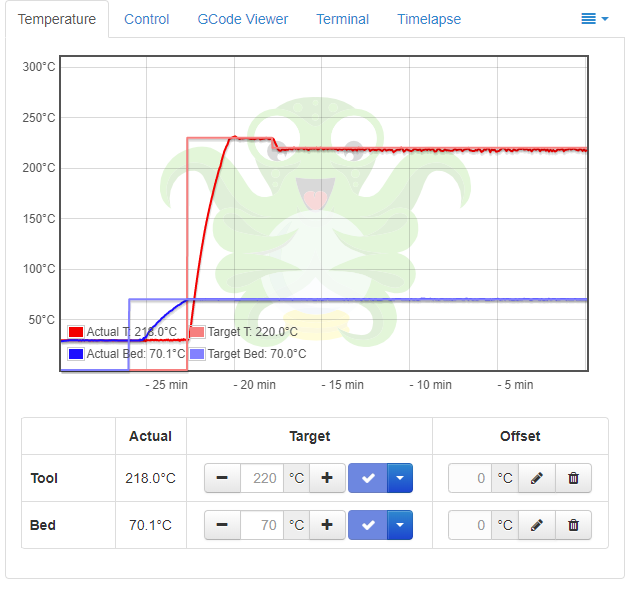
I will close this issue, as it seems to be hardware-related rather than something specific to klipper. Thanks for all the help so far!
urish
on 21 Jul 2019
Related issues
 speendo
·
3Comments
KevinOConnor
·
6Comments
speendo
·
3Comments
KevinOConnor
·
6Comments
 smokez89
·
4Comments
smokez89
·
4Comments
 ChiliApple
·
4Comments
KevinOConnor
·
5Comments
ChiliApple
·
4Comments
KevinOConnor
·
5Comments