Klipper: All pins high until klippy is connected
Hi,
i'm using a Arduino DUE paired with a RADDSv1.1
The intial setup went smooth and I compiled the included bossac 1.9 which was then used to successfully flash the mcu code.
Problem:
After resetting the Arduino (or powering on the whole printer), all Output pins on the DUE are in a semi-high state.
This causes all steppers to enable (stall), fans to spin and most importantly, all heaters turn on without any control.
This state persists until the klippy service is started on the Printhost _and_ connected to the MCU
After klippy is connected, all seems to work fine. The klippy-log was created with the RADDS unplugged to prevent any hardware damages while testing. klippy.log
The MCU binary was built from f6c2e8b4ebdac6a0b4b16c2799013b517ae1d77d on a Debian 8 ARMHF as well as on a Debian 9 amd64 system that were prepaired with install-octopi.sh to try to rule out any toolchain/library problems.
I'm quite new to klipper but that does not seem to be a desired behavour.
Maybe there is a way to force pull all Pins down until klippy connects to the mcu?
Thanks
-Markus
 mkuf
mkuf
All 11 comments
This is a common issue with RAMPS-FD boards - it is a hardware issue and it is recommended to not use boards with that problem. I've not heard of the RADDS boards being impacted though.
One could make software changes to the micro-controller software to disable some pins at startup. However, it would not be a complete fix (only a hardware change can fix the issue).
-Kevin
 KevinOConnor
on 10 Nov 2018
KevinOConnor
on 10 Nov 2018
This is a common issue with RAMPS-FD boards - it is a hardware issue and it is recommended to not use boards with that problem. I've not heard of the RADDS boards being impacted though.
One could make software changes to the micro-controller software to disable some pins at startup. However, it would not be a complete fix (only a hardware change can fix the issue).
From https://github.com/KevinOConnor/klipper/issues/443#issuecomment-419584885 I guess the underlying Problem is something different. If i serparate the boards and only power the RADDS without the DUE, all heaters remain off.
Looking at the schematics, this behaviour also seems right.
https://www.henschke-geraetebau.de/dr/RADDS_18_sch.pdf
How could one patch the MCU code to disable pins at startup, could you give an concrete example?
I already took a look at the source but my micro-controller programming skills are limited.
Thanks,
-Markus
mkuf
on 11 Nov 2018
There's some documentation on the overall code flow at https://github.com/KevinOConnor/klipper/blob/master/docs/Code_Overview.md .
In general, I don't think this is something that can be adequately addressed in software. The heater pins should have hardware pullups or pulldowns to ensure that they are in a proper state when the micro-controller isn't actively enabling them. All the major 3d printer boards do this.
-Kevin
KevinOConnor
on 24 Nov 2018
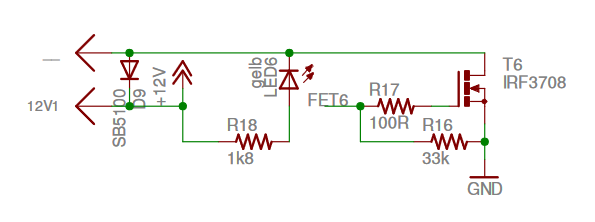
If you take a closer look the the circuit diagram, you'll see that there are indeed pulldowns on the FET control lines, so it's definately not an hardware issue with the RADDS.
Testing with a LED connected to one of the heater pins looks like this.
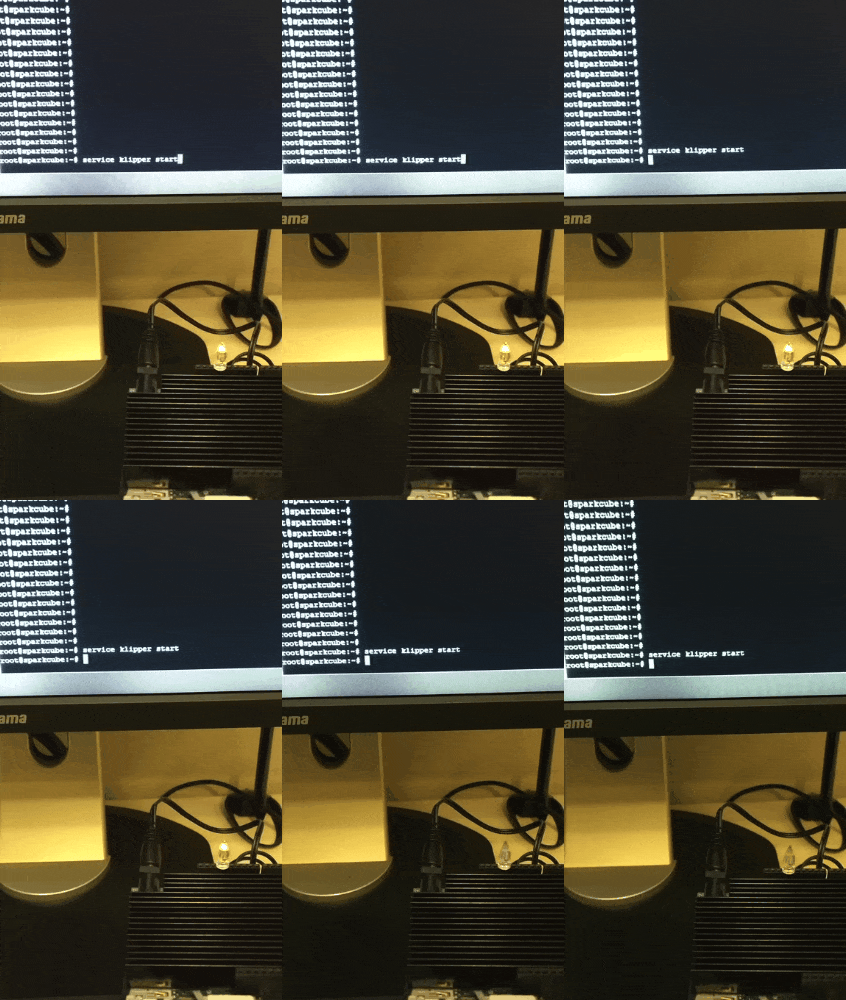
Unless klipper is started, my multimeter tells me that there are 3v3 on that pin, which is enough to switch the FET and turn on the connected heater.
I already took a look at the overall codeflow but still, I can't even remotely tell how I could change the startup behavour of the gpio pins. Any concrete examples would be highly appreciated.
-Markus
mkuf
on 26 Nov 2018
On a closer look of the SAM3 spec it appears the micro-controller is defaulting pins to have a pull-up enabled. This is a very surprising choice, and to the best of my knowledge no other micro-controller that Klipper supports does this. I'm reopening this issue. I suspect the Klipper mcu code should be changed to disable all pullups at startup. Unfortunately, such a change is too risky just prior to a Klipper release, so it will have to wait until after Klipper v0.7.0.
-Kevin
KevinOConnor
on 10 Dec 2018
Waiting for a solution to this problem. This is a dangerous nuance of this microcontroller.
 khseal
on 10 Dec 2018
khseal
on 10 Dec 2018
I did an investigation into this issue.
The sam3, sam4, and lpc176x chips all start with gpios in pull-up mode. The AVR, SAMD21, and STM32F1 chips all start in floating mode. In pull-up mode, the pull up resistor is weak (typically ~100k).
I also looked at various board schematics - the ramps, radds, ramps-fd v1.2, smoothieboard, duet2, etc all place external pulldowns on the control line to ensure they aren't triggered when the line is floating or weekly pulled up.
So, I don't think this is a Klipper issue. I don't know why the @voodoo-bravo is seeing this issue on his board - Klipper doesn't do anything to enable the lines, so they should not have been enabled.
-Kevin
KevinOConnor
on 5 Jan 2019
I have a heated extruder if there is no power on the microprocessor and this is strange. Also, if there is power, but the computer is not connected, the extruder is also heated. Perhaps the problem in the control transistors.
khseal
on 6 Jan 2019
FYI, looking at this again, this looks to me to be a problem with the RADDS boards. According to the schematics, they have a 33Kohm pull down. The SAM3X8E has a pull-up that can range from 50Kohm to 150Kohm (with the typical value of 100Kohm). As I understand it, that means when the mcu starts up these lines will have a voltage somewhere between 0.60V to 1.31V (with 0.82V typical). All of those voltages are sufficient to trigger the IRF3708 mosfet on the board (VGS=0.6 to 2.0V).
Other boards seem to use a lower pull down resistor (eg, Smoothieboard uses a 10Kohm pulldown).
-Kevin
KevinOConnor
on 7 Jan 2019
It is now possible to specify output pin settings during "make menuconfig" (as of commit 4a35f927). To use this feature, enable the "low level options" in "make menuconfig" and set the new "GPIO pins to set at micro-controller startup" option. Be sure to preface any pins with an "!" if the pin needs to be set to a low value at startup.
-Kevin
KevinOConnor
on 18 Mar 2019
Sweet.
I just compiled the current master, set all Heater-, Fan- and Enable-Pins to be pulled down at startup and it worked flawlessly. Now my printer is save to be powered on, even if no computer is connected.
Thank you, Kevin.
-Markus
mkuf
on 26 Mar 2019
Related issues
 CHILLYSMOKES
·
5Comments
CHILLYSMOKES
·
5Comments
 amaximchuk
·
6Comments
amaximchuk
·
6Comments
 aegelsky
·
3Comments
aegelsky
·
3Comments
 speendo
·
3Comments
speendo
·
3Comments
 Michael-Bell
·
5Comments
Michael-Bell
·
5Comments
Most helpful comment
It is now possible to specify output pin settings during "make menuconfig" (as of commit 4a35f927). To use this feature, enable the "low level options" in "make menuconfig" and set the new "GPIO pins to set at micro-controller startup" option. Be sure to preface any pins with an "!" if the pin needs to be set to a low value at startup.
-Kevin