Klipper: max_accel limits velocity
I tested today with your master branch: ef820d98f6fe4c67cf3d2c2a88b395a99fdaff42 (only accel=100) and with my own mix of sources on lpc1768.
I also did this test some time before (Feb 1. 2018) while testing lpc1768 from cruwaller. Since then I kept an eye on this and found it also for RAMPS and in a lot of variations.
The whole thing startet because I had shutdowns with lpc1768 and tried to slow everything down, but the situation became even worse.
I went down to accel=1 and was quite surprised by the behaviour I found.
I blamed the new code first.
At that time I made a few pictures (using reprap calculator) to visualize the behavior (note: I entered the speed limit as "desired speed"):
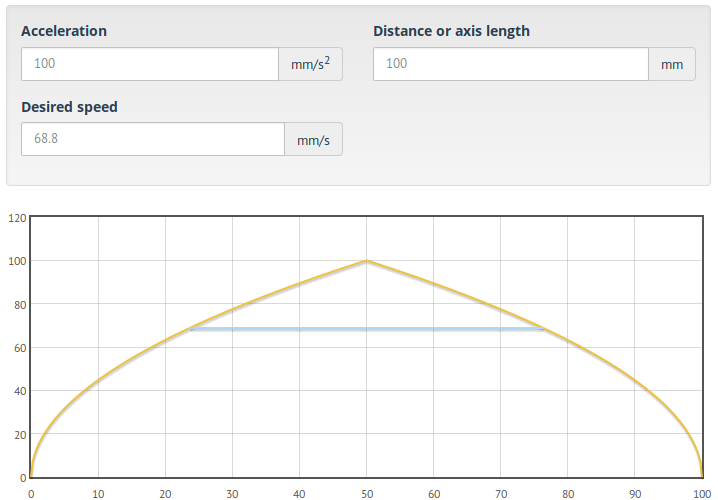

As you see, I tested with a distance of 100 mm (a square). The acceleration was 100 mm/s^2 in the first and 10 mm/s^2 in the second. The yellow curve is how the speed should have been and the blue line is the limit I got.
Today I repeated that test with a working lpc1768 branch. The limits were still there:
         speed limits
accel    mm/min  mm/s  ustep/s
  100 -> F4200     70    5600
 1000 -> F13500   225   18000
10000 -> F33600   560   44800
20000 -> F60000  1000   80000   (really! yes this works with lpc1768)
measurements were taken for 80 usteps/mm
(bare motors, no other mechanical parts)in all tests today the speed limit was at 1000 mm/s
in all old tests (AVR) it was at 500 mm/s
there is a speed plateau, about half of the distance at constant speed (=limit)
=> no physical limitation by acceleration curve (see pictures)same limit at accel=1000 for 20 usteps/mm
=> independent of usteps/mm
=> may be caused by pure calculation?the limit is effective for all accelerations at least from 100 up to 20000 mm/s^2
=> probably not a performance problem of CPU or interrupt rate or similar
I also tried accel=1 and accel=10 with similar results, but did not feel like testing more at that speed because it took too much time.
An old mail from me to @cruwaller contained some data from my tests at that time:
at 1000 mm/s^2 on AVR I got a limit at F13500 = 225 mm/s
=> same limit for different CPUwith AVR I got a limit of F27000 = 450 mm/s for accel=4000
=> this could be a quadratic dependency (4x accel => 2x speed)
e.g.
1000->4000, F13500 * sqrt(4) = F27000 (last AVR example)
100->1000, F4200 * sqrt(10) ~= F13300 (see table)
but
1000->10000, F13500 * sqrt(10) ~= F42700 != F33600 (see table)
not sure about this...to verify this, I repeated the test with your original sources on RAMPS (not easy, I need lots of config changes)
I tested at accel=100 which resulted in a limit of F4200.
=> as you see in both tables above, it's still the same.
Some more facts:
- junction_deviation from 0.0 up to 1.0
-> doesn't matter (may be a very small amount of speed limit change, might be 100-300) - corexy and cartesian
-> doesn't matter (cannot test delta) -> same speed limits
=> seems to effect the toolhead system not the motors - tested on your original code, cruwallers original code, my mix
code with speed calculations seems to be identical
-> doesn't matter
The issue should be quite easy to reproduce.
Just set max_accel to a low value, e.g. 10 and see how slow your printer is now.
I test this by increasing the speed G0 Fxxxx until it doesn't become faster any more (using my ears). Or start with a usual speed and dial down.
I will probably test some changes to code pieces (tomorrow?), to see if they have to do with this.
E.g. there is a limit_speed function somewhere...
 hg42
hg42
All 15 comments
On Fri, Mar 16, 2018 at 12:40:40AM +0000, Harald wrote:
- there is a speed plateau, about half of the distance at constant speed (=limit)
=> no physical limitation by acceleration curve (see pictures)
Right, it's the "Smoothed look-ahead" feature:
https://github.com/KevinOConnor/klipper/blob/master/docs/Kinematics.md#smoothed-look-ahead
See also the "max_accel_to_decel" setting in config/example.cfg.
-Kevin
 KevinOConnor
on 16 Mar 2018
KevinOConnor
on 16 Mar 2018
hmm, you mean 100mm is a short move and a square 100mm x 100mm is a zigzag?
From what I see, the speed is always limited, even with diagonal moves from one corner of my 330x330 bed to the other (300mm*1.41).
So this cannot be "frequent changes", "vibrate", "stress on the machine" and "increases the noise".
Instead driving with acceleration of 100mm/s^2 is the smoothest motion you have ever seen, even if it reaches full speed in the middle.
In general I doubt that "acceleration to deceleration" is a problem at all.
In fact I never noticed any shaking in the middle of a move. It's all at the ends of the moves.
You could eventually add more levels of derivations (acceleration to deceleration is only the next derivation, isn't it?), but this would certainly not limit anything for longer moves.
If the third derivative would be limited, you would only get a rounder shape for the velocity peak with only a small limit for the top speed.
If you want to keep it as it is, then you should use only a short plateau. It should be obvious that a short plateau has the same acceleration changes (ramp to flat and flat to ramp) like a longer plateau. Assuming your theory is correct, it simply doesn't matter how long the plateau is.
You could also see the plateau as approximation for a smooth curve (and smoothed by physical effects or something like that). Even then the plateau could be kept short.
On the other hand, the current implementation seems to do the opposite.
Meaning, for high accelerations, the plateau should be more important, because then the difference (= accel - (-accel) = 2 * accel) is bigger than for low accelerations.
But it significantly slows down the smoothest moves (accel=10) and nearly doesn't effect the hardest moves (accel=20000).
It seems that the limiting shouldn't depend as much on the acceleration, but more on the length.
That said, it's not clear from the text, how I could adjust max_accel_to_decel if I wanted to disable it completely.
#max_accel_to_decel:
#   A pseudo acceleration (in mm/s^2) controlling how fast the
#   toolhead may go from acceleration to deceleration. It is used to
#   reduce the top speed of short zig-zag moves (and thus reduce
#   printer vibration from these moves). The default is half of
#   max_accel.
On Fri, Mar 16, 2018 at 03:54:10AM +0000, Harald wrote:
In general I doubt that "acceleration to deceleration" is a problem at all.
In fact I never noticed any shaking in the middle of a move. It's all at the ends of the moves.
It noticeably reduces vibrations for me. Turn it off and see for
yourself.
I'm sure vibrations aren't a problem with a max_accel of 100 or less,
but that's hardly a common setting.
That said, it's not clear from the text, how I could adjust max_accel_to_decel if I wanted to disable it completely.
To disable it, set it equal to max_accel.
-Kevin
KevinOConnor
on 16 Mar 2018
Thanks, setting it to max_accel works...
...but it's very inconvenient, because I have to always change two values. A better way would be a factor. So for you it would be 0.5 and for me it would be 1.0. Then it would be possible to set it once and then forget.
Especially when dynamically changing it with M204 or similar.
I guess, nobody doesn't use it explicitly, so now is a good time to change that, before it hits the masses. And I would definitely set the default to 1.0 because nobody will think of this functionality. Instead they wonder, why their printer cannot run as fast as before (I already hit the limit without knowing and I remember some comments "why is my printer so slow")
hg42
on 16 Mar 2018
On Fri, Mar 16, 2018 at 07:55:55PM +0000, Harald wrote:
And I would definitely set the default to 1.0 because nobody will think of this functionality.
I think the "max accel to decel" feature should remain enabled by
default. I've found it noticeably reduces printer vibrations with
little impact to overall print time. It's not perfect, but I find it
does, in practice, lower the effective acceleration of short moves.
In particular, some slicers emit funky zig-zag moves for "gap filling"
that can stress the printer - the "max accel to decel" feature does a
good job limiting the impact.
I ran some quick tests measuring the print time of a print I had handy
(Emmett's Heart Gears) using the "batch mode" described in
docs/Debugging.md:
max_accel=3000, max_accel_to_decel=1500: 4901.804 seconds
max_accel=3000, max_accel_to_decel=3000: 4837.162
max_accel=1000, max_accel_to_decel=500 : 6471.024
max_accel=1000, max_accel_to_decel=1000: 6297.428
max_accel=100 , max_accel_to_decel=50 : 18017.695
max_accel=100 , max_accel_to_decel=100 : 17033.594
I believe the overall print time reduction is modest. One could argue
the 15 minutes at accel 100 is high, but an accel of 100 is extreme
anyway and the impact is still small compared to the overall print
time.
As for changing the max_accel_to_decel to use a percentage instead of
an absolute number. That seems to be "different" and not "better" - I
don't see a reason to introduce churn to the configs and documentation
for such a minor change.
-Kevin
KevinOConnor
on 19 Mar 2018
But why does it affect long (100mm) moves at all? I don't think this is the intended purpose that you described.
Additionally, I don't get why a kind of third order limitation limits the maximum speed. You describe it as change of acceleration, and the name says the same.
I think it should at least take the length of the move into account. But it doesn't.
The factor would be better because that seems to be the intended meaning.
At least your default calculations are with 0.5.
If you decrease max_accel, you have to decrease max_accel_to_decel by the same factor to get the same effect, right?
Or would you let max_accel_to_decel on the same value? How do you use it?
The factor is especially useful if you have a gcode command that changes accelerations.
hg42
on 19 Mar 2018
On Mon, Mar 19, 2018 at 02:25:23PM -0700, Harald wrote:
But why does it affect long (100mm) moves at all? I don't think this is the intended purpose that you described.
It's not clear to me if you are asking why it impacts 100mm moves or
if you are asking why I'd want it to impact 100mm moves.
If the former, the "max accel to decel" feature imposes a top speed on
moves to prevent a move going immediately from acceleration to
deceleration. It's described at:
https://github.com/KevinOConnor/klipper/blob/master/docs/Kinematics.md#smoothed-look-ahead
Let me know if there's something unclear in that description so I can
try to improve it.
If you are asking the latter, then the answer is: the algorithm
doesn't care about move lengths - it only cares about preventing
immediate shifts from acceleration to deceleration. It would only
impact moves of that length if one chooses an extreme acceleration
settings, and I don't particularly care what happens with such an
outlier setting. A max_accel=100 to me means run the printer at a
ridiculously slow rate - and we're totally successful at doing that!
Additionally, I don't get why a kind of third order limitation limits the maximum speed. You describe it as change of acceleration, and the name says the same.
That's described in the Kinematics documentation linked above - a
virtual acceleration is used to determine which moves get their top
speed limited (and what that top speed is). If it's unclear, please
let me know which parts are not clear.
I think it should at least take the length of the move into account. But it doesn't.
There are many different ways to limit vibrations. However, it can be
particularly difficult to do this well with the funky g-code that
slicers produce. The mechanism I came up with is (I think) robust to
various g-code input, but it definitely isn't perfect. In particular,
I suspect true s-curves would be superior. That said, I think the
feature is useful and should stay enabled by default - should
something superior be implemented then I'd happily revisit this.
-Kevin
KevinOConnor
on 22 Mar 2018
I talk about why you want it to be so:
the algorithm doesn't care about move lengths - it only cares about preventing immediate shifts from acceleration to deceleration
The 100mm move may reach the top speed as you say. So acceleration would switch directly from a positive to a negative value in the middle of the move.
But I already said, that even a small limit of the speed to say 99% would make the acceleration switch to zero and then to the negative value.
If your theory would be correct this would be totally sufficient. But I am sure you will experience no change at all.
A max_accel=100 to me means run the printer at a ridiculously slow rate
not so ridiculous, if you take printers into account that print houses or anyone with a very big mass.
Such a printer can reach higher speeds, but it can never accelerate much. I already have built such slowly accelerating but otherwise fast printers.
Klipper is indeed a candidate for very unusual printers, because you can do much in python code.
There are many different ways to limit vibrations. However, it can be particularly difficult to do this well with the funky g-code that slicers produce
It's all about the physical/mathematical term "step response".
It's fixed for a given hardware system and by software you can only control the input signal that is given to the system.
It's clear that the sharpness of the "step" (change in speed = acceleration) is reduced by the acceleration limit. So with a lower acceleration you simply reduce the range of the frequencies.
By a speed limit you reduce the height of the step (and the frequencies generated by this). So this also controls how big output frequencies are (=vibrations).
The main point is:
You already have a speed limit called max_velocity.
A second speed (fixed?) limit (that isn't easy to calculate) doesn't add anything you could not achieve with the usual speed limit.
I think you only trick yourself by adding a limit that you would not write into max_velocity :-)
hg42
on 22 Mar 2018
Oh I forgot the conclusion...
To make it do something different from max_velocity, it would have to take the length of the move into account.
hg42
on 22 Mar 2018
On Thu, Mar 22, 2018 at 10:02:06AM +0000, Harald wrote:
The main point is:
You already have a speed limit called max_velocity.
A second speed (fixed?) limit (that isn't easy to calculate) doesn't add anything you could not achieve with the usual speed limit.
I think you only trick yourself by adding a limit that you would not write into max_velocity :-)
No, it's not similar to the max_velocity limit. The feature targets
short zig-zag moves. In contrast, a reduction of max_velocity is more
likely to limit long straight moves.
Lets take an example with a printer that has max_accel=3000,
max_accel_to_decel=1500 (the default when max_accel is 3000), and a
move with a target speed of 100mm/s. In this case, if the move is
longer than 6.667mm it will never be impacted by the
max_accel_to_decel feature. This is certainly not true of a
max_velocity change.
A move longer than 6.667mm is not impacted, because a move of that
length is long enough that it could always accelerate at a rate of
1500mm/s^2 to its top speed and back to zero. To be clear, in
practice, even shorter moves are unlikely to be impacted by this
feature as most moves don't start and stop at a complete standstill.
The moves most likely to be impacted are short zig-zag moves (where
the cornering algorithm places speed restrictions on each move
junction).
It's difficult to place restrictions directly on "move length" as the
slicers are known to chop long moves up into lots of tiny moves.
Sometimes lots of tiny moves with angles close to 180 degrees between
them. That's one of the advantages to this algorithm - it doesn't
directly use move length, but instead indirectly uses it by virtue of
tracking a pseudo acceleration between moves. Shorter moves that
zigzag can't reach this pseudo acceleration limit, but lots of short
moves in the same or similar direction aren't impacted.
-Kevin
KevinOConnor
on 24 Mar 2018
ok, thanks, I understand.
I had forgotten, that it depends on the condition, that there is no flat part.
Yet, it should be easy to turn it off.
The factor would allow this (set to 1.0 and forget) while the current implementation forces me to always change two values even if I do not want that feature..
hg42
on 25 Mar 2018
On Sat, Mar 24, 2018 at 10:14:03PM -0700, Harald wrote:
Yet, it should be easy to turn it off.
The factor would allow this (set to 1.0 and forget) while the current implementation forces me to always change two values even if I do not want that feature..
I prefer the config to specify parameters in hard units of
millimeters, seconds, etc. where possible. This feature (for better
or worse) is implemented based on a virtual acceleration, and I'd
prefer to specify it in units of mm/s^2.
That said, I can change the code so the config isn't so picky about
the maximum. With that change you would be able to provide a value of
9999999 to disable it.
-Kevin
KevinOConnor
on 26 Mar 2018
but the default is 0.5 of max-accel :-)
which shows it's really a factor.
It has very much to do with the relation of acceleration and deceleration and I think the name max_accel_to_decel isn't suggesting an absolute value.
You didn't answer my former question, how you change this value if you change max_accel.
I guess you don't have it set at all, so you are using the factor of 0.5.
Currently, if you don't specify the setting, it works different (then it's always 0.5, right?). This breaks user expectations.
hg42
on 27 Mar 2018
FYI, I changed the code so that one can disable max_accel_to_decel by setting it to 999999 (commit 48e9fa04).
KevinOConnor
on 20 Apr 2018
thanks...
hg42
on 21 Apr 2018
Related issues
 speendo
·
3Comments
speendo
·
3Comments
 LazaroFilm
·
6Comments
KevinOConnor
·
5Comments
LazaroFilm
·
6Comments
KevinOConnor
·
5Comments
 krpepe
·
5Comments
krpepe
·
5Comments
 Hywelmartin
·
6Comments
Hywelmartin
·
6Comments
Most helpful comment
Thanks, setting it to max_accel works...
...but it's very inconvenient, because I have to always change two values. A better way would be a factor. So for you it would be 0.5 and for me it would be 1.0. Then it would be possible to set it once and then forget.
Especially when dynamically changing it with M204 or similar.
I guess, nobody doesn't use it explicitly, so now is a good time to change that, before it hits the masses. And I would definitely set the default to 1.0 because nobody will think of this functionality. Instead they wonder, why their printer cannot run as fast as before (I already hit the limit without knowing and I remember some comments "why is my printer so slow")