Klipper: Smoothieboard (and similar) support
Hi!
First I want to express my words of admiration for this work! This project is beautiful!
Do you will be add support other boards? I have an MKS sbase v 1.3. And i want that klipper has support for this platform.
The board has 32bit 100M Cortex-M3 MCU-LPC 1768.
I want to wish good luck in your project!
 userosos
All 75 comments
On Sat, Dec 16, 2017 at 08:09:30PM +0000, userosos wrote:
Hi!
First I want to express my words of admiration for this work! This project is beautiful!Do you will be add support other boards? I have an MKS sbase v 1.3. And i want that klipper has support for this platform.
The board has 32bit 100M Cortex-M3 MCU-LPC 1768.
I want to wish good luck in your project!
I'd like to see the Smoothieboard (and its derivatives) supported in
Klipper. However, I don't have any immediate plans to write the code
myself.
-Kevin
 KevinOConnor
on 17 Dec 2017
KevinOConnor
on 17 Dec 2017
I wonder if platformio could be used.
Is there a special reason why you didn't use it?
This might make adding other processors easier.
Marlin 2 also uses it and has some HAL code, which could be used as an example how to do such things with these CPUs.
platformio has groups of CPU platforms like wiring, mbed etc. so implementations based on these would probably enable a whole bunch of CPUs to be used.
 hg42
on 17 Dec 2017
hg42
on 17 Dec 2017
@KevinOConnor do you have any experience with LPC1768?
hg42
on 20 Dec 2017
On Wed, Dec 20, 2017 at 09:59:44AM +0000, Harald wrote:
@KevinOConnor do you have any experience with LPC1768?
No, I don't have that particular chip.
-Kevin
KevinOConnor
on 20 Dec 2017
FYI, I haven't had a chance to look at it yet, but it looks like @cruwaller has done some work in this area: https://github.com/cruwaller/klipper/tree/lpc176x .
KevinOConnor
on 26 Dec 2017
Thanks for pointing me to his repo. Do you know a way to find whats going on in all these forks?
hg42
on 27 Dec 2017
LPC176x port is working now (supports LPC1768 and LPC1769 processors).
Unfortunately i don't have SBase (LPC1768) connected to any printer currently so final testing might take some time... I can provide config and binary if someone is eager to test it :)
 cruwaller
on 27 Dec 2017
cruwaller
on 27 Dec 2017
I "only" have a real smoothieboard v1.0 (kind of prerelease, early version with A498x), but this should be sufficient to at least test the LPC.
So I want to test this...
But I could also try to use your repo to see if compilation makes any troubles...
hg42
on 27 Dec 2017
Good point.
Same compilation guide can be followed. Flashing is not supported by makefile, so just copy klipper.bin to SD card (name firmware.bin) and put SD into board. UART0 is used for debugging output and USB for communication. Ethernet is not used.
config/mks_sbase.cfg is an example configuration to start.
btw, I just pushed some fixes into branch...
cruwaller
on 27 Dec 2017
thanks for the info, I'll eventually try tomorrow.
I am currently working on the smoothie bootloader to compile it to a fully functional result with a current compiler (gcc 6.3). May be this takes some more time.
hg42
on 28 Dec 2017
the boot loader will probably take some more days, so testing this will probably be delayed until another year :-) (sorry, I couldn't resist this ancient joke)
hg42
on 29 Dec 2017
@cruwaller I'm also looking around for alternative firmware for my smoothieboard and this looks very promising. I notice in your repo you have put in quite a lot of other extra work/features into klipper (TMC2130, extra gcodes, homing offsets etc) -- are you planning to submit these as PR to this repository once you are happy with them?
 Lenbok
on 4 Jan 2018
Lenbok
on 4 Jan 2018
@Lenbok Maybe later when all are tested and verified carefully. I need split those features to smaller pieces to make it easier to follow. I am just modifying Klipper to make my printers and myself happy :)
Klipper is great firmware and I am encouraging everyone to test it!
btw, I just merged all Kevin's fixes from master to my lpc176x branch, so it should at least at the same level....
cruwaller
on 5 Jan 2018
@cruwaller I have a printer with and sbase attached. Been meaning to try out klipper for a while now but had no time to port it myself and too lazy to reconnect my old avr+ramps controller. Your effort makes me out of excuses :) Testing later tonight.
 andrimarjonsson
on 8 Jan 2018
andrimarjonsson
on 8 Jan 2018
@andrimarjonsson Please do. I have only run some basic dry run tests (not connected to "real" printer) :)
cruwaller
on 8 Jan 2018
@cruwaller Just starting to take a look at building your fork -- do you have instructions on how to build it? (the instructions used to build klipper in this repo doesn't work in your fork).
$ make menuconfig
scripts/kconfig/conf --olddefconfig /home2/len/dev/klipper/src/Kconfig
/home2/len/dev/klipper/src/Kconfig:36: can't open file "src/stm32f1xx/Kconfig"
/home2/len/dev/klipper/scripts/kconfig/Makefile:86: recipe for target 'olddefconfig' failed
make[1]: *** [olddefconfig] Error 1
scripts/kconfig/mconf /home2/len/dev/klipper/src/Kconfig
/home2/len/dev/klipper/src/Kconfig:36: can't open file "src/stm32f1xx/Kconfig"
/home2/len/dev/klipper/scripts/kconfig/Makefile:24: recipe for target 'menuconfig' failed
make[1]: *** [menuconfig] Error 1
Makefile:142: recipe for target 'menuconfig' failed
make: *** [menuconfig] Error 2
Could I trouble you for some quickstart instructions for building for smoothieboard?
Lenbok
on 20 Jan 2018
@Lenbok
Yeah, my bad. I will fix it when i am back at home... Or you can remove stm32 file from KConfig file (include).
Building is similar like others.
Then copy klipper binary to SD card as you do with Smoothie fw...
cruwaller
on 20 Jan 2018
yes, removing both stm32f1xx entries from src/Kconfig should work.
Then copy klipper binary to SD card as you do with Smoothie fw...
note, that klipper does not allow mounting the sdcard over USB, so you need to take out the sdcard everytime.
This is why I switched to ISP flashin via lpc21isp, using something like this:
  objcopy -R .stack -O ihex $out/klipper.elf $out/klipper.hex
  lpc21isp $out/klipper.hex lib/lpc176x/DFU-Bootloader.hex $serial_prog 57600 12000
I couldn't get it to work with only flashing klipper.hex (may be there is a missing command line option, may be it is wiping the whole flash or something like that).
As a workaround and because I wanted to flash the boot loader anyways, I used flashing both at the same time.
For ISP flashing you need an additional USB-serial adapter (the device is $serial_prog above).
Flashing fails often for higher baudrates, so I reduced it to 57600 (but it still fails from time to time).
I have a different setup with my printer and need to mix in my own patches which conflict with the version of @cruwaller, so I needed some time to make it work. I only imported the lpc176x parts for now.
I now have a version of klipper running on my smoothieboard v1 (controlling only XY and endstops).
Unfortunately it crashes after a move, which is speed dependent in some way (slower moves seem to work, at least if done manually). There is nothing in the klippy.log but after the "crash" the hotend fan runs, so there must be a complete shutdown (but I think this is usual for klipper if anything fails, for the sake of security).
However, this could be caused by
- lpc176x klipper binary (which works for @cruwaller I guess)
- avr klipper binary (influenced by the common Makefile)
- my klippy merges
- some hardware failure (which may be possible but all parts ran fine before)
I still hadn't enough time to investigate deeper.
@cruwaller as I guess you are not experiencing this, could you provide me the binary file that you offered in a post above?:
I can provide config and binary if someone is eager to test it :)
Does it work for you at speeds around F9000 or faster?
My lpc klipper binary should be very similar, the source is more or less the same, I only omitted some changes you did to the common files (to prevent warnings etc.). Biggest change might be the common Makefile which I had to merge. With your original binary file I could check if the problem is in my klipper binary or in the python code.
hg42
on 20 Jan 2018
I now connected XY incl. endstops to the RAMPS board.
Then my test works (homing XYZ and playing a file only moving XY in a certain rectangle+diagonal pattern).
So this should rule out
- avr klipper binary
- my klippy merges
and
- some hardware failure
is now limited to the smoothieboard.
So the
- lpc176x klipper binary
seems to be the number-one now.
Now I am testing with only Y with endstop attached to the smoothieboard, because I want to be able to do moves with or without using the smoothieboard.
A new test also fails but because only one motor is on the smoothieboard, it happens at a different step.
I found, that I misinterpreted the klippy.log and klippy's behavior.
I didn't expect, that the status would still be output continuously after a shutdown.
I scrolled back a lot of lines, but this was still not enough to see the error.
The relevant parts from the last test should be this:
 Stats 20408.2: gcodein=195 print_time=95.246 buffer_time=2.191 print_stall=0 ramps: mcu_awake=0.002 mcu_task_avg=0.000033 mcu_task_stddev=0
 .000040 bytes_write=5166 bytes_read=4196 bytes_retransmit=9 bytes_invalid=0 send_seq=198 receive_seq=198 retransmit_seq=2 srtt=0.002 rttvar
 =0.001 rto=0.025 ready_bytes=24 stalled_bytes=0 freq=15992341 smoothie: mcu_awake=0.000 mcu_task_avg=0.000004 mcu_task_stddev=0.000008 byte
 s_write=2921 bytes_read=3722 bytes_retransmit=9 bytes_invalid=0 send_seq=154 receive_seq=154 retransmit_seq=2 srtt=-0.005 rttvar=0.008 rto=
 0.028 ready_bytes=603 stalled_bytes=1 freq=25000655 adj=25012660 tronxy: mcu_awake=0.006 mcu_task_avg=0.000070 mcu_task_stddev=0.000060 byt
 es_write=830 bytes_read=8236 bytes_retransmit=0 bytes_invalid=0 send_seq=123 receive_seq=123 retransmit_seq=0 srtt=0.003 rttvar=0.000 rto=0
 .025 ready_bytes=0 stalled_bytes=0 freq=16000155 adj=16007834
 Stats 20409.2: gcodein=216 print_time=96.181 buffer_time=2.126 print_stall=0 ramps: mcu_awake=0.002 mcu_task_avg=0.000033 mcu_task_stddev=0
 .000040 bytes_write=5913 bytes_read=4273 bytes_retransmit=9 bytes_invalid=0 send_seq=211 receive_seq=211 retransmit_seq=2 srtt=0.003 rttvar
 =0.001 rto=0.025 ready_bytes=0 stalled_bytes=0 freq=15992340 smoothie: mcu_awake=0.000 mcu_task_avg=0.000004 mcu_task_stddev=0.000008 bytes
 _write=2921 bytes_read=3722 bytes_retransmit=9 bytes_invalid=0 send_seq=154 receive_seq=154 retransmit_seq=2 srtt=-0.005 rttvar=0.008 rto=0 .028 ready_bytes=603 stalled_bytes=605 freq=25000655 adj=25012673 tronxy: mcu_awake=0.006 mcu_task_avg=0.000070 mcu_task_stddev=0.000060 by tes_write=836 bytes_read=8337 bytes_retransmit=0 bytes_invalid=0 send_seq=124 receive_seq=124 retransmit_seq=0 srtt=0.003 rttvar=0.000 rto= 0.025 ready_bytes=0 stalled_bytes=0 freq=16000154 adj=16007840
 MCU 'smoothie' shutdown: No next step
 clocksync state: mcu_freq=25000000 last_clock=8264916307 clock_est=(20366.393 7256116988 25000655.523) min_half_rtt=-0.000261 min_rtt_time= 20357.704 time_avg=20366.393(231.079) clock_avg=7256116988.078(5777131583.784) pred_variance=384734667.131 clock_adj=(-238.835 25012673.000 )
 Dumping serial stats: bytes_write=2921 bytes_read=3734 bytes_retransmit=9 bytes_invalid=0 send_seq=154 receive_seq=154 retransmit_seq=2 srt t=-0.005 rttvar=0.008 rto=0.028 ready_bytes=603 stalled_bytes=1217
 Dumping send queue 100 messages
 Sent 0 20357.451453 20357.451213 6: seq: 16, get_status
 Sent 1 20357.501842 20357.501602 6: seq: 17, get_status
 Sent 2 20357.552151 20357.551911 6: seq: 18, get_status
 Sent 3 20357.602419 20357.602179 6: seq: 19, get_status
 Sent 4 20357.652702 20357.652462 6: seq: 1a, get_status
 Sent 5 20357.703509 20357.703229 7: seq: 1b, get_status, get_config
 Sent 6 20357.753978 20357.753658 8: seq: 1c, reset_step_clock oid=0 clock=0
 Sent 7 20357.754458 20357.753897 12: seq: 1d, end_stop_home oid=2 clock=0 sample_ticks=0 sample_count=0 rest_ticks=0 pin_value=0
 Sent 8 20357.754818 20357.754009 9: seq: 1e, end_stop_set_stepper oid=2 pos=0 stepper_oid=0
 Sent 9 20358.704271 20358.704031 6: seq: 1f, get_status
 Sent 10 20359.704836 20359.704596 6: seq: 10, get_status
 Sent 11 20360.705226 20360.704986 6: seq: 11, get_status
 Sent 12 20361.706051 20361.705811 6: seq: 12, get_status
 Sent 13 20362.707028 20362.706788 6: seq: 13, get_status
 Sent 14 20363.707866 20363.707626 6: seq: 14, get_status
 Sent 15 20364.708730 20364.708490 6: seq: 15, get_status
 Sent 16 20365.709565 20365.709325 6: seq: 16, get_status
 Sent 17 20366.710390 20366.710150 6: seq: 17, get_status
 Sent 18 20367.711224 20367.710984 6: seq: 18, get_status
 Sent 19 20368.712082 20368.711842 6: seq: 19, get_status
 Sent 20 20369.258997 20369.258717 7: seq: 1a, end_stop_query oid=2
 Sent 21 20369.712991 20369.712751 6: seq: 1b, get_status
 Sent 22 20370.713829 20370.713589 6: seq: 1c, get_status
 Sent 23 20371.714173 20371.713933 6: seq: 1d, get_status
 Sent 24 20372.715015 20372.714775 6: seq: 1e, get_status
 Sent 25 20373.396125 20373.393605 63: seq: 1f, end_stop_home oid=2 clock=3142855320 sample_ticks=375 sample_count=4 rest_ticks=3126 pin_val ue=0, schedule_digital_out oid=1 clock=3142855320 value=0, set_next_step_dir oid=0 dir=0, queue_step oid=0 interval=3142943754 count=1 add= 0, queue_step oid=0 interval=64346 count=2 add=-19384, queue_step oid=0 interval=35619 count=3 add=-3767, queue_step oid=0 interval=24944 c ount=6 add=-1277
 Sent 26 20373.398485 20373.393605 59: seq: 10, queue_step oid=0 interval=17804 count=10 add=-501, queue_step oid=0 interval=13299 count=13  add=-231, queue_step oid=0 interval=10463 count=23 add=-107, queue_step oid=0 interval=8193 count=29 add=-56, queue_step oid=0 interval=667 6 count=43 add=-30, queue_step oid=0 interval=5489 count=50 add=-18, queue_step oid=0 interval=4661 count=67 add=-11, queue_step oid=0 inte rval=3981 count=83 add=-7
My test was like this:
- homing manually X, then Y, then Z (to be safe), after that position is on -165,-165 (bed center is 0,0)
- print a file with these movements:
- move to X-100 Y-100 (being corexy, this moves only the motor on the RAMPS)
- move to X100 Y-100 (this moves both motors, one on them on the smoothieboard)
- move to X100,Y100 (second move on the smoothieboard, which fails early)
This seems to be a general pattern in all tests I tried. The first move on the lpc176x always runs well with acceleration (1000) cruising fast (F20000 in this case) and deacceleration.
No matter how fast and how long.
Usually a second move fails early (in acceleration phase or may be shortly after it).
ramps and smoothie start with bytes_retransmit=9, this seems to be a counter that is still set after sending firmware_restart and restart.
The failure message seems to be MCU 'smoothie' shutdown: No next step.
hg42
on 20 Jan 2018
the complete log:
2018-01-20-162837-klippy.log
hg42
on 20 Jan 2018
the whole thing is heavily dependent on CFLAGS and compiler version.
This reminds me of the problem I had lately when compiling the Smoothieware boot loader. This didn't work with 6.3.1 but with 4.9.3.
A simple change in IO handling helped, when a register was set completely like:
reg = value;
which resulted in setting the register to zero (despite of all necessary things like volatile and several tricks played by the boot loader makefile).
Instead using
reg &= ~ mask;
reg |= value & mask;
(eventually with mask being all 1s) resulted in the correct register content.
I guess this is a gcc problem.
My initial (arm-none-eabi-) gcc version for klipper was 6.3.1.
Currently I use 4.9.3 but this doesn't help here.
It even seems to make the whole issue worse, the movement starts to stutter etc.
It's evening here, so, I stop this for now.
@cruwaller which compiler version did you use?
Could you use -v and copy the command lines for one source file and linking?
I want to compare which flags are finally used (make did some unexpected things here).
Also, I am still interested to try your binary, to see, if it works with my tests.
hg42
on 20 Jan 2018
after some searching I found that the lpc21isp tool cannot flash partly, so it always overwrites the bootloader if only given a klipper.hex file. If used without a (secondary) boot loader the LPC1768.ld must use the line
FLASH (rx) : ORIGIN = 0x00000000, LENGTH = 512K
to ensure the firmware starts at zero.
hg42
on 21 Jan 2018
...and later tonight turned into almost a month. Life got in the way I'm afraid. Did start this but had similar issues as hg42 and gave up fairly quickly as I have only one printer and a backlog of projects I needed to finish. Excuse me for not checking in earlier with my lack of progress though.
andrimarjonsson
on 5 Feb 2018
FYI I am still testing this, but already tried so many things and still it doesn't work.
The problems are mixed with other effects, so it's not easy to find out the real problem.
EDIT: this paragraph is now invalid, it's caused by the unexpected feature max_accel_to_decel:
_E.g. max acceleration clearly limits speed (try max_accel=10 or lower), which I verified even on Mega2560/RAMPS. And no it's not because the path is too short. The curve has a lomg flat part.
I would like to hear if someone can reproduce this, because my code is heavily mixed and my setup does not run with original klipper code._
The LPC176x stepper code is simple enough, and probably works.
@cruwaller and I think the shutdowns could be caused by the usb serial code.
Often a restart command is enough to continue printing, so the mcu code does not hang or crash.
It would be nice so see tests from other users, because I could theoretically have hardware problems and it is difficult to exclude this.
hg42
on 5 Feb 2018
I'd appreciate it if those with a smoothieboard (or similar) could try out some experimental code I have:
cd ~/klipper ; git fetch ; git checkout origin/work-lpc176x-20180508
Compile and build for the lpc176x target. If I understand it correctly, the resulting out/klipper.bin can then be copied to firmware.bin on an SD card and flashed to the smoothieboard using the normal firmware upload process. If all goes well, after flashing the board, it should show up as a standard USB serial device on the Raspberry Pi.
I've created a sample config/generic-smoothieboard.cfg file on that branch. I have not tested this config (I have an lpc1768 development board, but not an actual Smoothieboard).
The code is in an experimental state, so don't expect long prints to work successfully. I'm looking for basic feedback on connectivity and basic printer functionality.
-Kevin
KevinOConnor
on 17 May 2018
Tried today on mks sbase with external stepsticks and seems like single functions from webui works ok (heating and reading temp okay, moves okay too) but I can't print anything succesfully, printer is hanging after few first moves because of:
"Your printer's firmware reported an error. Due to that the ongoing print job will be cancelled. Reported error: MCU 'mcu' shutdown: Timer too close"
 tig33r
on 20 May 2018
tig33r
on 20 May 2018
On Sun, May 20, 2018 at 08:50:01AM -0700, tig33r wrote:
Tried today on mks sbase with external stepsticks and seems like single functions from webui works ok (heating and reading temp okay, moves okay too) but I can't print anything succesfully, printer is hanging after few first moves because of:
"Your printer's firmware reported an error. Due to that the ongoing print job will be cancelled. Reported error: MCU 'mcu' shutdown: Timer too close"
Okay, thanks. I'll need the Klipper log file to understand what
happened - see:
https://github.com/KevinOConnor/klipper/blob/master/docs/Contact.md
-Kevin
KevinOConnor
on 20 May 2018
There was a race condition in the LPC176x USB code. It was likely the cause of @tig33r's error. I think it should be fixed now.
cd ~/klipper ; git fetch ; git checkout origin/work-lpc176x-20180508 ; make
Be sure to install the new version of the firmware on the smoothieboard after recompiling the firmware.
KevinOConnor
on 21 May 2018
I want to send you log today but now when you fix it already I will test it and give you feedback.
tig33r
on 21 May 2018
On Sun, May 20, 2018 at 09:23:38PM -0700, tig33r wrote:
I want to send you log today but now when you fix it already I will test it and give you feedback.
Thanks. After retesting, it would help me if you could attach the
klipper log of a print (success or failure).
Cheers,
-Kevin
KevinOConnor
on 21 May 2018
Still does not work properly
klippy.log
tig33r
on 21 May 2018
this looks similar to my experiences with cruwaller's usb-serial implementation.
@KevinOConnor, is your implementation different?
I once implemented a pure serial interface and this didn't have those problems. The rest of the code was identical (I could switch both modules).
My tests showed a dependency on the kind of moves. E.g. for the same code I could run a rectangle with usual speeds for a long time, but any curve immediately triggered a timeout/shutdown.
I also tried to eliminate reasons for timeouts (by disabling checks etc.) and it all boiled down to the serial connection just stopping to communicate in some way. My attempts to find a reason for blocking failed.
I had the unexpected behavior, that restarting klippy or the connection worked. I assume this is because the usb connection is completely restarted (on both sides).
So, if you have a different implementation than cruwaller, then it might also be a hardware oriented problem of the LPC1768.
hg42
on 21 May 2018
Smoothieware uses USB serial without problems though, so maybe there are some clues for any special handling requirements under https://github.com/Smoothieware/Smoothieware/tree/edge/src/libs/USBDevice/USBSerial
Lenbok
on 21 May 2018
@Lenbok I agree, at some time I had a quick look, but didn't find anything obvious.
But I don't have experience with usb implementations, so...
Eventually we could try their usbserial implementation.
Also, I said hardware oriented for a purpose....meaning "not hardware" but something near to hardware.
For cruwallers usbserial:
the usb code fills a buffer just like it's for other working platforms (due...).
The buffer handling was nearly identical and I think it's correct. I also tried to harden these parts by protecting bigger parts against interference. But this didn't change anything.
So I think, it's located in different areas. The only thing I didn't dive into was the usbserial.
As I said above, replacing usbserial with "realserial" worked, even at insane speeds (2000mm/s) and accelerations (20000mm/s2) with pure stepper motors.
Unfortunately realserial handling is generally different, so buffer handling is not proved by this.
hg42
on 21 May 2018
On Mon, May 21, 2018 at 10:45:56AM -0700, tig33r wrote:
Still does not work properly
Thanks. Looks like another USB problem. I'll take a look.
-Kevin
KevinOConnor
on 22 May 2018
On Mon, May 21, 2018 at 06:07:54PM +0000, Harald wrote:
this looks similar to my experiences with cruwaller's usb-serial implementation.
@KevinOConnor, is your implementation different?
Yes. I wrote the USB code from scratch with the goal of being able to
share much of the USB code across different micro-controllers.
-Kevin
KevinOConnor
on 22 May 2018
I wrote the USB code from scratch with the goal of being able to share much of the USB code across different micro-controllers
which is good...I would try the same.
So, if the usb code runs on other targets, and the consuming code, too, there should be some speciality on LPC1768
hg42
on 22 May 2018
There was a nasty bug in the USB code due to a code typo, which is now fixed.
cd ~/klipper ; git fetch ; git checkout origin/work-lpc176x-20180508 ; make
Be sure to compile and flash the new binary to the smoothieboard.
This bug could have caused the problems reported. However, I can't reproduce the exact failures (my simulated prints were running without issue - just the occasional report of retransmits - which are now fixed).
-Kevin
KevinOConnor
on 22 May 2018
Preliminary I would say it works properly however tomorrow I will run longer print and give you log.
tig33r
on 22 May 2018
FYI, I went ahead and merged this support into the master branch. I am still looking for feedback (success or failure).
-Kevin
KevinOConnor
on 25 May 2018
I am on the way to test this, if only the weather would be less sunny... :-) may be on Sunday
hg42
on 25 May 2018
I finally got around some problems (things like move without homing [pure motors = no endstops], anonymous mcu section etc.) and got the code running with comparable settings.
It generally worked well.
However, I could make it fail on high speed (something I couldn't using a real uart with even higher accel/speed settings).
using this gcode file:
TX_bar-80x10x10-4--fs0.5--only-XYZ-no-homing-no-e.gcode.zip
some comments:
- klippy is running on a Linux PC and Printrun/pronterface provides the gcode
- there are only motors with short plastic levers to see positioning and thermistors to prevent related errors, heat bed is disabled
- I use rather fast max. settings: max_velocity = 5000 max_accel = 10000
- the file uses speeds of 100mm/s print, 120mm/s travel
- I use M220 S
to increase the speed - in the log you find two prints
- the first "print" starts with 100% (stalled_bytes=0) then increasing to 2000% (which obviously gets clipped, so the speed should be max. 5000mm/s at least for some 8cm moves, which are the only ones where I can identify the speed with my ears)
- at that speed there are a lot of stalled_bytes
- there are ignored clock samples
- finally I get a shutdown near the end of the print
- the gcode at the shutdown was already printed some times before (e.g. near the start of the file), so I think this isn't a reason
- I tried several restart, restart_firmware to get it running again, which failed several times but finally worked (so it behaves different from my problems with cruwaller's usb-serial implementation)
- the second print starts with 100% and I tried to increase up to 300% getting stalled_bytes again, then at 250% I still got stalled_bytes, so I used 200% (= 200mm/s print, 240mm/s travel)
- stalled_bytes=0 after slowing down to 200%
- the "print" completed without problems
hg42
on 27 May 2018
with some work, I could try my uart code with exactly the same settings, but I'd rather only do this if it's helpful for you
hg42
on 27 May 2018
On Sun, May 27, 2018 at 09:41:24AM -0700, Harald wrote:
I finally got around some problems (things like move without homing [pure motors = no endstops], anonymous mcu section etc.) and got the code running with comparable settings.
It generally worked well.
Great!
However, I could make it fail on high speed (something I couldn't using a real uart with even higher accel/speed settings).
Alas, there's not much I can do unless you're running the pristine
code. Remote debugging is very difficult and time consuming - it's
not viable at all with a code skew.
That said, a "Stepper too far in past" error is indicative of running
the steppers at too high a rate. It's not indicative of a comms
issue. So, this in general is a promising sign that the USB issues
have been solved.
FWIW, it's easy enough to disable the endstop checks - just set the
homing_retract_dist=0 and toggle the polarity of the endstop_pin so it
appears always triggered.
some comments:
- klippy is running on a Linux PC and Printrun/pronterface provides the gcode
- there are only motors with short plastic levers to see positioning and thermistors to prevent related errors, heat bed is disabled
- I use rather fast max. settings: max_velocity = 5000 max_accel = 10000
- the file uses speeds of 100mm/s print, 120mm/s travel
- I use M220 S
to increase the speed - in the log you find two prints
- the first "print" starts with 100% (stalled_bytes=0) then increasing to 2000% (which obviously gets clipped, so the speed should be max. 5000mm/s at least for some 8cm moves, which are the only ones where I can identify the speed with my ears)
- at that speed there are a lot of stalled_bytes
FYI, "stalled_bytes" is not an indicator of high load. It is just a
counter of messages that haven't yet been transmitted because they
have a minimum clock requirement that hasn't yet been satisfied.
* there are ignored clock samples
These are normal.
* finally I get a shutdown near the end of the print
* the gcode at the shutdown was already printed some times before (e.g. near the start of the file), so I think this isn't a reason
- I tried several restart, restart_firmware to get it running again, which failed several times but finally worked (so it behaves different from my problems with cruwaller's usb-serial implementation)
- the second print starts with 100% and I tried to increase up to 300% getting stalled_bytes again, then at 250% I still got stalled_bytes, so I used 200% (= 200mm/s print, 240mm/s travel)
- stalled_bytes=0 after slowing down to 200%
- the "print" completed without problems
On Sun, May 27, 2018 at 09:45:35AM -0700, Harald wrote:
with some work, I could try my uart code with exactly the same settings, but I'd rather only do this if it's helpful for you
FYI, it's also possible to use the uart with the mainline code (just
disable usb in "make menuconfig"). However, I don't see anything that
indicates a comms issue.
-Kevin
KevinOConnor
on 27 May 2018
On Sun, May 27, 2018 at 09:41:24AM -0700, Harald wrote:
However, I could make it fail on high speed (something I couldn't using a real uart with even higher accel/speed settings).
It looks like this failure was due to a too high stepping rate. A "G0
X0 Y0 Z50" request was made with a 20x speed factor override - which
is 633.333mm/s on the Z - which is 253333 steps per second. That's
faster than Klipper can step any single stepper. (Because the DRV8814
drivers require a 1.9us delay, we always use a 2us delay, which is a
4us cycle time, which is a theoretical cap of 250K steps per stepper,
which is a practical cap at around 220K steps/s. Although it's
technically possible to step other drivers faster - there isn't any
particular real-world use case that would demand that.)
-Kevin
KevinOConnor
on 27 May 2018
FYI, it's come to my attention that the Smoothieboard has an i2c based MCP4452 chip that is used to control the stepper motor current. The code doesn't currently have support for that chip, which limits the overall usability of the current code.
-Kevin
KevinOConnor
on 27 May 2018
Remote debugging is very difficult and time consuming
yes, so just give me some hints how to continue...
"Stepper too far in past" error is indicative of running the steppers at too high a rate. It's not indicative of a comms issue
agreed, that's a conclusion I forgot to write.
I think the usb code works well. Though it may have influences like processor load or interrupt priorities.
it's easy enough to disable the endstop checks - just set the homing_retract_dist=0 and toggle the polarity of the endstop_pin so it appears always triggered
yes, but it has to fit in my testing system. Because I am testing a lot of branches, I have a top level config file, where I set variables and switch these configs with the kind of test.
Initially (and finally) I used homing_override using set_position_x|y|z, but forgot to invoke G28, so it didn't work. After trying some other things (and I didn't want to change the source) I went back and everything was ok...
"stalled_bytes" is not an indicator of high load. It is just a counter of messages that haven't yet been transmitted because they have a minimum clock requirement that hasn't yet been satisfied
thanks, this was an open question I should have asked...
I did another test, where the stalled_bytes went up to over 300000 bytes several times, while being low in between (around a few thousands, sometimes even zero).
Just before these high values, there was a pause in movements of about a second (stalled_bytes usually was low before).
After this happened, stalled_bytes steadily decreased until low again.
At some point stalled_bytes jumped up to about 300000 and after going down and reaching low values a shutdown happened.
A "G0 X0 Y0 Z50" request was made with a 20x speed factor override - which is 633.333mm/s on the Z - which is 253333 steps per second
oh, my bad, I had limited max_z_velocity before but then tried something, while setting max_z_velocity = 2000 and forgot to set it back to a lower value.
I'll try again with lower max_z_velocity...
MCP4452 chip that is used to control the stepper motor current
yes, but I think, most people have a MKS SBASE or a AZSMZ and those don't have these chips for current control. EDIT: wrong...MKS SBASE has current control...
For myself, I don't need to use my smoothieboard with Klipper, because it has A4983 drivers and I want tmc2130, or I would use external drivers, where the current control doesn't work.
I am doing these tests mainly for the community and partly out of curiosity and technical interests (e.g. how to use or manage multiple MCU platforms).
Also, for a smaller part, I want to explore what I could do with this old expensive board. Klipper offers more opportunities than smoothieware (with which I wasn't really happy lately).
hg42
on 27 May 2018
use the uart with the mainline code (just disable usb in "make menuconfig")
I already tried that, too, but I got
Starting serial connect
Starting stk500v2 leave programmer sequence
Got '' from stk500v2
Timeout on serial connect
Starting stk500v2 leave programmer sequence
Got '' from stk500v2
Timeout on serial connect
Starting stk500v2 leave programmer sequence
Got '' from stk500v2
Timeout on serial connect
Starting stk500v2 leave programmer sequence
Got '' from stk500v2
so, I gave up on this and tried my own code.
But my code didn't work either (surprisingly, because it did just before testing your code).
I got weird messages in chelper.py (the max() function receives an empty src_times array, but I don't see why, perhaps I am too tired now...).
hg42
on 27 May 2018
I now used:
max_z_velocity = 25
max_z_accel = 10
and the print completed.
Interestingly, the pauses of about a second still exist (I caught this when near my test environment):
Stats 39338.0: gcodein=2318520 smoothiekv: mcu_awake=0.030 mcu_task_avg=0.000020 mcu_task_stddev=0.000023 bytes_write=3566364 bytes_read=347963 bytes_retransmit=9 bytes_invalid=0 send_seq=58803 receive_seq=58803 retransmit_seq=2 srtt=0.000 rttvar=0.000 rto=0.025 ready_bytes=14 stalled_bytes=6235 freq=25000618 print_time=845.911 buffer_time=2.857 print_stall=10 extruder: target=0 temp=21.5 pwm=0.000
Stats 39339.0: gcodein=2342286 smoothiekv: mcu_awake=0.030 mcu_task_avg=0.000020 mcu_task_stddev=0.000023 bytes_write=3571846 bytes_read=348470 bytes_retransmit=9 bytes_invalid=0 send_seq=58893 receive_seq=58893 retransmit_seq=2 srtt=0.000 rttvar=0.000 rto=0.025 ready_bytes=27 stalled_bytes=1191 freq=25000617 print_time=845.911 buffer_time=1.856 print_stall=10 extruder: target=0 temp=21.5 pwm=0.000
Stats 39340.0: gcodein=2366184 smoothiekv: mcu_awake=0.030 mcu_task_avg=0.000020 mcu_task_stddev=0.000023 bytes_write=3573134 bytes_read=348632 bytes_retransmit=9 bytes_invalid=0 send_seq=58914 receive_seq=58914 retransmit_seq=2 srtt=0.000 rttvar=0.000 rto=0.025 ready_bytes=36 stalled_bytes=0 freq=25000617 print_time=845.911 buffer_time=0.855 print_stall=10 extruder: target=0 temp=21.6 pwm=0.000
Stats 39341.0: gcodein=2389146 smoothiekv: mcu_awake=0.030 mcu_task_avg=0.000020 mcu_task_stddev=0.000023 bytes_write=3573176 bytes_read=348709 bytes_retransmit=9 bytes_invalid=0 send_seq=58915 receive_seq=58915 retransmit_seq=2 srtt=0.000 rttvar=0.000 rto=0.025 ready_bytes=0 stalled_bytes=0 freq=25000617 print_time=845.911 buffer_time=0.000 print_stall=10 extruder: target=0 temp=21.3 pwm=0.000
Stats 39342.0: gcodein=2410156 smoothiekv: mcu_awake=0.018 mcu_task_avg=0.000018 mcu_task_stddev=0.000022 bytes_write=3580662 bytes_read=349406 bytes_retransmit=9 bytes_invalid=0 send_seq=59040 receive_seq=59040 retransmit_seq=2 srtt=0.001 rttvar=0.000 rto=0.025 ready_bytes=50 stalled_bytes=299283 freq=25000617 print_time=913.137 buffer_time=66.032 print_stall=10 extruder: target=0 temp=21.9 pwm=0.000
Stats 39343.0: gcodein=2410156 smoothiekv: mcu_awake=0.018 mcu_task_avg=0.000018 mcu_task_stddev=0.000022 bytes_write=3584678 bytes_read=349808 bytes_retransmit=9 bytes_invalid=0 send_seq=59106 receive_seq=59106 retransmit_seq=2 srtt=0.000 rttvar=0.000 rto=0.025 ready_bytes=58 stalled_bytes=295590 freq=25000617 print_time=913.137 buffer_time=65.027 print_stall=10 extruder: target=0 temp=21.5 pwm=0.000
as you see the stalled_bytes jump, from zero to near 300000, so this seems to be a magical number for this?
The part I use for tests is always the same, so I know how it prints. There usually isn't a pause. It looks like there is some kind of overload going on.
Do you have a hint how this jump could happen?
I guess stalled_bytes relates to the queue between klippy and MCU? Which would mean the MCU doesn't answer for a second?
hg42
on 27 May 2018
2018-05-27-235959-klippy.2018-05-27.log
2018-05-28-000101-klippy.log
one more test...
if using max_velocity=2000 instead of 5000 stalled_bytes is limited to about 26000 and there is no pausing.
hg42
on 28 May 2018
On Sun, May 27, 2018 at 02:44:23PM -0700, Harald wrote:
I now used:
max_z_velocity = 25
max_z_accel = 10
and the print completed.
Interestingly, the pauses of about a second still exist (I caught this when near my test environment):
Stats 39338.0: gcodein=2318520 smoothiekv: mcu_awake=0.030 mcu_task_avg=0.000020 mcu_task_stddev=0.000023 bytes_write=3566364 bytes_read=347963 bytes_retransmit=9 bytes_invalid=0 send_seq=58803 receive_seq=58803 retransmit_seq=2 srtt=0.000 rttvar=0.000 rto=0.025 ready_bytes=14 stalled_bytes=6235 freq=25000618 print_time=845.911 buffer_time=2.857 print_stall=10 extruder: target=0 temp=21.5 pwm=0.000
Stats 39339.0: gcodein=2342286 smoothiekv: mcu_awake=0.030 mcu_task_avg=0.000020 mcu_task_stddev=0.000023 bytes_write=3571846 bytes_read=348470 bytes_retransmit=9 bytes_invalid=0 send_seq=58893 receive_seq=58893 retransmit_seq=2 srtt=0.000 rttvar=0.000 rto=0.025 ready_bytes=27 stalled_bytes=1191 freq=25000617 print_time=845.911 buffer_time=1.856 print_stall=10 extruder: target=0 temp=21.5 pwm=0.000
Stats 39340.0: gcodein=2366184 smoothiekv: mcu_awake=0.030 mcu_task_avg=0.000020 mcu_task_stddev=0.000023 bytes_write=3573134 bytes_read=348632 bytes_retransmit=9 bytes_invalid=0 send_seq=58914 receive_seq=58914 retransmit_seq=2 srtt=0.000 rttvar=0.000 rto=0.025 ready_bytes=36 stalled_bytes=0 freq=25000617 print_time=845.911 buffer_time=0.855 print_stall=10 extruder: target=0 temp=21.6 pwm=0.000
Stats 39341.0: gcodein=2389146 smoothiekv: mcu_awake=0.030 mcu_task_avg=0.000020 mcu_task_stddev=0.000023 bytes_write=3573176 bytes_read=348709 bytes_retransmit=9 bytes_invalid=0 send_seq=58915 receive_seq=58915 retransmit_seq=2 srtt=0.000 rttvar=0.000 rto=0.025 ready_bytes=0 stalled_bytes=0 freq=25000617 print_time=845.911 buffer_time=0.000 print_stall=10 extruder: target=0 temp=21.3 pwm=0.000
Stats 39342.0: gcodein=2410156 smoothiekv: mcu_awake=0.018 mcu_task_avg=0.000018 mcu_task_stddev=0.000022 bytes_write=3580662 bytes_read=349406 bytes_retransmit=9 bytes_invalid=0 send_seq=59040 receive_seq=59040 retransmit_seq=2 srtt=0.001 rttvar=0.000 rto=0.025 ready_bytes=50 stalled_bytes=299283 freq=25000617 print_time=913.137 buffer_time=66.032 print_stall=10 extruder: target=0 temp=21.9 pwm=0.000
Stats 39343.0: gcodein=2410156 smoothiekv: mcu_awake=0.018 mcu_task_avg=0.000018 mcu_task_stddev=0.000022 bytes_write=3584678 bytes_read=349808 bytes_retransmit=9 bytes_invalid=0 send_seq=59106 receive_seq=59106 retransmit_seq=2 srtt=0.000 rttvar=0.000 rto=0.025 ready_bytes=58 stalled_bytes=295590 freq=25000617 print_time=913.137 buffer_time=65.027 print_stall=10 extruder: target=0 temp=21.5 pwm=0.000
as you see the stalled_bytes jump, from zero to near 300000, so this seems to be a magical number for this?
The part I use for tests is always the same, so I know how it prints. There usually isn't a pause. It looks like there is some kind of overload going on.
Do you have a hint how this jump could happen?
The stalled_bytes isn't interesting here. What is interesting is the
jump in print_time and buffer_time. Something convinced the motion
planner to prepare moves for the next 60+ seconds. Typically the
motion planner stays around 2 seconds ahead. The change in
stalled_bytes is just a logical conclusion of the actions taken by the
motion planner.
If you can reproduce this on pristine code, I'll take a look.
I guess stalled_bytes relates to the queue between klippy and MCU? Which would mean the MCU doesn't answer for a second?
No, stalled_bytes is not related to host/MCU communications.
-Kevin
KevinOConnor
on 28 May 2018
with max_velocity=4000 there is no pausing but maximum stalled_bytes is 283956.
So this seems to be a limit for this print object.
The decay rate seems to be constant at about 5000 stalled_bytes / Stats_line for non-pausing cases.
I think, when pauses occur the decay rate is lower (about 3500 or 4000 for the logs above).
For the insanely-fast log, the jumps (to over 360000) happen all the time, while less often for the other files.
It doesn't seem to be dependent on the position in the gcode.
hg42
on 28 May 2018
If you can reproduce this on pristine code, I'll take a look
The only difference to your code is the mcu name handling, but this doesn't matter because there is only one mcu.
The changed code is this (note because of the sort, the comment isn't correct, mainsync MCU is the first in the sorted list of names):
def add_printer_objects(printer, config):
    reactor = printer.get_reactor()
    # first configured MCU has mainsync, others get secondary sync
    # for best results the MCU with xy should be the first
    # but this is generally symmetric / doesn't really matter
    mainsync = clocksync.ClockSync(reactor)
    first = True
    for s in sorted(config.get_prefix_sections('mcu'), key=lambda s: s.section):
        if s.section == 'mcu' or s.section.startswith('mcu '):
            printer.add_object(s.section, MCU(
                printer, s,
                mainsync if first else clocksync.SecondarySync(reactor, mainsync)))
            first = False
To eliminate the name I would need to change my complete build system, because it uses the section names to find which mcu(s) to configure, build, flash etc. Everything depends on the name. And each pin also needs the name for other reasons (e.g. cross referencing, duplication checks).
hg42
on 28 May 2018
It is just a counter of messages that haven't yet been transmitted because they have a minimum clock requirement that hasn't yet been satisfied
just to be sure if I understand this correctly:
does that mean, the buffered events are too far in the future (more than 2 seconds)?
If so, the amount of bytes would be dependent on the speed, but it should be more or less linear to the speed, right?
This is a plot of stalled_bytes (magenta) and buffer_time*5000 (green) for 2018-05-27-233324-klippy.insanely-fast.log (speed=5000):
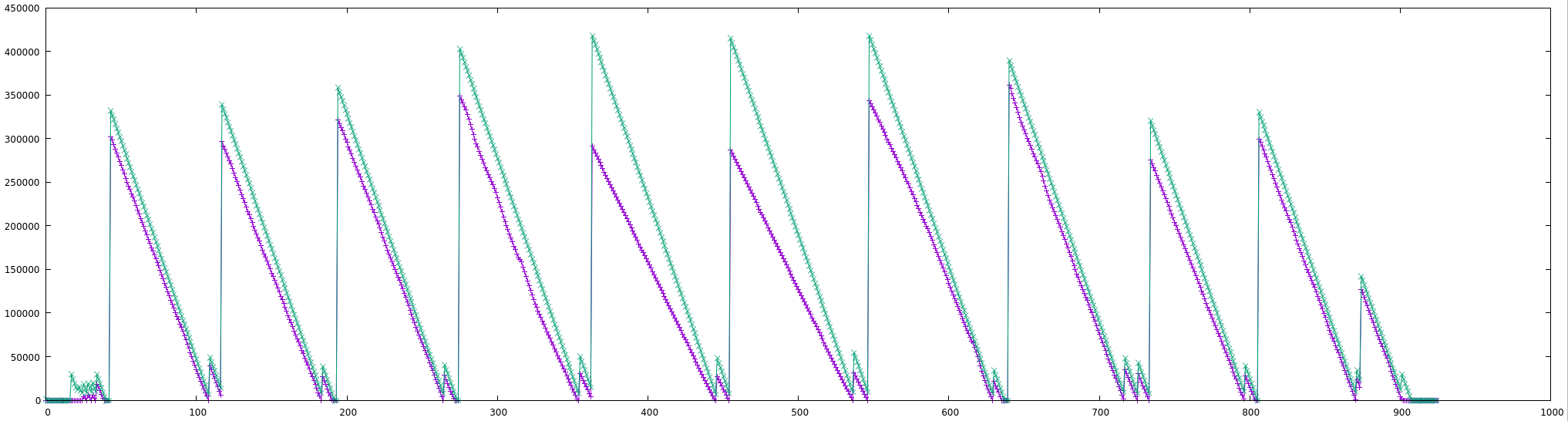
and 2018-05-28-002017-klippy.speed-4000-slow-decay-no-pause (speed=4000)
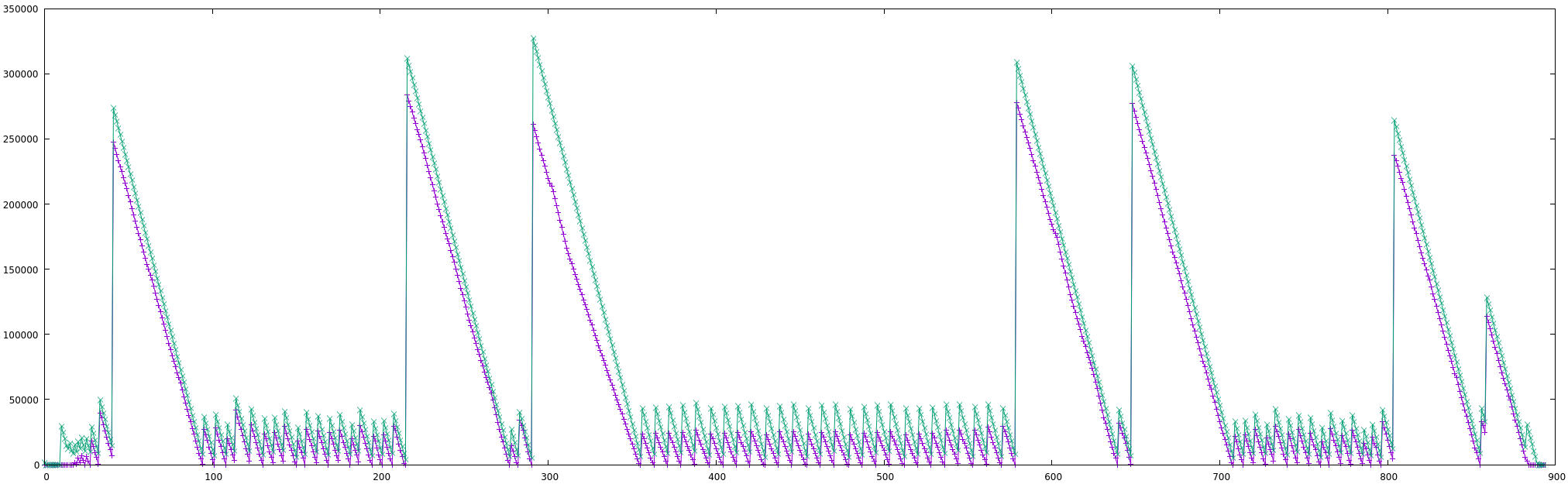
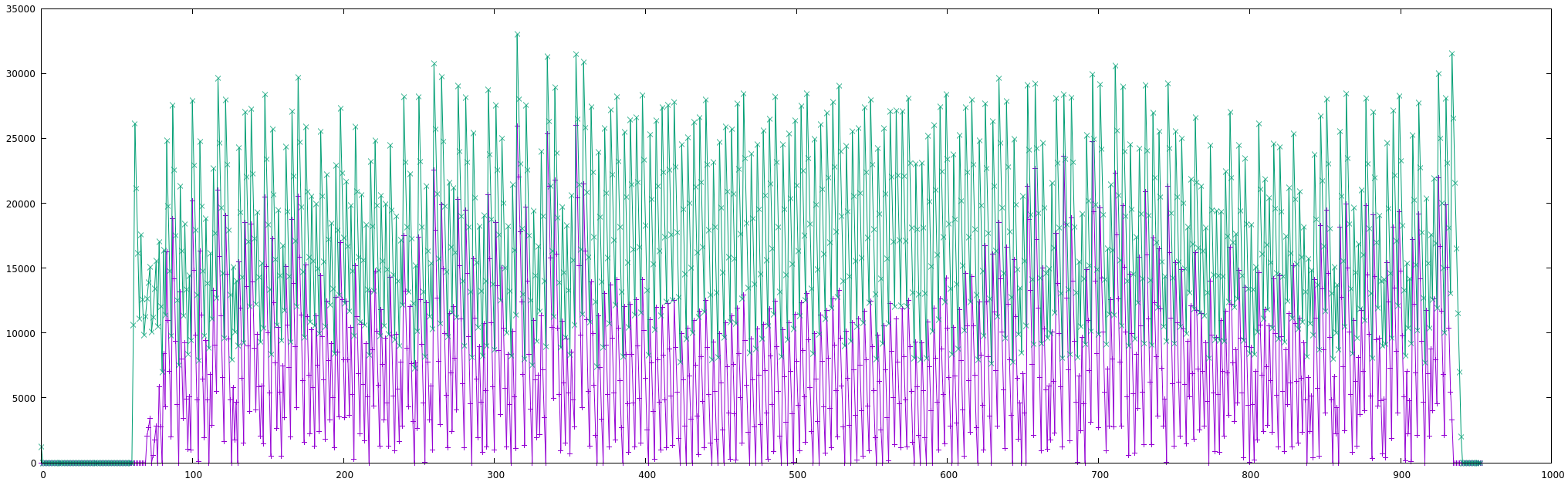
Given that the locations of the peaks are not coincident, this should not be directly dependent on the gcode.
I guess the planner has lower priority than something else and tries to keep up?
But after all, 2000mm/s isn't that bad, isn't it? I think we don't have to find reasons why more than 4000mm/s doesn't work continuously.
Here is the same plot for speed=2000 (note, maximum is about 30,000 instead of 300,000):
hg42
on 28 May 2018
using my other simple 100mm x 100mm square test, I noticed that the speed is limited to 1000mm/s for step_distance=0.0125mm, which increases for 200mm moves.
So there is some clipping because of acceleration (accel=10000 isn't enough to reach maximum speed).
The longest moves for the other test object should be 80mm, so I think it never reached maximum speed, though I heard changes for the longest moves.
I will try longer moves and use clearly defined print patterns to make this more reproducible. But this has to wait...real life is calling...
I am now quite sure the usb code works well.
hg42
on 28 May 2018
I continued testing and got a maximum of about 174000++ steps/s with one axis (F131000) or two axes (F185000, running diagonal).
Above these limits the motors abruptly stop somewhere in each move and the LEDs on the smoothieboard flash at the same time (seem to become more bright for a moment).
But there is no shutdown and the movements continue. Reducing the speed makes them return to normal.
Not sure if this is because of the motors or the MCU.
hg42
on 28 May 2018
For those with a smoothieboard, azteeg x5, or mks sbase, I've put up an experimental tree with MCP4451 support. If it works, it allows one to set the motor current on these boards.
cd ~/klipper ; git fetch ; git checkout origin/work-mcp4451-20180529 ; sudo service klipper restart
Be sure to also recompile and flash the micro-controller. The config/generic-smoothieboard.cfg on that tree has also been updated with an example to set the current.
If you try it, please let me know your results - success or failure.
-Kevin
KevinOConnor
on 30 May 2018
Hi Kevin,
First thanks for the great firmware!
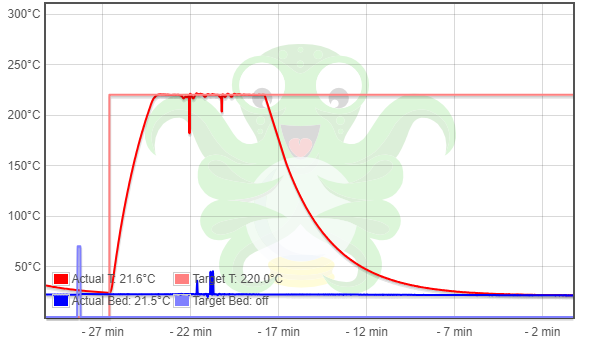
I have an MKS sbase running a Tronxy X5S. I am having an issue with erratic temperature readings.
When the motors are powered the temps spike up and down randomly.
It looks like this is an issue with these boards, marlin had to add extra filtering to account for it https://github.com/MarlinFirmware/Marlin/issues/8855.
The screenshot and log is from heating the hotend then a few jogs to power the motors on.
klippy.log
 LaurenceGGush
on 6 Jun 2018
LaurenceGGush
on 6 Jun 2018
I have also tried the work-mcp4451-20180529 branch, rebuilt and flashed the firmware, but get error "Unknown command: i2c_send" when trying to connect.
LaurenceGGush
on 7 Jun 2018
On Wed, Jun 06, 2018 at 02:16:45PM -0700, LaurenceGGush wrote:
Hi Kevin,
First thanks for the great firmware!
I have an MKS sbase running a Tronxy X5S. I am having an issue with erratic temperature readings.
When the motors are powered the temps spike up and down randomly.
It looks like this is an issue with these boards, marlin had to add extra filtering to account for it https://github.com/MarlinFirmware/Marlin/issues/8855.
Okay, thanks. Are you seeing a problem with the spikes, or are they
just visually distracting. I would have thought the Klipper PID code
would be robust to the line noise. (It is admittedly ugly to look at
the graph, though.)
The screenshot and log is from heater the hotend then a few jogs to power the motors on.
Ah - it's interesting that you can move the motors without the MCP4451
support. Do they seem over or under powered?
On Wed, Jun 06, 2018 at 03:28:38PM -0700, LaurenceGGush wrote:
I have also tried the work-mcp4451-20180529 branch, rebuilt and flashed the firmware, but get error "Unknown command: i2c_send" when trying to connect.
That happens when the new host code is run with the old firmware code.
You'll need to recompile and flash the firmware after checking out the
work-mcp4451-20180529.
-Kevin
KevinOConnor
on 7 Jun 2018
The spikes cause prints to fail with ADC out of range errors, I'll get a log of that tonight.
I didn't notice anything out of the ordinary with the motors, a little body maybe, only managed a couple of layers of a test cube print before adc failure though so don't have a lot to go on.
I tried and think I succeeded in rebuilding and flashing after checking out the mcp4451 branch.
I copied the klipper.bin to my sd card as firmware.bin and after a restart it was gone from the sd. I'll try again with a clean sd card in case that makes a difference.
LaurenceGGush
on 7 Jun 2018
Ah - it's interesting that you can move the motors without the MCP4451 support. Do they seem over or under powered?
Oh, up to this post I never thought it would not work without programming the chip.
But you are right, why the hell does my smoothieboard test configuration work without?
My smoothieboard is an early production version but seems to be compatible to the normal v1 board according to current control.
The smoothieboard v1 BOM mentions MCP4451 or MCP4461.
My board uses MCP4451.
I found this for the MCP4451:
Some devices of this series have an EEPROM, others have RAM:
MCP4431, MCP4432 RAM
MCP4441, MCP4442 EE
MCP4451, MCP4452 RAM
MCP4461, MCP4462 EE
So, MCP443x/5x only have RAM and don't remember their settings.
On power on there seem to be default values:
4.1.1 POWER-ON RESET
...
the following events occur:
•  Volatile wiper register is loaded with the default value
•  TCON registers are loaded with their default value
•  Device is capable of digital operation
The factory reset values in TABLE 4-2 (are those the defaults?) are 0x40 for 7bit and 0x80 for 8bit for the wiper registers and all bits on for the config registers.
So I think they are all half of the full scale.
hg42
on 7 Jun 2018
On Thu, Jun 07, 2018 at 09:55:00AM -0700, Harald wrote:
Ah - it's interesting that you can move the motors without the MCP4451 support. Do they seem over or under powered?
Oh, up to this post I never thought it would not work without programming the chip.
But you are right, why the hell does my smoothieboard test configuration work without?
[...]
So I think they are all half of the full scale.
Ah, thanks. On closer inspection, I agree the spec indicates they
default to half resistance. Which should equate to roughly 1.1 amps
for the steppers.
-Kevin
KevinOConnor
on 7 Jun 2018
Hi all,
I have done a bit more testing.
First I have a couple of logs of trying to run a print and having temperature fluctuation issues.
This log failed before I started the print.
klippy.log
This log failed printing the second layer.
klippy-2.log
These were both using master.
Second I managed to successfully flash the firmware from the work-mcp branch so I'm not getting the unknown command error anymore.
However when mcp4451 blocks are added to the config the mcu seems to crash/timeout.
This log is from booting up with mcp4451 blocks in the config and it seems to crash the mcu, looking at /dev/serial/ on the pi I can see the serial device go away as klippy starts up.
klippy-mcp.log
This log I had klippy running and connected without the mcp4451 blocks in the config then added them and it's a bit different, giving a "MCU 'mcu' shutdown: i2c timeout" error. I then do FIRMWARE_RESTART and we're back to the mcu "crashing" and the serial device going away.
klippy-mcp-staged.log
LaurenceGGush
on 8 Jun 2018
On Thu, Jun 07, 2018 at 03:53:00PM -0700, LaurenceGGush wrote:
Hi all,
I have done a bit more testing.
First I have a couple of logs of trying to run a print and having temperature fluctuation issues.
This log failed before I started the print.
Okay, thanks. We'll need to add a filter to the min_temp/max_temp
checks.
Second I managed to successfully flash the firmware from the work-mcp branch so I'm not getting the unknown command error anymore.
However when mcp4451 blocks are added to the config the mcu seems to crash/timeout.
Okay, thanks. I'll take another look at it next week.
-Kevin
KevinOConnor
on 9 Jun 2018
Hi all,
doing some testing with this branch on a MKS Sbase with 2A Nema 17s. I can confirm the issue reported by @LaurenceGGush regarding the mcp4451-commands in the config file though. Everything seems to work without these lines and the 2A Nemas 17s connected. My main printer uses low-currency Nema 14s (0.8A) so i'm searching for a way to set the currents lower to do some more testing with my machine-setup. Someone figured out a way to set the currents temporary already? As far as i read into it the current settings are volatile so there is no chance of setting it somehow different than via FW/Config. Thanks in advance - also for all the work here already done here, amazing project!
 dieideeistgut
on 21 Jun 2018
dieideeistgut
on 21 Jun 2018
according to the buffer_time issue see test logs in https://github.com/KevinOConnor/klipper/pull/417#issuecomment-401019160
Additional info:
- during the lines with buffer_time=0, the movement pauses and continues when the buffer_time jumps to the high value (about 170-200 in my tests today).
- the issue seems to be compiler independent (I tested with gcc 4.9.3 from xenial and gcc 6.3.1 from testing)
- the behavior didn't change between 2018-05-28 and 2018-06-26 (today).
hg42
on 28 Jun 2018
FYI, the mcp4451 support should now be fixed. The code is now on the master branch, and I have removed the work-mcp4451-20180529 branch.
-Kevin
KevinOConnor
on 30 Jun 2018
Can confirm that all is working for me on two mks sbase boards.
dieideeistgut
on 2 Jul 2018
@KevinOConnor
FYI, the mcp4451 support should now be fixed
now that my test environment is up and running, I could finally test the digipots.
I tried different currents (0.01-1.5) and verified that I can block the axes manually when the currents are low and force seems to be proportional.
I also verified that X-axis with low current and Y-axis with high current works like expected.
While this might not be a complete test, it's verifies that the code is working on a real Smoothieboard.
hg42
on 2 Jul 2018
@dieideeistgut, @hg42 - thanks for confirming.
I've just added support for filtering of the min/max temperature range check (commit 0dbfa915). With this change, the temperature spikes will still be visible, but the "ADC out of range" errors should no longer occur.
-Kevin
KevinOConnor
on 2 Jul 2018
I believe the code is now far enough along that we can say there is basic support for the Smoothieboard.
-Kevin
KevinOConnor
on 8 Jul 2018
Hi all,
I have successfully completed a few prints and can confirm that klipper is now working on my MKS sbase, thanks Kevin!
I did have to set min_extrude_temp to zero or I would get "Extrude below minimum temp" errors.
klippy-min-temp.log
Laurence
LaurenceGGush
on 8 Jul 2018
On Sun, Jul 08, 2018 at 12:29:05PM -0700, LaurenceGGush wrote:
I have successfully completed a few prints and can confirm that klipper is now working on my MKS sbase, thanks Kevin!
Thanks.
I did have to set min_extrude_temp to zero or I would get "Extrude below minimum temp" errors.
That should be addressed in the latest code (commit b0ee323e).
-Kevin
KevinOConnor
on 9 Jul 2018
Hi,
I tried building the firmware. Copied the klipper.bin as firmware.bin to the sd card. I think it flashes the firmware but it doesn't work. I can't see any serial port. And all indicator leds are always on. Can you help about it? What can be the problem?
 trgtylcnky
on 21 Nov 2018
trgtylcnky
on 21 Nov 2018
Related issues
KevinOConnor
·
6Comments
 Michael-Bell
·
5Comments
Michael-Bell
·
5Comments
 amaximchuk
·
6Comments
amaximchuk
·
6Comments
 speendo
·
3Comments
speendo
·
3Comments
 BlackStump
·
3Comments
BlackStump
·
3Comments
Most helpful comment
For those with a smoothieboard, azteeg x5, or mks sbase, I've put up an experimental tree with MCP4451 support. If it works, it allows one to set the motor current on these boards.
cd ~/klipper ; git fetch ; git checkout origin/work-mcp4451-20180529 ; sudo service klipper restart
Be sure to also recompile and flash the micro-controller. The config/generic-smoothieboard.cfg on that tree has also been updated with an example to set the current.
If you try it, please let me know your results - success or failure.
-Kevin