Kitty: Wayland: Window attention request not implemented yet
Hi Kovid!
I'm back on Arch Linux/KDE so am using Kitty daily again. (Previously I only had a non-Linux kernel compatible laptop after a move overseas...) Meaning, I'm ready to get back to contributing regularly :-)
I've found the new Wayland KWin to be surprisingly usable...except for one issue.
It seems that raising a bell in Kitty doesn't work, e.g. as sleep 2 && printf '\a'.
I get:
[285 11:54:25.612681] [glfw error 65549]: Wayland: Window attention request not implemented yet
Anything I can do to help?
 ctrlcctrlv
All 15 comments
Bell works fine for me on wayland. Window attention is different from
bell, it for example makes the task list entry for the window flash or
the dock icon bounce, etc. This is not supported by Wayland as far as I
know.
Bell is rung by libcanberra on Linux, see play_canberra_sound() in
desktop.c.
 kovidgoyal
on 12 Oct 2020
kovidgoyal
on 12 Oct 2020
@kovidgoyal I think window attention is implemented by KWin (kwin_wayland). Would you be interested in an implementation?
When I wrote "bell" I meant the taskbar yes. It works in Konsole.
ctrlcctrlv
on 12 Oct 2020
Sure, patches are welcome, you will need to implement it in wl_window.c (search for "attention"
kovidgoyal
on 12 Oct 2020
@kovidgoyal It seems I misunderstood what's actually happening; Plasma seems to be making an inference based on libnotify.
So, adding this to kitty.conf is sufficient:
command_on_bell notify-send -a 'Kovid Goyal'\''s TTY (kitty)' -i kitty -h STRING:desktop-entry:kitty 'Bell in kitty'
That results in:
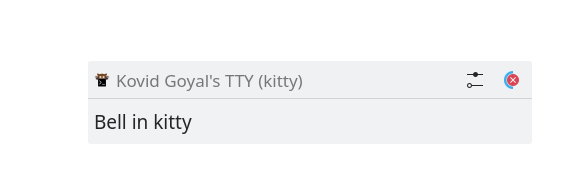
And persists in the notifications list until clicked—good enough for me.
You may want to document this, not sure. :-)
ctrlcctrlv
on 12 Oct 2020
Seems like a rather hacky workaround, how would one know which kitty window the bell is from? Just for interest, kitty recently gained native support for notifications, see https://sw.kovidgoyal.net/kitty/protocol-extensions.html#desktop-notifications
so you can actually do
printf '\x1b]99;;Hello world\x1b\'
And with a bit more work have clicking the notification focus the window the notification came from. Not really useful for your use case, but just for interest.
kovidgoyal
on 12 Oct 2020
When I try your example on Wayland, the right window isn't focused, so perhaps that is a good avenue of future work! :)
ctrlcctrlv
on 12 Oct 2020
@kovidgoyal Have you considered adding a configuration option for interpretation of the regular terminal bell as a desktop notification, as well?
ctrlcctrlv
on 12 Oct 2020
You mean the correct OS window or the correct kitty window within the OS Window?
As for adding a config option for it, seems to be fairly wayland specific as every other platform has window attention. Presumably someday wayland will get it as well.
kovidgoyal
on 12 Oct 2020
Correct kitty window
ctrlcctrlv
on 12 Oct 2020
(I think it would be useful even on X11 to send a GNOME Desktop Notification on bell)
ctrlcctrlv
on 12 Oct 2020
but why would you want a notification on bell? Bells are rather common
when doing interactive work, for example, backspacing to the prompt in a
shell.
As fo rthe right window not being focusesd, see the
notification_activated() function
kovidgoyal
on 12 Oct 2020
@kovidgoyal I run my IRC client weechat in a tmux session remotely; in 2019 I usually put it in a separate Kitty process. Was thinking of doing the same thing again, and only having the command_on_bell for that Kitty, while my normal Kitty won't have it.
ctrlcctrlv
on 12 Oct 2020
On Sun, Oct 11, 2020 at 08:57:20PM -0700, Fredrick Brennan wrote:
@kovidgoyal I run my IRC client weechat in a tmux session remotely; in 2019 I usually put it in a separate Kitty process. Was thinking of doing the same thing again, and only having the
command_on_bellfor that Kitty, while my normal Kitty won't have it.
The exisitng command_on_bell should be enough for that, I think.
kovidgoyal
on 12 Oct 2020
@kovidgoyal I run my IRC client weechat in a tmux session remotely; in 2019 I usually put it in a separate Kitty process. Was thinking of doing the same thing again, and only having the
command_on_bellfor that Kitty, while my normal Kitty won't have it.
Why not have WeeChat send a notification with the aforementioned notification protocol instead of a bell? That would allow you to include the message in the notification too.
 trygveaa
on 12 Oct 2020
trygveaa
on 12 Oct 2020
Certainly that's not a bad idea, I just didn't really know about the notification API. I learned about it because of this thread. Definitely what I was doing in 2019 can be improved.
ctrlcctrlv
on 12 Oct 2020
Related issues
 keyofnight
·
3Comments
keyofnight
·
3Comments
 wavexx
·
3Comments
wavexx
·
3Comments
 mihaicristiantanase
·
3Comments
mihaicristiantanase
·
3Comments
 lazarcf
·
4Comments
lazarcf
·
4Comments
 Askannz
·
3Comments
Askannz
·
3Comments