Kitty: MacOS: powerline symbols not work when starting kitty from launcher
but work when starting kitty from terminal
image blow is starting kitty form macos launcher
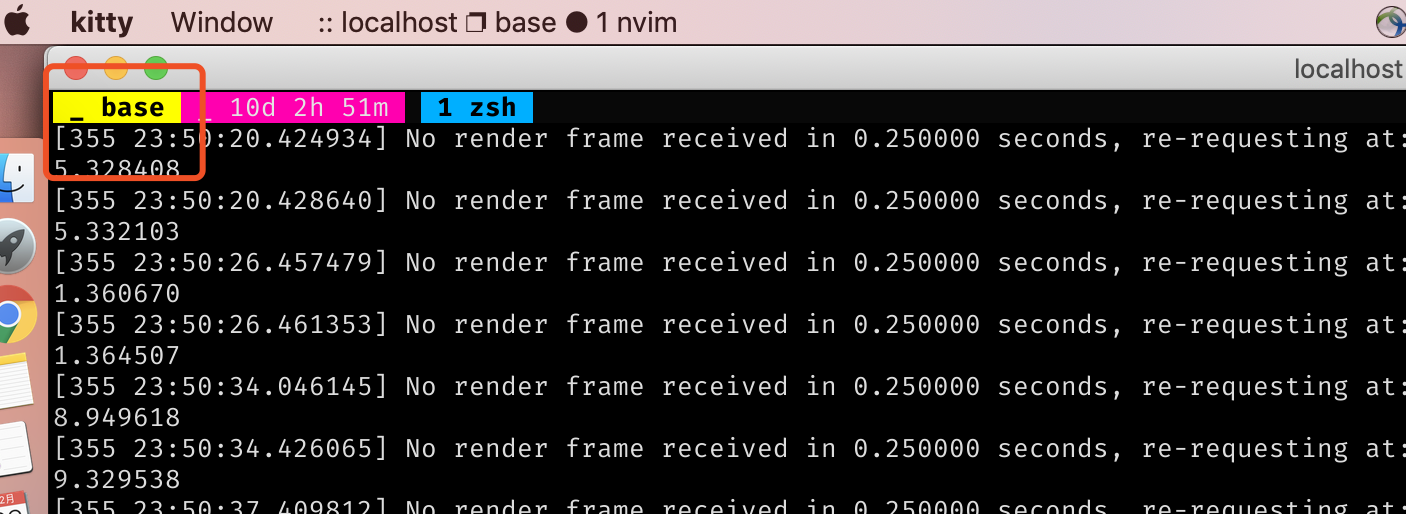
image blow is stating kitty from terminal:

the font config is :
font_family      Fira Mono for Powerline
bold_font        auto
italic_font      auto
bold_italic_font auto

#: You can specify different fonts for the bold/italic/bold-italic
#: variants. To get a full list of supported fonts use the `kitty
#: list-fonts` command. By default they are derived automatically, by
#: the OSes font system. Setting them manually is useful for font
#: families that have many weight variants like Book, Medium, Thick,
#: etc. For example::

#:     font_family      Operator Mono Book
#:     bold_font        Operator Mono Medium
#:     italic_font      Operator Mono Book Italic
#:     bold_italic_font Operator Mono Medium Italic

#: Font size (in pts)
font_size 13.0

adjust_line_height  0
adjust_column_width 0
 hujianxin
All 3 comments
that maybe not powerline symbols, but this can not display normally anyway
hujianxin
on 22 Dec 2019
This will be because your terminal startup scripts are setting some
environment variables that are not set in your macOS launchd
environment. Most probably locale related variables. Figure out what
those are and set them in kitty.conf instead of your shell startup
scripts using the env command and you will be fine.
 kovidgoyal
on 22 Dec 2019
kovidgoyal
on 22 Dec 2019
put this into .zshenv soves this:
export LC_ALL=en_US.UTF-8
export LANG=en_US.UTF-8
thank you
hujianxin
on 22 Dec 2019
❤2
🚀1
👍1
Was this page helpful?
0 / 5 - 0 ratings
Related issues
 skosch
·
3Comments
skosch
·
3Comments
 marningmol
·
4Comments
marningmol
·
4Comments
 atomsymbol
·
3Comments
atomsymbol
·
3Comments
 hdriqi
·
3Comments
hdriqi
·
3Comments
 Jomik
·
4Comments
Jomik
·
4Comments
Most helpful comment
put this into .zshenv soves this:
thank you