Since upgrading to mesa 19, kitty does not render text to screen, making it appear completely blank. It does not render after typing, too. Considering the background is still transparent, it might be an issue with my compositor instead, which I will look into later on.
 ranisalt
All 48 comments
You can try using --debug-gl to see if any of the OpenGL calls kitty uses return errors, but I doubt that will be the case. Most likely something else is broken.
 kovidgoyal
on 18 Mar 2019
kovidgoyal
on 18 Mar 2019
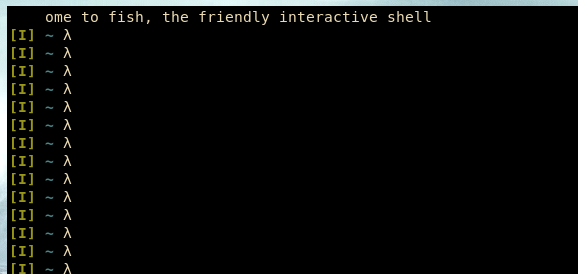
I noticed that using a compositor makes kitty unable to render text, but without a compositor the first line is broken and does not show properly. Every other line works as expected, though.
See how the first line renders incomplete:
ranisalt
on 18 Mar 2019
I doubt the first line issue has anything to do with compositor/nocompositor. Try running
kitty -o shell=bash
and see if you still get the first line problem.
kovidgoyal
on 19 Mar 2019
@kovidgoyal I can confirm this issue on Arch (w/ Intel Graphics) as well since upgrading to mesa 19... if I downgrade to the previous mesa version 18.3.4 this issue disappears..
 sjclayton
on 19 Mar 2019
sjclayton
on 19 Mar 2019
well, I will take a look at it when I have a moment, but really this seems like a bug in mesa 19
kovidgoyal
on 19 Mar 2019
@kovidgoyal I can confirm this issue on my gentoo box with kitty 0.13.3. In fact, I had similar issues before when I upgraded mesa from 18.3.4 to 18.3.5, then I downgraded it to keep using kitty. Now I tried mesa 19 and I have the issue with the first line. I use no compositor.
 rgwott
on 19 Mar 2019
rgwott
on 19 Mar 2019
Can confirm the same issue, though it's not just the first line but all of the lines: some characters render 'backwards' (right to left), and they keep switching around. Almost looks like some sly virus.
Downgrading to 18.x immediately solves the issue.
 buzzlightmonth
on 19 Mar 2019
buzzlightmonth
on 19 Mar 2019
Yep, i had the same "Black Screen" problem (Arch + Kitty and Mesa 19).
Downgrading mesa 18.4.3-1 solved the issue for me too
 YokaiRick
on 19 Mar 2019
YokaiRick
on 19 Mar 2019
Well I can reproduce with mesa 19. Since according to @rgwott it broke with mesa 18.3.5 as well, here is the list of changes https://lists.freedesktop.org/archives/mesa-dev/2019-March/216922.html in 18.3.5. Presumably one of them broke something kitty relied on. I dont have the time to go digging in mesa to figure out what exactly broke, so for the moment I suggest simply blacklisting mesa > 18.3.4 to use kitty with intel drivers.
kovidgoyal
on 20 Mar 2019
dont see anything obvious in the changelog of mesa, so someone is going to have to find the time to do a bisect on mesa. I have reported it upstream: https://bugs.freedesktop.org/show_bug.cgi?id=110201
kovidgoyal
on 20 Mar 2019
Well I can reproduce with mesa 19. Since according to @rgwott it broke with mesa 18.3.5 as well
In my case (Gentoo box) Mesa 18.3.5 seems ok: rendering breaks only with 19
 lferra
on 20 Mar 2019
lferra
on 20 Mar 2019
Well upstream has been able to reproduce the issue, so hopefully it will
be fixed in mesa 19.0.1, until then simply blacklist mesa 19.0.0
kovidgoyal
on 20 Mar 2019
I can confirm on Arch with mesa 19. Downgrade to 18.3.4 fix the problem. I'm using compton, but I have the same problem without the compositor. It seems that only the first line is affected.
 alepez
on 20 Mar 2019
alepez
on 20 Mar 2019
I am also able to reproduce the issue and fix it with a downgrade. Something I noticed though is that by mashing Ctrl+C and enter gets me a bunch of mangled characters from my PS1 string.
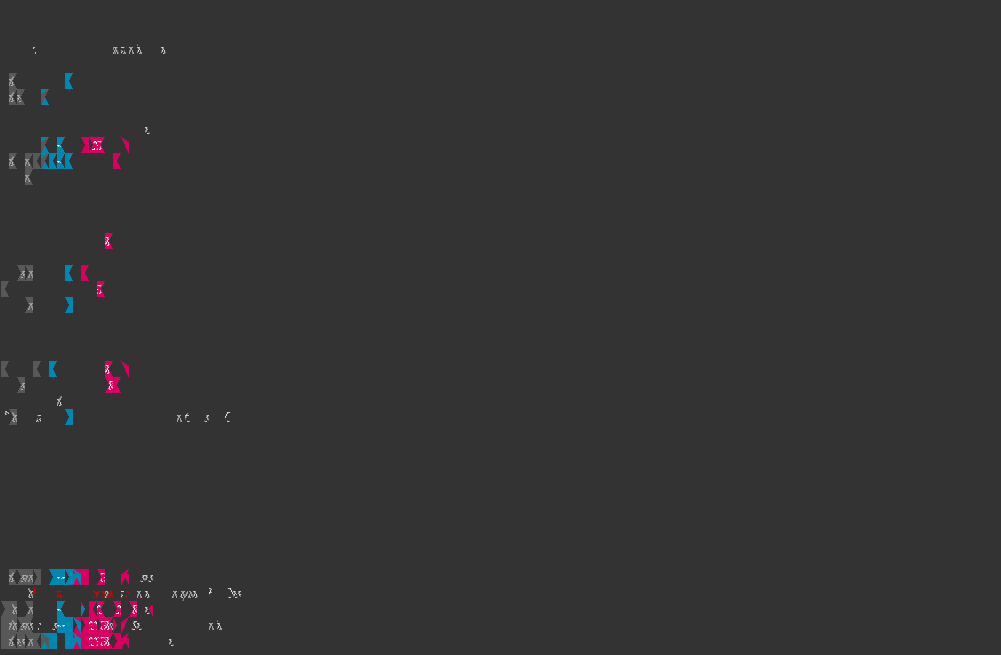
Probably not useful information, but I'm adding it just in case.
 ben-turner
on 20 Mar 2019
ben-turner
on 20 Mar 2019
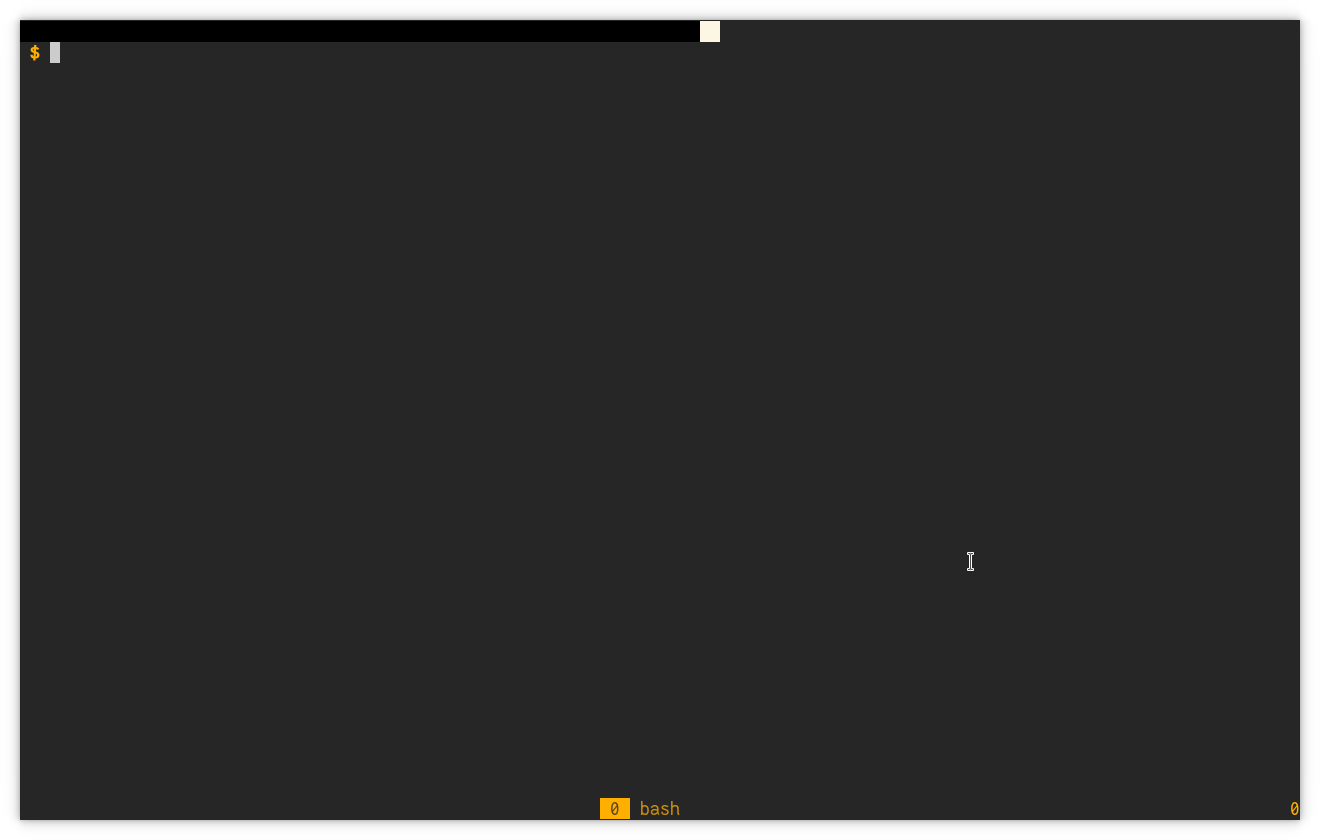
Just as another variation, in case some users find their way here: Since upgrading to Mesa 19.0.0 there's a black log in the top-left corner of Kitty, always at the same position; lines that go past it get mangled but otherwise the terminals stays usable.
 2ion
on 20 Mar 2019
2ion
on 20 Mar 2019
I have done some testing:
- kitty works on the proprietary nvidia driver on nvidia cards, but that's expected, since nvidia doesn't use mesa
- kitty works on AMD cards using the amdgpu driver, and I think that the amdgpu driver uses mesa
- kitty doesn't work on Intel GPUs, at least on the i915 driver
Tested on Arch Linux, with Linux 5.0.3 and Mesa 19.0.0
 miketth
on 22 Mar 2019
miketth
on 22 Mar 2019
It is a bug in the intel driver in mesa, see the upstream report I linked to earlier. There is a proposed fix there test it out and post ont he bug if you wish to expedite the fix.
kovidgoyal
on 23 Mar 2019
Confirming the patch fixed the issue with kitty for me. Downloaded the 512.diff and added it to the Arch PKGBUILD in _prepare_ (similar to a previous version).
 archusr
on 24 Mar 2019
archusr
on 24 Mar 2019
@archusr So it's fixed in the latest version of the mesa package now?
 weskerfoot
on 24 Mar 2019
weskerfoot
on 24 Mar 2019
@weskerfoot no, that patch was not merged yet.
ranisalt
on 25 Mar 2019
Confirming 520 fixes the issue with kitty for me.
archusr
on 25 Mar 2019
Cool hopefully they will release it soon
kovidgoyal
on 25 Mar 2019
Mesa 19.01 is in testing, but I didn't see the fix in the commit history. Can anyone confirm?
 ronasimi
on 29 Mar 2019
ronasimi
on 29 Mar 2019
@ronasimi 520 hasn't been merged so that makes sense
 GladOSkar
on 29 Mar 2019
GladOSkar
on 29 Mar 2019
OK thanks.
ronasimi
on 29 Mar 2019
@ronasimi You could download my temporary PKGBUILD and run makepkg -si in its directory.
archusr
on 31 Mar 2019
@ronasimi You could download my temporary PKGBUILD and run
makepkg -siin its directory.
You're the best, thanks!
ronasimi
on 31 Mar 2019
@ronasimi You could download my temporary PKGBUILD and run
makepkg -siin its directory.
I'm getting an invalid PGP key error when running makepkg. I'm gonna be honest, I just stripped the pgp keys out of the pkgbuild, but I wanted to give you a heads up.
The error is "mesa-19.0.1.tar.xz ... FAILED (unknown public key 4C95FAAB3EB073EC)"
LICENCE is missing as well: "install: cannot stat 'LICENSE': No such file or directory" and I can't see it in the archive
ronasimi
on 31 Mar 2019
It seems to happen less often, but I have reproduced using Mesa 18.3.4-1 and 19.0.1.
Running with --debug-gl now to see if I can get some output.
 troubas
on 3 Apr 2019
troubas
on 3 Apr 2019
The error is "mesa-19.0.1.tar.xz ... FAILED (unknown public key 4C95FAAB3EB073EC)"
Just run gpg --recv-keys 4C95FAAB3EB073EC and it should pass
ranisalt
on 3 Apr 2019
All I'm getting with --debug-gl is
GL version string: '4.5 (Core Profile) Mesa 18.3.4' Detected version: 4.5
Any way I can get kitty to be more verbose?
Also I noticed I've only downgraded mesa
warning: lib32-mesa: local (19.0.1+really+18.3.5-1) is newer than multilib (19.0.1-1)
warning: lib32-mesa-vdpau: local (19.0.1+really+18.3.5-1) is newer than multilib (19.0.1-1)
warning: lib32-vulkan-intel: local (19.0.1+really+18.3.5-1) is newer than multilib (19.0.1-1)
warning: lib32-vulkan-radeon: local (19.0.1+really+18.3.5-1) is newer than multilib (19.0.1-1)
warning: libva-mesa-driver: local (19.0.1+really+18.3.5-1) is newer than extra (19.0.1-2)
warning: mesa: ignoring package upgrade (18.3.4-1 => 19.0.1-2)
warning: mesa-vdpau: local (19.0.1+really+18.3.5-1) is newer than extra (19.0.1-2)
warning: vulkan-intel: local (19.0.1+really+18.3.5-1) is newer than extra (19.0.1-2)
warning: vulkan-radeon: local (19.0.1+really+18.3.5-1) is newer than extra (19.0.1-2)
Should I downgrade any of these packages to?
troubas
on 4 Apr 2019
--debug-gl simply causes kiity to print out error reported by OpenGL.
There wont be any here, since this is a bug in a layer well below
opengl, in the intel driver provided by mesa. Essentially they got their
register assignments wrong which causes random number to be read from
textures in some shaders.
kovidgoyal
on 4 Apr 2019
@ronasimi You could download my temporary PKGBUILD and run
makepkg -siin its directory.
Great job! Just missing the flex dependency.
 farid-fari
on 8 Apr 2019
farid-fari
on 8 Apr 2019
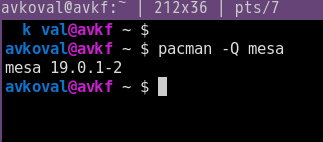
With 19.0.1-2 I still see some rendering issues, but I am not sure if this is same bug or something else. Exactly, first 3-4 symbols on first line of terminal are not displayed, and sometimes some rendering issues happen on this 1st line, everything else works fine.
 avkoval
on 10 Apr 2019
avkoval
on 10 Apr 2019
Since the fix was not released as part of mesa 19.0.1 that is hardly surprising. Just downgrade mesa. I will close this bug report when a version of mesa with the fix is released.
kovidgoyal
on 10 Apr 2019
Thanks for hint @kovidgoyal I did not realized that. OK, I did it, and it works fine, for other arch users this was the fix:
sudo pacman -U /var/cache/pacman/pkg/mesa-18.3.4-1-x86_64.pkg.tar.xz
Actually, prefer not do downgrade and use @archusr PKGBUILD above - Arch has (positive) issues when it comes to library versioning.
ranisalt
on 10 Apr 2019
I can confirm this bug has been solved with mesa 19.0.2.
I'm running Arch Linux with the latest kitty and mesa 19.0.2-1, both from the official repos.
 wallace11
on 15 Apr 2019
wallace11
on 15 Apr 2019
As far as I know the fix was not included in mesa 19.0.2 so I would be very surprised if the issue was fixed by it.
kovidgoyal
on 15 Apr 2019
As far as I know the fix was not included in mesa 19.0.2 so I would be very surprised if the issue was fixed by it.
I just arrived home and found out that the problem persists on my Ivy Bridge CPU.
On Kaby Lake it worked just fine earlier today...
Sorry for the false news :(
wallace11
on 15 Apr 2019
I don't have this issue on my Kaby Lake iGPU on Solus's build of Mesa 19.0.0. Maybe an issue with Arch's build?
 serebit
on 17 Apr 2019
serebit
on 17 Apr 2019
@serebit Solus with Mesa 19.0.0 on Haswell iGPU does have the problem
GladOSkar
on 17 Apr 2019
Looks like the patch has been merged so hopefully the next mesa release will have the fix.
kovidgoyal
on 17 Apr 2019
mesa-19.0.3 available as per https://gitlab.freedesktop.org/mesa/mesa/tags
archusr
on 25 Apr 2019
I cannot reproduce the symptoms on my system with mesa 19.0.3, so closing this bug report.
kovidgoyal
on 25 Apr 2019
mesa 19.0.2 was published to Ubuntu 18.04 bionic on 2019-07-03 and it broke Kitty for me. Updating tomesa 19.1.0 with Padoka stable PPA fixed it.
 salmanulfarzy
on 9 Jul 2019
salmanulfarzy
on 9 Jul 2019
Can confirm, on Linux Mint all glitches were fixed using above PPA
sudo add-apt-repository ppa:paulo-miguel-dias/pkppa
sudo apt-get update
sudo apt-get upgrade

$ kitty --debug-gl
GL version string: '4.5 (Core Profile) Mesa 19.1.0 - padoka PPA' Detected version: 4.5
 okdewit
on 10 Jul 2019
okdewit
on 10 Jul 2019
Related issues
 crocket
·
4Comments
crocket
·
4Comments
 atomsymbol
·
3Comments
atomsymbol
·
3Comments
 Askannz
·
3Comments
Askannz
·
3Comments
 wavexx
·
3Comments
wavexx
·
3Comments
 bewzaalex
·
3Comments
bewzaalex
·
3Comments
Most helpful comment
@kovidgoyal I can confirm this issue on Arch (w/ Intel Graphics) as well since upgrading to mesa 19... if I downgrade to the previous mesa version 18.3.4 this issue disappears..