Is there a way to change how fonts are smoothed while using kitty on macOS?
iTerm2 is on the left, and kitty is on the right.
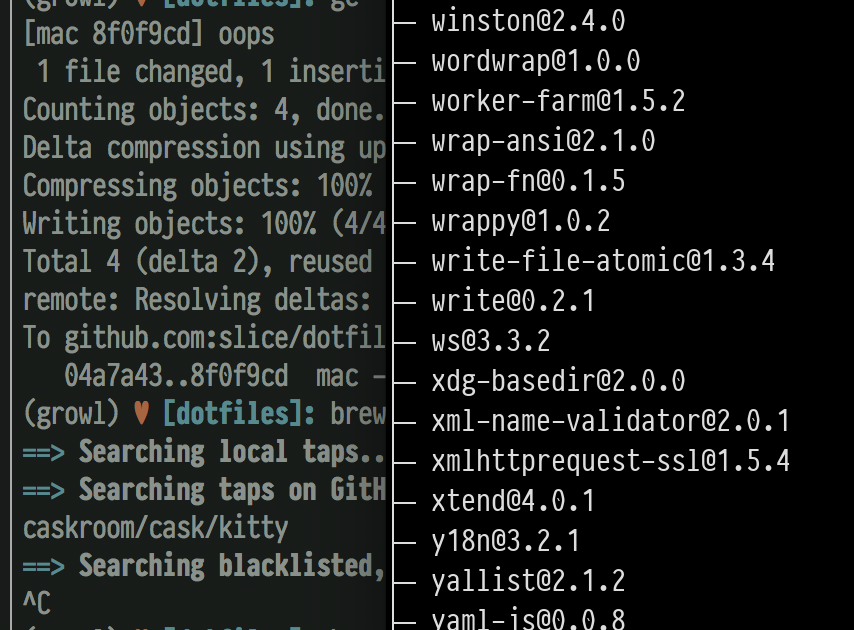
Is there a way to accomplish the same smoothing as iTerm?
 slice
slice
All 10 comments
No, you will never get the same rendering between iterm2 and kitty as kitty does not use CoreText to render fonts. The next kitty release will however include support for subpixel antialiasing, which IIRC iterm2 uses as well (although personally, I find sub-pixel antialiasing to be sub-optimal on high resolution displays).
 kovidgoyal
on 10 Dec 2017
kovidgoyal
on 10 Dec 2017
Thank you for the quick response! :+1:
slice
on 10 Dec 2017
Actually, I should say that I am currently investigating getting kitty to use CoreText on macOS, if I succeed, this should be automatically fixed.
kovidgoyal
on 10 Dec 2017
I managed to get CoreText rendering working (in the ct branch)
kovidgoyal
on 11 Dec 2017
I built a fresh version of kitty and there appears to be no effect, how strange. I tried messing around with the render context in the render_glyphs function and couldn't figure out how to make the text appear to my liking.
I guess it's not a big deal, though.
slice
on 12 Dec 2017
Make sure you are using the same font variant, i.e. the thick/thin/medium/book style. Use kitty list-fonts to get a list.
kovidgoyal
on 12 Dec 2017
Some recent changes caused the font rendering to change substantially for me:
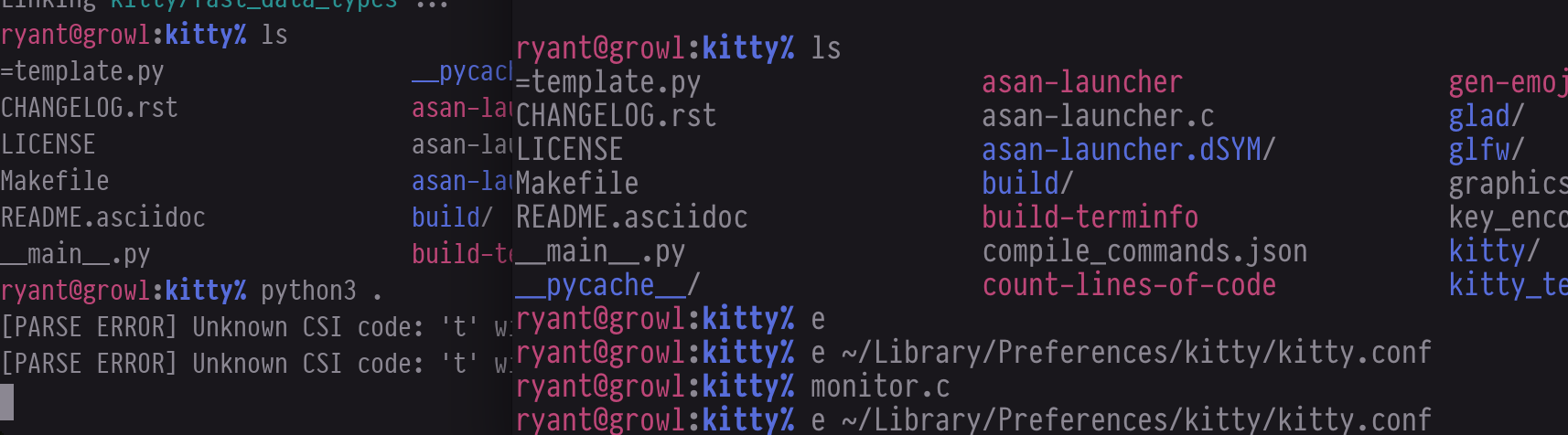
Old on the left, new on the right. Thanks for this, it looks much better now!
NOTE: Both instances are using identical configuration.
slice
on 14 Dec 2017
That's likely the effect of https://github.com/kovidgoyal/kitty/commit/b9d0ec0d4cc4e35b805f5dd3b8e9342926051673
kovidgoyal
on 14 Dec 2017
Hmm...
I know this issue is closed and it has been a while, but font smoothing is still "thin" despite terminal glyphs being rendered with CoreText.
slice
on 18 Feb 2018
The remaining difference between kitty and most other terminals is kitty does not do sub-pixel AA as it is an unnecessary waste of resources on modern retina displays, see other bug reports for full explanation.
kovidgoyal
on 19 Feb 2018
Related issues
 Askannz
·
3Comments
Askannz
·
3Comments
 lazarcf
·
4Comments
lazarcf
·
4Comments
 hujianxin
·
3Comments
hujianxin
·
3Comments
 Ulrar
·
3Comments
Ulrar
·
3Comments
 bewzaalex
·
3Comments
bewzaalex
·
3Comments