Kitematic: Kitematic Refuse to start after update docker in Windows 10
Expected behavior
Kitematic should start properly
Actual behavior
Kitematic setup always stopps at ~10% and generates error messages below:
Command failed: C:\Program Files\Docker Toolbox\docker-machine.exe -D create -d virtualbox --virtualbox-memory 2048 default,Docker Machine Version: 0.14.0, build 89b8332,Found binary path at C:\Program Files\Docker Toolbox\docker-machine.exe,Launching plugin server for driver virtualbox,Plugin server listening at address 127.0.0.1:50400,() Calling .GetVersion,Using API Version 1,() Calling .SetConfigRaw,() Calling .GetMachineName,(flag-lookup) Calling .GetMachineName,(flag-lookup) Calling .DriverName,(flag-lookup) Calling .GetCreateFlags,Found binary path at C:\Program Files\Docker Toolbox\docker-machine.exe,Launching plugin server for driver virtualbox,Plugin server listening at address 127.0.0.1:50404,() Calling .GetVersion,Using API Version 1,() Calling .SetConfigRaw,() Calling .GetMachineName,(default) Calling .GetMachineName,(default) Calling .DriverName,(default) Calling .GetCreateFlags,(default) Calling .SetConfigFromFlags,Reading certificate data from C:\Users\hongb.docker\machine\certs\ca.pem,Decoding PEM data...,Parsing certificate...,Reading certificate data from C:\Users\hongb.docker\machine\certs\cert.pem,Decoding PEM data...,Parsing certificate...,(default) Calling .PreCreateCheck,(default) DBG | COMMAND: C:\Program Files\Oracle\VirtualBox\VBoxManage.exe --version,(default) DBG | STDOUT:,(default) DBG | {,(default) DBG | 5.2.8r121009,(default) DBG | },(default) DBG | STDERR:,(default) DBG | {,(default) DBG | },(default) DBG | COMMAND: wmic computersystem get hypervisorpresent,(default) DBG | STDOUT:,(default) DBG | {,(default) DBG | HypervisorPresent ,(default) DBG | TRUE ,(default) DBG | ,(default) DBG | },Error with pre-create check: "This computer is running Hyper-V. VirtualBox won't boot a 64bits VM when Hyper-V is activated. Either use Hyper-V as a driver, or disable the Hyper-V hypervisor. (To skip this check, use --virtualbox-no-vtx-check)",open C:\Users\hongb.docker\machine\machines\default\default\Logs\VBox.log: The system cannot find the path specified.,notifying bugsnag: [Error with pre-create check: "This computer is running Hyper-V. VirtualBox won't boot a 64bits VM when Hyper-V is activated. Either use Hyper-V as a driver, or disable the Hyper-V hypervisor. (To skip this check, use --virtualbox-no-vtx-check)"],
Information about the Issue
Docker has been reminding me to update to the latest version since this July (or even earlier) but I refused to. And Docker and Kitematic could run perfectly. But this changed completely after I accidentally clicked 'install' buton today. I looked for possible reasons and solutions online and tried to disable Hyper-V while reinstalling Docker and then either enable or disable Hyper-V while starting Docker. But Kitematic still refuse to properly start...
Did any one experience the same issue after updating Docker?
 sumpokemonster
All 3 comments
I faced the same issue and I disabled the Hyper-V hypervisor and rebooted.

Now docker wont start because docker needs it.
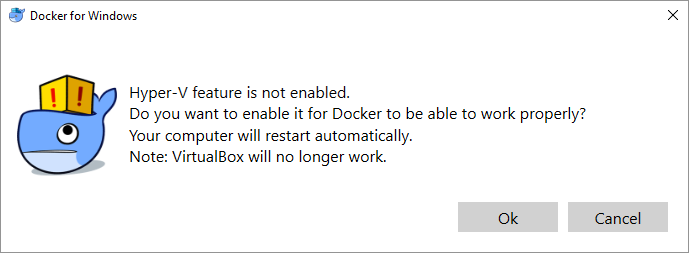
So, what I understand is, Hyper-V is essential for Docker on windows, either the message coming from Kitematic should be updated to not suggest disabling Hyper-V Hypervisor or include help on how to use Hyper-V as a driver ?
 mithuns
on 9 Nov 2018
mithuns
on 9 Nov 2018
Could you try the solution written in this post ?
You only need to delete Kitematic folder in %APPDATA% (C:\Users{User}\AppData\Roaming) and run Kitematic again.
 ThomasCollignon
on 27 Dec 2018
ThomasCollignon
on 27 Dec 2018
Could you try the solution written in this post ?
You only need to delete Kitematic folder in %APPDATA% (C:\Users{User}\AppData\Roaming) and run Kitematic again.
Hey Thomas, that worked like a charm! Thank you. I had the exact issue as the author of this post and this solved my problem.
 imadamtoo
on 13 Jan 2019
imadamtoo
on 13 Jan 2019
Related issues
 rick02840
·
3Comments
rick02840
·
3Comments
 cnBruceHong
·
4Comments
cnBruceHong
·
4Comments
 EugeneKrapivin
·
4Comments
EugeneKrapivin
·
4Comments
 niclarcipretti
·
3Comments
niclarcipretti
·
3Comments
 foverzar
·
4Comments
foverzar
·
4Comments
Most helpful comment
Could you try the solution written in this post ?