Kitematic: Refresh Button of Docker container list in Kitematic Windows
Expected behavior
Container List with refresh button on Windows (simple icon button is enough!)
Actual behavior
Container List without refresh button
Information about the Issue
This is so hard to know how to refresh container list for users...
There is already function implemented, so let's make it visible :)
Steps to reproduce the behavior
- Open Kitematic
- Look into Kitematic Container List closely
 darron1217
All 31 comments
Since we have a menu item and a shortcut key, this seems like overkill. Most application provide similar UX.
Feel free however to create a PR in order to get this implemented.
 FrenchBen
on 5 Dec 2017
FrenchBen
on 5 Dec 2017
@FrenchBen I almost opened an issue about the container list not refreshing until I saw your comment that there was a menu option.
Since every other function seems to have an easily available button on the UI, I think it would be really nice to at least show that it is possible - before I was just quitting the app and starting it.
 lilactown
on 29 Dec 2017
lilactown
on 29 Dec 2017
I've created a PR #3462 to attempt resolve this issue, maybe you could take a look or provide some feedback 😉
 collin5
on 1 Jan 2018
collin5
on 1 Jan 2018
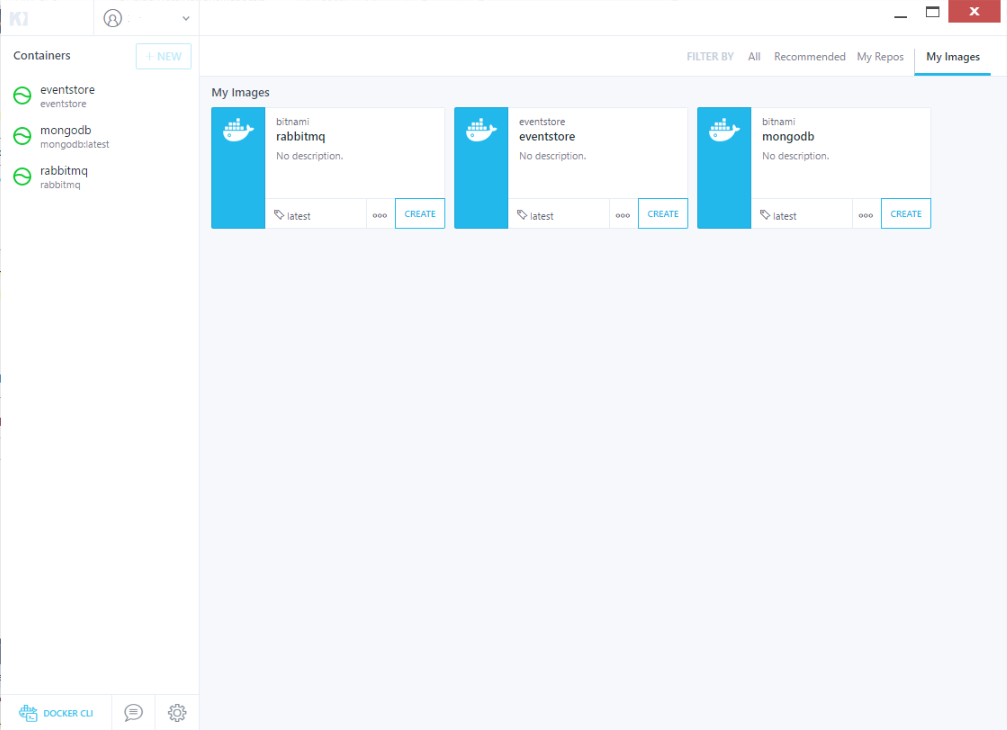
I don't see these menus anywhere. Is this the app that you're talking about? I also noticed it's not reflecting changes made externally (e.g. via CLI), and a way to refresh would be nice.
 hlubovac
on 13 Feb 2018
hlubovac
on 13 Feb 2018
@hlubovac looks like you're on Windows - I believe you have to hit the alt key to see those menu. The Keyboard shortcut, and clicking on the Containers word are still valid ways to get the same result
FrenchBen
on 13 Feb 2018
Thanks; I tried, but with no success.
The UI does not visually respond to Alt keypress; I tried both Alt keys. Clicking "Containers" label (top-left) doesn't do anything either. Combining these doesn't show any menu.
Maybe that feature isn't available for Windows.
Restarting the app does the job :)
hlubovac
on 13 Feb 2018
Actually, I'm on Windows too.
My request was aiming at Windows Version
darron1217
on 14 Feb 2018
@darron1217 Can you update the title to reflect the windows focus?
@hlubovac what about the shortcut of CTRL+R ?
FrenchBen
on 14 Feb 2018
@FrenchBen Sure :)
darron1217
on 14 Feb 2018
If creating button is overkill, then how about supporting F5 button to do the same thing as CTRL+R?
For window users, we don't use CTRL-R to refresh something
darron1217
on 17 May 2018
Any updates? Having to close and reopen is pretty rough.
 sega19
on 9 Sep 2018
sega19
on 9 Sep 2018
@sega19
As @darron1217 said, CTRL-R works. But it's not very intuitive. It should be F5in Windows. And there was obviously supposed to be a menu that is missing. ALT does not work.
 jwedel
on 27 Sep 2018
jwedel
on 27 Sep 2018
Yeap, Ctrl R works, ALT no though, but really could be F5 on Windows, prevent us from going to search for solves and improves usability.
 malarahfelipe
on 12 Dec 2018
malarahfelipe
on 12 Dec 2018
Is there any issue of latest kitematic on Windows 10? I always need to close then open my kitematic to see new running containers. This is a pain.
 neilpalima
on 18 Jan 2019
neilpalima
on 18 Jan 2019
there seem an issue with windows. it is not refreshing automatically. I need to ctrl+r everytime.
 canarslan12
on 18 Jan 2019
canarslan12
on 18 Jan 2019
weird. ctrl + r does not work. I am using the latest kitematic. tried browsing to My Images then clicking a container but it does not load even after ctrl + r.
neilpalima
on 21 Jan 2019
I don't understand why this is not a top priority issue.
Several teams use docker for windows (on Windows 10) in my company, and every single one of them told me that they don't use kitematic because "it doesn't detect stopped/started containers and there is no refresh button".
 KeatsPeeks
on 22 Jan 2019
KeatsPeeks
on 22 Jan 2019
@KeatsPeeks, they prefer you to try a third-party UI-management tool. I recommend portainer (free, and better).
hlubovac
on 22 Jan 2019
On Win 10 x64 here; clicking the "Container" word, pressing F5, CTRL+R, ALT, all do nothing at all.
I used the ccommand-line by clicking the "Docker-cli" item at the bottom left, pulled an image, now can't see it in the list, and no way that I can see to manually refresh it.
 STaRDoGG
on 5 Feb 2019
STaRDoGG
on 5 Feb 2019
Thanks to this issue I found out that there is a refresh option in Kitematic. I have restarted Kitematic so many times.
I would expect that Kitematic should refresh automatically.
 peterfortuin
on 11 Feb 2019
peterfortuin
on 11 Feb 2019
Thanks to this issue I found out that there is a refresh option in Kitematic. I have restarted Kitematic so many times.
I would expect that Kitematic should refresh automatically.
and where is that @peterfortuin ?
 fixwa
on 22 Feb 2019
fixwa
on 22 Feb 2019
It's in the menu.
peterfortuin
on 22 Feb 2019
It's in the menu.
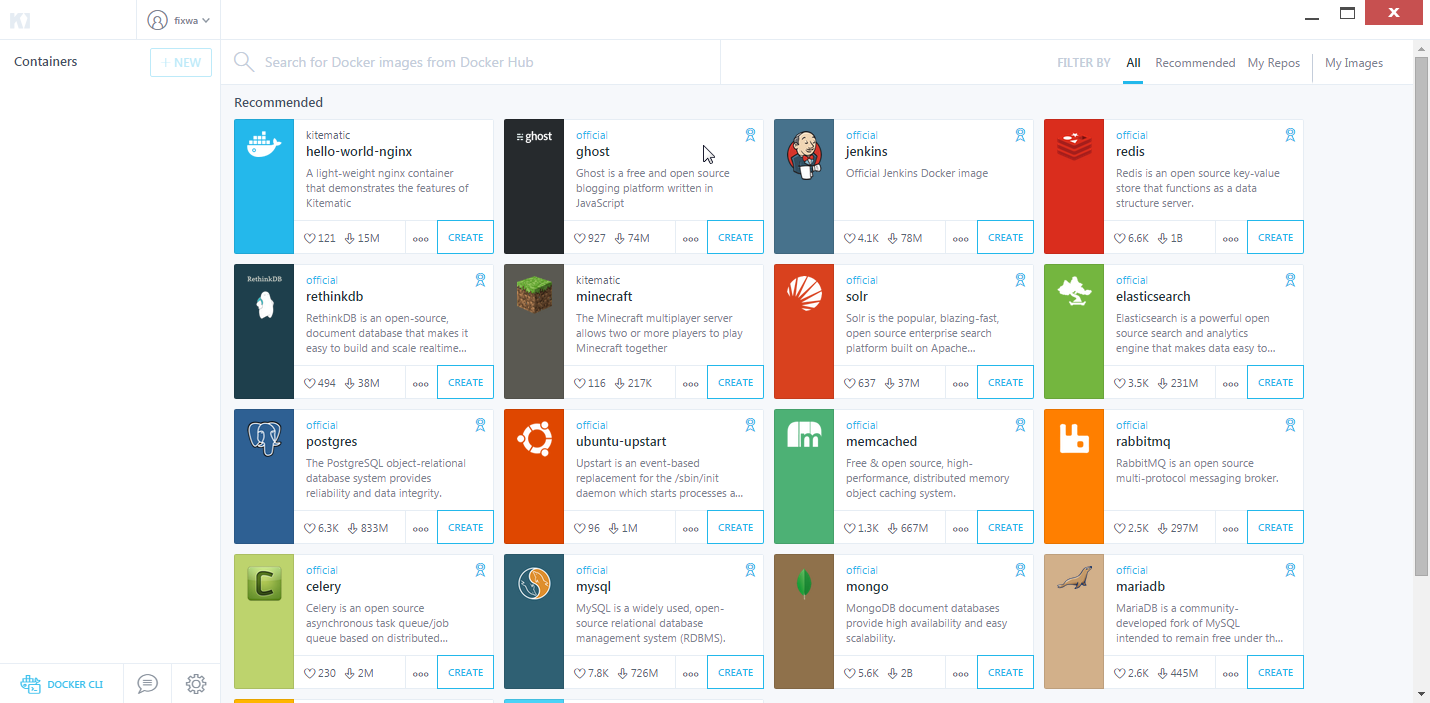
thanks @peterfortuin but I don't see any menu, screenshot below is while pressing alt... still no menu. (this is windows 7)
fixwa
on 22 Feb 2019
Same problem, Win10 1809.
I don't even know how to view the version number in the kitematic UI.
If you run a container via command line, you can't see any updates in kitematic UI.
 GF-Huang
on 26 Mar 2019
GF-Huang
on 26 Mar 2019
Two years later and we still cannot refresh our containers.
 GCSBOSS
on 28 Apr 2019
GCSBOSS
on 28 Apr 2019
@GCSBOSS feel free to contribute, and add the functionality :)
FrenchBen
on 2 May 2019
@FrenchBen
I found already there is PR to add refresh button.
Is there any reason cannot merge this?
https://github.com/docker/kitematic/pull/3462
 jtanaka
on 8 May 2019
jtanaka
on 8 May 2019
ctrl+R saved me.

 xingfudeshi
on 14 Jun 2019
xingfudeshi
on 14 Jun 2019
@xingfudeshi yes, this seems to work for Windows 👏 it saved me too 😄
 yousrasdn
on 10 Jul 2019
yousrasdn
on 10 Jul 2019
Guys, Kitematic seems to be abandonware, I'd recommend using DockStation instead. Very similar apps, and though it's dev isn't super active on it, it's at least not abandoned.
STaRDoGG
on 10 Jul 2019
Even on mac... who uses the "menu" somewhere way in top of the screen. blegh. Why is it not auto refreshing anyways?
 rayhvh
on 21 Aug 2019
rayhvh
on 21 Aug 2019
Related issues
 rick02840
·
3Comments
rick02840
·
3Comments
 albfan
·
3Comments
albfan
·
3Comments
 niclarcipretti
·
3Comments
niclarcipretti
·
3Comments
 rbq
·
4Comments
rbq
·
4Comments
 sumpokemonster
·
3Comments
sumpokemonster
·
3Comments
Most helpful comment
@sega19
As @darron1217 said,
CTRL-Rworks. But it's not very intuitive. It should beF5in Windows. And there was obviously supposed to be a menu that is missing.ALTdoes not work.