Good day, I am in love with the KISS launcher. The only extra feature that I would love to see is double tap screen to lock. Most launchers have this feature, and as my phone is rather big with an uncomfortable lock button, I would love to see this option :)
 noreferences
All 13 comments
So, I've been looking into this one.
Strictly speaking, it's just a matter of overriding onDoubleTap(MotionEvent e) in the GestureDetector here https://github.com/Neamar/KISS/blob/b2675f6763ae21d43e4e3f59f521928ad27fb70a/app/src/main/java/fr/neamar/kiss/forwarder/ExperienceTweaks.java#L67
However.. actually locking the device can't be done easily. By the look of it, you need to make the application a DeviceAdministrator, and that's a big scary pain for the user:
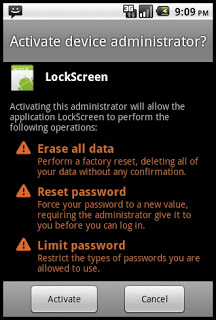
http://rdcworld-android.blogspot.ie/2012/03/lock-phone-screen-programmtically.html
If there is an easy way to lock the device, then sure, let's do this.
 Neamar
on 25 Mar 2018
Neamar
on 25 Mar 2018
See how https://gitlab.com/juanitobananas/wave-up does it too.
Anyway, Device Admin...AND (very important) you can't just UN-install KISS then, noo, you first need to take away the Device Admin (special button IN app) first and then you can un-install.
Users will not read, then they'll get mad that they've just given Device Admin permission to an EVIL app that now cannot be uninstalled blahblahblah
 licaon-kter
on 25 Mar 2018
licaon-kter
on 25 Mar 2018
Double tap to lock screen is a must have. I would happily give KISS launcher Device Admin privileges.
@no-references : For the time being, well, there's this app called "Lock it: Screen off" by Mayank. It lets you long press home button to lock the screen
 SuperSaiyan11
on 26 May 2018
SuperSaiyan11
on 26 May 2018
Although I understand that this would be nice, the app you mentioned for instance will not let you use your fingerprint or iris scan to unlock your device. It really seems pretty complex to get right :-
Neamar
on 26 May 2018
Yes, locking like that blocks finger/eye on the next unlock, it's a pain. :(
licaon-kter
on 26 May 2018
Lean Launcher can lock without Device Admin privileges and also allow you to unlock with fingerprint.
It uses some kind of screen timeout, I guess. I'm not an android developer so I can't tell, but you can check Lean-Launcher/src/com/hdeva/launcher/LeanTimeoutActivity.java
 Stanley00
on 4 Sep 2018
Stanley00
on 4 Sep 2018
@Stanley00 I just checked their code, they do it in a sneaky way :p
What they do is display an activity that doesn't respond to touches and is full-black, immersive (hides navigation, etc.).
Then they wait for the timeout to happen, which will indeed lock your screen.
They have some code to make the timeout faster but it didn't seem to work on my phone (Android Pie).
If you change the background color in https://github.com/hundeva/Lean-Launcher/blob/o-mr1/res/layout/lean_activity_timeout.xml you can notice that the screen stays on for a minute or so. What this means is if you want to unlock your screen in the next minute, you need to press the power button twice as the first time will actually really lock your phone!
Code is on 67f3a578
I'm not 100% convinced it's a good idea (my biggest concern is the "press twice to unlock if locked recently"), but they definitely get points for originality!
Neamar
on 7 Sep 2018
I think blocking fingerprint scanner and similar unlock methods isn't an issue to some users as in many countries including some in the EU you can be legally forced to unlock by finger/face while you cannot be forced to give up your PIN/password.
 Mikaela
on 23 Nov 2018
Mikaela
on 23 Nov 2018
@Mikaela Yes, but let users choose.
licaon-kter
on 23 Nov 2018
We can have an option to choose an app to launch on double click. Leaving it to user if they want to lock using some locking app or launch a camera app or whatever.
 Docbroke
on 6 Feb 2019
Docbroke
on 6 Feb 2019
An interesting thing to note: Android P adds https://developer.android.com/reference/android/accessibilityservice/AccessibilityService.html#GLOBAL_ACTION_LOCK_SCREEN which is a nice way to lock the phone without doing any black magic. It also doesn't disable fingerprint :)
Neamar
on 6 Mar 2019
Still not an easy thing to implement, as we'd need an Accessibility service: https://stackoverflow.com/questions/52903686/how-to-turn-screen-off-with-1-button-but-not-locked-with-admin-privilege
Neamar
on 23 Feb 2020
I've started coding, and have something that's working :) Needs to be tweaked a little, but should be live at some point :)
Neamar
on 8 Apr 2020
Related issues
 jefvel
·
6Comments
jefvel
·
6Comments
 Larnicone
·
6Comments
Larnicone
·
6Comments
 Wilker-a
·
4Comments
Wilker-a
·
4Comments
 ghost
·
5Comments
ghost
·
5Comments
 lil5
·
4Comments
lil5
·
4Comments
Most helpful comment
An interesting thing to note: Android P adds https://developer.android.com/reference/android/accessibilityservice/AccessibilityService.html#GLOBAL_ACTION_LOCK_SCREEN which is a nice way to lock the phone without doing any black magic. It also doesn't disable fingerprint :)