Kingfisher: Problem with Dynamic height image in tableview cell using URL Kingfisher
Check List
Thanks for considering to open an issue. Before you submit your issue, please confirm these boxes are checked.
- [x] I have read the wiki page and cheat sheet, but there is no information I need.
- [x] I have searched in existing issues, but did not find a same one.
- [x] I want to reoprt a problem instead of asking a question. It'd better to use kingfisher tag in Stack Overflow to ask a question.
Issue Description
Problem with Dynamic height image in cell Tableview
What
In my app I download the image from Firebase and in TableViewCell.swift resize the image with current aspectRatio.
The first time tableView is populate correctly but sometime seems that some rows are display without the image .
If I scroll the tableview the image will be reloaded fine.
If I don't use Kingfisher but load image from array all works.
Reproduce
override func tableView(_ tableView: UITableView, cellForRowAt indexPath: IndexPath) -> UITableViewCell {
let cell = tableView.dequeueReusableCell(withIdentifier: "Cell") as! VetrinaTableViewCell
    let resource1 = ImageResource(downloadURL: URL.init(string: vetrina[indexPath.row].urlPhoto)!, cacheKey: vetrina[indexPath.row].urlPhoto)
    let p1 = Bundle.main.path(forResource: "loading", ofType: "gif")
    let data1 = try! Data(contentsOf: URL(fileURLWithPath: p1!))
    cell.immagineVetrina.kf.indicatorType = .image(imageData: data1)
    cell.immagineVetrina.kf.setImage(with: resource1)


    cell.setNeedsLayout()
    return cell
}
If I don't use Kingfisher works fine this is the code.
override func tableView(_ tableView: UITableView, cellForRowAt indexPath: IndexPath) -> UITableViewCell {
let cell = tableView.dequeueReusableCell(withIdentifier: "Cell") as! VetrinaTableViewCell
    cell.immagineVetrina.image = UIImage(named: imgMenu[indexPath.row])

    cell.setNeedsLayout()
    return cell
}
this is my VetrinaTableViewCell where I resize image:
class VetrinaTableViewCell: UITableViewCell {
@IBOutlet weak var ultimoLbl: UILabel!
@IBOutlet weak var immagineUltimo: UIImageView!
@IBOutlet weak var numeroCommenti: UILabel!

@IBOutlet weak var likeImg: UIImageView!
@IBOutlet weak var numeroLike: UILabel!
@IBOutlet weak var immagineVetrina: UIImageView!
@IBOutlet weak var nomeuid: UILabel!
@IBOutlet weak var uidImg: UIImageView!

override func awakeFromNib() {
    super.awakeFromNib()
    // Initialization code
}

override func setSelected(_ selected: Bool, animated: Bool) {
    super.setSelected(selected, animated: animated)

    // Configure the view for the selected state
}

internal var aspectConstraint : NSLayoutConstraint? {
    didSet {
        if oldValue != nil {
            immagineVetrina.removeConstraint(oldValue!)
        }
        if aspectConstraint != nil {
            immagineVetrina.addConstraint(aspectConstraint!)
        }
    }
}

override func prepareForReuse() {
    super.prepareForReuse()
    aspectConstraint = nil
}

func setCustomImage(image : UIImage) {

    let aspect = image.size.width / image.size.height

    let constraint = NSLayoutConstraint(item: immagineVetrina, attribute: NSLayoutAttribute.width, relatedBy: NSLayoutRelation.equal, toItem: immagineVetrina, attribute: NSLayoutAttribute.height, multiplier: aspect, constant: 0.0)
    constraint.priority = UILayoutPriority(rawValue: 999)

    aspectConstraint = constraint

    immagineVetrina.image = image
}
}
Other Comment
[Add anything else here]
 FedericoSub
All 19 comments
@FedericoSub Sorry for the late reply.
Kingfisher's setImage method is an async one, so your cell.setNeedsLayout() will not layout the cell according to the real image size. The original image view size will be used when layout happens.
A possible workaround would be calling cell.setNeedsLayout() inside the completion handler of setting image method, like this:
cell.immagineVetrina.kf.setImage(with: resource1) { _, _, _, _ in
cell.layoutIfNeeded()
}
This will layout your cell with the constraint of your cell and the image view's intrinsic content size (as long as you are not setting the size constraint for the image view). So if you were using an auto sizing cell, it will work for you to resize the cell by downloaded image.
 onevcat
on 3 Apr 2018
onevcat
on 3 Apr 2018
@onevcat I created custom UITableViewCell and for simplicity added just one UIImageView with leading/tailing/top/bottom constraints set to cell's margins.
This is how I am loading image into a cell:
class AttachmentCell: UITableViewCell {
@IBOutlet weak var attachmentImageView: UIImageView!
internal var aspectConstraint : NSLayoutConstraint? {
didSet {
if oldValue != nil {
attachmentImageView.removeConstraint(oldValue!)
}
if aspectConstraint != nil {
aspectConstraint?.priority = UILayoutPriority(999)
attachmentImageView.addConstraint(aspectConstraint!)
}
}
}
var message: Message? {
didSet {
guard let message = message else { return }
guard let attachment = message.info.attachment else {
fatalError("Tried to bind non-attachment message to a cell!")
}
attachmentImageView.kf.indicatorType = .activity
attachmentImageView.kf.setImage(with: attachment.downloadUrl, completionHandler: { [weak self] (image, error, cacheType, imageUrl) in
guard let strongSelf = self, let image = image else { return }
let aspect = image.size.width / image.size.height
print("setting aspect \(aspect)")
strongSelf.aspectConstraint = NSLayoutConstraint(item: strongSelf.attachmentImageView, attribute: NSLayoutAttribute.width, relatedBy: NSLayoutRelation.equal, toItem: strongSelf.attachmentImageView, attribute: NSLayoutAttribute.height, multiplier: aspect, constant: 0.0)
strongSelf.setNeedsLayout()
strongSelf.layoutIfNeeded()
})
}
}
override func prepareForReuse() {
super.prepareForReuse()
aspectConstraint = nil
}
}
It's displayed almost correctly, except for a first time. Cell does not resize itself and tried different combination of layoutIfNeeded / setNeedsLayout.
Those are my constraints:
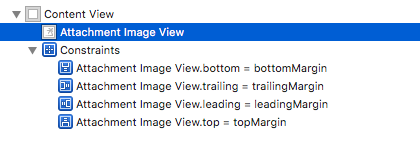
Any idea how to set it up? Maybe you could spin up some example?
 pzmudzinski
on 26 Jun 2018
pzmudzinski
on 26 Jun 2018
I have this same issue too and would be interested in a solution.
 chamitha
on 27 Jun 2018
chamitha
on 27 Jun 2018
@chamitha this is solution I've found:
                cell.setNeedsLayout()

                UIView.performWithoutAnimation {
                    tableView.beginUpdates()
                    tableView.endUpdates()
                }
You might remove that performWithoutAnimation block so images will resize in animated way, I just didn't like that effect.
pzmudzinski
on 27 Jun 2018
@pzmudzinski Did you find solution for
It's displayed almost correctly, except for a first time
?
 anhhtbk
on 21 Aug 2018
anhhtbk
on 21 Aug 2018
Uhm yes. I posted my solution?
pzmudzinski
on 21 Aug 2018
@pixyzehn Sorry. I added it wrong position. Now I add it in cellForRowAt indexPath and it work correctly. Thanks!
anhhtbk
on 22 Aug 2018
This doesn't solve the problem for me. The only way I can get it to auto layout the height properly is by adding the .forceRefresh option to setImage ... which defeats the whole purpose of using the cache.
 Dmurph24
on 24 Aug 2018
Dmurph24
on 24 Aug 2018
Hello,
I have the same problem.
An other point, sometimes I will have an image to load in the cell and sometimes not.
And it is the fiesta in the tableview, the cell are not sized correctly, I have to scroll down and scroll up to make appear some images.
Hope you find a solution :)
 gorbat-o
on 6 Sep 2018
gorbat-o
on 6 Sep 2018
Hello
Nothing yet? I have found some solutions, but all of them feel glitchy. When you are scrolling the tableview resizes and you lost track of were you where before. I don't like that
 bsarmiento-akurey
on 20 Sep 2018
bsarmiento-akurey
on 20 Sep 2018
Hey @bsarmiento-akurey
I found a solution for this, it is to know if i will load an image or not in the tableview before instantiate an uitableviewcell
If yes, uitableviewcellIMAGE
if not, i have an other uitableviewcellNOIMAGE
The recycler made some crazy things with my cells.
If you need I can provide some code here.
gorbat-o
on 21 Sep 2018
Me, too. Any great ideas?
 masuhara
on 26 Nov 2018
masuhara
on 26 Nov 2018
Maybee this can help some people, add this function in your tableviewcell class :
override func prepareForReuse() {
super.prepareForReuse()
fooImageView.kf.cancelDownloadTask()
fooImageView.image = nil
}
 antoinepemeja
on 6 Feb 2019
antoinepemeja
on 6 Feb 2019
@chamitha this is solution I've found:
                cell.setNeedsLayout()

                UIView.performWithoutAnimation {
                    tableView.beginUpdates()
                    tableView.endUpdates()
                }
You might remove that
performWithoutAnimationblock so images will resize in animated way, I just didn't like that effect.
@pzmudzinski This is will cause the table to reload again hence going in the infinite loop of reloading.
I don't think is the right solution.
 RishabhTayal
on 4 Sep 2019
RishabhTayal
on 4 Sep 2019
@antoinepemeja - thank you for that! I have been fighting this for a week trying to figure out why my cells were resizing on additional refreshes. In my case I'm using UICollectionViewCells, but overriding the prepareForReuse() function as you describe finally solved my issue.
 jdavidbakr
on 3 Oct 2019
jdavidbakr
on 3 Oct 2019
@RishabhTayal My solution might be out dated by now, but at the time of writing I definitely wasn't getting infinite loop.
pzmudzinski
on 4 Oct 2019
I'm having multiple crashes only on iOS 13 regarding the infinite loop issue by calling begin/endUpdates when the image finishes loading. Everything works fine on iOS 9-12
Does anyone have any idea of how to solve this?
 jorgealegre
on 15 Oct 2019
jorgealegre
on 15 Oct 2019
I'm having multiple crashes only on iOS 13 regarding the infinite loop issue by calling begin/endUpdates when the image finishes loading. Everything works fine on iOS 9-12
Does anyone have any idea of how to solve this?
I noted a similar issue (nothing to do with Kingfisher) when calling performBatchUpdates too to resize in my case a UITableViewHeaderFooterView. It seemed to go away when I used a UITableViewCell instead.
chamitha
on 15 Oct 2019
cell.setNeedsLayout() // in cellForRowAt indexPath
and
override func prepareForReuse() {
super.prepareForReuse()
imageView.kf.cancelDownloadTask()
imageView.image = nil
}
fixes issue for me.
 i-Varun
on 18 Oct 2019
i-Varun
on 18 Oct 2019
Related issues
 jeffreylyg
·
3Comments
jeffreylyg
·
3Comments
 joebenton
·
4Comments
joebenton
·
4Comments
 SURYAKANTSHARMA
·
4Comments
SURYAKANTSHARMA
·
4Comments
 nickgate
·
4Comments
nickgate
·
4Comments
 damirstuhec
·
3Comments
damirstuhec
·
3Comments
Most helpful comment
@chamitha this is solution I've found:
You might remove that
performWithoutAnimationblock so images will resize in animated way, I just didn't like that effect.