Kibana: Exception stack trace source map line numbers mismatch
Kibana version: 7.6.2
Elasticsearch version: 7.6.2
Server OS version:
Browser version: Chrome 86
Browser OS version: Windows 10
Original install method (e.g. download page, yum, from source, etc.):
Describe the bug: Source map line numbers mismatch
Steps to reproduce:
- Generate source maps for Angular application using
ng build --prod --source-map - Upload source maps to
/assets/v1/sourcemapsendpoint - Introduce a bug at a particular line number and check Kibana
Expected behavior: APM exception stack trace should display webpack files with the same formatting as in Chrome DevTools and the original source code
Screenshots (if relevant):
APM exception stack trace:

Chrome DevTools:
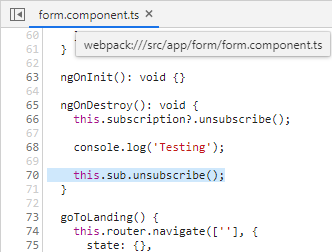
The file and line number are correct:
"webpack:///src/app/form/form.component.ts in call at line 70"
That correctly refers to the line with:
this.sub.unsubscribe();
However, in the exception stack trace, it is missing the empty lines in between lines of code, so it's erroneously highlighting:
goToLanding() {
Is there a way to fix this issue/preserve the original formatting of the files when they are displayed in the exception stack trace?
Errors in browser console (if relevant):
Provide logs and/or server output (if relevant):
Any additional context:
 channancy
All 12 comments
Pinging @elastic/apm-ui (Team:apm)
 elasticmachine
on 20 Oct 2020
elasticmachine
on 20 Oct 2020
@vigneshshanmugam or @jahtalab is this a known issue with the RUM agent when source code is transpiled? Or can the UI do something to fix this?
 sqren
on 20 Oct 2020
sqren
on 20 Oct 2020
I assume here both DevTools and Kibana are using the same sourcemap file, in that case they are getting the exact same source for the file form.component.ts. This means that sourcemap is processed incorrectly on our side, i.e. kibana/apm-server. There might be a bug in our sourcemap library that doesn't recognise windows newlines.
 jahtalab
on 21 Oct 2020
jahtalab
on 21 Oct 2020
@elastic/apm-server does this windows newline idea ring any bells?
 graphaelli
on 21 Oct 2020
graphaelli
on 21 Oct 2020
That does't ring any bells for me, and looking at the code I cannot see anywhere that CRLF would trip anything up.
@channancy would it be possible to get a copy of your source map and an error document for which this happens? If we have those then we can try to work backwards to the cause.
 axw
on 22 Oct 2020
axw
on 22 Oct 2020
@axw Sure, thank you for your reply. I did end up opening an Elastic Support case (#00623944). However, I am unable to access the case in the support portal (404 error when I click on the case) and emailing files did not work since the files would either get rejected by security or policy settings at elastic.co or they would be sent securely based on my company's corporate policy. I can upload the files to the portal if I can get access to the case there.
EDIT: Closed case #00623944 and re-opened it as case #00626474.
channancy
on 22 Oct 2020
In the interest of having a single source of truth I'll close this issue, and we can follow up through the support case. If we find a bug then we'll come back and open a new issue.
axw
on 26 Oct 2020
Actually no need to open a new issue, this one is good. I've reproduced the issue locally, there's definitely a bug and it's definitely related to CRLF. I tested the same program with both Windows and Unix newlines, and only the Windows newlines triggered it.
Source:
function main() {
        const x = 123;

        let y = 456;

        throw 'argh!';
}

main()
Unix newlines:

error.exception source:
{
  "stacktrace": [
    {
      "library_frame": false,
      "exclude_from_grouping": false,
      "filename": "webpack://testing/./src/index.js",
      "original": {
        "lineno": 1,
        "filename": "dist/app.min.js",
        "abs_path": "http://localhost:8201/dist/app.min.js",
        "colno": 13,
        "function": "<anonymous>"
      },
      "abs_path": "http://localhost:8201/dist/app.min.js",
      "sourcemap": {
        "updated": true
      },
      "line": {
        "number": 6,
        "column": 1,
        "context": "\tthrow 'argh!';"
      },
      "function": "<anonymous>",
      "context": {
        "pre": [
          "function main() {",
          "\tconst x = 123;",
          "",
          "\tlet y = 456;",
          ""
        ],
        "post": [
          "}",
          "",
          "main()",
          "",
          ""
        ]
      }
    }
  ],
  "message": "Uncaught argh!"
}
Windows newlines (e.g. in vim, set ff=dos):

error.exception source:
{
  "stacktrace": [
    {
      "exclude_from_grouping": false,
      "library_frame": false,
      "filename": "webpack://testing/./src/index.js",
      "abs_path": "http://localhost:8201/dist/app.min.js",
      "original": {
        "filename": "dist/app.min.js",
        "abs_path": "http://localhost:8201/dist/app.min.js",
        "lineno": 1,
        "colno": 13,
        "function": "<anonymous>"
      },
      "sourcemap": {
        "updated": true
      },
      "line": {
        "number": 6,
        "column": 1,
        "context": "\tthrow 'argh!';\r"
      },
      "function": "<anonymous>",
      "context": {
        "pre": [
          "function main() {\r",
          "\tconst x = 123;\r",
          "\r",
          "\tlet y = 456;\r",
          "\r"
        ],
        "post": [
          "}\r",
          "\r",
          "main()\r",
          "\r",
          ""
        ]
      }
    }
  ],
  "message": "Uncaught argh!"
}
The server code just splits on "n", which explains why the "r" characters get left behind. The carriage returns appear to be affecting the rendering.
axw
on 26 Oct 2020
Thank for looking into this @axw!
Actually no need to open a new issue, this one is good.
Unless there's anything needed in Kibana I think this issue should be closed or transferred to elastic/apm-server
sqren
on 26 Oct 2020
I opened elastic/apm-server#4347, so I think we're good to close this now unless you want Kibana to try and handle carriage returns in source code too.
axw
on 26 Oct 2020
unless you want Kibana to try and handle carriage returns in source code too.
Afaict your change will fix the problem 👍
sqren
on 26 Oct 2020
@axw Thank you for your help with this!
channancy
on 26 Oct 2020
Related issues
 ctindel
·
3Comments
ctindel
·
3Comments
 LukeMathWalker
·
3Comments
LukeMathWalker
·
3Comments
 celesteking
·
3Comments
celesteking
·
3Comments
 cafuego
·
3Comments
cafuego
·
3Comments
 bhavyarm
·
3Comments
bhavyarm
·
3Comments