Kibana: CSV upload - Indexing geo_point data from latitude and longitude columns
Todays CSV upload experience with latitude and longitude in separate columns requires a lot of extra steps. From the advanced tab, users have to:
- add a new field with
geo_pointmapping. - add a
scriptingest processor to combine the latitude and longitude columns into a new field
These steps are error prone and require a lot of elasticsearch technical knowledge. Not a great experience for novice users who just want to see some dots on a map.
Users would have a much better experience if indexing geo_point data from separate latitude and longitude columns occurred automatically and had UI elements for configuration instead of having users manually edit mappings and ingest processor configurations.
@elastic/kibana-gis proposes updating the existing UI with the following:
- a check box asking "Index geo-point data?". Check box will be checked by default if the column pairs match names such as "lat", "latitude", "lon", "longitude". Check box will be unchecked by default if those column pairs are not found.
- When checked, the UI will ask for latitude and longitude column names as well as the new field name to hold the geo_point field.
- Configuring the UI will automatically add the mapping and ingest processor sets mentioned above.
@elastic/ml-ui how does this proposal sound? @elastic/kibana-gis can do the work. We just want to ensure this is a desired feature and meets your design objectives.
 nreese
All 6 comments
nreese
on 9 Sep 2020
This sounds OK to me.
I think instead of a script processor to create the combined field, it might be possible to use a simple set processor, for example:
      "set": {
        "field": "lat_lon",
        "value": "{{lat}},{{lon}}"
      }
 droberts195
on 9 Sep 2020
droberts195
on 9 Sep 2020
There is still a question of where this should go in the UI.
The checkbox could exist on either the initial summary page or on the import page under the advanced section.
The advantage of having the checkbox on the initial summary page is we would only need to pass the field names across to the import page and we would auto add the new field to the mappings and ingest pipeline on page render. Meaning they will already be there by the time the user seems them.
Having the checkbox on the import page under the advanced section would mean the user could check and uncheck it and we'd have to edit the JSON on the fly, adding and removing the field and processor. This could be additionally difficult if the user has already started editing them.
Rather than having a checkbox, perhaps this should be a button that opens a modal. This would mean it is not automatically undoable. The user would need to edit the JSON manually to remove the field.
If this was the case, having this button in the advanced import section might make sense.
 jgowdyelastic
on 9 Sep 2020
jgowdyelastic
on 9 Sep 2020
The more i think about this, the more i'm leaning towards this being a button in the advanced import section.
The initial use case is for combining lat and long fields, but it could be a general combine fields feature. The user could select multiple fields and even choose the delimiter.
It would automatically add the new field and it would not be undoable in an automatic way. The user would have to edit the JSON themselves to remove it.
It could also be used multiple times.
We would need to check both the mappings and ingest pipeline that the field does not already exist before allowing them to add it.
We should have some text saying that this is great for combining lat long fields.
jgowdyelastic
on 9 Sep 2020
The more i think about this, the more i'm leaning towards this being a button in the advanced import section.
Is there telemetry on the percent of users that open the advanced tab? I am concerned that placing this functionality outside of the optimized UI flow will hide the feature from the very users we are targeting.
The initial use case is for combining lat and long fields, but it could be a general combine fields feature. The user could select multiple fields and even choose the delimiter.
I think aligning this effort with a more generic solution for combining fields will expose the same implementation details we are attempting to hide. The geo_point formatting is very strict and needs to be [longitue, latitude] if expressed as an array format or latitude longitude if expressed as a string. These details should be abstracted away from the user so they do not accidentally reverse the order during ingest. Allowing the user to specify how the fields are combined will be error prone and exposes users to elasticsearch details they do not need to know about.
nreese
on 9 Sep 2020
I created https://github.com/elastic/kibana/pull/77117 to explore what the UI might look like using a generic Add combined field button. I only added a geo point UI but other UIs for other combined field types can be added in the future. For example, we could add a "custom" form.
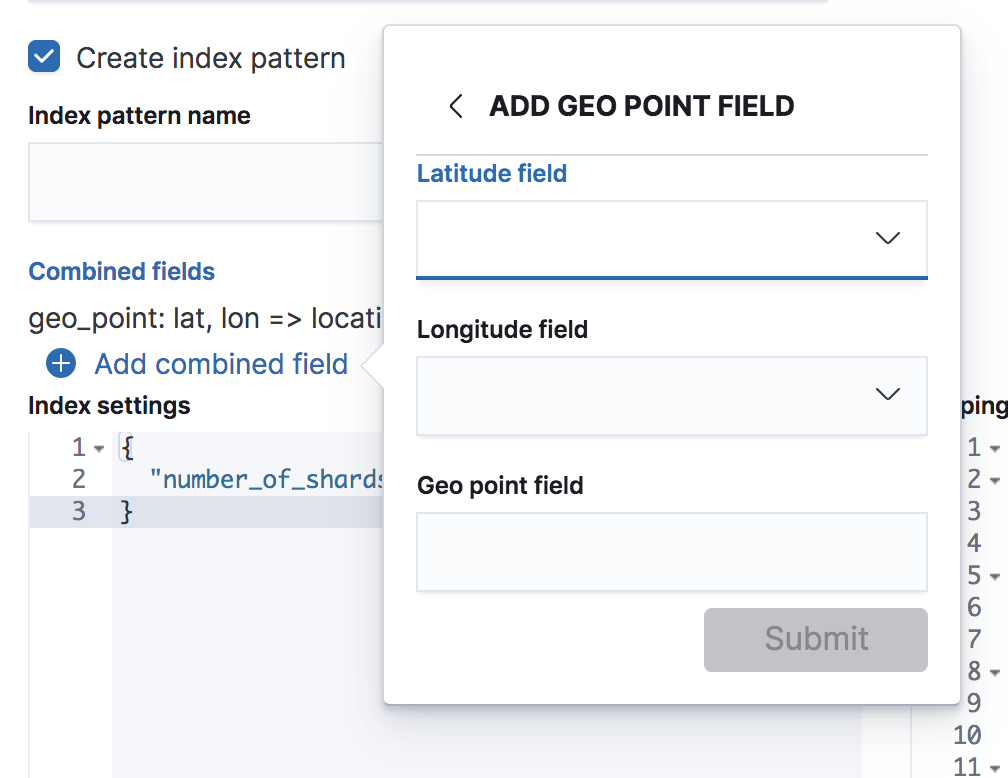
Please take a look and let me know what you think. If this looks like a viable path, I can clean up the UI and get the PR ready for review.
nreese
on 9 Sep 2020
Related issues
 bradvido
·
3Comments
bradvido
·
3Comments
 celesteking
·
3Comments
celesteking
·
3Comments
 timmolter
·
3Comments
timmolter
·
3Comments
 stacey-gammon
·
3Comments
stacey-gammon
·
3Comments
 ynux
·
3Comments
ynux
·
3Comments
Most helpful comment
I created https://github.com/elastic/kibana/pull/77117 to explore what the UI might look like using a generic
Add combined fieldbutton. I only added a geo point UI but other UIs for other combined field types can be added in the future. For example, we could add a "custom" form.Please take a look and let me know what you think. If this looks like a viable path, I can clean up the UI and get the PR ready for review.