Kibana: [Canvas] Add a 'Basic' data source
Describe the feature:
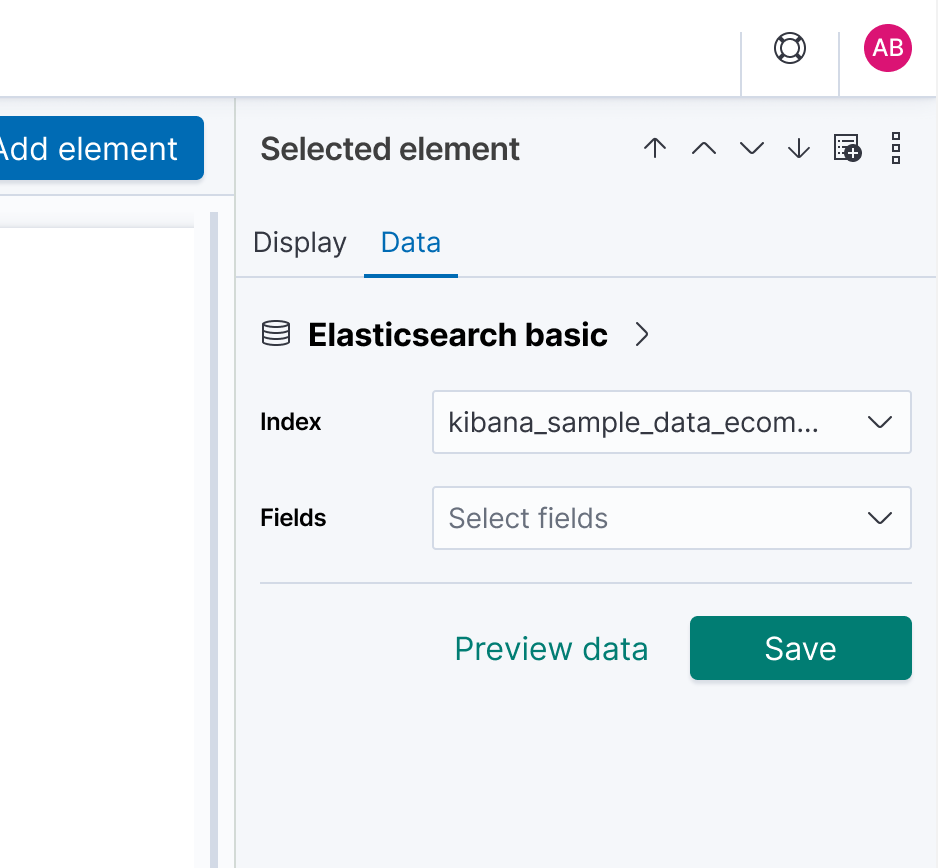
Use can select a basic data source that only requires them to select an index and a field(s).
Describe a specific use case for the feature:
Asking users to write a query in the early stages of learning and checking out Canvas is a significant obstacle (i.e. they often don't know SQL, Timelion, Lucene syntax, etc.). By offering a basic (no query needed) data source, a user can simply select an index, then select one or more fields from that index and use that data to populate their element.
This provides them a straightforward way to see how 'live' data works in Canvas which is a key differentiator for this product.
Mockup
The UI could look like the following mockup, using existing EUI components. Simply selecting one or two fields is enough to populate a metric or bar chart, for example.
 ryankeairns
All 9 comments
Pinging @elastic/kibana-canvas (Team:Canvas)
 elasticmachine
on 16 Dec 2019
elasticmachine
on 16 Dec 2019
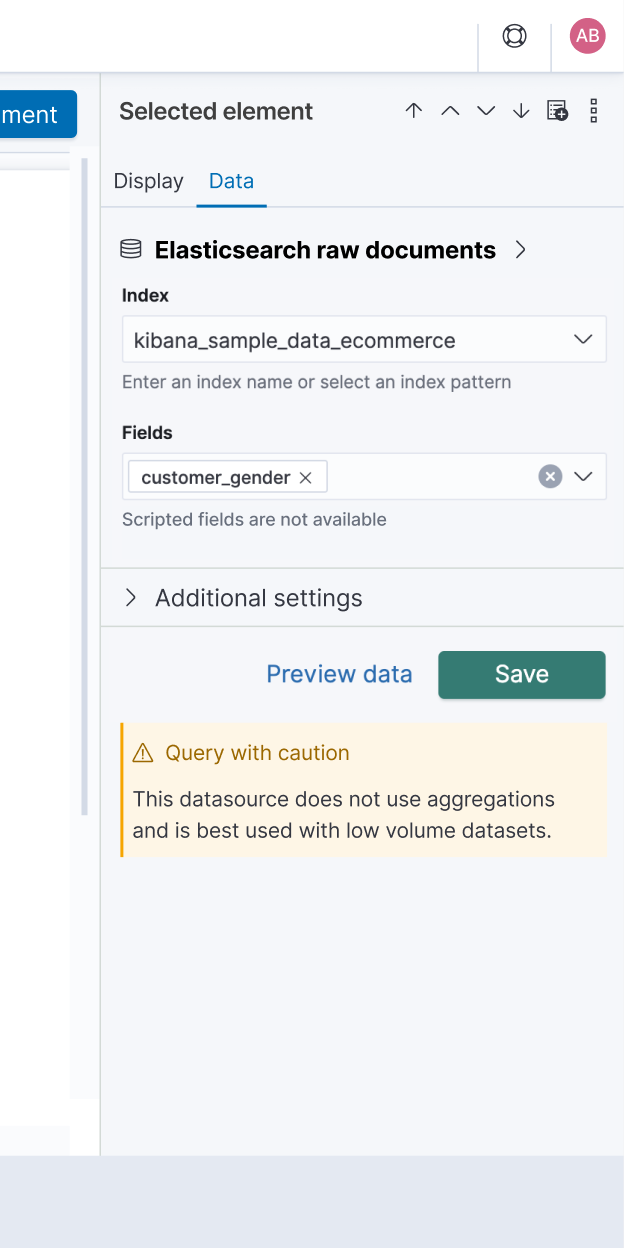
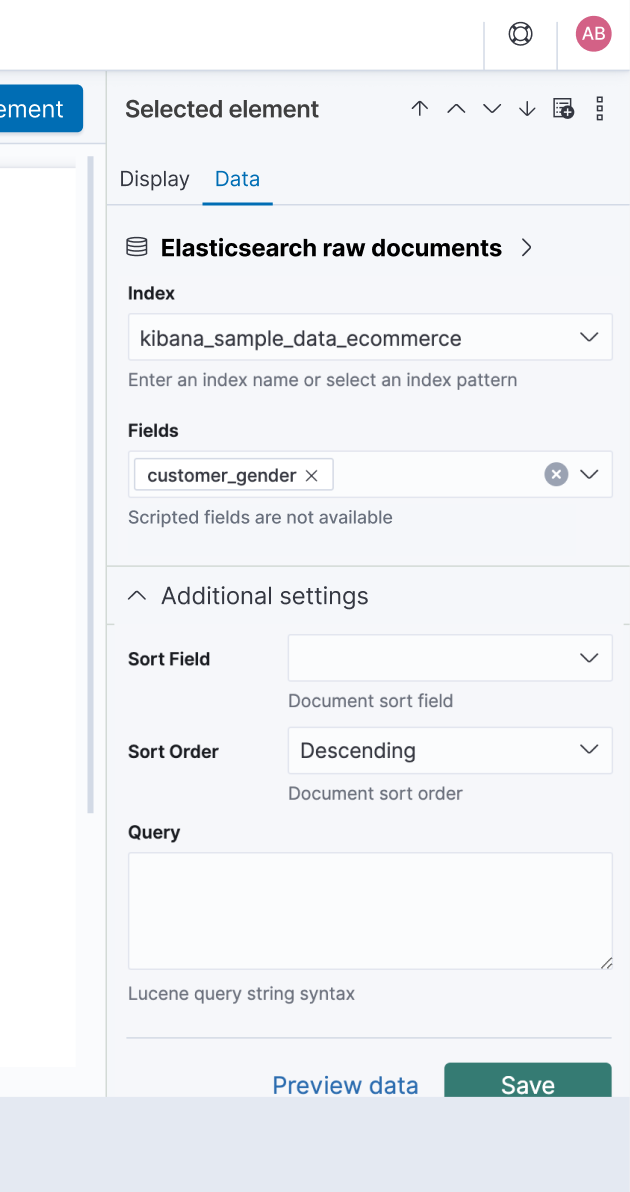
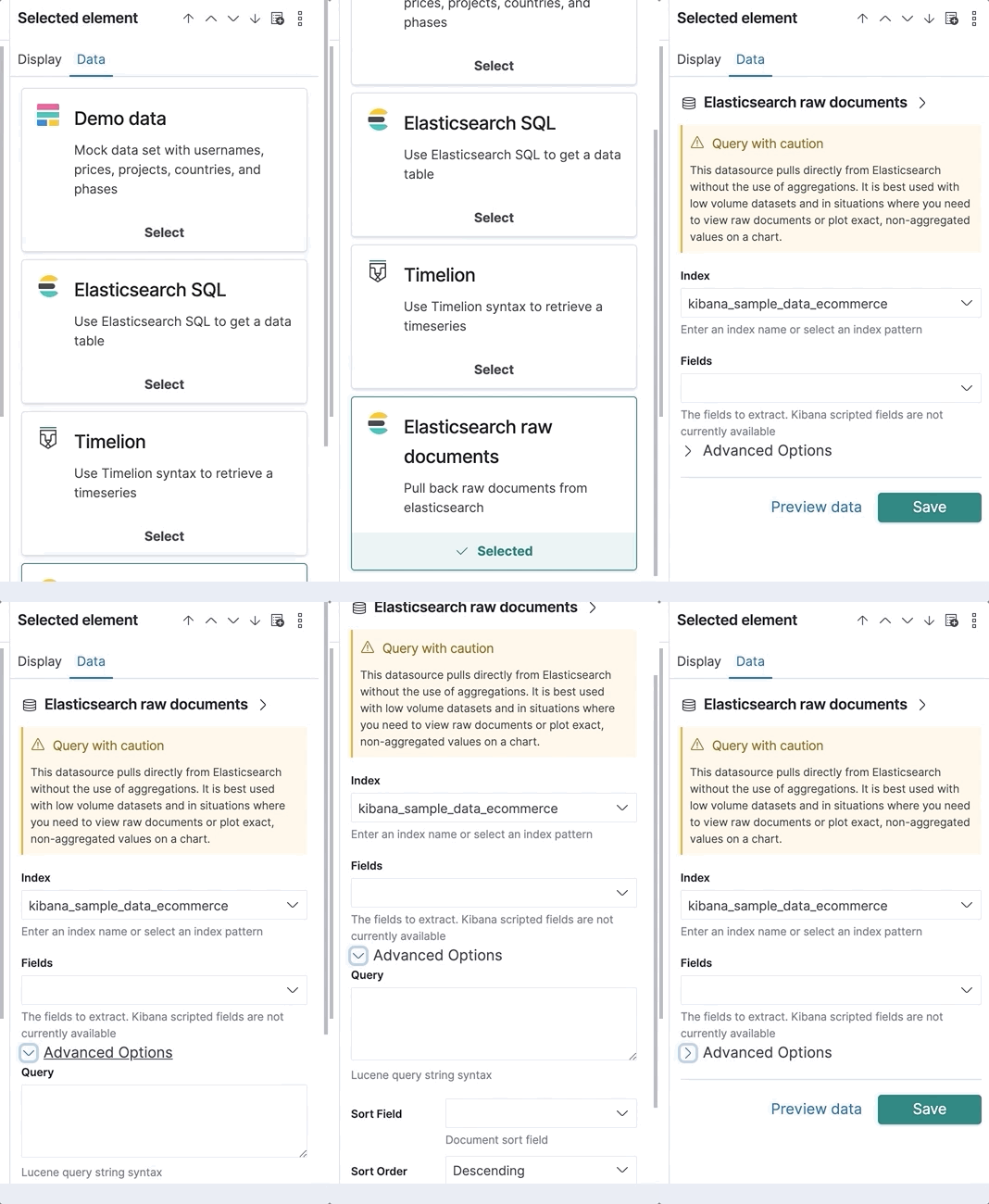
There is a somewhat lengthy explanation (I'll post a follow-up comment) of how we got to this checklist, but the TL;DR is that we're going to improve the "Elasticsearch raw documents" data source as opposed to creating a new, distinct, data source. Without further ado, here is the checklist of proposed changes:
Elasticsearch raw documents side panel
- [x] Make the Index selector and Fields selector the first two items
- [x] Move the callout warning to the bottom, below the Preview | Save buttons
- [x] Shorten the text in the callout warning (see below)
- [x] Move the remaining items into an 'Advanced options' accordion that is closed by default; appearing after the Fields selector. The included items would be (in this order): Sort field, Sort order, and Query
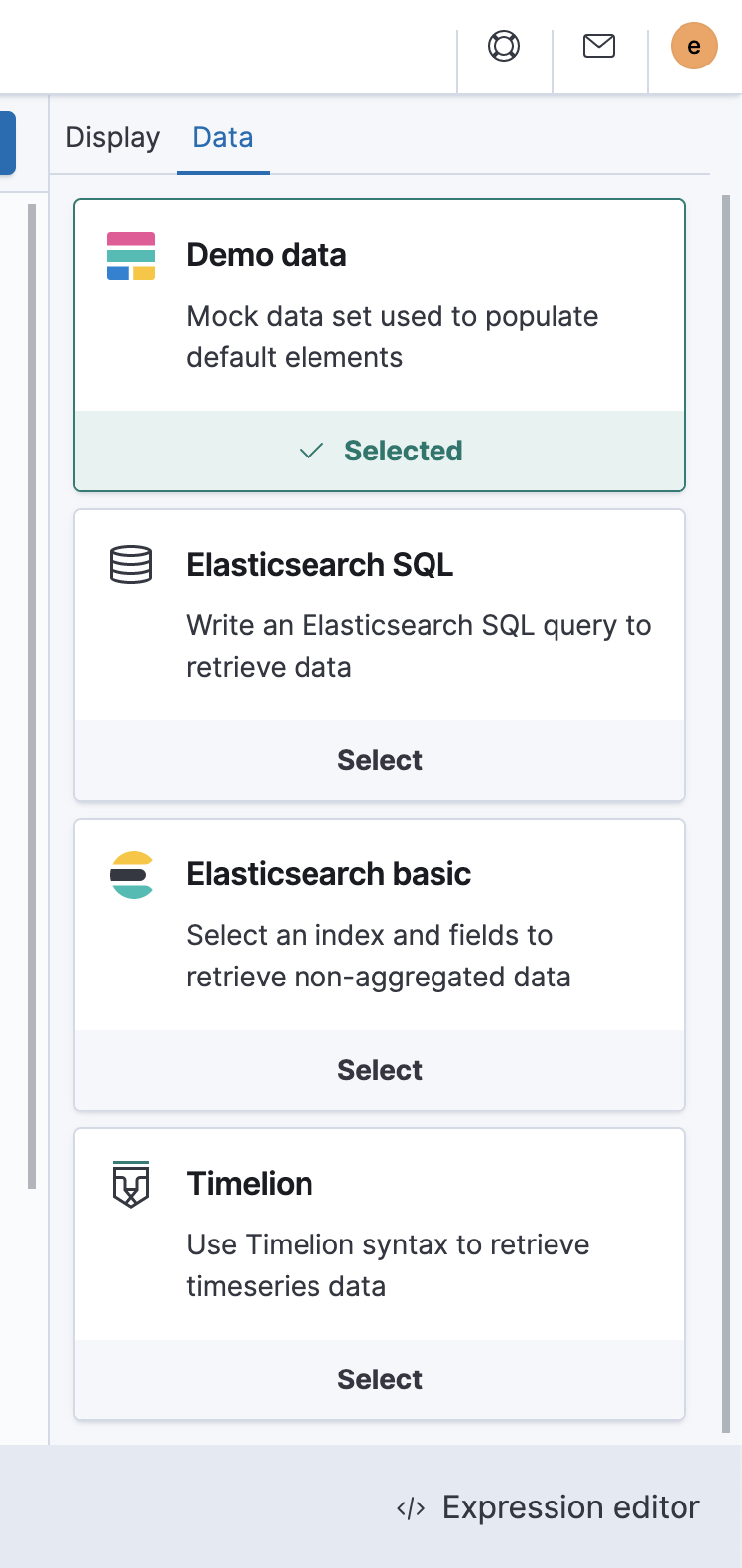
Data source selection side panel
- [x] Reduce the size of the
EuiCardtitles using thetitleSize="xs"prop - EuiCard docs - [x] Change the 'Elasticsearch SQL'
icontodatabase- EuiIcon list - [x] Shorten the copy in each card to be two or less lines (see below)
- [x] Move Timelion to the bottom of the list so the order becomes: Demo, SQL, Raw, Timelion
- [x] Re-name 'Elasticsearch raw documents' to 'Elasticsearch ...' (I don't know, but 'raw' is weird)
Mockups
Elasticsearch raw documents side panel
Collapsed (default)
Expanded
Data source selection side panel
ryankeairns
on 5 Mar 2020
I'm also adding the feedback from @crob611 here just to document the iterative process and impromptu mockup:
- Move advanced options into an Advanced Options accordion (https://elastic.github.io/eui/#/layout/accordion)
- Add a new max doc count field under the advanced settings. It should default to 1000.
- Make sure that advanced settings is closed by default if none of the advance settings are being used, and make sure it's open if something is being used
 maggieghamry
on 5 Mar 2020
maggieghamry
on 5 Mar 2020
@KOTungseth We would like your input on the following (see screenshots in this comment):
- We'd like to rename the 'Elasticsearch raw documents' data source to something less odd, e.g 'Elasticsearch basic'
- We shortened the text in the yellow callout box, does that look ok/make sense?
- In the data source list, we've shortened all the descriptions. They also (in the current version) just repeat what the title says, which is not great
- We shortened the help text below the Index and Fields inputs, does it make sense?
The last topic is more ambiguous... are there any points where we should link out to the docs site, for example:
- Maybe a help link for the Lucene query syntax
- Also, Canvas shows an error if you pick a field that is an array - is that a common thing that might already be covered in the docs?
- Lastly, we have a limit on how many docs will be returned from this data source (since it can blow things up)... any thoughts on how to clarify that? We're thinking of adding a count/max records nots (e.g. Max records 1000), but that in itself may need some explanation as to why it is the case.
ryankeairns
on 6 Mar 2020
Do we need to specify
raw documentsorbasic? Or could we use something simple likeElasticsearch dataorElasticsearch documents? If we do, I agree withElasticsearch basic.I like the shortened text in the yellow text box, but could we be more specific and put a positive spin on it? For example,
The Elasticsearch basic data source only retrieves non-aggregated data. Use with low volume data sets.The shortened data source descriptions are great! For
Demo data, could we usesampleinstead ofmock?For the
Fieldsfield, could we make it a positive? For example,Scripted fields are unavailable.For the
Indexfield, if we changedIndextoIndex pattern, would we need any text below?In the current Elasticsearch raw data docs, I link to Lucene Query Syntax. Adding a link to the docs below the
Queryfield would be an extra bonus for users.We _sort of_ have something in the docs re: an error when you pick a field that is an array. On the Supported aggregations page, we say
Kibana filters string fields with only regular expression patterns, and does not filter numeric fields or match with arrays.If this is Canvas specific, we should add something to the Canvas docs.I've seen other areas in the Kibana UI that uses
Max blah, blah. Instead ofrecords, I would usedocuments. We should add something to the documentation about why there is a maximum.
 KOTungseth
on 6 Mar 2020
KOTungseth
on 6 Mar 2020
@ryankeairns I've updated all on the checklist except for the re-ordering, so far. I've also incorporated the majority of Kaarina's comments, but working to figure out how to hyperlink the EUIFormRow helpText
maggieghamry
on 7 Mar 2020
@KOTungseth @ryankeairns please see my comments below:
- Do we need to specify
raw documentsorbasic? Or could we use something simple likeElasticsearch dataorElasticsearch documents? If we do, I agree withElasticsearch basic.
- I'm unclear what the recommendation is ultimately. I have
Elasticsearch Documents, as that is clearly stating what the datasource is querying, but if you have a preference, please let me know.
- I like the shortened text in the yellow text box, but could we be more specific and put a positive spin on it? For example,
The Elasticsearch basic data source only retrieves non-aggregated data. Use with low volume data sets.
- I have made this change
- The shortened data source descriptions are great! For
Demo data, could we usesampleinstead ofmock?
- I have made this change
- For the
Fieldsfield, could we make it a positive? For example,Scripted fields are unavailable.
- I have made this change
- For the
Indexfield, if we changedIndextoIndex pattern, would we need any text below?
Indexis correct here;Index patternis the mapping of data to an index, and what is shown are the indices. An index pattern tells Kibana which Elasticsearch indices contain the data that you want to work with. Once you create an index pattern, you're ready to explore and query the data
- In the current Elasticsearch raw data docs, I link to [Lucene Query Syntax]
(https://www.elastic.co/guide/en/kibana/current/lucene-query.html). Adding a link to the docs below theQueryfield would be an extra bonus for users.- I just need to understand how to use EUI to add a hyperlink to the
EuiFormRowhelpText- We _sort of_ have something in the docs re: an error when you pick a field that is an array. On the Supported aggregations page, we say
Kibana filters string fields with only regular expression patterns, and does not filter numeric fields or match with arrays.If this is Canvas specific, we should add something to the Canvas docs.- I believe we agreed we need a new issue to explicitly filter out any array fields from the list, but adding documentation to make users aware of this would be helpful.
- I've seen other areas in the Kibana UI that uses
Max blah, blah. Instead ofrecords, I would usedocuments. We should add something to the documentation about why there is a maximum.
- I made the change to
documents. Please let me know if you have specific verbiage for the maximum values.
maggieghamry
on 9 Mar 2020
@maggieghamry I have some suggestions for the text.
How about shortening the warning text as follows:
Query with caution
Using this data source with larger data sets can result in slower performance. Use this source only when you need exact values.
And then put the information about pulling data directly from ES on the previous screen. That way, users get that information before they get to the warning.
Elasticsearch basic
Pull data directly from Elasticsearch without the use of aggregations
(be sure to use an uppercase E for Elasticsearch in the description).
Other edits
We use a period at the end of hint text:
- Enter an index name or select an index pattern.
- The fields to extract. Scripted fields are not currently available. (Also suggest removing the word "Kibana".
 gchaps
on 17 Mar 2020
gchaps
on 17 Mar 2020
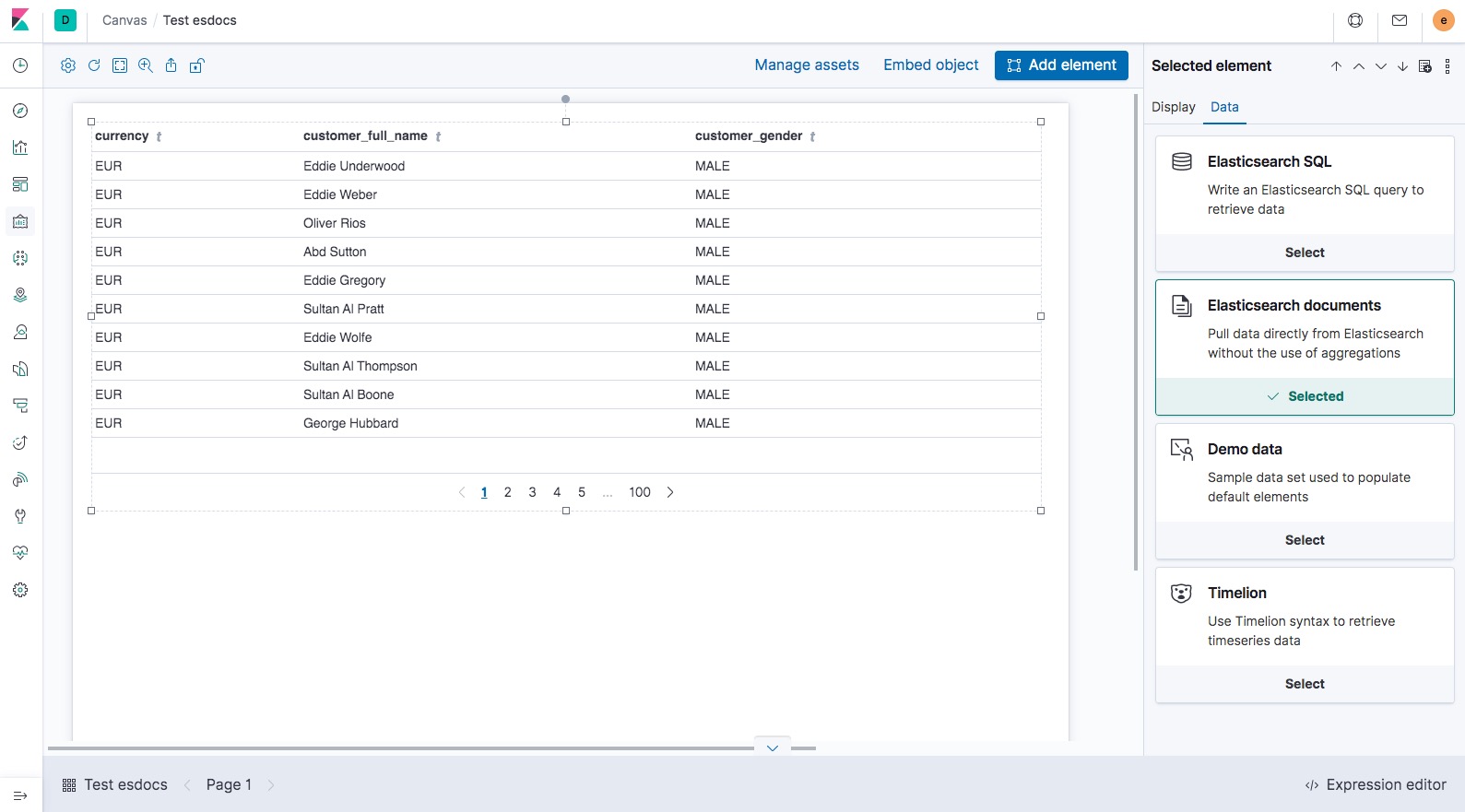
I've updated the datasource list per @timductive 's recommendations:
maggieghamry
on 18 Mar 2020
Related issues
 mark54g
·
3Comments
mark54g
·
3Comments
 bhavyarm
·
3Comments
bhavyarm
·
3Comments
 timroes
·
3Comments
timroes
·
3Comments
timroes
·
3Comments
timroes
·
3Comments
 timmolter
·
3Comments
timmolter
·
3Comments