Kibana: Snapshots not getting deleted through kibana UI (7.4.2)
Kibana version: 7.4.2
Elasticsearch version: 7.4.2
Server OS version: CentOS Linux release 7.6.1810 (Core)
Browser version: Versioon 77.0.3865.120 64-bit
Browser OS version: Versioon 77.0.3865.120 64-bit
Original install method (e.g. download page, yum, from source, etc.): yum
Describe the bug: Cannot delete snapshots through kibana UI. I get an error:
Error deleting snapshot 'ss_20191120_1519'
And I get this error with all the snapshots.
Steps to reproduce:
- Navigate to "Snapshot and Restore"
- You must have some snapshots present
- Click "Delete snapshot"
- And I get an error
Expected behavior: Snapshot should get deleted.
Screenshots (if relevant):
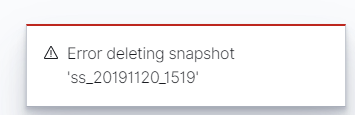
Errors in browser console (if relevant):
vendors.bundle.dll.js:417 DELETE https://hostname.domain/api/snapshot_restore/snapshots/dev-watsonelastic_idx_data%2Fss_20191120_1519 404 (Not Found)
Provide logs and/or server output (if relevant):
There are no log messages in elasticsearch or kibana logs.
Any additional context:
If I execute this delete command from linux server, eveyrthing works:
[root@dev-dc1-watsonelastic ~]# curl -XDELETE 'http://'
hostname':9200/_snapshot/dev-watsonelastic_idx_data/ss_20191120_1519?pretty'; echo
{
"acknowledged" : true
}
 raulk89
All 19 comments
Pinging @elastic/es-ui (Team:Elasticsearch UI)
 elasticmachine
on 20 Nov 2019
elasticmachine
on 20 Nov 2019
Hi @raulk89! Thanks for reporting this. How was the snapshot originally created? I believe the issue is caused by the / in the snapshot name, which should be prevented.
 alisonelizabeth
on 20 Nov 2019
alisonelizabeth
on 20 Nov 2019
Hi
I do not have / in snapshot name.
There is:
There is slash between.
This is the problem.
This specific snapshot was created in linux commandline.
But I also tested with kibana snapshot policy, same problem.
Raul
Sent from my iPhone
On 20. Nov 2019, at 16:55, Alison Goryachev notifications@github.com wrote:
Hi @raulk89! Thanks for reporting this. How was the snapshot originally created? I believe the issue is caused by the / in the snapshot name, which should be prevented.—
You are receiving this because you were mentioned.
Reply to this email directly, view it on GitHub, or unsubscribe.
raulk89
on 20 Nov 2019
So you can see from error message also, snapshot name is like this, there is no slash.
Error deleting snapshot 'ss_20191120_1519'
My repository name is "dev-watsonelastic_idx_data".
The required syntax is to use slash in between (repo_name and snapshot_name).
Raul
raulk89
on 21 Nov 2019
Having the same issue, it appears the final "/" in the path of the snapshot repository is getting URL encoded incorrectly.
 pemontto
on 22 Nov 2019
pemontto
on 22 Nov 2019
A concrete example. All tested through the "Snapshot and Restore" interface in Kibana Management app. These are the requests my Chrome browsers makes on Kibana 7.4.2. This also occurs on 7.4.0 too.
Create a "test" repo - returns 200 OK {"acknowledged":true}
PUT https://test.com:5601/api/snapshot_restore/repositories
{"name":"test","type":"fs","settings":{"location":"/tmp/test","compress":true}}
Create a policy for that repo 200 OK {"acknowledged":true}
PUT https://test.com:5601/api/snapshot_restore/policies
{"name":"test","snapshotName":"test","schedule":"0 30 1 * * ?","repository":"test","config":{}}
Take a new snapshot - returns 200 OK {"snapshotName":"test-tt8jgs3lqogsa-kj0jke6g"}
POST https://test.com:5601/api/snapshot_restore/policy/test/run
Try to delete the new snapshot - returns a 404
DELETE https://test.com:5601/api/snapshot_restore/snapshots/test%2Ftest-tt8jgs3lqogsa-kj0jke6g
You can clearly see here the final / after the repo name test and before the snapshot name test-tt8jgs3lqogsa-kj0jke6g has been URL encoded as %2F - test%2Ftest-tt8jgs3lqogsa-kj0jke6g.
pemontto
on 22 Nov 2019
Thanks @raulk89 and @pemontto for providing additional information. I misread the snapshot name in your initial comment. We will look into this and report back. In the meantime, if you can use Console to delete the snapshot as a workaround.
alisonelizabeth
on 26 Nov 2019
+1
 saragri31
on 30 Jan 2020
saragri31
on 30 Jan 2020
Hi @pemontto! I've started looking into this issue again, but I am having a hard time reproducing. Do you think you could provide additional information to help troubleshoot?
- Can you provide the full request error using the network tab in your browser's dev tools?
- Can you confirm the same delete request is successful through Console in Dev Tools or calling the ES API directly (docs)?
If you need help with any of this, just let us know.
alisonelizabeth
on 5 Feb 2020
Can you provide the full request error using the network tab in your browser's dev tools?
Here's a screenshot of the kind of information we're looking for. Hopefully the error response object will tell us that either the snapshot is missing or the repository is missing.

 cjcenizal
on 5 Feb 2020
cjcenizal
on 5 Feb 2020
Tested this locally and it worked OK on 7.4 and 7.5. Testing through a reverse proxy, this is the only functionality that doesn't work. There's no error response, I just get a 404 back with the very same URL path as when testing locally 😕
pemontto
on 6 Feb 2020
@pemontto thanks for the additional details! That is helpful.
@saragri31 and @raulk89 can you confirm if you are also running kibana behind a reverse proxy?
alisonelizabeth
on 7 Feb 2020
Hi @alisonelizabeth
We're also running Kibana behind an Apache Reverse Proxy.
saragri31
on 7 Feb 2020
@saragri31 or @pemontto - would either of you be available sometime to walk me through your setup to help track down this issue?
alisonelizabeth
on 11 Feb 2020
@alisonelizabeth Zoom is not working from my company and I won't be able to share my screen. We can still have a call if needed so I can show you our reverse proxy settings.
saragri31
on 24 Feb 2020
@alisonelizabeth, we use nginx as reverse proxy and I can see the same issue. Raised support ticket and waiting to hear from Elastic. From Kibana, snapshot not getting deleted on demand (404 error). Scheduled retention is also not working. Though I have defined policy to retain the snapshot for 1 day, nothing gets purged after 2 days. Deleting snapshot using API works fine. I can join a zoom meeting to show you the problem. Tested with ELK 7.6.2 running in docker.
 uvenukadasula
on 11 May 2020
uvenukadasula
on 11 May 2020
Hi @uvenukadasula! Thanks for the information. I am able to reproduce now, and
I am currently looking into a fix. I will update the issue once I have more details.
Regarding the scheduled retention, that sounds like a separate issue. Would you mind opening a new issue with more details, or continue to work with support on this? Thanks!
alisonelizabeth
on 12 May 2020
Sure thanks @alisonelizabeth I am working with Jonathan Wilson in Elastic @JWilsonElastic via support ticket. Can you please update him on this issue so that he can save time replicating.
If I cannot find scheduled retention related issue, I will submit a new one. Thanks.
uvenukadasula
on 12 May 2020
Thanks @alisonelizabeth
uvenukadasula
on 15 May 2020
Related issues
 bhavyarm
·
3Comments
bhavyarm
·
3Comments
 stacey-gammon
·
3Comments
stacey-gammon
·
3Comments
 ctindel
·
3Comments
ctindel
·
3Comments
 ynux
·
3Comments
ynux
·
3Comments
 timroes
·
3Comments
timroes
·
3Comments