Kibana: Small time ranges can cause a 404
This error can be caused by either setting a very small time-range (~30 seconds) in the date/time picker (at the top right), or zooming all the way in on a specific monitoring chart (by click scrubbing left/right).
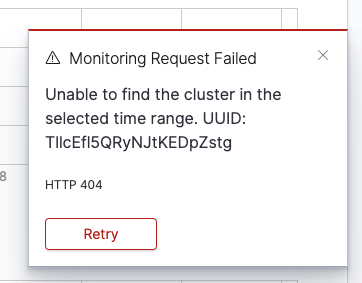
Once triggered the error keeps appearing on every tick, and refreshing the page does not help (since the invalid time-range is now part of the URL). The only way to get out of it is to click on Stack Monitoring side menu link again.
I don't think my first approach (https://github.com/elastic/kibana/pull/39497) is the right one, since it only safe guards the problem, but does not fix it. The root of the bug might either be in our routes/response or even ES itself (and might not be monitoring specific)
cc: @ycombinator @chrisronline
 igoristic
All 10 comments
Pinging @elastic/stack-monitoring
 elasticmachine
on 1 Aug 2019
elasticmachine
on 1 Aug 2019
After some investigations I can conclude that this is actually an ES issue, but this might not be a bug. I think a query with a low time range just happens to fall under a gap where data does not exist. For example, if collection interval is set to 10s and we query a range with 5 second it is more likely that we will fall into a range where there are no collected data points. In some rare cases a collection could have also been skipped/failed to store data points at that particular time so that increases the chances of 0 hit results even more. This explains why in some cases I've seen the same error at 30 second ranges.
I think a good solution here would be to still return a valid object with empty arrays/values etc, since ES only returns the bare minimum if there are no hits. Maybe also skipping warnings, since any kind of messages/toasts will be popping up every 10 seconds (unless we make it smart etc).
Another solution is to try to always return at least something (maybe nearest neighbors). By sending a min range to ES eg persistent.xpack.monitoring.collection.interval * 2. This might be a bit flakey though since that setting could be fairly large 10m or even more
@ycombinator @chrisronline Would love any additional suggestions/feedback
igoristic
on 2 Aug 2019
I think the most straight-forward solution here to simply let the user know that the time range is too small and give them a way to fix it.
If I understand the issue correctly, this particular edge case is detectable, and therefore we can do something custom when/if it occurs?
The following suggestion is assuming the answer about is "yes".
WDYT about replacing the toast we see in the screenshot with a toast that tells the user the time window is too small, and offers a button to "widen" the time window by our recommended amount? I'm assuming the most common use case for hitting this is zooming in too far and not realizing you went too far - as a user, it'd be nice to have a quick button click to widen the time range to what Elastic thinks is the smallest time range where things should work.
 chrisronline
on 5 Aug 2019
chrisronline
on 5 Aug 2019
I think a good solution here would be to still return a valid object with empty arrays/values etc, since ES only returns the bare minimum if there are no hits. Maybe also skipping warnings, since any kind of messages/toasts will be popping up every 10 seconds (unless we make it smart etc).
Yes, I think this is the _bare minimum_ we need to do here, essentially to fix the 404 issue. However, this sort of leaves the user blind, in that they'd take an action (reducing the time window too much) and not see any data in the charts the page but not quite know what happened.
So...
WDYT about replacing the toast we see in the screenshot with a toast that tells the user the time window is too small, and offers a button to "widen" the time window by our recommended amount?
I think we might as well go this far, since it ends up in a better UX. I like the idea of providing the user with a possible resolution to their issue via the "widen" button as well. I didn't realize toasts can have extra action buttons like this - very cool!
Just as a reminder, there are two ways to narrow the time window for a chart — so the implementation would ideally be done at a place in the code that would be executed no matter which way was used by the user.
 ycombinator
on 5 Aug 2019
ycombinator
on 5 Aug 2019
I also like the toast with the "widen time range" action, but was wondering what that norm should be? Something like: monitoring.collection.interval * 2 ?
Also, I don't know how we can distinguish whether the zero hits result was from a gap or from something else entirely. I guess we can try to figure it out based on on selected time range vs collection interval, but still seems kind of flaky
igoristic
on 5 Aug 2019
I think it's reasonable to assume the user was seeing some data before they tried to narrow down the time window too much. So perhaps the "widen" button could just revert the time window back to that previous range?
The nice thing with this solution is that it solves this problem:
Also, I don't know how we can distinguish whether the zero hits result was from a gap or from something else entirely.
[EDIT] We can tell the user in the toast message something like, "there is no data for the selected time range [X - Y]. Revert to previous time range."
And it also puts the user back in a familiar state. They can still choose to narrow down the window again, but hopefully not too much this time.
ycombinator
on 5 Aug 2019
@ycombinator That's an awesome idea!
igoristic
on 5 Aug 2019
I think revert makes sense too. Again, I think the most common use case for this is a user explicitly zooming in and we just need to give them the option to go back one "zoom level" up. I'm wondering if offering two options makes sense:
Revert to previous time range or Widen selected time period by [x] seconds. The latter might be more ambiguous in terms of what to actually write, but there might be some scenarios where the user encounters this through some direct link (or other scenario) and a history.back() (I'm assuming we will use the same code as zoom out) will not be helpful (and might even take them outside of Kibana entirely)
chrisronline
on 5 Aug 2019
@chrisronline Yeah, I see your point
This is more of an implementation detail, but we could store last valid time range in a variable and fallback to that. And, if there is no last valid time (caused by direct link most likely) we can do the widen approach. We still need to be "smart" about it, since their link can be older than their data retention xpack.monitoring.history.duration
igoristic
on 5 Aug 2019
I'd not try and get too smart right away. I think an experience where a user needs to click the Widen action button a couple times isn't the worst experience (at least initially) and we can see how that goes. I'd not recommend doing some magic behind the scenes that might confuse the user.
chrisronline
on 6 Aug 2019
Related issues
 celesteking
·
3Comments
celesteking
·
3Comments
 timmolter
·
3Comments
timmolter
·
3Comments
 mark54g
·
3Comments
mark54g
·
3Comments
 stacey-gammon
·
3Comments
stacey-gammon
·
3Comments
 Ginja
·
3Comments
Ginja
·
3Comments
Most helpful comment
I think it's reasonable to assume the user was seeing some data before they tried to narrow down the time window too much. So perhaps the "widen" button could just revert the time window back to that previous range?
The nice thing with this solution is that it solves this problem:
[EDIT] We can tell the user in the toast message something like, "there is no data for the selected time range [X - Y]. Revert to previous time range."
And it also puts the user back in a familiar state. They can still choose to narrow down the window again, but hopefully not too much this time.