Kibana: ML- Filter lists - error message seen on clicking refresh button and also on creating a New filter list
Kibana version: 7.2.0 BC3
Elasticsearch version:7.2.0 BC3
Server OS version: cloud- staging
Browser version: Chrome latest
Browser OS version:
Original install method (e.g. download page, yum, from source, etc.): 7.2.0 BC3
Describe the bug: When you navigate to Machine Learning > Filter Lists - and hit refresh - there is a pop up which occurs with an error message An error occurred loading the filter lists This is the same error message seen while you try to create a new Filter list . Unable to create and save a new Filter list.

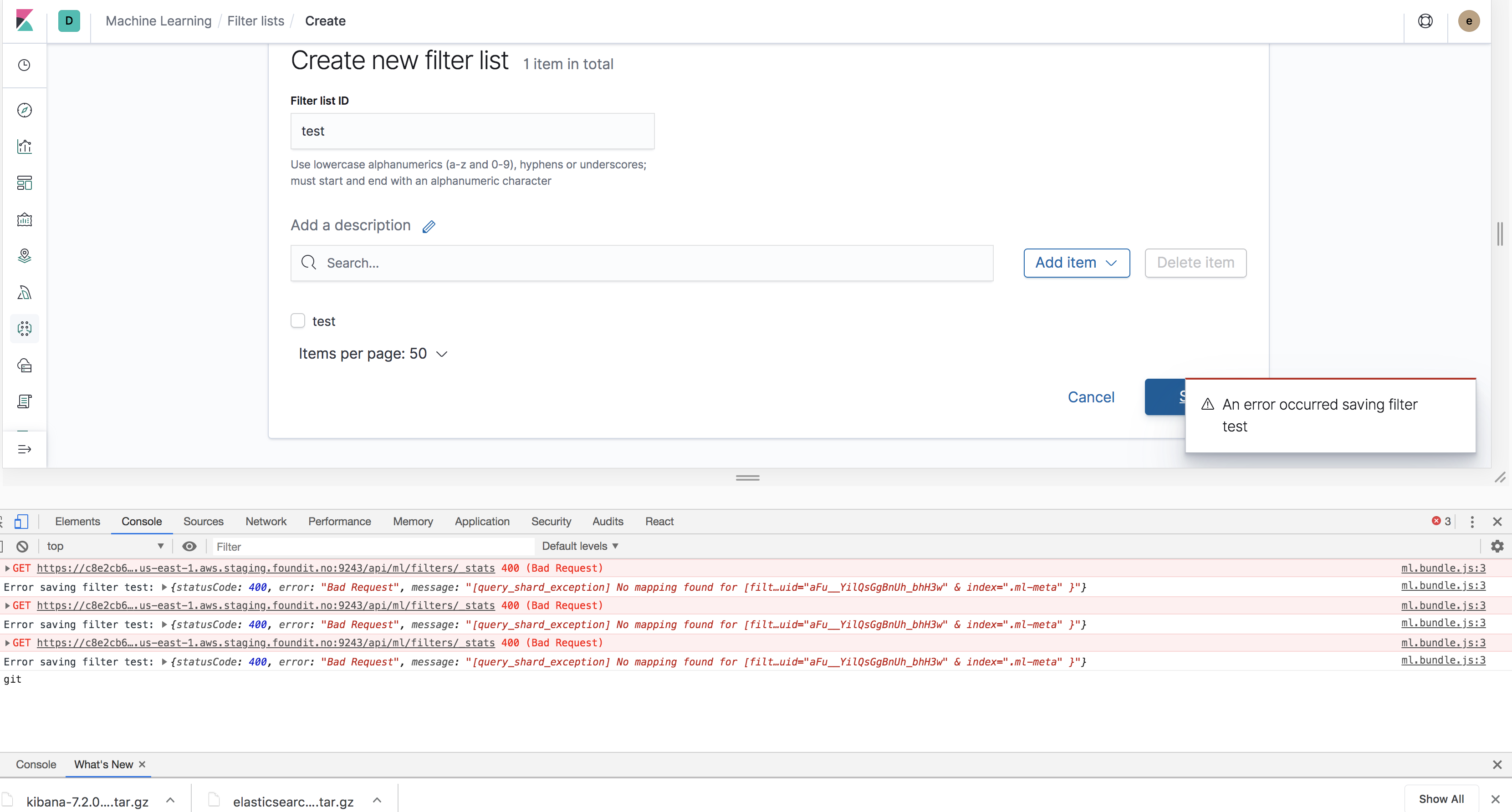
Console logs:
ml.bundle.js:3 GET https://c8e2cb6a16554611b6d7328e625f7d18.us-east-1.aws.staging.foundit.no:9243/api/ml/filters/_stats 400 (Bad Request)
(anonymous) @ ml.bundle.js:3
http @ ml.bundle.js:3
filtersStats @ ml.bundle.js:3
(anonymous) @ ml.bundle.js:3
onClick @ ml.bundle.js:3
ca @ vendors.bundle.dll.js:233
ja @ vendors.bundle.dll.js:233
ka @ vendors.bundle.dll.js:233
wa @ vendors.bundle.dll.js:233
Aa @ vendors.bundle.dll.js:233
ya @ vendors.bundle.dll.js:233
Da @ vendors.bundle.dll.js:233
Ad @ vendors.bundle.dll.js:233
Gi @ vendors.bundle.dll.js:233
Kb @ vendors.bundle.dll.js:233
Dd @ vendors.bundle.dll.js:233
(anonymous) @ vendors.bundle.dll.js:233
exports.unstable_runWithPriority @ vendors.bundle.dll.js:242
Ii @ vendors.bundle.dll.js:233
Cd @ vendors.bundle.dll.js:233
ml.bundle.js:3 Error loading list of filters: {statusCode: 400, error: "Bad Request", message: "[query_shard_exception] No mapping found for [filt…uid="aFu__YilQsGgBnUh_bhH3w" & index=".ml-meta" }"}
 rashmivkulkarni
All 7 comments
Pinging @elastic/ml-ui
 elasticmachine
on 3 Jun 2019
elasticmachine
on 3 Jun 2019
I've noticed that during my 7.2.0-bc1 tests a single time, but when I tried to reproduce everything was fine.
I've now also tried to reproduce on a local 7.2.0 one-node cluster and on a cloud-production 7.2.0-bc2 multi-node cluster, but without success, no error on load and no error on new filter list creation.
I will try again when 7.2.0-bc4 is out.
 pheyos
on 3 Jun 2019
pheyos
on 3 Jun 2019
I came across this issue again during 7.2.0 testing and after some more investigations I found the following steps to reproduce:
- On a fresh deployed instance (i.e. no past ML activity):
- Create a calendar
- Go to the filter lists view => error loading filters lists
Analysis of the issue:
- After these steps the
.ml-metaindex (created via the calendar create) has the following mapping:
{
  "mapping": {
    "_meta": {
      "version": "7.2.0"
    },
    "dynamic_templates": [
      {
        "strings_as_keywords": {
          "match": "*",
          "mapping": {
            "type": "keyword"
          }
        }
      }
    ],
    "properties": {
      "calendar_id": {
        "type": "keyword"
      },
      "description": {
        "type": "keyword"
      },
      "end_time": {
        "type": "date"
      },
      "job_ids": {
        "type": "keyword"
      },
      "start_time": {
        "type": "date"
      },
      "type": {
        "type": "keyword"
      }
    }
  }
}
- Note, that it does not contain the
filter_idfield, which leads to the error - When creating a machine learning job as a first task on a new instance, the
.ml-metaindex is created with the correct mapping:
{
  "mapping": {
    "_meta": {
      "version": "7.2.0"
    },
    "dynamic_templates": [
      {
        "strings_as_keywords": {
          "match": "*",
          "mapping": {
            "type": "keyword"
          }
        }
      }
    ],
    "properties": {
      "calendar_id": {
        "type": "keyword"
      },
      "description": {
        "type": "keyword"
      },
      "end_time": {
        "type": "date"
      },
      "filter_id": {
        "type": "keyword"
      },
      "job_ids": {
        "type": "keyword"
      },
      "start_time": {
        "type": "date"
      },
      "type": {
        "type": "keyword"
      }
    }
  }
}
- In this case the issue does not occur and filter lists can be displayed and created
pheyos
on 7 Jun 2019
The fix for this will be in the Elasticsearch code. @dimitris-athanasiou will investigate what the best fix is.
 droberts195
on 7 Jun 2019
droberts195
on 7 Jun 2019
@droberts195 - Thanks for your inputs. Will this make it into 7.2.0 or the next ?
rashmivkulkarni
on 7 Jun 2019
I think we'll make 7.2.0 but we'll have to confirm it.
 dimitris-athanasiou
on 10 Jun 2019
dimitris-athanasiou
on 10 Jun 2019
I can now confirm this is going in 7.2.0.
dimitris-athanasiou
on 10 Jun 2019
Related issues
 Ginja
·
3Comments
Ginja
·
3Comments
 ynux
·
3Comments
ynux
·
3Comments
 timmolter
·
3Comments
timmolter
·
3Comments
 mark54g
·
3Comments
mark54g
·
3Comments
 ctindel
·
3Comments
ctindel
·
3Comments
Most helpful comment
The fix for this will be in the Elasticsearch code. @dimitris-athanasiou will investigate what the best fix is.