Kibana: Visualization with Histogram x-axis is not scaling to histogram:maxBars configuration
Steps to reproduce
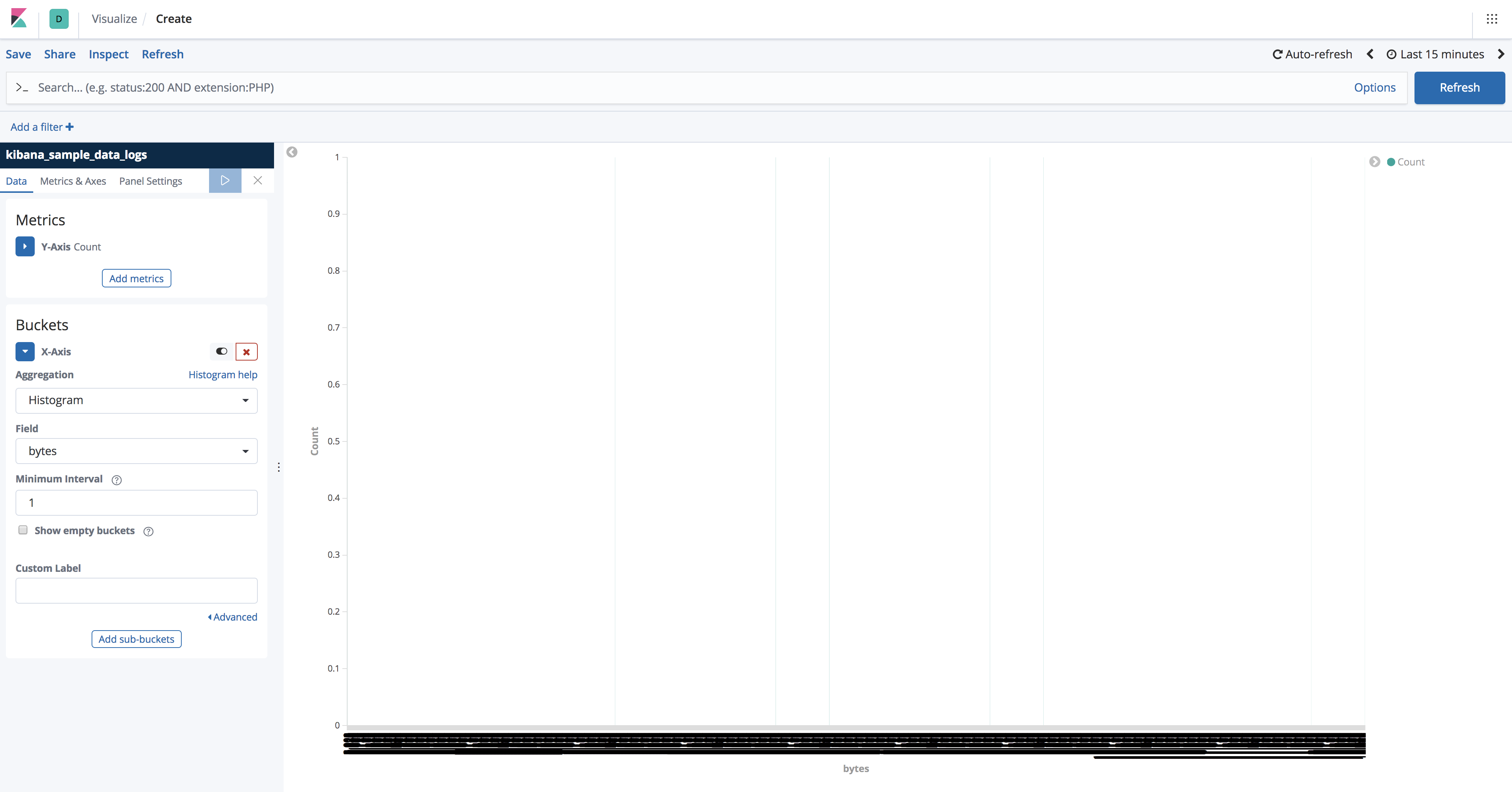
1) Create a new visualization with kibana_sample_data_logs
2) Create x-axis aggregation config with Histogram aggregation on the bytes field. Set miniumn interval to 1.
3) Notice in the network requests that histogram:maxBars is being respected and the histogram aggregation request is correctly made with an interval of 200.
4) The x-axis does not respect histogram:maxBars and renders an axis label for interval of 1. This results in 19000+ labels being generated and makes the UI unresponsive.
What should happen
The interval of 200 should be used to generate the x-axis labels so the UI does not freeze.
This is a big deal because it limits the ability to explore data. Users can not set a low min interval and then brush into areas and explore and have the interval dynamically scale to the filters applied.
 nreese
All 12 comments
Pinging @elastic/kibana-app
 elasticmachine
on 30 Jan 2019
elasticmachine
on 30 Jan 2019
@nreese this is not a "real" issue on master, but instead a regression on this un merged PR: https://github.com/elastic/kibana/pull/29521
Does it make sense to have an issue for that or it's better to close and move that on a comment on the PR?
 markov00
on 30 Jan 2019
markov00
on 30 Jan 2019
@nreese this is not a "real" issue on master, but instead a regression on this un merged PR
@markov00 you are correct. I will close and move comments to PR
nreese
on 30 Jan 2019
I face this issue, is it fixed? Both this and the aforementined PR is closed...
I'm using a (non-date) histogram with {"histogram:maxBars":5} in the -Y-axis metric settings, but this property has no effect.
If I lower Minimum interval, too many bucketes are created and the app freezes.
It is not possible to select a "good" "Minimum interval" in my situation, since the x-axis scale varies by many orders of magnitude, depending on the filters.
 th0ger
on 11 Aug 2020
th0ger
on 11 Aug 2020
@th0ger which version of Kibana are you running? I'd like to check if this still an issue on the latest version or not
markov00
on 11 Aug 2020
I've quickly checked on 7.8 and the problem seems to be solved
markov00
on 11 Aug 2020
Thanks @markov00, we're on 7.8.0 as well.
I learned that our issue was caused related to admin who've set {"histogram:maxBars":1000} globally in kibana.yml. They did it for other good reasons, not related to my visualization.
I therefore also learned that the histogram:maxBars is a space setting under Stack Management/Advanced Settings.
This really confused me. Because the tooltip for "Minimum interval" in the histogram reads "Interval will be automatically scaled in the event that the provided value creates more buckets than specified by Advances Settings's histogram:maxBars".
What is tried first was the "Advanced" JSON input for the X-axis ({"histogram:maxBars":10}) - that failed.
Then i tried the "Advanced" JSON on the metric level - that was ignored.
My question is now - is the Advanced JSON settings meant to override the space setting?
As a side note: It is also pretty inconsistent that the (non-date) histogram's tooptip refers to this "Advanced Setting". But the Advanced Setting's description says: "Never show more than this many bars in date histograms, scale values if needed".
th0ger
on 12 Aug 2020
@th0ger the Advanced JSON on the visualize editor is used to add extra parameters to the selected aggregation (Elasticsearch aggregation params). For example in when using a date histogram aggregation with a daily interval you can specify {"offset": "+6h"} to shift the start/end hour of the bucket by 6 hours https://www.elastic.co/guide/en/elasticsearch/reference/current/search-aggregations-bucket-datehistogram-aggregation.html#search-aggregations-bucket-datehistogram-offset
So the histogram:maxBars is basically an Advanced Settings of Kibana, not a specific setting of a particular aggregation
As a side note: It is also pretty inconsistent that the (non-date) histogram's tooptip refers to this "Advanced Setting". But the Advanced Setting's description says: "Never show more than this many bars in date histograms, scale values if needed".
Thanks for this note, @elastic/kibana-app we should update the text used here to reflect both histograms and date histograms
markov00
on 17 Aug 2020
@markov00 thanks for the explanation.
I wonder what's the rationale behind having histograms:maxBars as a global setting only (space or instance level)?
To me, adjusting the number of histogram bars, is something I've always done on ad-hoc basis for individual histograms.
Currently I can't build my histograms without breaking other visuals.
th0ger
on 17 Aug 2020
@th0ger you can manually specify interval values, as described in this issue PR. You can use the auto interval for dates, or specify your time interval, for numerical fields you have to specify the interval for your range.
The histograms:maxBars is a global setting because it can prevent overloading your cluster and your browser with a histogram aggregation query that returns a huge list of buckets to compute and/or to visualize.
It just describes the upper limit of the number of bins that can be created, not the actual number of bars in the visualization that, instead, depends on the interval you have chosen.
markov00
on 21 Aug 2020
Hi again @markov00. It all boils down to histograms not supporting autoscaling the same way date histogram does.
We are not able to pick a "good" minimum interval size for our histogram, because the optimal value depends on user filters.
Our workaround is to force the minimum interval down to 1, so the histogram:maxBins limit always kicks in, hence offering a way of autoscaling.
The downside of the workaround is, we can't set histogram:maxBins per visual.
th0ger
on 24 Aug 2020
You are prefectly right, unfortunately we don't have an auto-interval histogram aggregation in ES but it's definitely useful. Let's follow this ticket for now that specify exactly what you are looking for: https://github.com/elastic/kibana/issues/75438
markov00
on 25 Aug 2020
Related issues
 timroes
·
3Comments
timroes
·
3Comments
 bhavyarm
·
3Comments
bhavyarm
·
3Comments
 ctindel
·
3Comments
ctindel
·
3Comments
 cafuego
·
3Comments
cafuego
·
3Comments
 treussart
·
3Comments
treussart
·
3Comments