Kibana: Kibana Data Table: Provide an option to align data (horizontal : left, center or right, vertical : up, center, down) on each data column
Description of the problem including expected versus actual behavior:
When using data table in Kibana, the view of data (string, number, or etc) is left-aligned by default.
My customer thinks it looks loose and scattered, and he wants an option or method to align data (horizontal: left, center or right, vertical: up, center, down) on each data column by himself manually.
Steps to reproduce:
- Run elasticsearch and kibana.
- Add a visualization of "Data Table" type.
- Add metrics to show data
Screenshot
You can see "hotel_name.keyword" and "Average daily_rate" data here is left-aligned.

Describe the feature:
Provide an option or method to align data (horizontal: left, center or right, vertical: up, center, down) on each data column.
(e.g. provide an align adjustment button in the title row)
 kunisen
All 7 comments
any updates here?
kunisen
on 12 Dec 2017
any updates here?
kunisen
on 25 Dec 2017
Hi,
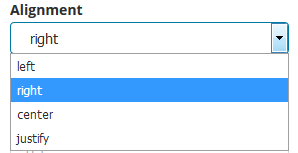
You can get this feature using enhanced-table plugin :
https://github.com/fbaligand/kibana-enhanced-table
 fbaligand
on 22 May 2018
fbaligand
on 22 May 2018
thanks!! @fbaligand
kunisen
on 22 May 2018
Happy to see you appreciate the feature ! :)
fbaligand
on 22 May 2018
Happy to see you appreciate the feature ! :)
Much appreciated. Very useful plugin. Thank you
 tony-dtn
on 17 Sep 2019
tony-dtn
on 17 Sep 2019
Nice!
In case you missed it, I just published 1.5.0 release, with some new features:
https://github.com/fbaligand/kibana-enhanced-table/releases/tag/v1.5.0
fbaligand
on 17 Sep 2019
Related issues
 rashidkpc
·
116Comments
rashidkpc
·
116Comments
 Alex-Ikanow
·
364Comments
Alex-Ikanow
·
364Comments
 AlexIoannides
·
138Comments
AlexIoannides
·
138Comments
 stormpython
·
74Comments
stormpython
·
74Comments
 JulienPalard
·
95Comments
JulienPalard
·
95Comments