Kibana: Time and level fields are cut off in dashboard vizualization
Kibana version: 5.6.1
Elasticsearch version: 5.6.1
Server OS version: CentOS 7.1611
Browser version: Chrome (61.0.3163.91)
Browser OS version:
Original install method (e.g. download page, yum, from source, etc.): Yum Repos
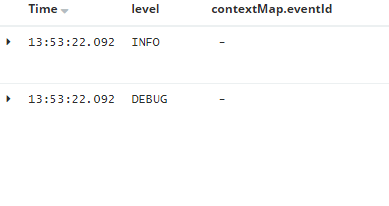
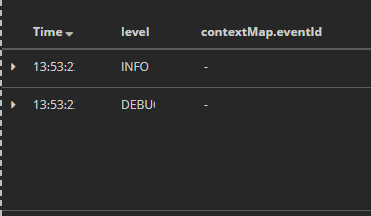
Description of the problem including expected versus actual behavior: On the search, neither the time nor the info fields are cut off, however when that search is added to a dashboard those fields are then cut off.
This is what the fields look like in the discover tab as a search:
This is what they look like when the search is added to a dashboard:
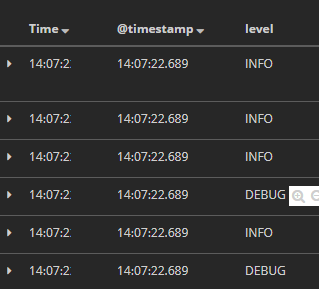
If the timestamp field is added directly, instead of time, that field is not cutoff. It also resolves the Level not being cutoff. However then we have duplicate data being shown with no way of removing the Time field, in favor of the timestamp field. Demonstrated below:
 KnechtionsCoding
All 7 comments
Any ideas on this?
KnechtionsCoding
on 28 Sep 2017
hi @KnechtionsCoding, not sure...
cc @elastic/kibana-discovery, any thoughts?
 thomasneirynck
on 6 Oct 2017
thomasneirynck
on 6 Oct 2017
Is the panel wide enough? We're not doing anything fancy, the browser will try to lay out the table the best it can with the width available.
 Bargs
on 6 Oct 2017
Bargs
on 6 Oct 2017
@Bargs Yes the panel is across the whole page, as a way to have the logs underneath some visualizations.
KnechtionsCoding
on 6 Oct 2017
@KnechtionsCoding I just remembered, values shouldn't be getting cut off at all. If there isn't enough space available you should get a horizontal scroll bar. Are you not getting a scroll bar? I just tested in master and 5.5.3 and I can't reproduce your issue. I'll have to get a 5.6.1 instance set up so I can test there.
Bargs
on 9 Oct 2017
Hi, we have same issue in kibana 5.6.2. We found this bug only in dark theme.
It should be fixed with:
.tab-dashboard.theme-dark .discover-table-row td .table-cell-filter {
    background: none;
}
Not sure if thats in new 6.0.0 version.
 petak-it
on 27 Nov 2017
petak-it
on 27 Nov 2017
closing duplicate of https://github.com/elastic/kibana/issues/13421.
 nreese
on 25 Jan 2018
nreese
on 25 Jan 2018
Related issues
 spalger
·
3Comments
spalger
·
3Comments
 socialmineruser1
·
3Comments
socialmineruser1
·
3Comments
 stacey-gammon
·
3Comments
stacey-gammon
·
3Comments
 celesteking
·
3Comments
celesteking
·
3Comments
 LukeMathWalker
·
3Comments
LukeMathWalker
·
3Comments
Most helpful comment
Hi, we have same issue in kibana 5.6.2. We found this bug only in dark theme.
It should be fixed with:
.tab-dashboard.theme-dark .discover-table-row td .table-cell-filter {
    background: none;
}
Not sure if thats in new 6.0.0 version.