Kibana version:
38cbd44658229d54fc40cd2745ac69ea7973b212
Browser version:
Chrome 60.0.3112.113
Browser OS version:
MacOS 10.12.6
Original install method (e.g. download page, yum, from source, etc.):
npm start
Description of the problem including expected versus actual behavior:
Embedding visualizations no longer functions. You should just get a visualization, but instead you get this:
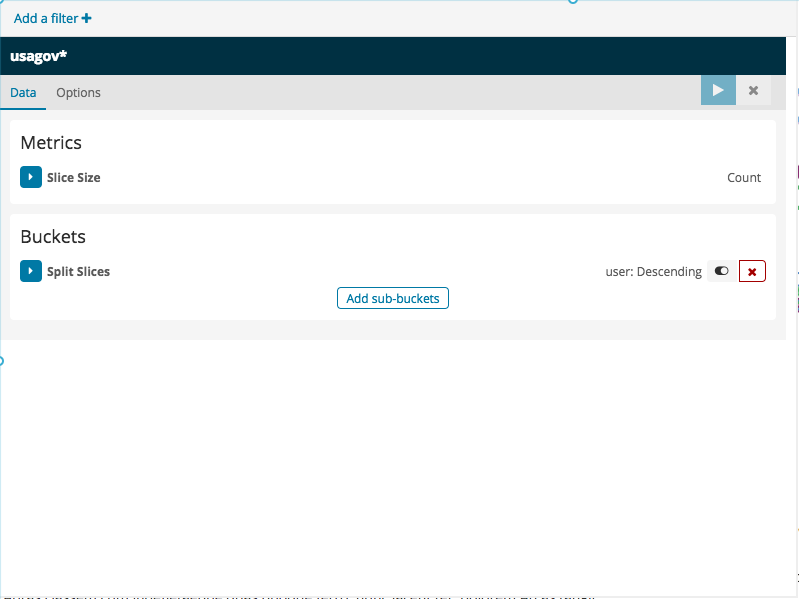
Seems like a combination of bad media queries and the visualization editor not respecting the embed URL parameter
Steps to reproduce:
- Create a visualization
- Copy the URL out of the iframe
- Use in a window < 992px wide
 rashidkpc
All 8 comments
Seeing this in 6.0.0
 jgough
on 22 Nov 2017
jgough
on 22 Nov 2017
This seems to only happen when the screen is minimized and Kibana switches into "mobile" mode.
@elastic/kibana-design is this something you have seen before? thx
 thomasneirynck
on 13 Dec 2017
thomasneirynck
on 13 Dec 2017
Regardless of window size, the sidebar always shows - which before Kibana 6 was always hidden in embedded mode.
jgough
on 13 Dec 2017
have you an update on this issue or a planned fix version ?
thanks and regards
 GregBoero
on 11 Jan 2018
GregBoero
on 11 Jan 2018
This absolutely breaks functionality for our 900px wide site (It's legacy). I upgraded to 6.1 in hopes of alleviating very, very niche/strange bugs with 5.5.1. Any update on this issue would be greatly appreciated
 poor-bob
on 25 Jan 2018
poor-bob
on 25 Jan 2018
To anyone looking for a workaround on the client-side, try this
.vis-editor-canvas {
    height: 100%!important;
}
so i am guessing that when embed=true is set in the url editor should not be shown at all ?
any idea since when this is broken ? (as i was not aware of this functionality at all)
 ppisljar
on 26 Jan 2018
ppisljar
on 26 Jan 2018
ok found it ... this was broken with visualize refactor (6.0)
ppisljar
on 26 Jan 2018
Related issues
 ctindel
·
3Comments
ctindel
·
3Comments
 tbragin
·
3Comments
tbragin
·
3Comments
 timmolter
·
3Comments
timmolter
·
3Comments
 celesteking
·
3Comments
celesteking
·
3Comments
 ynux
·
3Comments
ynux
·
3Comments
Most helpful comment
Regardless of window size, the sidebar always shows - which before Kibana 6 was always hidden in embedded mode.