Kibana: Font size does not get honored for imported visualizations
Kibana version:
5.5 RC4
Elasticsearch version:
5.5 RC4
Server / Browser OS version:
MacOS Sierra 10.12.4 (16E195)
Browser version:
Chrome Version 58.0.3029.110 (64-bit)
Original install method (e.g. download page, yum, from source, etc.):
Manual
Description of the problem including expected versus actual behavior:
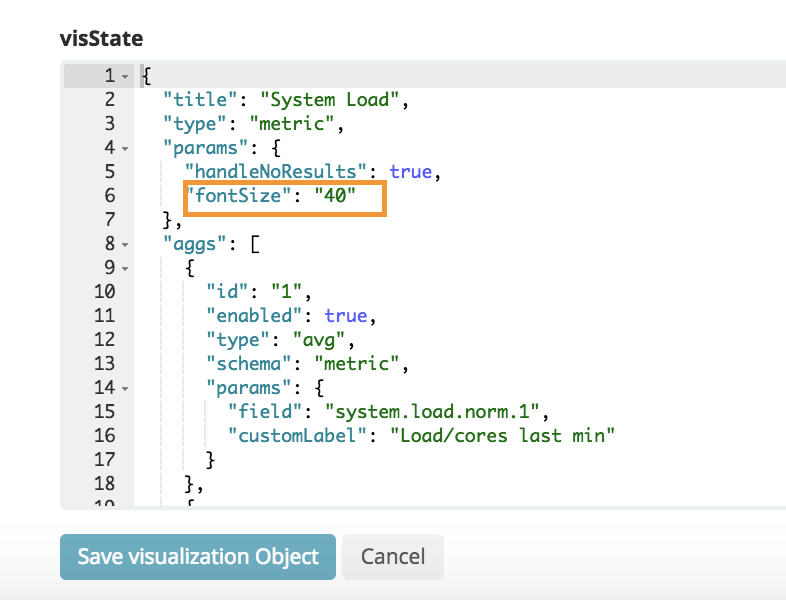
There seems to be a bug importing dashboards into 5.5, where a font size associated with a metric vis does not get honored. This affects Metricbeat dashboards.
Steps to reproduce:
- Install Elasticsearch, Kibana
- Startup Metricbeat
- Import Metricbeat dashboards
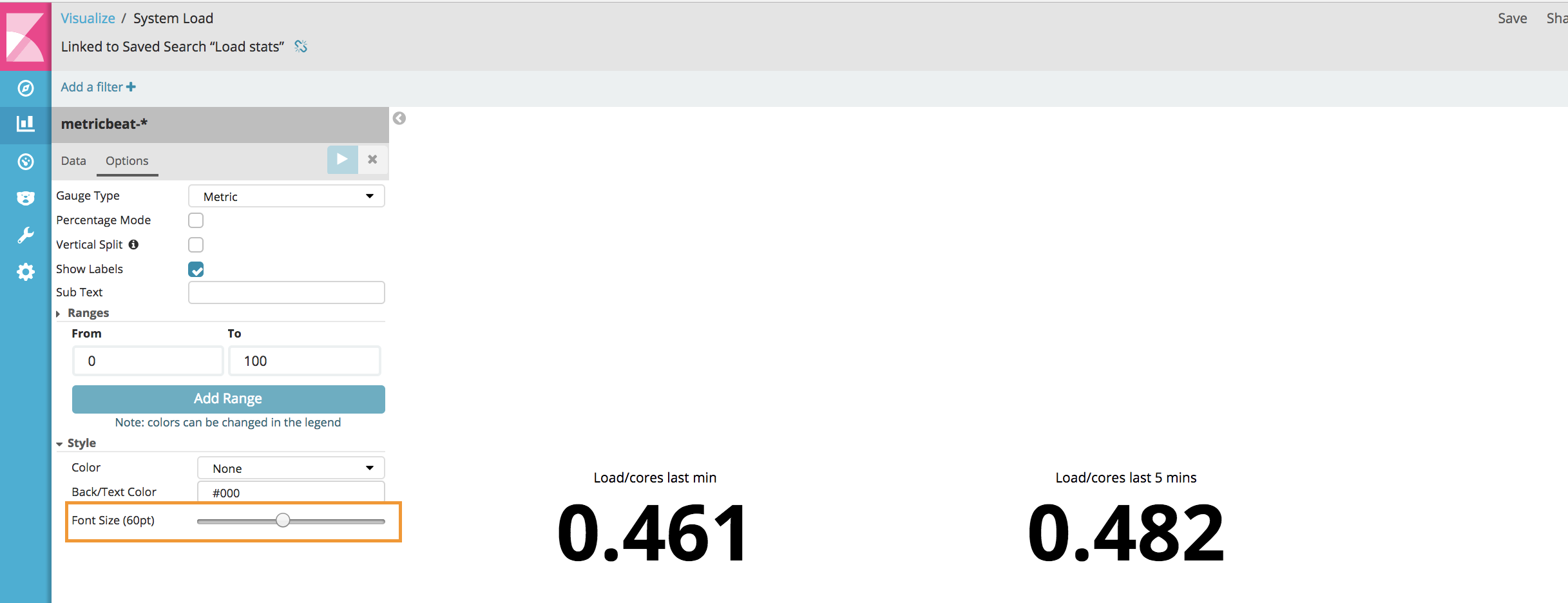
- Go look at the Overview dashboard -- see fonts too large, some of them beyond widget real estate
- If you check a specific visualization (e.g. "System Load"), saved object view will show correct font under "fontSize" parameter, but if you open that vis, in Visualize Options, you'll see that the font size is something else.
If you open the vis and change the setting in the UI, it seems to persist properly.

 tbragin
All 10 comments
@ppisljar mentions that this PR might fix it https://github.com/elastic/kibana/pull/11958
@thomasneirynck would love your thoughts
tbragin
on 21 Jun 2017
@alexfrancoeur FYI. I worry if we don't fix this, it will result in bad getting-started experience with Beats dashboards. They use a lot of metric visualizations and if the fonts are messed up, dashboards will look borderline broken.
tbragin
on 21 Jun 2017
@tbragin @alexfrancoeur taking a look now..
 thomasneirynck
on 21 Jun 2017
thomasneirynck
on 21 Jun 2017
@tbragin @LeeDr @tsg
This is due a change in the configuration for Metrics-Viz in 5.5(which introduces gauges and goal metrics). Kibana in 5.5 doesn't respect the font-size paramter of older 5.4<= versions, that's a bug.
That PR ##11958 does not fix the issue.
We should address this the Kibana side. This could also be resolved by editing the metrics in the 5.5 dashboards for Beats. I'm not 100% sure right now what would be quicker.
thomasneirynck
on 21 Jun 2017
If we change it on the Beats side, can we do it in such a way that it works with both old and new kibana versions? Because we have users that use newer beats with older ES/KB.
 tsg
on 21 Jun 2017
tsg
on 21 Jun 2017
@tsg ah interesting. no, older versions (5.4 and lower) won't be able to respect the new (5.5) settings).
I'll look at how involved a fix is at the Kibana side. Let's try that first...
thomasneirynck
on 21 Jun 2017
Added the regression label. This only affects people importing saved-objects from older version, but does not affect users creating new Visualizations.
thomasneirynck
on 21 Jun 2017
Does this affect loading saved objects after an upgrade from 5.4 to 5.5 ?
 jimgoodwin
on 21 Jun 2017
jimgoodwin
on 21 Jun 2017
Added PR that should fix this: https://github.com/elastic/kibana/pull/12452
thomasneirynck
on 21 Jun 2017
Closed with https://github.com/elastic/kibana/pull/11958.
thomasneirynck
on 21 Jun 2017
Related issues
 timroes
·
3Comments
timroes
·
3Comments
 bradvido
·
3Comments
bradvido
·
3Comments
 treussart
·
3Comments
treussart
·
3Comments
 snide
·
3Comments
snide
·
3Comments
 LukeMathWalker
·
3Comments
LukeMathWalker
·
3Comments
Most helpful comment
Closed with https://github.com/elastic/kibana/pull/11958.