Keystone: Infinite admin login loop with production build
Bug report
Describe the bug
When running the Users starter project in production mode, you can't reach the Admin UI. You keep getting prompted to login.
To Reproduce
- Create a new test project using
yarn create keystone-app. Select the Users starter. - Run the project in dev mode with the auth strategy temporarily removed so you can create an initial user.
- Log out and close the server.
- Restart the server in dev mode to verify your new User can log in and get to the admin UI.
- Log out and close the server.
- Run
yarn build && yarn start. - Try to access the Admin UI. You'll get the login page as before. However, every time you log in you just end up back at the login screen. You can never reach the admin UI.
Expected Behavior
Should end up in the admin UI as in dev mode. Trying to navigate to localhost:3000/admin still sends you to the login page.
System information
- OS: Windows 10 1903
- Browser (if applies): Chrome 78
 Vultraz
All 8 comments
@jesstelford I've verified this bug and I do not understand why it only happens on a production build. I suspect you might have better intuition on how to track this down?
 MadeByMike
on 27 Oct 2019
MadeByMike
on 27 Oct 2019
Since we don't know the cause this might be happening for other projects\templates too so I think this is high-priority.
MadeByMike
on 27 Oct 2019
Confirmed this is effecting other projects. This could mean login is not working in prod @timleslie @jesstelford don't do any releases. Also we should add a test for a prod build login.
MadeByMike
on 28 Oct 2019
The problem here is related to secure cookies
A secure cookie is only sent to the server with an encrypted request over the HTTPS protocol.
By default, Keystone will use secure cookies in production, with the assumption that you will be running over HTTPS.
secureCookies = process.env.NODE_ENV === 'production', // Default to true in production
The workaround if you don't want to/can't run HTTPS in production mode is to explicitly turn of secure cookies:
const keystone = new Keystone({
  name: PROJECT_NAME,
  adapter: new Adapter(),
  secureCookies: false,
});
@MadeByMike Could you work out where the best place is for this information to live in the documentation, because it's definitely going to catch everyone when they first try to run in "production".
 timleslie
on 28 Oct 2019
timleslie
on 28 Oct 2019
@timleslie yep! Documenting this here is a good start. I'll add it to the docs as well.
MadeByMike
on 28 Oct 2019
@timleslie Actually I have the same issue, i'm using heroku and https is enabled. I don't know if it's a limitation of cookies with regard to heroku domains or node app.
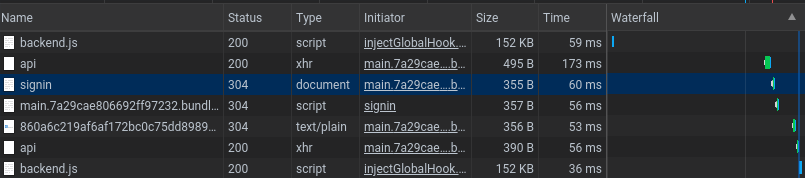
 arnaud-zg
on 1 Nov 2019
arnaud-zg
on 1 Nov 2019
It seems it's related to this question; https://stackoverflow.com/questions/14463972/how-to-set-secure-cookie-using-heroku-node-js-express
So I guess we need to update this file, maybe we can pass an optional parameter on initiating Keystone. https://github.com/keystonejs/keystone/blob/master/packages/session/lib/session.js#L54
arnaud-zg
on 1 Nov 2019
There's some info related to this in my write up on Secure Cookies and Reverse Proxies.
 molomby
on 31 Mar 2020
molomby
on 31 Mar 2020
Related issues
 bothwellw
·
18Comments
bothwellw
·
18Comments
 JedWatson
·
17Comments
JedWatson
·
17Comments
 jesstelford
·
14Comments
molomby
·
11Comments
molomby
·
11Comments
jesstelford
·
14Comments
molomby
·
11Comments
molomby
·
11Comments
Most helpful comment
The problem here is related to secure cookies
By default, Keystone will use secure cookies in production, with the assumption that you will be running over HTTPS.
The workaround if you don't want to/can't run HTTPS in production mode is to explicitly turn of secure cookies:
@MadeByMike Could you work out where the best place is for this information to live in the documentation, because it's definitely going to catch everyone when they first try to run in "production".