Kendo-angular: Cannot scroll when touch event starts in a <kendo-chart> component
Suppose you have a mobile site that shows Kendo charts. If you attempt to scroll the site on your phone, _and_ the scroll’s touch event initiated from the Kendo chart, Kendo will prevent the default scroll action of the browser.
Presumably this is to enable touch interactions with the charts themselves, but for simple use cases it would be nice to have a simple way to turn this behavior off. I’ve tried binding to basically every one of the chart’s events and running preventDefault(), but that doesn’t seem to have any effect.
To recreate this run http://run.plnkr.co/2Zixhn8BWd4Lyw59/ on your mobile device and attempt to scroll. (You can also recreate the behavior in Chrome’s device simulator, which is a bit easier to test.) Notice that you’re able to scroll when your touch initiates in the _lorem ipsum_ paragraphs, but you’re not able to scroll when your touch initiates in the Kendo chart.
Any help would be appreciated. @jlooper, @tzmanics, and I are using these charts for a Kendo UI demo at ng-conf 😄
Thanks!
 tjvantoll
All 9 comments
I couldn't find an easy workaround for this issue. As long as we use the Pan or Pinch recognizers in HammerJS the scrolling will be locked.
We'll try to figure it out. Perhaps we can disable these recognizers if pan/zoom are not active /cc @danielkaradachki
 tsvetomir
on 24 Mar 2017
tsvetomir
on 24 Mar 2017
@tsvetomir Thanks for looking into this. I’m going to keep trying to play with this as well. I wonder if there’s a way I can remove Hammer entirely from the app (or maybe just deactivate it).
tjvantoll
on 24 Mar 2017
We'll normally throw an error if hammer is not loaded, but only in development mode. Production mode should work without hammer.
tsvetomir
on 24 Mar 2017
@tsvetomir Just tried that and it works exactly as you describe. That should give us the short-term workaround we need for ng-conf, so thanks! I’ll obviously leave this open so we can come up with a friendlier long-term solution.
tjvantoll
on 24 Mar 2017
The browser scroll should no longer be prevented when panning and zooming are not enabled. Could you try with the latest version and let me know how it goes?
 danielkaradachki
on 31 Mar 2017
danielkaradachki
on 31 Mar 2017
@danielkaradachki Will do. Could you give me the version numbers I should be using just so I can make sure I’m testing the right thing?
tjvantoll
on 31 Mar 2017
The specific fix was included in 0.20.2
danielkaradachki
on 31 Mar 2017
@danielkaradachki I verified that 0.20.2 indeed addresses this issue. I can scroll as expected. Thanks so much! Feel free to close this issue if all is good on your end.
tjvantoll
on 2 Apr 2017
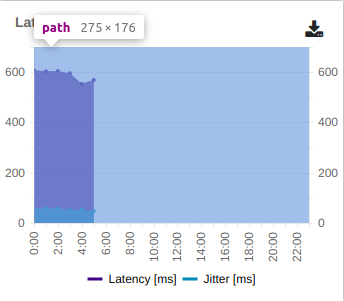
I have the same issue as @tjvantoll. My webpage on mobile has multiple kendo charts acquiring the full width of the page on mobile and also, panning is enabled. Now I'm unable to scroll my page if the event fires from the chart. A suggestion from my side would be to enable scrolling if the event fires from anywhere except the chart area such as the space after the category axis or legends. As shown in the image, the scrolling should be enabled as long as the event doesn't fire from the highlighted area since the panning and zooming is functional for that area only.
 ujjwal1801
on 10 Jan 2020
ujjwal1801
on 10 Jan 2020
Related issues
 simon11196
·
17Comments
simon11196
·
17Comments
 wkpablo
·
25Comments
wkpablo
·
25Comments
 pkoecker
·
16Comments
pkoecker
·
16Comments
 dassjosh
·
23Comments
simon11196
·
17Comments
dassjosh
·
23Comments
simon11196
·
17Comments