Kendo-angular: DatePicker - ExpressionChangedAfterItHasBeenCheckedError
When using the DatePicker if it is close to the bottom of the screen and opens the Popup above the control it will throw the ExpressionChangedAfterItHasBeenCheckedError. If it opens below the control no error will be thrown.
Here is a slightly modified plunker to help show this: Modified Original
In this plunker I added a field called distance. Adjust this field to get DatePicker close to the bottom so it's popup will open above the control.
Steps to Reproduce:
- Adjust the distance field value to get control near the bottom so the popup opens above the control.
- Open the console
- Click on the Calendar Icon
- Error will Appear
Expected Result:
If the popup opens above the control no error should appear
Actual Result:
Error appears if popup opens above the control
 dassjosh
All 23 comments
I am having the same problem. No solution yet ?
 martindevos
on 26 Jun 2017
martindevos
on 26 Jun 2017
We're investigating the issue and will update the thread soon.
 ggkrustev
on 27 Jun 2017
ggkrustev
on 27 Jun 2017
Same problem here.
 aerlijman
on 28 Jun 2017
aerlijman
on 28 Jun 2017
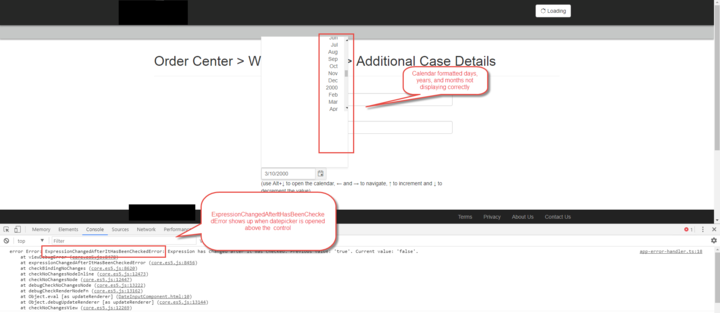
Same Issue here as well. In addition, the control does not display the dates the same way as in the demo and I cannot change the value property when selecting a date. Any update on when this issue will be resolved?
 Sabio-JeffJ
on 29 Jun 2017
Sabio-JeffJ
on 29 Jun 2017
Hi guys,
the issue is fixed locally and soon a new dev package will be published. I will update the thread with more details soon.
ggkrustev
on 30 Jun 2017
To all interested, the latest DEV release includes the fix. The specific version is v1.0.6-dev.201706300648.
ggkrustev
on 30 Jun 2017
Run npm install --save @progress/kendo-angular-dateinputs@dev to get the development build.
Please review issue #712 as well.
 tsvetomir
on 3 Jul 2017
tsvetomir
on 3 Jul 2017
I'm curious to know if this is working for others. I'm still having the same problem even after running the latest install mentioned by tsvetomir.
Sabio-JeffJ
on 6 Jul 2017
@Sabio-JeffJ please make sure you follow the instructions in #712
tsvetomir
on 6 Jul 2017
@tsvetomir I tried running npm install --save @progress/kendo-angular-dateinput@dev, but getting an error saying that @progress/kendo-angular-dateinput is not in the npm registry. I took a look at #712 and we are not using a .npmrc file. Thoughts on next steps? Thanks
 nicholasblexrud
on 2 Aug 2017
nicholasblexrud
on 2 Aug 2017
@nicholasblexrud the name of the package is @progress/kendo-angular-dateinputs (notice the plural of the input). With that change you should be able to install the package.
ggkrustev
on 3 Aug 2017
@ggkrustev, I'm seeing error when I use datepicker.
package.json
"@progress/kendo-angular-dateinputs": "^1.0.5-dev.201706261326",

Any thoughts on what I can try to do to resolve?
nicholasblexrud
on 7 Aug 2017
The 1.0.5 version still exposes the erroneous behavior. You will need to use dev version of 1.0.6, more specifically 1.0.6-dev.201707071314. I do believe that your npm still points to the private registry.
Please verify that you're using NPMJS registry and your cache is cleaned.
ggkrustev
on 7 Aug 2017
@ggkrustev thank you sir - we're error free!
nicholasblexrud
on 8 Aug 2017
When is this going to be released?
 bhaidar
on 10 Aug 2017
bhaidar
on 10 Aug 2017
@bhaidar, the fix was just release. Check @progress/[email protected].
ggkrustev
on 10 Aug 2017
Will close the thread for now. Please comment if the issue is still present in 1.0.6.
ggkrustev
on 10 Aug 2017
Seems to be working fine now. Thanks
bhaidar
on 10 Aug 2017
For some reason, when I am trying to install the package on another PC I am getting this error:
npm install --save @progress/[email protected]
npm ERR! code ETARGET
npm ERR! notarget No matching version found for @progress/[email protected]
npm ERR! notarget In most cases you or one of your dependencies are requesting
npm ERR! notarget a package version that doesn't exist.
bhaidar
on 10 Aug 2017
If there is a problem on the second PC, then clearly issue is related to the development environment of that machine. Please examine the configuration of the environment and make sure that is configured correctly. If the problematic machine is setup correctly, then the installation should work just fine.
The Kendo UI for Angular is available from the public NPMJS, which means that developer should be able to install as any other regular NPM package.
ggkrustev
on 11 Aug 2017
I am getting the same issue as @bhaidar, i am getting the following error when trying to install 1.0.6:
npm ERR! notarget No matching version found for @progress/[email protected]
npm ERR! notarget In most cases you or one of your dependencies are requesting
npm ERR! notarget a package version that doesn't exist.
 joe307bad
on 27 Sep 2017
joe307bad
on 27 Sep 2017
I stopped using this control and switched to another. I hope I could help
more here.
On 27 Sep 2017 10:11 pm, "Joe Badaczewski" notifications@github.com wrote:
I am getting the same issue as @bhaidar https://github.com/bhaidar, i
am getting the following error when trying to install 1.0.6:npm ERR! notarget No matching version found for @progress/[email protected]
npm ERR! notarget In most cases you or one of your dependencies are requesting
npm ERR! notarget a package version that doesn't exist.—
You are receiving this because you were mentioned.
Reply to this email directly, view it on GitHub
https://github.com/telerik/kendo-angular/issues/687#issuecomment-332625620,
or mute the thread
https://github.com/notifications/unsubscribe-auth/ABHAnbSfhpS2iXPSVIjshpcz1yUSnPZuks5smp30gaJpZM4OD764
.
bhaidar
on 27 Sep 2017
Sorry, my issue was I was still using the Progress NPM registry. I removed the two lines which contain registry.npm.telerik.com from my .npmrc file which was located in my C:/Users/UserName folder and afterwards I was able to download 1.0.6.
joe307bad
on 27 Sep 2017
Related issues
 simon11196
·
3Comments
simon11196
·
3Comments
 ilianiv
·
3Comments
ilianiv
·
3Comments
 ulgen
·
3Comments
ulgen
·
3Comments
 ghost
·
3Comments
ghost
·
3Comments
 patrykp57
·
3Comments
patrykp57
·
3Comments
Most helpful comment
Sorry, my issue was I was still using the Progress NPM registry. I removed the two lines which contain registry.npm.telerik.com from my .npmrc file which was located in my C:/Users/UserName folder and afterwards I was able to download 1.0.6.