Kendo-angular: Which npm package has Calendar and Date controls for Angular 2 Kendo RC?
 pmangat
All 15 comments
This would be the kendo-angular-dateinputs package, but it's not published yet. We expect to have the first version out in a few days.
 tsvetomir
on 20 Jan 2017
tsvetomir
on 20 Jan 2017
The kendo-angular-dateinputs package has been published. At this time the Calendar component is available. We are working towards the release of the DatePicker and DateInput components -- until they are ready, the following plunkr shows how to use the Calendar in a popup to achieve a basic date picker.
 gyoshev
on 23 Jan 2017
gyoshev
on 23 Jan 2017
Thank you!
pmangat
on 23 Jan 2017
The Datepicker has been released (http://www.telerik.com/kendo-angular-ui/components/dateinputs/datepicker/) but the UX is terrible! How do I select a year, decade or century?
Try selecting 2/1/1941
 MurrayEaton
on 7 Aug 2017
MurrayEaton
on 7 Aug 2017
@MurrayEaton
We believe this UI provides one of the fastest (if not the fastest) way in terms of interactions for selecting a date in the most common scenarios.
Here is a simple test:
Select the same date (today) for the next or previous year. E.g. August 8, 2018
With Kendo UI for jQuery DatePicker and majority of datepickers available:
- Click on
August 2017in the header – opens Year View - Click on
2017in the header – opens Decade View - Click on
2018 - Click on
Aug - Click on the day
8to select
With Kendo UI for Angular DatePicker:
- Scroll down to
Aug2018 (clicking on the month is optional) - Click on the day
8to select
However, we do agree that selecting a distant date e.g. someone’s birthday, requires a bit more scrolling with the current basic navigation setup. In addition, one cannot select e.g. a month only (as in “November, 2017” date format). To address these issues, we are considering the introduction of additional views for even faster navigation within a wider date range. You can vote for and follow this idea in UserVoice.
 yordanov
on 8 Aug 2017
yordanov
on 8 Aug 2017
We are using the Kendo controls however are looking at other third party calendar controls for this very issue. We have data entry forms for Patents filed in the early 1900's so scrolling is not an option for our users.
Telerik/Progress have been making calendar controls for years with a great experience. I dont know why you degraded the user experience other than to get something out quickly?
MurrayEaton
on 8 Aug 2017
Thank you for the feedback. We understand that we need to provide means to easily pick such date values while at the same time cover all other common scenarios with the least number of interactions possible. To have a better understanding of what we are aiming to ship by saying "additional views", please review the image below that depicts how a "Year view" will look like in the Calendar:
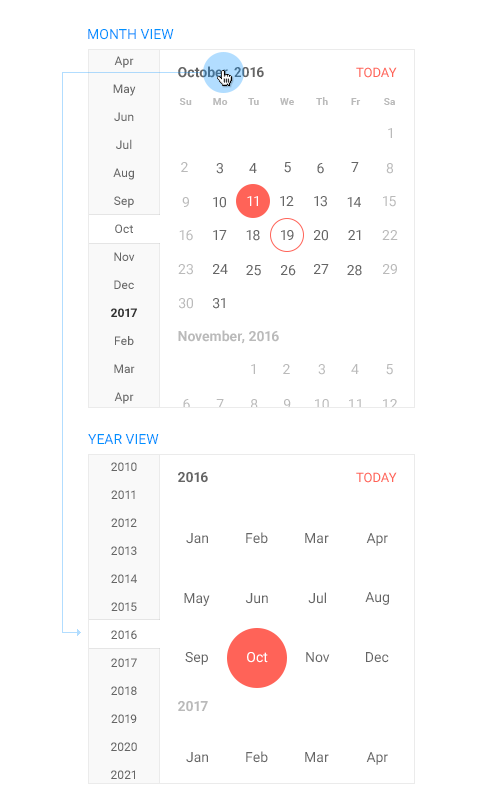
This basically covers the functionality present in the Kendo UI for jQuery Calendar/DatePicker + the additional side navigation that greatly enhances the experience, especially on mobile or when the end user's mouse or device supports kinetic scrolling.
Even now the side navigation bar can be hidden by setting the navigation property to false, which will make the Calendar look like the month view of the Kendo UI Calendar for jQuery.
We will appreciate, if you can share your thoughts on this so that we know we are on the right direction.
yordanov
on 8 Aug 2017
Its on the right path, but from a UX perspective I'm not sure about the reliance on the scroll wheel instead of a click?
The older bootstrap datepicker (https://angular-ui.github.io/bootstrap/#!#datepickerPopup) allowed for click navigation that was touch friendly and also included decade navigation (much like your jquery control). However picking years was a little difficult as the UI only showed the last 2 digits (17)
Anyway, your proposal seems valid and I will feel more comfortable once I can interact with it. Do you have a date on when it would be released so I can decide if we need to continue pursuing other libraries?
MurrayEaton
on 8 Aug 2017
And I want to say thank you Yordanov for your quick and thorough response!
MurrayEaton
on 8 Aug 2017
If we're clicking on the 'Month, Year title' to get to the 'year', which, ok, is a _small step in the right direction_, why not also make the 'Year' title additionally clickable so one could then see the years (and eventually decades, etc..) by hero drill-down? One could still utilize the left menu, sure - it's nifty, but seriously, our Business AND QA/Testing are going to be less than pleased with us if they see this - "snazzy but big-picture usability is gone?!?!"
We need consistency. :)
 crunchfactory
on 8 Aug 2017
crunchfactory
on 8 Aug 2017
Thank you @MurrayEaton . The task is of high priority and we will do our best to have different views implemented by the end of September, right after the R3 official release.
@crunchfactory - That is exactly what I mean by saying “we are considering the introduction of additional views”.
Regarding the “nifty” side navigation bar – we actually introduced it with the purpose to separate navigation from selection. With this implementation one uses the side menu to navigate and the Calendar to select a date. With the Kendo UI for jQuery implementation one uses selection to navigate, which is not OK from a UX perspective (e.g. one has to select a year in order to see the months, and then select a month in order to see the days… and the initial selection is lost…).
We even tested how things would look like if we introduced steps, so that one can configure the navigation items with respect to the specific use case, but decided to ditch this approach as it is heavy implementation & configuration-wise:

yordanov
on 9 Aug 2017
hello @yordanov do you have any update on year and month selection as mentioned above? Is that still on your radar.
 surya-gadiraju
on 22 Sep 2017
surya-gadiraju
on 22 Sep 2017
This feature is being actively developed. We'll follow up with preview releases in the development channel in a few weeks.
tsvetomir
on 25 Sep 2017
Hello kendo team,
Can one help me with the multiple dates selection like it was in silverlight and javascript versions?
https://demos.telerik.com/kendo-ui/calendar/selection
 kirhhof
on 26 Oct 2017
kirhhof
on 26 Oct 2017
Hi @kirhhof,
currently the Calendar component for Angular doesn't support multiple cell selection. It is in our TODO list, but I won't be able to provide any time frame whether it will be available. I would suggest you follow our roadmap for updates.
 ggkrustev
on 26 Oct 2017
ggkrustev
on 26 Oct 2017
Related issues
tsvetomir
·
3Comments
 Mostafa-Rady
·
3Comments
Mostafa-Rady
·
3Comments
 ChrisProlls
·
3Comments
ChrisProlls
·
3Comments
 fgladisch
·
3Comments
fgladisch
·
3Comments
 patrykp57
·
3Comments
patrykp57
·
3Comments
Most helpful comment
Thank you for the feedback. We understand that we need to provide means to easily pick such date values while at the same time cover all other common scenarios with the least number of interactions possible. To have a better understanding of what we are aiming to ship by saying "additional views", please review the image below that depicts how a "Year view" will look like in the Calendar:
This basically covers the functionality present in the Kendo UI for jQuery Calendar/DatePicker + the additional side navigation that greatly enhances the experience, especially on mobile or when the end user's mouse or device supports kinetic scrolling.
Even now the side navigation bar can be hidden by setting the
navigationproperty tofalse, which will make the Calendar look like the month view of the Kendo UI Calendar for jQuery.We will appreciate, if you can share your thoughts on this so that we know we are on the right direction.