Keepassxc: No "Repeat" password field in entry
Overview
When creating a new entry or editing an existing entry there is no longer a "Repeat" field to verify the password. (This existed in all previous versions of the program, AFAIK.)
Steps to Reproduce
- Create a new entry or edit an existing entry.
- Notice that there is no "Repeat" field.
Expected Behavior
There should be a "Repeat" field. Or at least there should be an option in the preferences to enable or disable it. This is a very useful feature as it prevents typos in the password before I save them to my database. Has caught errors many times for me.
Actual Behavior
There is no "Repeat" field.
Context
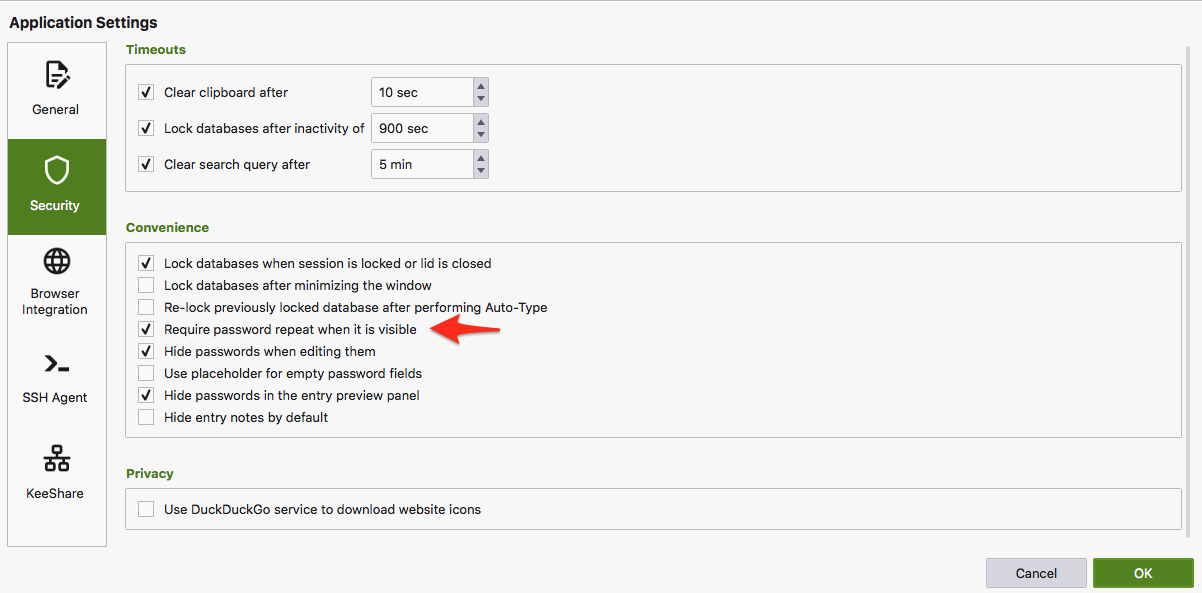
(There's still an entry in preferences to "Require password repeat when it is visible". But that doesn't seem to do anything. Passwords are never required to be repeated.
KeePassXC - Version 2.6.0
Revision: 0765954
Operating System: macOS
 quadari
All 8 comments
Ctrl + H to toggle password visibility or click the eye icon
 droidmonkey
on 24 Jul 2020
droidmonkey
on 24 Jul 2020
@droidmonkey in my opinion that's only a workaround and not a fix.
Actual use case I had recently:
I wanted to save a hard to remember password which was only in my mind so far so I had to type it in.
Even with visibility enabled I wanted to keep 101% sure I have typed it in correctly. Now I have to use an external editor to compare if I had typed it in two times correctly.
Please re-add the missing double password field:

Also this option makes no sense now:
 therealmarv
on 27 Aug 2020
therealmarv
on 27 Aug 2020
That is an insane niche case. You are using a password manager... let it manage your passwords.
droidmonkey
on 27 Aug 2020
i don't understand why this security feature got removed, although it is/was optional?!? :disappointed:
until now, i thought it was a bug somehow related to #5119 and also because (as already mentioned) the setting still exists in 2.6.1.
 DJCrashdummy
on 2 Sep 2020
DJCrashdummy
on 2 Sep 2020
Exactly like other keepassxc users, I consider as really annoying bug / missing feature, when I cannot let program check typos. It prevent users to comfortably and safely store passwords from their memory to database - so it actually prevent people from letting manager to manage their passwords - in opposite as was said. You simply cannot use program, while some other people are messing around (much easier to read password from screen as from keyboard).
I like keepassxc really much, but if some features (which are common and good practice for a along time) starts to remove, I think it's time to find some other password manager.
 griga-upjs
on 29 Sep 2020
griga-upjs
on 29 Sep 2020
New feature request here #5491 .
griga-upjs
on 29 Sep 2020
Or maybe make the feature optional (totally fine, if it will be disabled by default) - but please do not remove them.
griga-upjs
on 29 Sep 2020
That is an insane niche case. You are using a password manager... let it manage your passwords.
That's for sure not an insane and niche case as you have characterized in crude manner.
@therealmarv described a real use case when there is a need to type password twice in order to make sure that it has been entered correctly. It may be really helpful when a password has been initially created outside of password manager and you just want to save it in.
Or do you think that such cases are an insane and niche as well?
 igorty
on 8 Nov 2020
igorty
on 8 Nov 2020
Related issues
 813gan
·
3Comments
813gan
·
3Comments
 shaneknysh
·
3Comments
shaneknysh
·
3Comments
 MountainX
·
3Comments
MountainX
·
3Comments
 guihkx
·
3Comments
guihkx
·
3Comments
 mstarke
·
3Comments
mstarke
·
3Comments
Most helpful comment
@droidmonkey in my opinion that's only a workaround and not a fix.
Actual use case I had recently:
I wanted to save a hard to remember password which was only in my mind so far so I had to type it in.
Even with visibility enabled I wanted to keep 101% sure I have typed it in correctly. Now I have to use an external editor to compare if I had typed it in two times correctly.
Please re-add the missing double password field:

Also this option makes no sense now:
