Keepassxc: --pw-stdin doesn't work on Windows
Expected Behavior
Database is launched and unlocked, given the provided password and/or keyfile.
Current Behavior
Database fails to unlock, only successfully reading the keyfile path (however databases with only a keyfile and without a password unlock successfully).

Steps to Reproduce (for bugs)
- Run CMD with the below line (I'm unsure if each or any of these lines are correct, as the --help page doesn't specify).
- keepassxc --keyfile ~/folder/keyfile.key --pw-stdin ~/anotherFolder/database.kdbx
- keepassxc --keyfile ~/folder/keyfile.key --pw-stdin PASSWORD ~/anotherFolder/database.kdbx
- keepassxc --keyfile ~/folder/keyfile.key --pw-stdin ~/anotherFolder/database.kdbx PASSWORD
Context
I'm trying to launch my database without any user intervention at startup, and this issue is stopping me from doing so.
Debug Info
KeePassXC - Version 2.2.2
Revision: 6d46717
Libraries:
- Qt 5.9.2
- libgcrypt 1.8.1
Operating system: Windows 10 (10.0)
CPU architecture: x86_64
Kernel: winnt 10.0.14393
Enabled extensions:
- KeePassHTTP
- Auto-Type
- YubiKey
 TheChiefMeat
All 54 comments
I tried to get --pw-stdin to work on Windows and it just wasn't happening. The issue is mainly in how windows hands of gui apps from the cmd prompt. It is entirely different than Linux. I believe you can accomplish this using the "start" command though, ymmv.
 droidmonkey
on 15 Nov 2017
droidmonkey
on 15 Nov 2017
I've tried using the START command, but I'm entirely unsure how I'd get it to send the password from the CLI to KeePassXC, I know on the original KeePass is was -pw instead of the --pw-stdin we're using here.
One thing I've noticed is that regardless of what you type for the --keyfile parameter, even if the path doesn't exist, the parameter will still be send to KeePassXC.
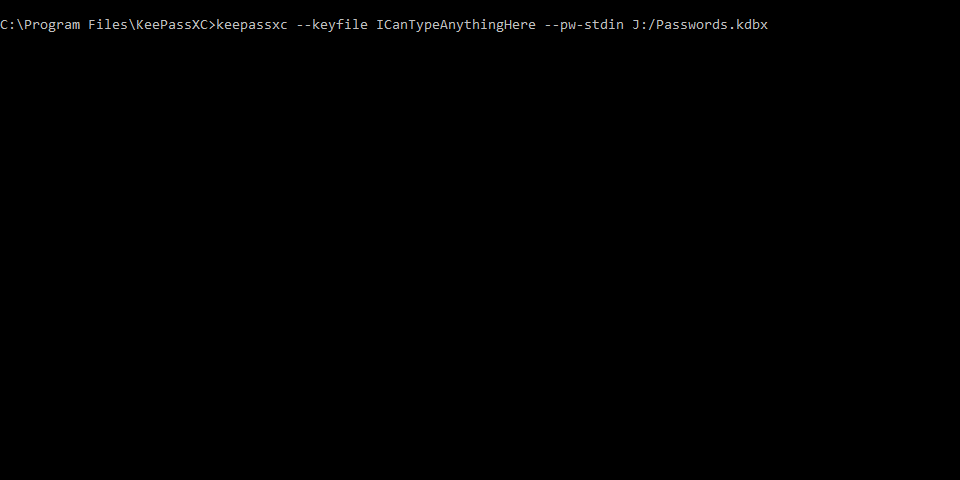

Perhaps (I'm no expert) if a new parameter were to be made, say a clone of --keyfile, but instead this parameter would put it's information into the password box for KeePassXC, this issue could be fixed for Windows? I assume that this parameter would be a Windows exclusive parameter seeing as it is working fine for Linux, there must be a reason as to why the --keyfile parameter sends the information, but the other does not.
TheChiefMeat
on 15 Nov 2017
Basically if you do that, anything running under your user account can get your password by harvesting the start-up script
droidmonkey
on 15 Nov 2017
Can you point me in the right direction, what source files I should look at that control the CLI parameters? I'm super rusty on my coding, but I'll have a look if it means I might be able to help fix this issue, honestly it's the only thing stopping me from switching over to KeePassXC.
TheChiefMeat
on 15 Nov 2017
Its mid way through main.cpp
droidmonkey
on 15 Nov 2017
@TheChiefMeat Looking forward good news for this to be fixed.
 Remonli
on 11 Dec 2017
Remonli
on 11 Dec 2017
I haven't actually been able to work on this at all yet.
Can anyone help me get past this error? I've set up the env but every time I try to compile I get:
CMake Error at C:/msys64/mingw64/share/cmake-3.9/Modules/FindPackageHandleStandardArgs.cmake:137 (message):
  Could NOT find LibGPGError (missing: GPGERROR_LIBRARIES)
Call Stack (most recent call first):
  C:/msys64/mingw64/share/cmake-3.9/Modules/FindPackageHandleStandardArgs.cmake:377 (_FPHSA_FAILURE_MESSAGE)
  cmake/FindLibGPGError.cmake:23 (find_package_handle_standard_args)
  CMakeLists.txt:234 (find_package)
TheChiefMeat
on 28 Dec 2017
You need to install libgcrypt20-dev
droidmonkey
on 28 Dec 2017
Honestly having trouble finding it, couldn't see it at all on the FTP server that gnupg has:
And msys2 comes up with:
$ pacman -S libgcrypt20-dev
error: target not found: libgcrypt20-dev
TheChiefMeat
on 28 Dec 2017
Sorry my mistake, i was thinking Ubuntu. Here is the msys instructions per our wiki:
pacman -S mingw-w64-$(uname -m)-qt5 \ mingw-w64-$(uname -m)-libgcrypt mingw-w64-$(uname -m)-zlib
droidmonkey
on 28 Dec 2017
Thanks, but I'm still getting the error: target not found: mingw-w64-x86_64-libgcrypt
Managed to find it on the https://sourceforge.net/projects/msys2/files/REPOS/MINGW/x86_64/ page though and manually installed it.
Edit: Builds fine now, I'll start digging into the code and see what I can do.
TheChiefMeat
on 28 Dec 2017
You might have to do a sync by performing pacman -Syu before attempting to install new packages. Either that or your msys install is a little janky because I see that package when I issue pacman -Ss libgcrypt
Pro Tip: pacman -Ss searches the remote index for a package
droidmonkey
on 28 Dec 2017
Welp, that was relatively easy, I fixed the --pw-stdin bug already xD
How do I merge the code to the main branch? I've never used Github before this.
TheChiefMeat
on 29 Dec 2017
You'll want to first checkout develop, then make a new branch called hotfix/pw-stdin, then commit your changes to that branch, then push it to your fork of keepassxc, then in your fork click on the "Create a PR" and follow the process.
droidmonkey
on 29 Dec 2017
Forgot to say, opened up a pull request with the above fix.
TheChiefMeat
on 29 Dec 2017
I can't reproduce this
You have to start the database with:
echo 'password' | keepassxc --keyfile ~/folder/keyfile.key --pw-stdin ~/anotherFolder/database.kdbx
 TheZ3ro
on 30 Dec 2017
TheZ3ro
on 30 Dec 2017
On Windows? With cmd.exe or Powershell?
 phoerious
on 30 Dec 2017
phoerious
on 30 Dec 2017
I'm using msys. I will test with cmd.exe and Powershell, alternatively I think I have a fix for other shells too
TheZ3ro
on 30 Dec 2017
Nothing, I was trying
#ifdef _WIN32
if (AttachConsole(ATTACH_PARENT_PROCESS)) {
    freopen("CONIN$", "r", stdin);
    freopen("CONOUT$", "w", stdout);
    freopen("CONOUT$", "w", stderr);
}
#endif
But this doesn't seems to work.
Powershell doesn't even start develop keepassxc.exe :'(
TheZ3ro
on 30 Dec 2017
Msys2 works differently, since it's basically a Unix shell.
phoerious
on 30 Dec 2017
I think I narrowed this down. If you try this:
echo foo | KeePassXC.exe --pw-stdin ...
the result will depend on your shell. In PowerShell the echo command works as expected but with the old cmd.exe it will include a whitespace at the end.
To use the echo command with old cmd.exe, you need to avoid having space before the pipe:
echo foo| KeePassXC.exe --pw-stdin ...
Redirecting a file works fine with both:
KeePassXC.exe --pw-stdin ... < password.txt
where password.txt contains your password in plain text.
I would expect any program that can output text on stdout will work just fine even on Windows to pipe it in.
 hifi
on 7 Jan 2018
hifi
on 7 Jan 2018
Can confirm that the following works with CMD even without the echo foo| before.
KeePassXC.exe --pw-stdin < D:\KeePass\pw.txt D:\KeePass\NewDatabase.kdbx --keyfile G:\NewDatabase.key
Having trouble with the other method though. The password box is now being ticked, but the raw password is not being piped through properly if I do:
echo foo| KeePassXC.exe --pw-stdin MYPASSWORDHERE D:\KeePass\NewDatabase.kdbx --keyfile G:\NewDatabase.key
--pw-stdin seems fine with paths, but not with anything else?
TheChiefMeat
on 7 Jan 2018
If you want to have your password on the command line itself you can use echo like so:
echo YOURPASSWORDHERE| KeePassXC.exe --pw-stdin D:\KeePass\NewDatabase.kdbx --keyfile G:\NewDatabase.key
But please bear in mind special characters will most likely break the echo command and as said before it's not a secure way to handle your passphrase.
hifi
on 7 Jan 2018
Should this issue be closed? Looks like it was fixed: https://github.com/keepassxreboot/keepassxc/pull/1336#issuecomment-372121455
 AustinHaigh
on 27 Aug 2018
AustinHaigh
on 27 Aug 2018
Yup i agree
droidmonkey
on 27 Aug 2018
I still can't seem to actually run the command. I've tried the three variants that I layed out before all those months ago, yet they still don't seem to work.
keepassxc --pw-stdin PASSWORD D:\KeePass\Database.kdbx
The password still doesn't get sent to the application and it's left hanging waiting for input.
Edit: Appears to be just as it was before; The keyfile variable gets sent to the application but the password does not.
TheChiefMeat
on 27 Aug 2018
Yah I didn't understand what was going on in your PR, but looks like it was never merged.
droidmonkey
on 27 Aug 2018
@droidmonkey It's okay, I guess there was just some confusion. The fix I did was a simple if statement, if someone wants to still implement that then the code can be found at the follow link (unfortunately that pull request was deleted ages ago under the assumption that it wouldn't ever be merged):
TheChiefMeat
on 27 Aug 2018
Hope this get fixed soon.
Remonli
on 31 Aug 2018
@droidmonkey Hello , is this fixed on 2.4.0 ?
I tried keepassxc --pw-stdin PASSWORD D:\KeePass\Database.kdbx but faild again.
Remonli
on 21 Mar 2019
This should be fixed, Phoerious made improvements to handling the different stdin encodings on Windows. Are you using cmd shell or powershell?
droidmonkey
on 21 Mar 2019
CMD , I tried different way, both failed , is there any mistake on the commands?
KeePassXC.exe --pw-stdin PASSWD D:\keepass\database.kdbx
KeePassXC.exe D:\keepass\database.kdbx --pw-stdin PASSWD
Remonli
on 21 Mar 2019
@droidmonkey Doesn't seem to be fixed. I'm on 2.4.0 and running into the same issue with both echo test | KeePassXC.exe --pw-stdin Passwords.kdbx and KeePassXC.exe --pw-stdin Passwords.kdbx < master.txt. It opens the database, but it doesn't unlock it and it doesn't populate the password field either.
A database with just a key file (no password) can be opened just fine. However, when I try to combine a keyfile and a password like so echo test | KeePassXC.exe --keyfile file --pw-stdin Passwords.kdbx it doesn't even open the database -- just shows the welcome screen (with the "remember last used database"-option being disabled).
I used the traditional windows cmd on Win 10 (Build 1809).
 helloworld52413
on 25 Mar 2019
helloworld52413
on 25 Mar 2019
I'll give this a go in the debugger
droidmonkey
on 25 Mar 2019
Version 2.4.1 - still not working :-(
(try "--pw-stdin" and "/pw-stdin")
 heX16
on 21 Apr 2019
heX16
on 21 Apr 2019
I tested this with 2.4.1 which also fixed opening databases from the command line. It works perfectly. If you are using the "echo" method, make sure you do not place a space between your password and the |. I'm going to close this issue.
droidmonkey
on 21 Apr 2019
set /p pass=<h:\KEY\k
echo %pass%
echo %pass%|start "" KeePassXC.exe --pw-stdin D:\NetDrive\Data\keep\hex
pause
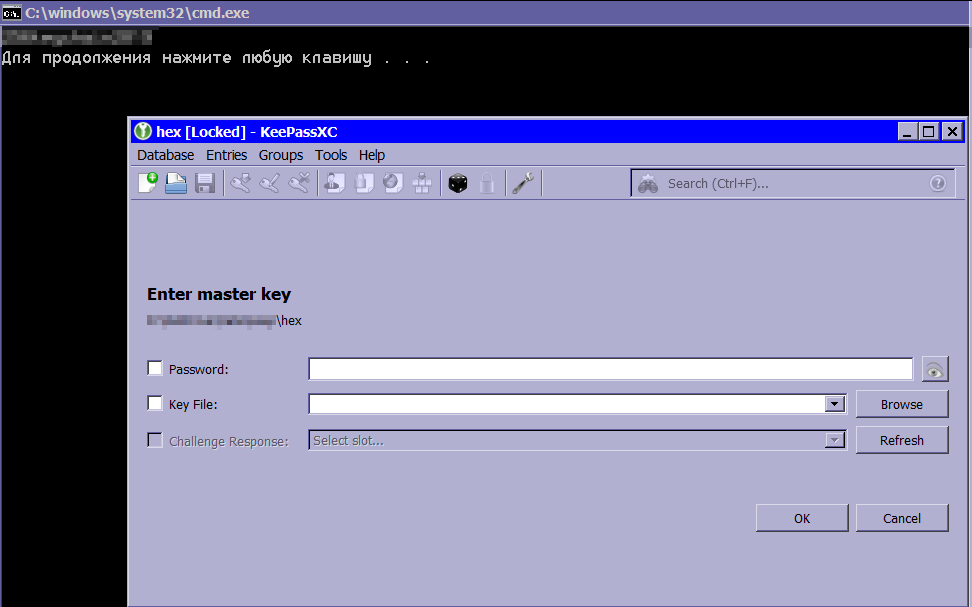
echo MY_PASSWORD|KeePassXC.exe --pw-stdin D:\NetDrive\Data\keep\hex
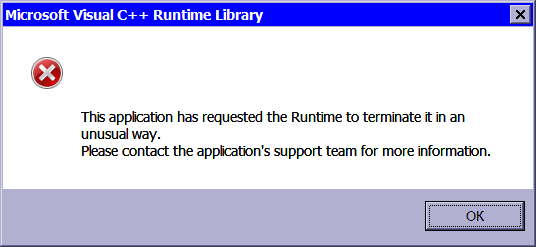
Microsoft Visual C++ Runtime Library

This application has requested the Runtime to terminate it in an unusual way.
Please contact the application's support team for more information.
Debug Info
KeePassXC - Version 2.4.1
Revision: 7bafe65
Qt 5.12.2
Debugging mode is disabled.
Operating system: Windows 7 SP 1 (6.1) (Windows 7 x64 Russian)
CPU architecture: x86_64
Kernel: winnt 6.1.7601
PS:
If you are using the "echo" method, make sure you do not place a space between your password and the |.
My script really had a space (thanks for the useful information!). But removing it did not help. :-(
heX16
on 22 Apr 2019
I don't think this feature works on Windows or did we find a way to make it work? In any case, it shouldn't crash.
phoerious
on 22 Apr 2019
Interesting, this does not work from the batch file I created replicating your setup. It also does not work in mingw. It appears to be broken again!
droidmonkey
on 22 Apr 2019
Hello, i also have the same problem. Tried everything, but nothing works. Cant't send my password. would this be fixed in future?
 BARR001
on 21 Nov 2019
BARR001
on 21 Nov 2019
Hello, i also have the same problem. Tried everything, but nothing works. Cant't send my password. would this be fixed in future?
I just create file with password and use "--keyfile". Of course, this is not safety. But that’s all we have.
Example:
start "" KeePassXC.exe --config "%~d0%~p0\keepassxc.ini" --keyfile D:\xxx\mypasswd D:\xxx\database
heX16
on 21 Nov 2019
Hello, i know that this works. But i have to use a passwort because everyone who uses my PC can open the database. My batchfile has an input parameter like (set /p Input=Enter Crypt:) so the password isn't stored in this file!
BARR001
on 21 Nov 2019
What's the point? Why can't you just enter the password after KeePassXC opens
droidmonkey
on 21 Nov 2019
im starting different programs in a batch. Most have the same Password, so i have to fill it only once!
BARR001
on 22 Nov 2019
@BARR001 , Yes, I also wanted to do this: for another program to take the password from a physical device (digispark with homemade firmware (as Memtype) ).
But for the last 2 years I just keep the file in a shared cryptographic repository... And waiting until "pw-stdin" is implemented. :smile:
heX16
on 26 Nov 2019
I'm sorry, but I changed now to the original KeePass and the paramenter -pw: works fine for me. It is realy pity.
BARR001
on 28 Nov 2019
i found a solution that works for me
echo password| "C:\Program Files\KeePassXC\KeePassXC.exe" --pw-stdin "D:\test.kdbx" --keyfile "D:\Bild.jpg"
BARR001
on 8 Jan 2020
@BARR001 I tried that and i doesn't worked. But if use the portable version everything works fine. How do you managed, that the batch file closes after it opened the programm? My only closes from itself, if I close the programm.
 BitWuehler
on 10 Jan 2020
BitWuehler
on 10 Jan 2020
You must not include a space between the password and the pipe |
droidmonkey
on 10 Jan 2020
@BARR001 I tried that and i doesn't worked. But if use the portable version everything works fine. How do you managed, that the batch file closes after it opened the programm? My only closes from itself, if I close the programm.
i don't have a solution yet. The console keeps open
BARR001
on 10 Jan 2020
You must not include a space between the password and the pipe |
there is no space. It works fine. It also works if there is no space before and after the pile, like
echo test123|"D:\LupoPenSuite\KeePassXC.exe" --pw-stdin "D:\test.kdbx"
BARR001
on 10 Jan 2020
Thanks @BARR001
I found something interesting. Seems like it is a problem with the Browser integration. Thats also the reason why it worked for me before with the portable version. I don't configurate it before. But if I now activate the browser integration the hole password fill thing doesn't work anymore.
BitWuehler
on 10 Jan 2020
But i have a new Problem so this solution is not useful for me!
If i activate Browser Integration the Software crashes, because only the last three characters from the password where forwardet.
for this i made a new bug report
https://github.com/keepassxreboot/keepassxc/issues/4140
BARR001
on 10 Jan 2020
@BARR001 I tried that and i doesn't worked. But if use the portable version everything works fine. How do you managed, that the batch file closes after it opened the programm? My only closes from itself, if I close the programm.
i don't have a solution yet. The console keeps open
You can close the console by running it through a power shell from a batch file.
@echo off
setlocal
cd /d %~dp0

set kdbx=your.kdbx
set pass=password.txt
set key=keyfile.key

set script=Start-Process -FilePath "KeePassXC.exe" -ArgumentList "%kdbx% --keyfile %key% --pw-stdin" -RedirectStandardInput "%pass%"
set script=%script:"=\"%
powershell -Command "%script%"

endlocal
 higuti-yuuma
on 19 Jul 2020
higuti-yuuma
on 19 Jul 2020
Related issues
 MisterY
·
3Comments
MisterY
·
3Comments
 MountainX
·
3Comments
MountainX
·
3Comments
 shaneknysh
·
3Comments
shaneknysh
·
3Comments
 JosephHatfield
·
3Comments
JosephHatfield
·
3Comments
 n1trux
·
3Comments
n1trux
·
3Comments