Keepassxc-browser: Google shows 'Forgot email' screen rather than password field
Expected Behavior
When logging in to Google (YouTube), go to 'Next' (password field) after entering the email address, allowing me to click-to-fill the password.
Current Behavior
Click-to-fill, KPXC-browser shows the 'Forgot email' field (rather than the password entry field). This renders KPXC-browser useless for logging in to Google.
Debug info
KeePassXC - 2.5.3
KeePassXC-Browser - 1.5.4
Operating system: Win32
Browser: Mozilla Firefox 73.0
 keunes
All 11 comments
Have you enabled Username-only Detection for Google URL's?
 varjolintu
on 10 Mar 2020
varjolintu
on 10 Mar 2020
Hi @varjolintu. Yes I have. Would you have a Google account you could test this with?
Just tried again and also on my home device I'm experiencing this issue:
KeePassXC - 2.5.3
KeePassXC-Browser - 1.5.4
Operating system: Linux x86_64
Browser: Mozilla Firefox 73.0
keunes
on 10 Mar 2020
I have no trouble signing in to Youtube. It's the same accounts.google.com page that should work nicely. Make sure the URL in the Site Preferences is https://accounts.google.com/*.
varjolintu
on 10 Mar 2020
Hi @varjolintu,
Thanks for helping out, and sorry for the late reply. I just finally got to check, and saw that the URL in the entry is https://accounts.google.com - so without the asterisk. Trying to replace it with https://accounts.google.com/* as you proposed gives an error: Invalid URL.
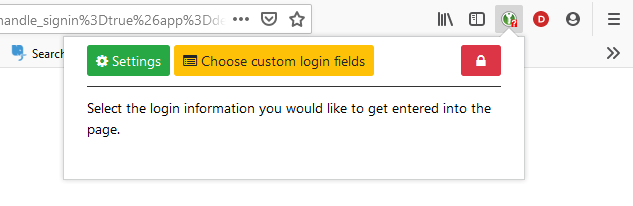
Maybe related: I have two entries for Google (two different accounts). One has https://accounts.google.com as URL, the other one https://google.com. Both have this same issue (showing 'Forgot email' screen). The issue: on most other websites the extension shows the two options when clicking on the extension icon. This list is shown when there's a red question mark on the icon. However, for Google, these two options aren't shown - only the related intro text:
keunes
on 2 Jun 2020
@keunes Please note that I wasn't talking about the entry URL but the URL you put to Site Preferences tab in the extension settings.
varjolintu
on 2 Jun 2020
Ah, sorry - I misunderstood that.
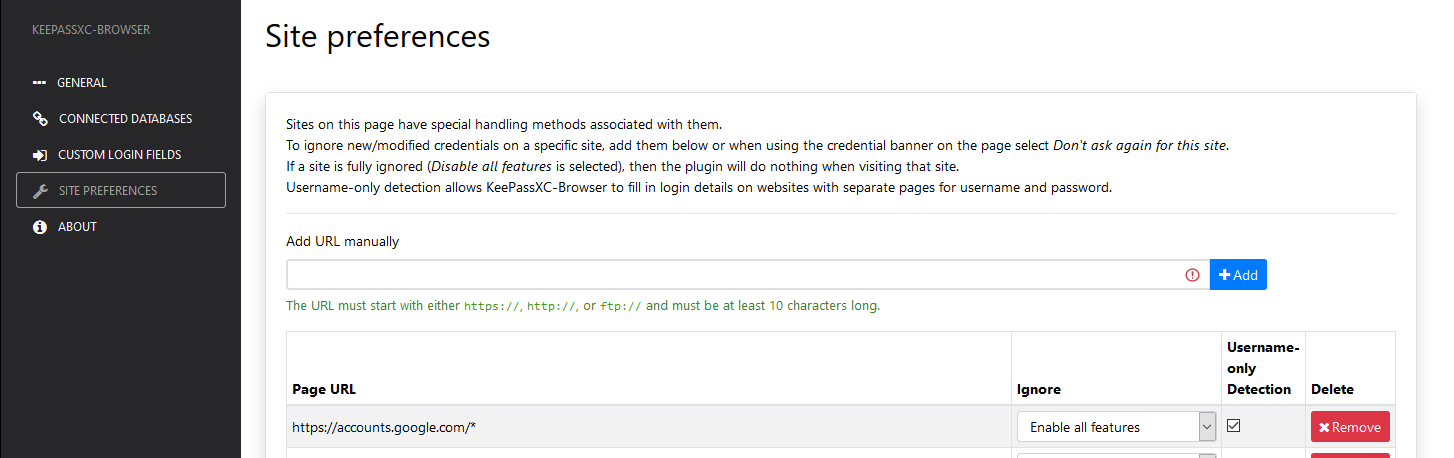
I just checked, and the URL you mentioned was indeed listed in the Site Preferences:
keunes
on 2 Jun 2020
I have the exact same problem.
I manually set the login-only detection setting like this (sorry for french language) :

I have the auto-submit feature enabled, because I want it.
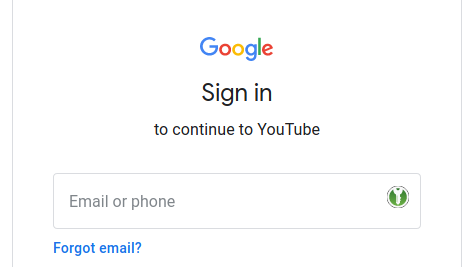
I am able to enter my email in the login box with keepassxc-browser :
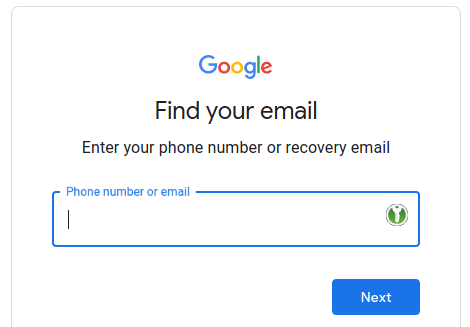
But it redirects me to the following form :
I think the problem is that the browser extension does the following :
_Detect login field
_Fill login
_Press TAB
_Press ENTER
The form is submitted by "clicking" the Forgot Email ? link.
If the press TAB step was removed it would work I guess. But would it break other websites ? Hard for me to tell, I installed KeepassXC 30 minutes ago...
Same thing happen if I disable login only detection, manually type my email in the login form and use the browser extension to input and submit my password : the password is entered correctly, but the extension presses TAB and then enter, which again, does not work in the google form : the password is just printed in clear text instead of being submitted because of the TAB step bringing the focus to the "Show Password" icon in the password field.
A workaround is to modify your KeepassXC Google entry to override the default auto-type sequence with the following one :
{USERNAME}{ENTER}{DELAY 1000}{PASSWORD}{ENTER}
Then just go to the google form, open KeepassXC, select your entry and press CTRL+SHIFT+V or whatever your auto-type shortcut is in the main app. This does not use the browser extension. And it is suuuper long to do.
Another workaround is to disable the auto-submit feature.
If you need more testing, I'm here. I think this is quite urgent as Google / GMail / Youtube sadly are the most visited websites and their login form not working with this extension is a big con to use KeepassXC IMO.
TL;DR : it's an auto submit problem.
 Ouack23
on 16 Sep 2020
Ouack23
on 16 Sep 2020
I'll test the Auto-Submit bug. It might detect a wrong submit from the form. Still, pressing ENTER without TAB should work, as using ENTER in the login input field usually submits the form. Because you use TAB it selects the "Forgot email" link.
Sadly Google/GMail/Youtube sites gives the biggest headaches.
varjolintu
on 16 Sep 2020
Indeed, this function seems not to be working.
// Get the form submit button instead if action URL is same as the page itself
kpxcForm.getFormSubmitButton = function(form) {
    const action = kpxc.submitUrl || form.action;
    if (action.includes(document.location.origin + document.location.pathname)) {
        for (const i of form.elements) {
            if (i.type === 'submit') {
                return i;
            }
        }
    }

    // Try to find another button. Select the first one.
    const buttons = Array.from(form.querySelectorAll(kpxcForm.formButtonQuery));
    if (buttons.length > 0) {
        return buttons[0];
    }

    // Try to find similar buttons outside the form which are added via 'form' property
    for (const e of form.elements) {
        if ((e.nodeName === 'BUTTON' && (e.type === 'button' || e.type === 'submit' || e.type === ''))
            || (e.nodeName === 'INPUT' && e.type === 'button')) {
            return e;
        }
    }

    return undefined;
};
The google Next button is the second button and not the first, and moreover is outside of the login form.
The Forgot Email ? button is inside the form and the first, so I think it is selected as submit.
Now, I don't have any clue on how to correct this issue while keeping generic code... F*cking Google !!
Ouack23
on 16 Sep 2020
@Ouack23 I'll find a way.
varjolintu
on 16 Sep 2020
Fixed. I had to add a special handling for accounts.google.com, but this is necessary because it's a popular page. We want to ensure the compatibility of these sites.
varjolintu
on 16 Sep 2020
Related issues
 muchqs
·
4Comments
muchqs
·
4Comments
 gwerbin
·
4Comments
gwerbin
·
4Comments
 kylesorkness
·
5Comments
kylesorkness
·
5Comments
 whit-colm
·
4Comments
whit-colm
·
4Comments
 tolot27
·
5Comments
tolot27
·
5Comments
Most helpful comment
Fixed. I had to add a special handling for
accounts.google.com, but this is necessary because it's a popular page. We want to ensure the compatibility of these sites.