Keepassxc-browser: Strange TOTP behaviour on login.xing.com with MacCtrl+Shift+T
Expected Behavior
I would expect, that the input shortcut for TOTP would work as on all other sites, but keepassxc-browser fails to input the current TOTP without any error and leaves the selected input field blank.
Current Behavior
keepassxc-browser seems to do nothing, I need to copy and paste the TOTP from keepassxc manually.
Possible Solution
Strangely, while using MacCtrl+Shift+U before MacCtrl+Shift+T, an error message is presented and then the TOTP will be correctly entered.
Steps to Reproduce (for bugs)
- login to your xing.com profile
- see the 2fa page after a successful login
- try to insert TOTP with the adjusted hotkey
- use the hotkey for inserting username and passwort and then again the TOTP -> which will work.
Debug info
KeePassXC - 2.4.3
KeePassXC-Browser - 1.5.2
Operating system: Mac/
Browser: Firefox
 schwedenmut
All 22 comments
What is the error message?
Sometimes when there are multiple credentials, correct credential for TOTP cannot be regognized. Workaround for this is to select the correct credentials using the popup and then fill the TOTP. With single credentials, the TOTP should be always found.
 varjolintu
on 17 Oct 2019
varjolintu
on 17 Oct 2019
I only have one entry for xing in keepassxc, so there is only one credential displayed. When using the TOTP shortcut, there is no error message at all. When first using input of username/credential shortcut, the error message is Fehler: Auszufüllende Felder können nicht gefunden werden (engl: Error: Fields to be filled in cannot be found) which is correct since there is only the one input field for the TOTP.
schwedenmut
on 17 Oct 2019
This would need debugging of the site. I have problems creating account to that page (I don't want to use my personal email for testing sites).
varjolintu
on 17 Oct 2019
Would it be helpful, if I submit the HTML from the 2FA page? Or can I provide any additional information (except for my personal credentials 😉)?
schwedenmut
on 17 Oct 2019
Sorry, I meant debugging the extension itself. The content script is available via Web Inspector.
varjolintu
on 17 Oct 2019
Oh, ok. When using the shortcut, the following message is displayed in the console Error 14: Keine URL angegeben keepass.js:1060:13
schwedenmut
on 17 Oct 2019
So the credentials are not found for that URL. You can try to make a clone entry with the TOTP page URL, or alternatively make the main entry's URL to contain everything possible, like: https://example.com.
varjolintu
on 17 Oct 2019
Hmpf, but why are the credentials/TOTP settings found after I use the username/password shortcut 🤔 - really a strange behaviour.
I did what you suggested. Made a clone of the entry in KeePassXC with the whole URL to the TOTP page. Reloaded everything. Restarted Keepassxc and firefox. But still not working with the same error message.
schwedenmut
on 17 Oct 2019
This is because currently there's no command for retrieving just the TOTP. It's received with the credentials. This is why it works after the shortcut.
Another thing you can try is to add the TOTP page URL to extension's Site Preferences and enable Username-only detection for it. It could help retrieving the credentials.
varjolintu
on 17 Oct 2019
Thanks for the further reply and clarification. Tried your suggestion, doesn't work either.
Probably somebody else is using xing or can give a hand debugging?
schwedenmut
on 18 Oct 2019
https://github.com/keepassxreboot/keepassxc-browser/wiki/Troubleshooting-guide#debug-the-content-script
Put a breakpoint to https://github.com/keepassxreboot/keepassxc-browser/blob/develop/keepassxc-browser/content/keepassxc-browser.js#L1238 and step over to see where it fails exactly. Does it get the index or is kpxc.credentials empty?
varjolintu
on 18 Oct 2019
Ok, thanks for the feedback.
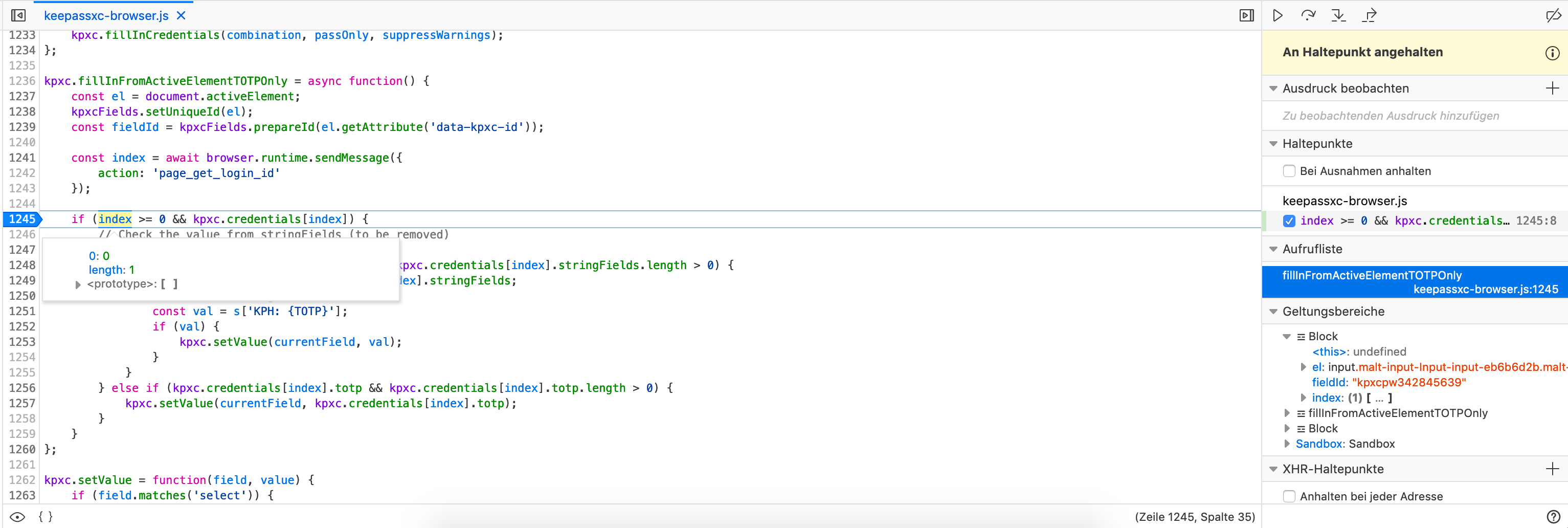
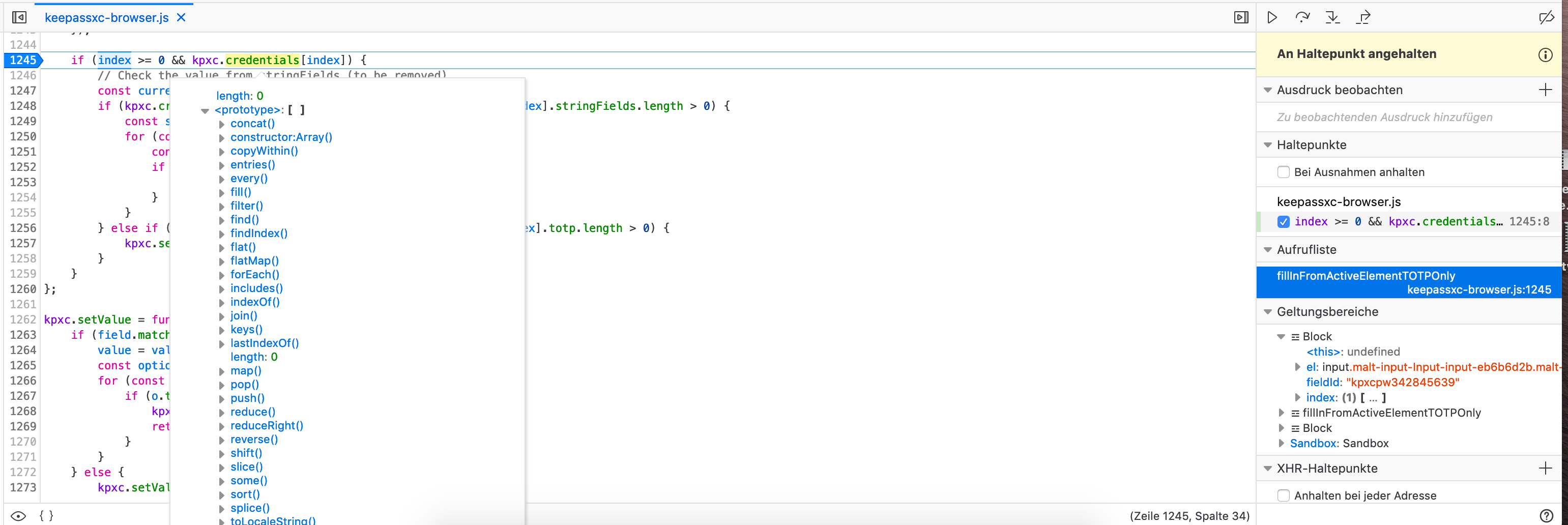
| index | kpxc.credentials[index] |
|---|---|
| |
| |
|
But it jumps to line 1257 with currentField undefined.
It never runs through line 1247 const currentField = _fs(fieldId);
schwedenmut
on 18 Oct 2019
Thanks! I'll check this one out.
varjolintu
on 18 Oct 2019
I made some code cleaning? Are you ready to try a patch? Btw, you didn't say anything about the kpxc.credentials array. Is it empty? (Just don't take a screenshot that can reveal any credentials inside it)
varjolintu
on 18 Oct 2019
https://github.com/keepassxreboot/keepassxc-browser/archive/fix/promise_cleaning.zip
And the instructions for loading it: https://github.com/keepassxreboot/keepassxc-browser/wiki/Loading-the-extension-manually
varjolintu
on 18 Oct 2019
kpc.credentials array has a length of 0 👉second screenshot in https://github.com/keepassxreboot/keepassxc-browser/issues/645#issuecomment-543768962.
Thanks for the patch, I will now try that one 👏👍
schwedenmut
on 19 Oct 2019
Then it means the credentials are not received for that page/URL.
varjolintu
on 19 Oct 2019
Just checked with the patched version. This worked flawlessly on xing the first try, but after logging out and trying again it doesn't work for the TOTP anymore 🧐
schwedenmut
on 19 Oct 2019
Ah, with the patched version it works, when I go to the TOTP page directly after the login. If I then refresh this TOTP page - which works because I still have a valid session from the credentials login - the TOTP shortcut doesn't work and the breakpoint will never be reached.
schwedenmut
on 19 Oct 2019
Glad to hear it works even slightly better. The credentials are lost if you refresh the page. We don't keep anything in the extension's memory, except after a login form submit, like in this case.
varjolintu
on 19 Oct 2019
your approach makes totally sense. I think this is just a corner case with the xing login flow. I think there is no reason to refresh that TOTP page except for my testing.
I am looking forward fo the next version of the browser plugin. Thanks for your guidance and support. Also the feedback and insights into debugging plugins - I have never done this before 🎉.
schwedenmut
on 19 Oct 2019
Thank you for the help! I found few other bugs also when investigating this. So, the next version will have this fixed. Of course, in the meanwhile you can keep using that patch if you like.
varjolintu
on 19 Oct 2019
Related issues
 christophetd
·
4Comments
christophetd
·
4Comments
 flibustenet
·
4Comments
flibustenet
·
4Comments
 dgnuff
·
3Comments
dgnuff
·
3Comments
 Generator
·
5Comments
Generator
·
5Comments
 ForsakenHarmony
·
4Comments
ForsakenHarmony
·
4Comments
Most helpful comment
https://github.com/keepassxreboot/keepassxc-browser/wiki/Troubleshooting-guide#debug-the-content-script
Put a breakpoint to https://github.com/keepassxreboot/keepassxc-browser/blob/develop/keepassxc-browser/content/keepassxc-browser.js#L1238 and step over to see where it fails exactly. Does it get the
indexor iskpxc.credentialsempty?