Keepassxc-browser: honor "Don't ask again for this site" / Dismiss
Expected Behavior
i often access a site where the password combines a known leader with a value from my phone. i store the leader in the database and add the changing value later. keepassxc-browser asks to store the new password. i expect if i check the "Don't ask again for this site" box it will not "ask again for this site".
when i visit this site again keepassxc-browser should not show the New / Update / Dismiss bar.
Current Behavior
the New / Update / Dismiss bar appears every time i visit this site.
Possible Solution
store the "Don't ask again for this site" setting in the database so it is disabled for this site on all browsers on all computers.
Steps to Reproduce (for bugs)
- Access a site requiring a password.
- Change the password.
- Click "Don't ask again for this site" then "Dismiss".
- Close the tab.
- Access the site again.
- Change the password.
- Notice the New / Update / Dismiss bar shows again.
Debug info
KeePassXC - 2.5.0-snapshot, git commit a07ea12ac4ea882283dd47120dfeddadd0bcb21c
KeePassXC-Browser - 1.5.1, updated September 29, 2019
Operating system: Linux
Browser: Firefox
 jkt628
All 27 comments
What's the site URL? I can check if there's something strange happening. Or does this happen with every site?
The extension settings are not synced, and it's not possible to import/export them yet.
 varjolintu
on 2 Oct 2019
varjolintu
on 2 Oct 2019
unfortunately, the sites are internal to my company but the authentication pages require simple username and password entries. here is a sample image:

PIN is a configured Personally Identifiable Number.
OTP is a periodic One Time Password generated on phone.
jkt628
on 3 Oct 2019
Have you verified the URL is really correct? You can use a wildcard to test if it works better, for example https://site.com/*
varjolintu
on 3 Oct 2019
yes, notice the keepassxc icon in the Username field above? the site is definitely recognized and my username and leader are filled in correctly if i click the icon or hit Alt-Shift-U.
jkt628
on 4 Oct 2019
I haven't been able to reproduce this. Can you test this with some other site? Does this happen only with that page you are referring to?
varjolintu
on 15 Oct 2019
i've watched more closely (instead of the usual mindless clicking) and there are three company internal sites where i've noticed this, all configured in my second KP database. yes, i separate Home and Work and they meet only at keepassxc-browser.
jkt628
on 15 Oct 2019
This would need debugging the keepassxc-browser.js content script and see why the ignore site check fails. The check is mainly done at line 896 inside kpxc.initCredentialsFields().
varjolintu
on 16 Oct 2019
To assist identifying this bug please see the current workflow I observe in Firefox Nightly (72) - test example is logging into GitHub. I've been successfully using this db for a couple of years. Note I'm using the "Dark background and light text" extension and some fields become obfuscated under its default settings - I'll attempt to explain when that occurs:
An unlocked keepassxc db shows as a locked keepassxc-browser icon in taskbar. Previous behaviour was to for this to turn GREEN when db is unlocked.

Username field shows a greyed-out keepassxc-browser icon that switches to a GREEN keepassxc-browser icon, when the db is unlocked.

Clicking this green (unlocked db) icon provokes an error message "Error! No logins found." This is reproduced even when I have "Chose[n] custom login fields for this page."
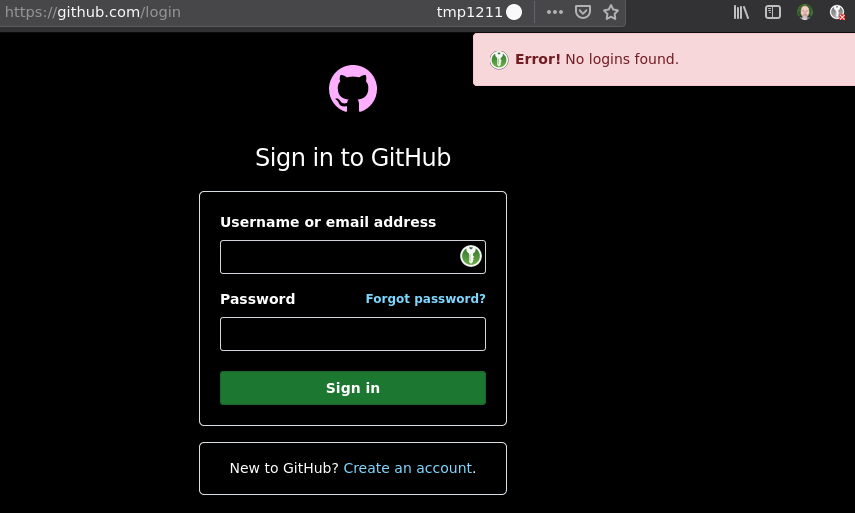
As the autofill functionality doesn't work, I paste in the username and password and credentials are accepted. A banner message now incorrectly shows these credentials have apparently changed - now presenting me with THREE options: new, update (obfuscated by dark background and light text extension in screenshot), dismiss. I have 2FA setup for this GitHub account - this does not affect the behaviour seen in keepassxc-browser as it reproduces on every saved website's sign-in process.

Clicking on UPDATE provokes an error message: "Error! Credentials cannot be saved or updated to a closed database." The db is in fact open.

I have on another site (presumably in an earlier version of this extension) instead clicked on NEW. This creates a new set of credentials for the same website. Dropping back to step 3 in the above list, even a NEWly created set of credentials provokes the message "Error! No logins found."
The only way to correctly proceed, in this test, is to DISMISS (via the banner in step 4).
Once I complete the 2FA, GitHub is now correctly signed-in.
 bunnybooboo
on 23 Oct 2019
bunnybooboo
on 23 Oct 2019
@bunnybooboo We don't support Beta or Nightly browsers because they ofter break multiple API's and can cause strange bugs. If you can reproduce this with the stable Firefox 70, then I will look at the issue.
varjolintu
on 23 Oct 2019
@varjolintu OK thanks. When trying to reproduce in a fresh Release profile I had to CONNECT to the db. I've done that in Nightly and it seems to work correctly. Not sure what clunky backwards nonsense I've done this last few weeks but I'm relieved it's at least back, fully functional. Some weeks back I had to resort to a backed-up db and my probs must have been surrounding that switch and nothing to do with this OP's issue. Apologies, I'll sneak away reflecting on my foolish error. 🤦🤣
bunnybooboo
on 23 Oct 2019
@bunnybooboo Every database must be associated to the extension before it can access any credentials.
varjolintu
on 24 Oct 2019
This issue happens to me on https://mail.protonmail.com.
Note: I have a separate mailbox password which I have to get manually, which is why the extension thinks the passwords changed.
Edit: Arch Linux with Firefox 70.0.0.1 and KeepassXC 2.5.1
 Nitroretro
on 27 Nov 2019
Nitroretro
on 27 Nov 2019
@Nitroretro Thanks, I will check out if I can reproduce it.
varjolintu
on 27 Nov 2019
For me it happens on every site. These are the ones I checked and all have the same problem:
protonmail
monkkee
github
amazon
I can't seem to configure shortcuts in the extension either. It throws this error my way (other shortcut configuration changes raise errors too):
Error: Shortcut for fill_username_password has not been changed!
It seems like the extension just can't save any configurations. It's not just the "Don't ask again ..."
I'm using Firefox Browser 70.0.1 (64-bit) for Arch Linux and KeePassXC 2.5.1 (both from pacman)
 r0ar
on 27 Nov 2019
r0ar
on 27 Nov 2019
I found a bug in the implementation. Fixing it to the next version. Going to release it tomorrow.
Thanks for reporting this!
varjolintu
on 27 Nov 2019
Was the shortcut config problem related?
r0ar
on 27 Nov 2019
@r0ar The shortcut problem is not related to this. Firefox is quite picky with the shortcuts. It doesn't allow you to override any of the browser's own shortcuts, and doesn't even report that it's reserved when the error triggers.
varjolintu
on 27 Nov 2019
@varjolintu You're right. I checked with a lot of other shortcuts and was able to save at least one of them.
r0ar
on 27 Nov 2019
I am still having the problem even with this fix (keepassxc-browser version 1.5.4 and KeepassXC version 2.5.3). Exactly the same behaviour as in the original report. Should I create another issue?
 Dehumanizer77
on 4 Mar 2020
Dehumanizer77
on 4 Mar 2020
@Dehumanizer77 What is the URL where this happens? And what is the URL saved to the Site Preferences (made by the banner option)?
varjolintu
on 4 Mar 2020
I have probably missed this reply... It happens almost on every login page. But for example phpmyadmin on my server does this, and the URL in site preferences matches the URL of the phpmyadmin (https://.../phpmyadmin/index.php). When I select "Disable all features", it doesn't bother me anymore. But if it's just set to disable new/modified credentials, it keeps popping up at every login.
Dehumanizer77
on 10 May 2020
I switched from keepass to keepassxc two months ago and never manage to have this feature work.
Both on FF 76 & 77, on Linux & Windows, it just don't work.
And I'm currently using the very last version (KeePassXC-Browser 1.6.4)
I have a few websites with passwords outside from keepassxc and while their URL is correctly disabled in the plugin settings (in keepassxc-browser's site settings section), the banner is always displayed.
Sites are both from Internet or Intranet, like PostfixAdmin, Roundcube, Riot (matrix.org web client),...
Please re-open that bug until it's really fixed.
 Stopi
on 16 Jun 2020
Stopi
on 16 Jun 2020
@Stopi I just tested this with https://riot.im/app/#/login adding the same URL to Site Preferences with "Disable new/modified credentials" setting and I cannot see the banner. Same with Roundcube (https://emailmg.ipage.com/roundcube/). Everything seems to work just fine.
varjolintu
on 16 Jun 2020
@varjolintu so basically you're saying: "it's working on my computer".
As much as I can appreciate you took the time to answer, I have to admit this isn't helpful.
Please have a look here, I've captured my desktop while trying to connect to my office's Roundcube.
Stopi
on 21 Jun 2020
@varjolintu so basically you're saying: "it's working on my computer".
As much as I can appreciate you took the time to answer, I have to admit this isn't helpful.Please have a look here, I've captured my desktop while trying to connect to my office's Roundcube.
I admit it might not be helpful but it's a standard procedure to try to reproduce the problem. With the site in the video it seems the default URL doesn't work for the ignore stuff. But if you change it to https://mail.pasteur.la/* it works. Maybe we should store the wildcarded URL by default so these kind of issues wouldn't start popping up.
varjolintu
on 21 Jun 2020
Thanks, this is an effective workaround.
Now this is still a bug to me.
When one clicks the "don't ask me" button, he's expecting not to be asked any more.
If it works smoothly, then I can recommend keepassxc to my friends/family/customers.
So I agree, maybe you should store the wildcard by default, or think of something that makes it effective.
Thanks again for your quick support.
Stopi
on 21 Jun 2020
@Stopi I'm going to make a fix for it to the next version with the wildcard added by default. That should do the trick.
varjolintu
on 21 Jun 2020
Related issues
 FWDekker
·
3Comments
FWDekker
·
3Comments
 maniqui
·
3Comments
maniqui
·
3Comments
 kylesorkness
·
5Comments
kylesorkness
·
5Comments
 flibustenet
·
4Comments
flibustenet
·
4Comments
 sliwowitz
·
5Comments
sliwowitz
·
5Comments
Most helpful comment
I found a bug in the implementation. Fixing it to the next version. Going to release it tomorrow.
Thanks for reporting this!