Keepassxc-browser: Failed to save credentials
Expected Behavior
After logging in to a site, when the little red lock blinks on the menu bar, Keepassxc browser should be able to click "new" and save my entry.
Current Behavior
I never have been able to save credentials with KeePassXC, the "new" and "update" options are unavailable every single time. The only active button is "dismiss", and yes, I have triple-checked that the database is open
Steps to Reproduce (for bugs)
- Login to a page
- see the blinking lock on the menu bar
- Click on it before it stops blinking
- Find that the New and Update buttons can't be clicked
Debug info
KeePassXC - Version 2.4.0
Revision: c51752d
Distribution: Snap
Libraries:
- Qt 5.9.5
- libgcrypt 1.8.1
Operating system: Ubuntu Core 18
CPU architecture: x86_64
Kernel: linux 4.18.0-17-generic
Enabled extensions:
- Auto-Type
- Browser Integration
- SSH Agent
- KeeShare (signed and unsigned sharing)
- YubiKey
Operating system: Linux Ubuntu Cosmic
Browser: Firefox 66.0.2
 vasyugan
All 19 comments
Is this a situation where you don't have any existing credentials with the URL and you are trying to save new ones just using the password field with an empty username? Or could you give the page URL so I can try to reproduce it? Thanks.
 varjolintu
on 10 Apr 2019
varjolintu
on 10 Apr 2019
Am 10.04.19 um 12:35 schrieb Sami Vänttinen:
>
Is this a situation where you don't have any existing credentials with
the URL and you are trying to save new ones just using the password
field with an empty username?I have just generated a password via the generate buttons that
Kepassxc-browser adds to password fields and now the password is in the
clipboard and I want to save it without having to manually add an entry
in KeePassXC
Or could you give the page URL so I can try to reproduce it? Thanks.
Actually, I don't work for me at /any/ URL, but this time I tried at
https://www.eventbrite.de/
vasyugan
on 10 Apr 2019
I'm sorry but I cannot reproduce it. This would need debugging from your side.
varjolintu
on 10 Apr 2019
Am 10.04.19 um 13:48 schrieb Sami Vänttinen:
>
I'm sorry but I cannot reproduce it. This would need debugging from
your side.If you advise what I need to do, I gladly will, because this has annoyed
me for many months already.
—
You are receiving this because you authored the thread.
Reply to this email directly, view it on GitHub
https://github.com/keepassxreboot/keepassxc-browser/issues/467#issuecomment-481657288,
or mute the thread
https://github.com/notifications/unsubscribe-auth/ADKOOJg1tW3b5zTll6qAiMbp0vfegCtYks5vfc9_gaJpZM4cmpMk.
vasyugan
on 10 Apr 2019
With Firefox you will have to go to about:debugging and launch the debug for KeePassXC-Browser. Then you must find the file popup/popup_remember.js. Put a breakpoint to the start of the main _initialize function and see what values the tab.credentials has when you open the popup dialog after icon blinking.
varjolintu
on 10 Apr 2019
I am not sure where to find popup/popup_remember.js. It isn't selectable in the left pane. Or am I in the wrong place?

vasyugan
on 10 Apr 2019
I see the file when I open the subfolder popups in the XPI file, but I don't see it in the debugger. How do I get it?
vasyugan
on 10 Apr 2019
https://developer.mozilla.org/en-US/docs/Mozilla/Add-ons/WebExtensions/Debugging#Debugging_popups
Or just open the popup once so the code loads to the debugging screen.
varjolintu
on 10 Apr 2019
https://developer.mozilla.org/en-US/docs/Mozilla/Add-ons/WebExtensions/Debugging#Debugging_popups
Or just open the popup once so the code loads to the debugging screen.
Will try. Meanwhile I have thefollowing:
Error: Type error for parameter options (Property "buttons" is unsupported by Firefox) for notifications.create. browserAction.js:266:13
Error: Promised response from onMessage listener went out of scope
Those are known issues.
varjolintu
on 10 Apr 2019
OK, I still haven't managed to bring up the variables pane even though I have set a breakpoint. I guess I'll stop searching for now.
vasyugan
on 10 Apr 2019
OK, I still haven't managed to bring up the variables pane even though I have set a breakpoint
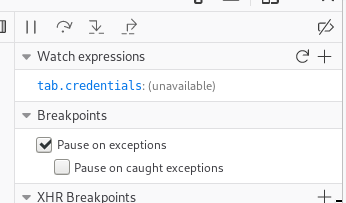
When you have the code, you can just hover over the variable, if it is currently visible, or simply add that variable to the watched expressions, like this:
 rugk
on 23 Apr 2019
rugk
on 23 Apr 2019
I'm observing this as well. It works exactly one time (nope, sometimes it works more than once), then I have to restart KeePassXC, which will make it work one time again etc.
Firefox 66.0.4
keepassxc-browser 1.4.3
keepasxc info:
KeePassXC - Version 2.4.1
Revision: 7bafe65

Qt 5.12.3
Debugging mode is disabled.

Operating system: Arch Linux
CPU architecture: x86_64
Kernel: linux 5.0.13-1-ck-haswell

Enabled extensions:
- Auto-Type
- Browser Integration
- SSH Agent
- KeeShare (signed and unsigned sharing)
- YubiKey

Cryptographic libraries:
 libgcrypt 1.8.4
Maybe some sort of setting-guarded debug logging would be helpful to resolve issues like this, since expecting users to delve into JavaScript debuggers isn't, realistically speaking, going to work out.
 enkore
on 13 May 2019
enkore
on 13 May 2019
After seeing it several times in a row, and restarting KeepassXC a few times, it hasn't happened the last ~dozen or so times I tried. I did notice however that occasionally the extension icon and its status popup report that it couldn't connect to KeepassXC.
I did not restart Firefox, or enabled/disabled/uninstalled/reinstalled the extension at any point.
I suspect this might be a wider, sporadic issue with the KeepassXC connection and it just becomes more obvious when you get the "failed to save credentials" error message/popup.
enkore
on 13 May 2019
The next version has a fix for the popup connection issue.
varjolintu
on 14 May 2019
I have done the above debugging steps, and it looks like frequently there is no username present in the tab.credentials variable, which is what makes the buttons disabled. Not sure why it gets the username on some sites but not on other sites.
 brondsem
on 16 Jun 2019
brondsem
on 16 Jun 2019
The whole credential saving is being redesigned and refactored, so any fixes for this will be handled in #351.
varjolintu
on 17 Jun 2019
Still having the issue?
varjolintu
on 15 Oct 2019
Still having the issue?
seems to be fixed. Thanks!
vasyugan
on 23 Jan 2020
Related issues
 christophetd
·
4Comments
christophetd
·
4Comments
 tolot27
·
5Comments
tolot27
·
5Comments
 compilenix
·
5Comments
compilenix
·
5Comments
 Generator
·
5Comments
Generator
·
5Comments
 brwolfgang
·
4Comments
brwolfgang
·
4Comments
Most helpful comment
I'm observing this as well. It works
exactlyone time (nope, sometimes it works more than once), then I have to restart KeePassXC, which will make it work one time again etc.Firefox 66.0.4
keepassxc-browser 1.4.3
keepasxc info:
Maybe some sort of setting-guarded debug logging would be helpful to resolve issues like this, since expecting users to delve into JavaScript debuggers isn't, realistically speaking, going to work out.