Keepassxc-browser: Passwords not saved
Steps to Reproduce (for bugs)
- Go to https://bugs.documentfoundation.org.
- Register and save password.
Expected Behavior
Password saved in group "KeePassXC-Browser" or so.
Current Behavior
The group is not even created. Only the old "KeePassHttp Passwords" is still there.
Also the popup showed no reaction when clicking on "New". It did not disappear.
Possible Solution
Maybe related to other bugs?
Debug info
KeePassXC-Browser Version: 1.0.1
KeePassXC Version: 2.3.1
Operating system: Linux
Browser: Firefox 59
Proxy used: yes
 rugk
rugk
All 30 comments
What happens when you click twice? Might be #80
 macau23
on 27 Mar 2018
macau23
on 27 Mar 2018
I have the same problem. On some sites the 'New' button does not react at all (even on multiple clicks).
 guido4000
on 27 Mar 2018
guido4000
on 27 Mar 2018
I have the same problem, sometimes the "new" button does nothing.
I think it happens when despite being linked to keepassXC there must be something broken because you can not add new passwords, and it looks like the pluging isn't able to access the databese either although in the interface it looks like it can, becase is not detecting websites either.
Usually shutting down keepassXC and open it again fix the problem. There must some inconsistence .
 lordraiden
on 30 Mar 2018
lordraiden
on 30 Mar 2018
Same problem here.
KeePassXC-Browser Version: 1.0.1
KeePassXC Version: 2.3.1
macOS High Sierra
 woj-tek
on 31 Mar 2018
woj-tek
on 31 Mar 2018
Cannot reproduce this. Is is possible for you to debug the extension? Put breakpoints to keepass.js lines 172 and 173. See if any parameters are empty in the messageData.
 varjolintu
on 2 Apr 2018
varjolintu
on 2 Apr 2018
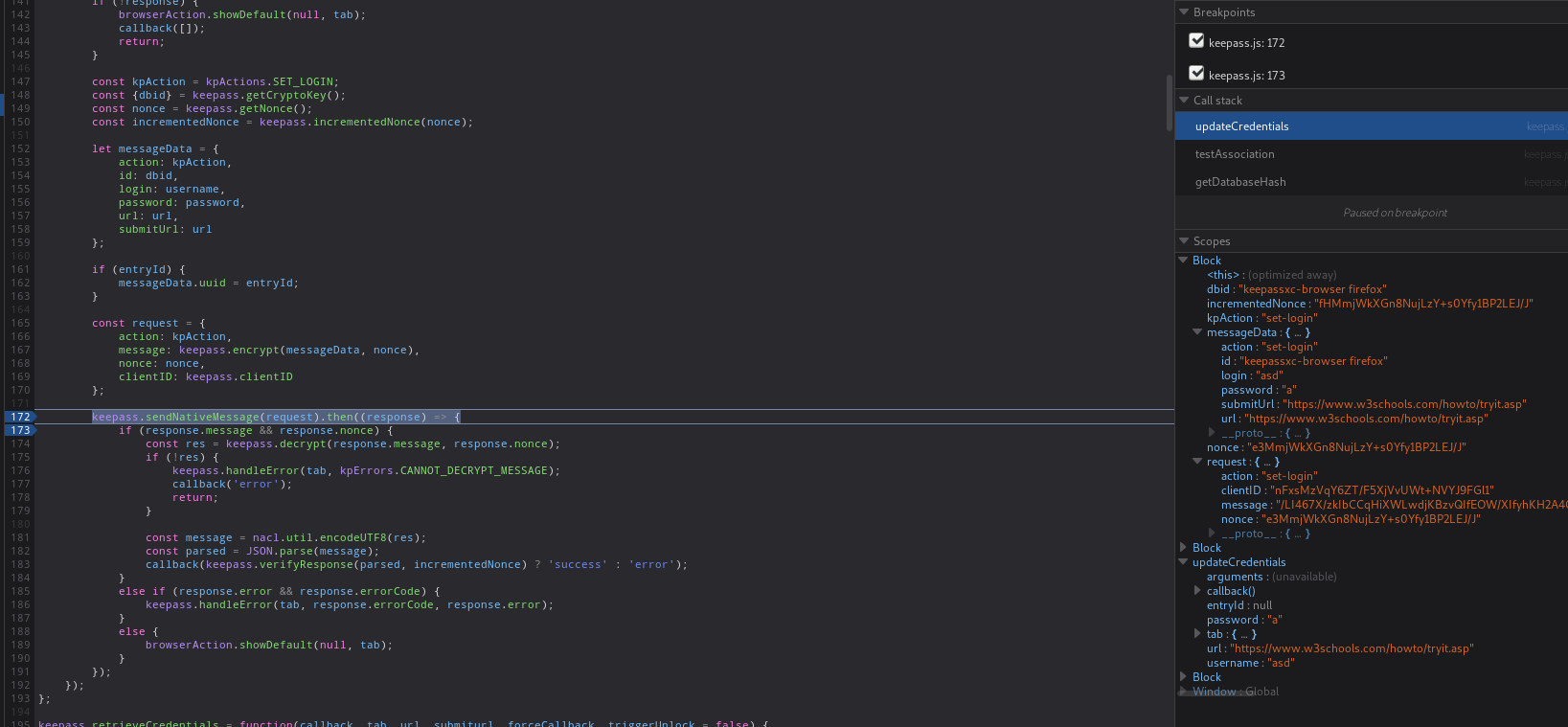
Can reproduce the issue on https://www.w3schools.com/howto/tryit.asp?filename=tryhow_css_signup_form_modal
 z3ntu
on 2 Apr 2018
z3ntu
on 2 Apr 2018
@z3ntu That site works just fine for me (both new and update). I even tried to delete the password group from my database and a new one was created. So this is a bit strange.
Thank you for finding a nice test page for this!
varjolintu
on 3 Apr 2018
Anyway, BTW, it is reproducible with all sites.
I looked at about:debugging and got some console errors here. Not all have to be related to this issue.
I tried to trigger the saving and click save on english.stackexchange.com.
So first a general overview, were I tried to trigger it multiple times:
Error 8: KeePassXC-Verbindung fehlgeschlagen, bitte erneut versuchen keepass.js:954:5
19:03:08.549 ReferenceError: require is not defined[Learn More] a77a9df9-ad79-46bc-8aad-99052d1e43dd:2:14
19:03:13.399 Quota 'mvelo=editor&id=fec4c543dfa3c5e53d997b7"a=10485760&embedded=true' is not a valid port number!: ActorsParent.cpp:8468 (unknown)
19:03:13.399 Quota Origin 'moz-safe-about+blank+mvelo=editor&id=fec4c543dfa3c5e53d997b7"a=10485760&embedded=true' failed to parse, handled tokens: 'moz-safe-about', 'blank': ActorsParent.cpp:8218 (unknown)
19:03:13.401 IndexedDB UnknownErr: ActorsParent.cpp:599 (unknown)
19:04:11.751 Webconsole context has changed
19:04:21.354 Error 8: KeePassXC-Verbindung fehlgeschlagen, bitte erneut versuchen keepass.js:954:5
19:04:23.862 this._recipeManager is null LoginManagerParent.jsm:86
19:04:23.873 Invalid chrome URI: /
19:04:26.459 ReferenceError: require is not defined[Learn More] a77a9df9-ad79-46bc-8aad-99052d1e43dd:2:14
19:04:26.505 Cannot send message: Other side disconnected: ["MessageChannel:Response", {result:0, messageName:433336, recipient:{}, value:{expts:["docs.google.com/spreadsheets", "slack.com", "messenger.com"]}}] ExtensionUtils.jsm:527
19:04:26.597 ReferenceError: require is not defined[Learn More] a77a9df9-ad79-46bc-8aad-99052d1e43dd:2:14
19:04:28.071 ReferenceError: require is not defined[Learn More] a77a9df9-ad79-46bc-8aad-99052d1e43dd:2:14
19:04:53.958 this._recipeManager is null LoginManagerParent.jsm:86
19:04:53.973 Invalid chrome URI: /
19:04:57.255 this._recipeManager is null LoginManagerParent.jsm:86
19:04:57.265 Invalid chrome URI: /
19:05:01.588 ReferenceError: require is not defined[Learn More] a77a9df9-ad79-46bc-8aad-99052d1e43dd:2:14
19:05:03.774 Error 8: KeePassXC-Verbindung fehlgeschlagen, bitte erneut versuchen keepass.js:954:5
19:05:05.889 [Exception... "Component returned failure code: 0xc1f30001 (NS_ERROR_NOT_INITIALIZED) [nsIMessageSender.sendAsyncMessage]" nsresult: "0xc1f30001 (NS_ERROR_NOT_INITIALIZED)" location: "JS frame :: resource://gre/modules/ExtensionUtils.jsm :: sendAsyncMessage :: line 524" data: no]
BTW the localized message "KeePassXC-Verbindung fehlgeschlagen, bitte erneut versuchen ", whcih states the KeePassXC connection failed, is surprising, because AFAIK the connection worked and the UI never indicated or suggested me to reconnect the session.
Also there are likely unrelated issues:
- first, why is it constantly requesting credentials for Google Docs, Slack and such things? They are not even saved in the password file I use.
- secondly there are some likely unrelated issues, which may also not be so nice. So better try to get rid of errors in the console.
So finally when I manually trigger password saving and click on the KeePassXC icon:
19:08:25.788 ReferenceError: require is not defined[Learn More]  a77a9df9-ad79-46bc-8aad-99052d1e43dd:2:14
19:08:29.614 this._recipeManager is null  LoginManagerParent.jsm:86
    receiveMessage resource://gre/modules/LoginManagerParent.jsm:86:9
    receiveMessage jar:file:///usr/lib64/firefox/browser/omni.ja!/components/nsBrowserGlue.js:188:15
    receiveMessage self-hosted:1036:17
19:08:29.625 Invalid chrome URI: /
When I then go on (different try, that's why the times are different), it get's over 100 promise errors and two exceptions for some component, which returned an error:
19:11:57.901 Error 8: KeePassXC-Verbindung fehlgeschlagen, bitte erneut versuchen  keepass.js:954:5
19:11:58.676 this._recipeManager is null  LoginManagerParent.jsm:86
19:11:58.687 Invalid chrome URI: /
19:12:02.850 ReferenceError: require is not defined[Learn More]  a77a9df9-ad79-46bc-8aad-99052d1e43dd:2:14
19:12:02.879 [Exception... "Component returned failure code: 0xc1f30001 (NS_ERROR_NOT_INITIALIZED) [nsIMessageSender.sendAsyncMessage]"  nsresult: "0xc1f30001 (NS_ERROR_NOT_INITIALIZED)"  location: "JS frame :: resource://gre/modules/ExtensionUtils.jsm :: sendAsyncMessage :: line 524"  data: no]  (unknown)
    sendAsyncMessage resource://gre/modules/ExtensionUtils.jsm:524:51
    _handleMessage/deferred.promise< resource://gre/modules/MessageChannel.jsm:985:9
19:12:03.139 ReferenceError: require is not defined[Learn More]  a77a9df9-ad79-46bc-8aad-99052d1e43dd:2:14
19:12:09.614 [Exception... "Component returned failure code: 0xc1f30001 (NS_ERROR_NOT_INITIALIZED) [nsIMessageSender.sendAsyncMessage]"  nsresult: "0xc1f30001 (NS_ERROR_NOT_INITIALIZED)"  location: "JS frame :: resource://gre/modules/ExtensionUtils.jsm :: sendAsyncMessage :: line 524"  data: no]  (unknown)
    sendAsyncMessage resource://gre/modules/ExtensionUtils.jsm:524:51
    _handleMessage/deferred.promise< resource://gre/modules/MessageChannel.jsm:985:9
19:12:09.847 Error: Promised response from onMessage listener at onMessage@moz-extension://52e61681-a517-493a-98b8-54ae02c28680/background.js:132:9 went out of scope undefined
19:12:09.851 Error: Promised response from onMessage listener at @moz-extension://9ac43c25-d910-40f3-80f6-a9fa860c3e04/background/init.js:77:1 went out of scope  undefined
19:12:09.851 Error: Promised response from onMessage listener at onMessage@moz-extension://52e61681-a517-493a-98b8-54ae02c28680/background.js:132:9 went out of scope
The last thing in a colored output (first line there is just me writing stuff into the console to differentiate the parts when I do something):
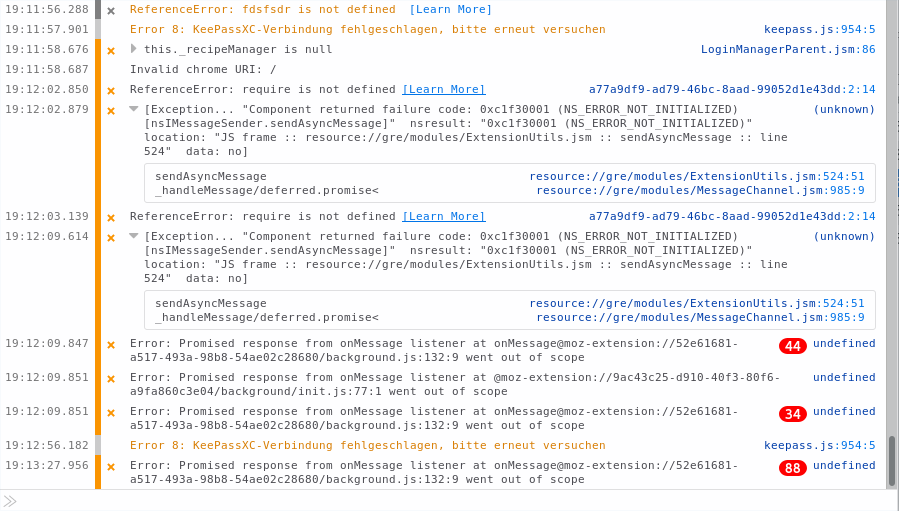
And BTW the promise errors don't stop there, over time they then go on (without me interacting with KeePassXC/the browser addon):
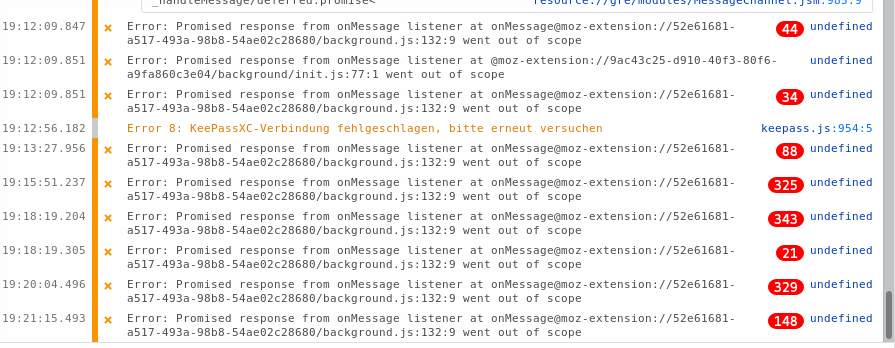
(So maybe they are also only so much, because I retried this thing multiple times.)
I hope this helps. Firefox 59
rugk
on 4 Apr 2018
Those background.js related errors are from different extension, not KeePassXC-Browser.
varjolintu
on 4 Apr 2018
Thanks, I've reported it to the author of that add-on.
rugk
on 4 Apr 2018
@rugk Btw, your error messages show that the extension is not even connected to the database you're trying to save the credentials to.
varjolintu
on 7 Apr 2018
Indeed it does say that. Please read what I wrote:
BTW the localized message "KeePassXC-Verbindung fehlgeschlagen, bitte erneut versuchen ", whcih states the KeePassXC connection failed, is surprising, because AFAIK the connection worked and the UI never indicated or suggested me to reconnect the session.
rugk
on 8 Apr 2018
If I could reproduce this I'd debug the KeePassXC process itself and see what really happens and why it thinks the extension is not connected in this case.
varjolintu
on 8 Apr 2018
I have the same issue : I can't save any password on any site with this extension
I'm on ubuntu 17.10 (XFCE) and Firefox 59.
It might be related to the database closing automatically though. But with the previous extension, I never had this problem (I think when I saved a password, the database would ask to be reopened)
 cdancette
on 18 Apr 2018
cdancette
on 18 Apr 2018
@cdancette Can you download the sources of this branch and give it a try? https://github.com/keepassxreboot/keepassxc-browser/tree/release_102
To load the extension manually, go to about:debugging and click "Load Temporary Add-on", and select manifest.json from the folder.
varjolintu
on 18 Apr 2018
When I login to a website, the icon becomes grey with a red cross and says "Timeout or not connected to KeepassXC" (but i am connected, if I do "reload" it becomes green again)
cdancette
on 18 Apr 2018
@cdancette Can you monitor what happens with keepassxc-proxy process during this behaviour? Does it quit by itself?
varjolintu
on 18 Apr 2018
I have the same issue, pressing the button on any webpage never saves new details to the database, on arch linux and firefox, as well as macos with firefox.
 mannp
on 25 Apr 2018
mannp
on 25 Apr 2018
@mannp Same instructions to you: check the behaviour of keepassxc-proxy process and try KeePassXC 2.3.2 (build from the sources) if possible.
varjolintu
on 25 Apr 2018
@varjolintu will do, will try and look after work today. I am using the lastest git on arch, so that doesn't seem to solve it for me.
Unless the 2.3.2 is a differant branch, not sure.
KeePassXC - Version 2.3.1-snapshot
Build Type: Snapshot
Revision: 5a84978Libraries:
- Qt 5.10.1
- libgcrypt 1.8.2
Operating system: Arch Linux
CPU architecture: x86_64
Kernel: linux 4.16.3-1-ARCHEnabled extensions:
- Auto-Type
- Browser Integration
- SSH Agent
- YubiKey
mannp
on 25 Apr 2018
@mannp It's a different branch.
varjolintu
on 25 Apr 2018
@varjolintu yes its the develop branch keepassxc-git arch aur is using, which I thought was ahead of any pre release branches, or have I misunderstood?
I've built the release/2.3.2 branch for my mac anyway and am trying that out too.
Thanks
mannp
on 25 Apr 2018
Please test if this still happens with KeePassXC 2.3.3 and KeePassXC-Browser 1.1.3.
varjolintu
on 11 May 2018
For me it worked now on https://www.w3schools.com/howto/tryit.asp?filename=tryhow_css_signup_form_modal

But I had to press three times on the extension icon, the first time the normal popup came, then had to close it again and then the password dialog came up which worked (see https://youtu.be/aX-NjgT9gwY)
z3ntu
on 11 May 2018
For some pages the popup doesn't show on a first try (there's a separate issue for this: #67). @rugk, are you still having the issue with saving the credentials? I'm tempted to close this issue and focus to continue #67.
varjolintu
on 12 May 2018
Yeah…
rugk
on 12 May 2018
I got same issue,
Cannot save password to database, even I clicked credentials under right button "KeePassXC-Browser".
All running with latest versions.
Thanks
 mwftts
on 6 Jul 2018
mwftts
on 6 Jul 2018
Inded, I can reproduce this again. (even if I use the context menu -> Save credentials)
rugk
on 6 Jul 2018
Still having the problem?
varjolintu
on 25 Jan 2019
no
rugk
on 25 Jan 2019
Related issues
 compilenix
·
5Comments
compilenix
·
5Comments
 metaxis
·
3Comments
metaxis
·
3Comments
 kylesorkness
·
5Comments
kylesorkness
·
5Comments
 brwolfgang
·
4Comments
brwolfgang
·
4Comments
 mrmeszaros
·
3Comments
mrmeszaros
·
3Comments
Most helpful comment
I have the same problem. On some sites the 'New' button does not react at all (even on multiple clicks).