Keepassxc-browser: Make allowed characters for pw generator configurable
Expected Behavior
Some websites allow only a limited set of characters for passwords.
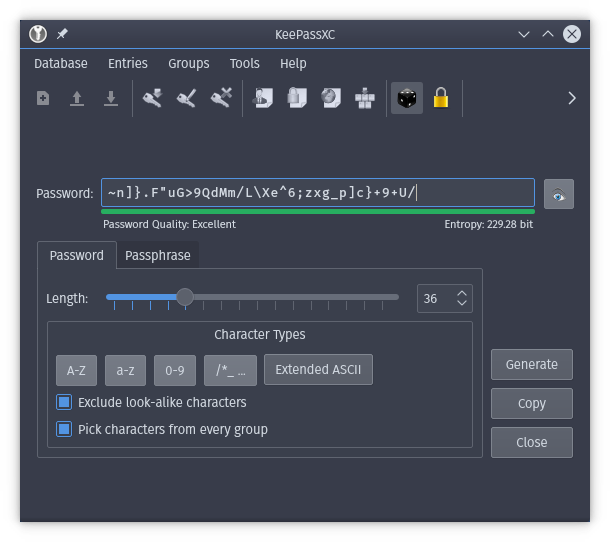
The password generator of keepassxc-browser should have the same options as the keepassxc program itself and this should be configurable for each password and not as global plugin configuration.
Current Behavior

Possible Solution
Debug info
KeePassXC - 2.3.1
keepassxc-browser - 1.0.1
Operating system: Linux
Browser: Firefox
Proxy used: NO
 sedrubal
All 8 comments
I think the browser-based password generator should include a button that opens the KeePassXC standalone generator which can pass the password back to the browser using native messaging. That way you get all the power and updates of the real password generator without bloating your plugin.
 droidmonkey
on 17 Mar 2018
droidmonkey
on 17 Mar 2018
Indeed.
Maybe it should just always use KeePassXC's generator. (behind the scenes, i.e. via native messaging) Also e.g. to abide to the default settings for passwords, which one can configure.
In any case, I'd like to configure the default settings for password generation, too. It can just use KeePassXC's ones.
 rugk
on 18 Mar 2018
rugk
on 18 Mar 2018
Maybe it should just always use KeePassXC's generator. (behind the scenes, i.e. via native messaging) Also e.g. to abide to the default settings for passwords, which one can configure.
It's already using KeePassXC's generator, but it's using custom settings. I agree we should centralize settings and use KeePassXC one
 TheZ3ro
on 24 Mar 2018
TheZ3ro
on 24 Mar 2018
Using custom settings? AFAIK the password generator uses exactly the same settings configured in KeePassXC.
 varjolintu
on 1 Apr 2018
varjolintu
on 1 Apr 2018
Hmm, also think so after some time later. But it does not do this instantly? So it needs a browser restart/reconnecting to apply the new settings or so, does not it?
rugk
on 1 Apr 2018
Once you close the password generator in KeePassXC the settings are saved. This doesn't happen on-the-fly. No need to restart browser or connection.
varjolintu
on 1 Apr 2018
Indeed, it seems to use the settings from keepassxc. But I wanted to suggest that either all buttons (to select character classes) should be shown in the in-browser dialogue or the desktop app should open to have full control.
sedrubal
on 2 Apr 2018
I'd prefer the second approach. Have a button "More options", which opens the desktop pw gen app and displays the password, and when clicking on OK it should be passed back to the browser extension and pasted into the field. I think, this saves implementation time than remaking the whole PW generator in the browser add-on (and maintaining it, if new additions come to it).
rugk
on 2 Apr 2018
Related issues
 ForsakenHarmony
·
4Comments
ForsakenHarmony
·
4Comments
 brwolfgang
·
4Comments
brwolfgang
·
4Comments
 flibustenet
·
4Comments
flibustenet
·
4Comments
 sliwowitz
·
5Comments
sliwowitz
·
5Comments
 whit-colm
·
4Comments
whit-colm
·
4Comments
Most helpful comment
I think the browser-based password generator should include a button that opens the KeePassXC standalone generator which can pass the password back to the browser using native messaging. That way you get all the power and updates of the real password generator without bloating your plugin.