Keepass2android: Frequent OneDrive authorization request
Since version 1.08 (pre3), it is necessary to confirm authorization on OneDrive almost every time I want to open it.
https://i.ibb.co/nr91Bc1/x-Screenshot-Nov-13-2019-3-11-49-PM.png
 wombat01
All 34 comments
Same issue here with version 1.07b-r0.
I use Microsoft authenticator, maybe that is the reason.
Pablo
 parovi01
on 13 Nov 2019
parovi01
on 13 Nov 2019
I have the same or a similar problem - Every time when the app is started fresh and it tries to access the database on Onedrive for Business I get an Onedrive Authentication Message "Pick an account" (I use different O365 accounts for different purposes).
Then I select the account where my keepass DB ist stored,
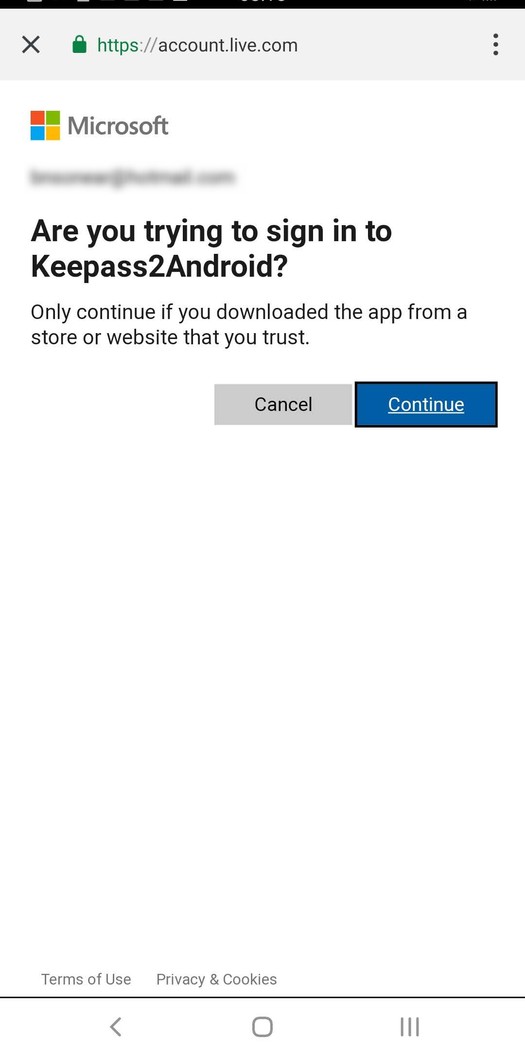
Next I get a message "Are you trying to sign in to Keepass2Anfroid?" (this seems to be the same screen as wombat01 posted above) and I click "Continue".
Then the sync works (I do not hae to selected the databse again). However these authentication dialogs keep coming back every time the app is restarted.
 J-O-P
on 25 Nov 2019
J-O-P
on 25 Nov 2019
Already described the problem when the offline access bug was fixed: here There is also a log file.
 towadroid
on 3 Dec 2019
towadroid
on 3 Dec 2019
For me this pops up about one time a day.
 priv
on 28 Jul 2020
priv
on 28 Jul 2020
Since the last update 1.08b-r0, everything seems to be fine.
wombat01
on 29 Jul 2020
I am using 1.08b-r1 and I get inconsistent behavior.
The only scenario I am able to reproduce is the following: The authorization window pops up every time if 1) the app has been stopped forcefully and 2) there is an internet connection when opening the app.
However I have also experienced that I could not access my database without an internet connection at all because the app tried to authorize onedrive access.
towadroid
on 17 Sep 2020
Like @J-O-P I have 2 OneDrive accounts, and I often get a prompt when opening the database asking me which account I want to use. (The 2nd account is not on my Android device, has never been used in the app.) I speculate that this is being triggered by Microsoft, which knows that I have more than one account from my desktop activity.
 JNavas2
on 13 Oct 2020
JNavas2
on 13 Oct 2020
Just switched from Dropbox to Onedrive sync and also having this issue with 1.08b-r1.
 Mercerudy
on 28 Oct 2020
Mercerudy
on 28 Oct 2020
Since my earlier comment I've paid more attention to this problem, and it seems to be related to the quality of my Internet connection. It never seems to happen on a solid Internet connection, just when I'm on a bad connection with poor speed and high latency. And when the issue occurs, I can open my database without new authorization by backing up and trying again. My guess is that authentication is timing out, and that the app assumes it's an authentication error, so opens a new unnecessary authorization. That would seem to be a possible bug or at least poor error recovery.
JNavas2
on 28 Oct 2020
I've also noticed that I can just back up and try again, successfully opening the database. I assumed that I was just working with local cache, but what you're saying makes sense @JNavas2.
Mercerudy
on 29 Oct 2020
Video showing unnecessary OneDrive authorization: [DELETED, SEE NEW VIDEO BELOW]
JNavas2
on 30 Oct 2020
I enabled logging, and reproduced the problem. Log file attached (OneDrive details deleted).
Keepass2Android.log
JNavas2
on 30 Oct 2020
Video showing issue: https://youtu.be/jGcLJiKc77I
Starts with fingerprint (not captured) opening of database.
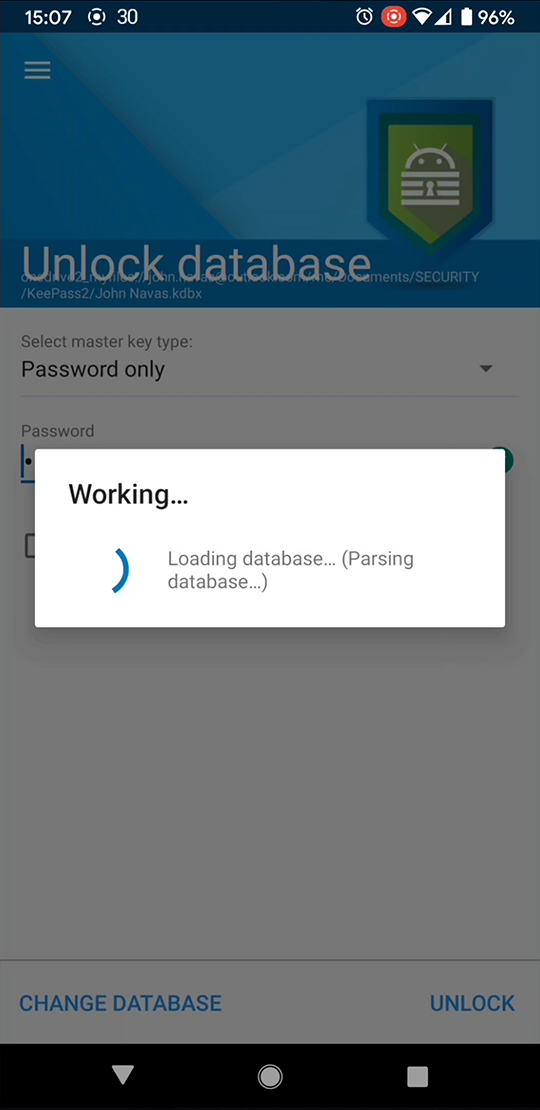
App opens database [see capture below], but displays OneDrive authorization screen.
Single back touch then displays _open_ database.
JNavas2
on 31 Oct 2020
a user noted that the authorization request happens after updating the file from the Windows client. this might help diagonising this.
 PhilippC
on 9 Nov 2020
PhilippC
on 9 Nov 2020
It happens for me even when the local android device was the last to update the file.
Mercerudy
on 9 Nov 2020
This is very strange behavior. Even if you just close this dialog, file is still synchronized correctly. The re-auth is just unnecessary.
priv
on 10 Nov 2020
@PhilippC
a user noted that the authorization request happens after updating the file from the Windows client. this might help diagonising this.
See my video and log. The behavior was _not_ after a Windows update of the file.
JNavas2
on 10 Nov 2020
I'm not saying this is the only option how to produce this, but in my previous tests I wasn't able to reproduce this behavior (which makes it very difficult to fix), so I thought this might be a good hint for me when fixing.
PhilippC
on 10 Nov 2020
@PhilippC
It can be hard to reproduce, but the problem appears to entirely be a function of what's happening on the phone, not anything external. How I reproduce it (how I got the log file and video I posted):
- Reboot the phone
- Wait a few minutes until the reboot dust has settled
- Open the database on OneDrive.
I just did it again to confirm that _it does reproduce the problem_.
JNavas2
on 10 Nov 2020
Since my earlier comment I've paid more attention to this problem, and it seems to be related to the quality of my Internet connection. It never seems to happen on a solid Internet connection, just when I'm on a bad connection with poor speed and high latency. And when the issue occurs, I can open my database without new authorization by backing up and trying again. My guess is that authentication is timing out, and that the app assumes it's an authentication error, so opens a new unnecessary authorization. That would seem to be a possible bug or at least poor error recovery.
@JNavas2's hypothesis from a couple of weeks ago^ fits my observations as well. Is there no reason to think that a premature authentication timeout might be the culprit? @PhilippC
Mercerudy
on 10 Nov 2020
This behavior (as shown in the video) happens to me very frequently (so much so, that each time I open the manager I expect it to do this double auth behavior). I do not have the Windows client installed and do not modify the database outside of Kp2A. I have a fast WiFi connection and a Pixel 4 XL.
However, I cannot repro the problem reliably... even with JNavas2's instructions. To me, it seems like the popup likelihood is positively correlated with respect to the time passed since the database was last opened. If I have opened it recently it does not occur, but if I opened it a few days ago (exact time TBD) it seems to popup.
 alwils
on 18 Nov 2020
alwils
on 18 Nov 2020
@alwils
I agree that time since it was last opened is a factor. The longer it has been the more likely the problem will occur.
JNavas2
on 18 Nov 2020
Another anecdote: I just moved from a Pixel 3 to a Pixel 5. Same Android version and all apps are also the same. The reauth does still happen but maybe 20% as often as before with my Pixel 3. This also makes me wonder whether a slow authentication is triggering the reauth. With more compute power in my newer device, I'm guessing it's beating that timeout threshold more often.
Agree with the previous comment as well: if I do have to reauth, then it will tend to successfully load without reauth if I quickly try it a few more times.
Mercerudy
on 18 Nov 2020
Btw,
Though I'm not very familiar with onedriver auth or Android app development, I can reproduce this many times a day on my phone. Please tell me where to add log, I can build test apk and do logcat or something.
priv
on 24 Nov 2020
@priv
Go to Settings > App > Log file for debugging.
JNavas2
on 24 Nov 2020
@JNavas2
I mean add more log in code
I've already inspected the app log, there's no telling why it triggers the re-auth activity.
The most strange part is that file handler is already successfully check the hash and in sync with remote.
2020/11/25 上午 09:37:00:570 -- Fingerprint: StartListening
2020/11/25 上午 09:37:01:368 -- FP: Decrypting
2020/11/25 上午 09:37:02:18 -- PasswordActivity.OnPause
2020/11/25 上午 09:37:02:47 -- FSSA.OnCreate
2020/11/25 上午 09:37:03:76 -- PasswordActivity.OnStop
2020/11/25 上午 09:37:06:549 -- LockingActivity: OnActivityResult
2020/11/25 上午 09:37:06:550 -- PasswordActivity.OnActivityResult 874348/1000
2020/11/25 上午 09:37:06:569 -- PasswordActivity.OnStart
2020/11/25 上午 09:37:06:570 -- PasswordActivity.OnResume
2020/11/25 上午 09:37:06:571 --  DB null
2020/11/25 上午 09:37:06:571 -- starting: True, Finishing: False, _performingLoad: True
2020/11/25 上午 09:37:06:620 -- status message: Initializing...
2020/11/25 上午 09:37:06:621 -- status submessage:
2020/11/25 上午 09:37:06:664 -- status message: 載入資料庫...
2020/11/25 上午 09:37:06:669 -- CFS: OpenWhenNoLocalChanges
2020/11/25 上午 09:37:06:669 -- CFS: hashing cached version
2020/11/25 上午 09:37:06:685 -- getPathItem for onedrive2_myfiles://<<personal information masked>>
2020/11/25 上午 09:37:06:697 -- PasswordActivity.OnPause
2020/11/25 上午 09:37:07:223 -- PasswordActivity.OnStop
2020/11/25 上午 09:37:08:149 -- CFS: Files in Sync
2020/11/25 上午 09:37:08:291 -- status submessage: 轉換主金鑰...
2020/11/25 上午 09:37:10:696 -- status submessage: 解析資料庫中...
2020/11/25 上午 09:37:10:727 -- found E0 in E1
2020/11/25 上午 09:37:11:7 -- ReadXmlStreamed: 308ms
2020/11/25 上午 09:37:11:56 -- status submessage:
2020/11/25 上午 09:37:11:62 -- status message: 更新本機備份...
2020/11/25 上午 09:37:11:83 -- Timeout cancel
2020/11/25 上午 09:37:11:98 -- LoadDB OK
2020/11/25 上午 09:37:11:114 -- Starting/Updating OngoingNotificationsService. Database Unlocked
2020/11/25 上午 09:37:11:267 -- PasswordActivity.OnDestroyTrue   <- Here is the authorization activity
2020/11/25 上午 09:37:28:880 -- StackBaseActivity.OnActivityResult Ok/1
The following log indicates there's no authorization request:
They are basically the same in the app log.
2020/11/25 上午 09:38:41:799 -- Starting/Updating OngoingNotificationsService. Database Unlocked
2020/11/25 上午 09:38:42:100 -- PasswordActivity.OnPause
2020/11/25 上午 09:38:42:101 -- Timeout start
2020/11/25 上午 09:38:42:112 -- StackBaseActivity.OnActivityResult Ok/1
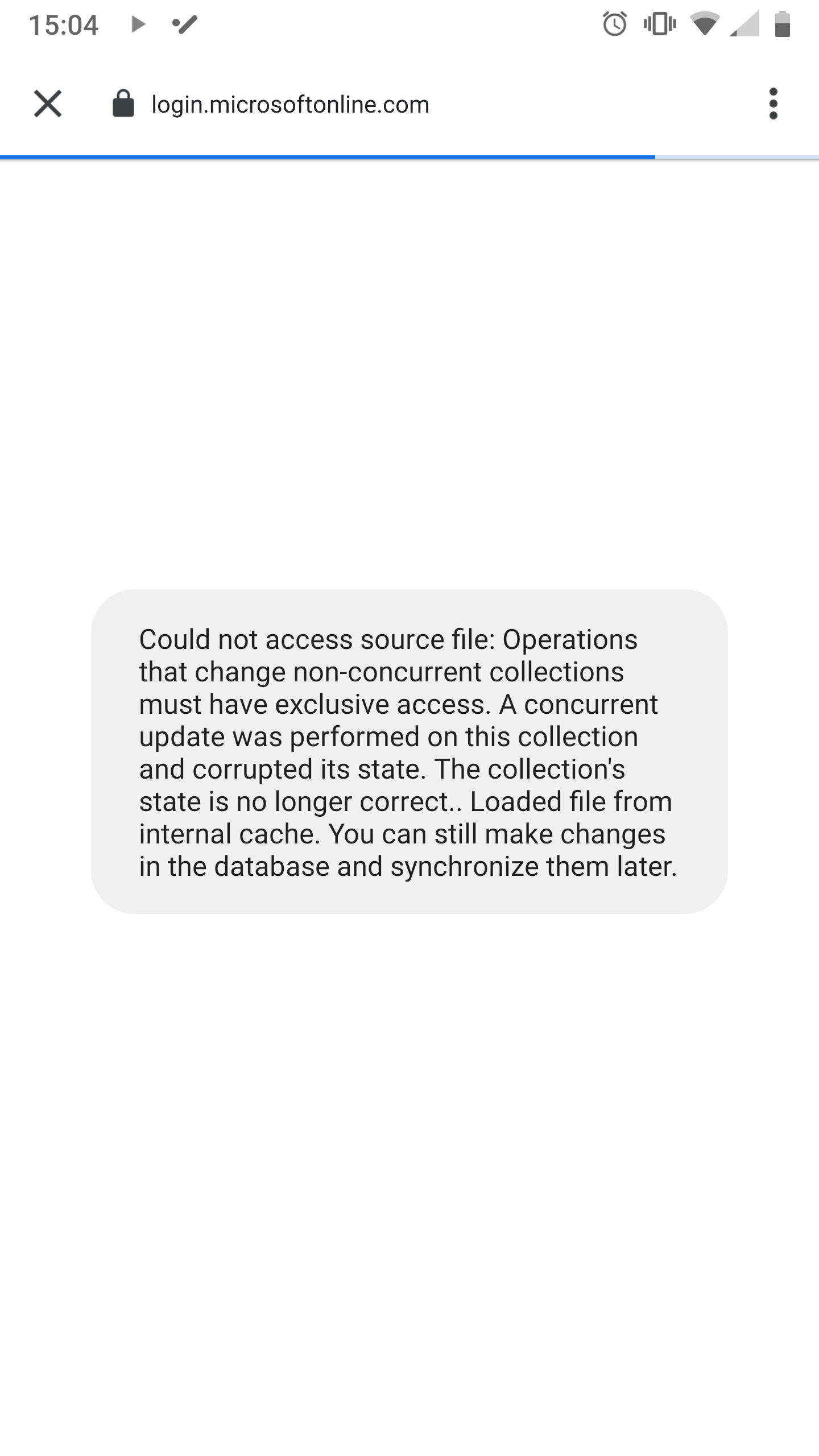
I regularly get this issue. I recently started seeing this too which requires a force close to be able to get back in to the database. Not sure if related to the issue in question but posting it just in case
 cjk28
on 25 Nov 2020
cjk28
on 25 Nov 2020
I'm using Galaxy Samsung Note 9 (Android 10) and Keepass 1.08b-r1.
I'm frequently asked to log-in to Microsoft Account when I pass the fingerprint authentication, and then forced to tap "Yes" button for "Are you trying to sign in to Keepass2Android?"
This is very painful to use Keepass. Is there any other workaround except downgrading to 1.07?
 bnsonear
on 3 Dec 2020
bnsonear
on 3 Dec 2020
There are two workarounds.
- Just press back when opening auth web page(even in white screen) on unlocking, k2a will still successfully open database.
- Open database in offline mode, and manually sync database on demand.(I'm using this one, since my database changed infrequently.)
 CzBiX
on 3 Dec 2020
CzBiX
on 3 Dec 2020
Thank you for the fast response!
For me, frequent and fluent sync between mobile and desktop is very important. Therefore I have to downgrade and will wait for 1.09, thank you again!
bnsonear
on 3 Dec 2020
I face this issue almost every time I open the app.
Is there anything I can provide to help you to debug this problem, @PhilippC?
 roboxv
on 3 Dec 2020
roboxv
on 3 Dec 2020
is this the same as https://github.com/PhilippC/keepass2android/issues/1495?
PhilippC
on 10 Dec 2020
@PhilippC
1495 does appear to be a dup.
JNavas2
on 10 Dec 2020
Problem persists in 1.08c-r1
JNavas2
on 14 Dec 2020
Related issues
 metafarion
·
5Comments
metafarion
·
5Comments
 madjo80
·
5Comments
madjo80
·
5Comments
 Sveninndh
·
6Comments
Sveninndh
·
6Comments
 Zhaph
·
4Comments
Zhaph
·
4Comments
 wikholm
·
4Comments
wikholm
·
4Comments
Most helpful comment
Problem persists in 1.08c-r1