keepass2android doesn't start in Samsung DeX mode
When trying to start keepass2android on Galaxy Tab S4 (Oreo 8.1) in DeX mode (https://developer.samsung.com/samsung-dex) , it is refused by the system. It is not clear why, but it could be some missing requirements in the manifest.
Everything is explained on https://developer.samsung.com/samsung-dex/modify-optimizing
 fcrozat
All 25 comments
I've a Samsung Galaxy S9. It's not working there in DeX mode, too. Would be very cool if you could fix this.
 bazhub
on 2 Mar 2019
bazhub
on 2 Mar 2019
I purchased the required hardware to troubleshoot this but cannot reproduce. Are you running Android 8 or 9? My S8 with Android 9 works fine.
 PhilippC
on 23 Mar 2019
PhilippC
on 23 Mar 2019
I'm using a Tab S4 and switching into Dex mode when I get the message.
Matt
From: PhilippC notifications@github.com
Sent: Saturday, March 23, 2019 1:25 PM
To: PhilippC/keepass2android
Cc: Matt Baker; Manual
Subject: Re: [PhilippC/keepass2android] keepass2android doesn't start in Samsung DeX mode (#625)
I purchased the required hardware to troubleshoot this but cannot reproduce. Are you running Android 8 or 9? My S8 with Android 9 works fine.
-
You are receiving this because you are subscribed to this thread.
Reply to this email directly, view it on GitHubhttps://github.com/PhilippC/keepass2android/issues/625#issuecomment-475893161, or mute the threadhttps://github.com/notifications/unsubscribe-auth/AP6qUI3hhg2UCSGAHxw00YJZvUEkLjvnks5vZnGngaJpZM4Y4CHp.
 raregtp
on 23 Mar 2019
raregtp
on 23 Mar 2019
Apologies on my last reply.....should have gave you more info. My Tab S4 is currently on Android 8.1....trying to launch the app generates a message that it cannot run in Dex mode and to try running in tablet mode. Tablet mode of course works fine.
Let me know if you have any beta releases I can test for you....happy to help out.
raregtp
on 24 Mar 2019
just one thing you might try is to disable the "screen protection" in the app settings. Maybe this causes this behavior. Apart from that, I would suggest you wait for Android 9 which I think should be rolled out at some time: https://tabletmonkeys.com/samsung-galaxy-tab-s4-android-9-0-pie-update-officially-certified-today/
PhilippC
on 25 Mar 2019
No go….I’m assuming you’re talking about the setting to prevent copying the screen??
Thanks!!
Matt
From: PhilippC notifications@github.com
Sent: Monday, March 25, 2019 2:34 AM
To: PhilippC/keepass2android keepass2android@noreply.github.com
Cc: Matt Baker Matt@myacs.com; Manual manual@noreply.github.com
Subject: Re: [PhilippC/keepass2android] keepass2android doesn't start in Samsung DeX mode (#625)
just one thing you might try is to disable the "screen protection" in the app settings. Maybe this causes this behavior. Apart from that, I would suggest you wait for Android 9 which I think should be rolled out at some time: https://tabletmonkeys.com/samsung-galaxy-tab-s4-android-9-0-pie-update-officially-certified-today/
—
You are receiving this because you are subscribed to this thread.
Reply to this email directly, view it on GitHubhttps://github.com/PhilippC/keepass2android/issues/625#issuecomment-476084944, or mute the threadhttps://github.com/notifications/unsubscribe-auth/AP6qUPMbkWkUFQVnoMMWxplChpZGVICbks5vaHvwgaJpZM4Y4CHp.
raregtp
on 25 Mar 2019
Just updated my Tab S4 to Android 9.....no change in this issue. I've tried with screen protection enabled and disabled. Thanks!
raregtp
on 24 Apr 2019
I am having the same issue. I attach logs. One with the screen protect setting on and one with it off. It doesn't work in either mode.
keepass_dex_screen_protect_off.log
keepass_dex_screen_protect_on.log
The error is a toast that pops up saying "Keepass2Android cannot run in Samsung Dex. Try running in phone mode."
Based on the fact that this text does not appear in the Keepass2Android source code, I assume that Samsung Dex is checking something about the Keepass2Android application and deciding it is not compatible.
It would be really nice if it was possible to figure out what the issue is so we can run the application in Dex mode.
Let me know if there is further testing or logging that I can do to help identify the issue.
 tturner
on 27 Apr 2019
tturner
on 27 Apr 2019
Forgot to mention I'm using a Samsung Galaxy S9 running Android 9
tturner
on 27 Apr 2019
Samsung DeX seems to disable all keyboard applications except Samsung one. I wonder if a keepass2android build with keyboard disabled would work
fcrozat
on 1 May 2019
Seems reasonable.....I can certainly try it out if you want to do a test build. Assuming that outside of the Dex environment there would be no input available within Keepass2android? At least with the test build?
Matt
From: Frederic Crozat notifications@github.com
Sent: Wednesday, May 1, 2019 2:49 AM
To: PhilippC/keepass2android
Cc: Matt Baker; Manual
Subject: Re: [PhilippC/keepass2android] keepass2android doesn't start in Samsung DeX mode (#625)
Samsung DeX seems to disable all keyboard applications except Samsung one. I wonder if a keepass2android build with keyboard disabled would work
-
You are receiving this because you are subscribed to this thread.
Reply to this email directly, view it on GitHubhttps://github.com/PhilippC/keepass2android/issues/625#issuecomment-488229393, or mute the threadhttps://github.com/notifications/unsubscribe-auth/AD7KUUBJ2HDTKLPTJVYTNLDPTFDQXANCNFSM4GHAEHUQ.
raregtp
on 1 May 2019
That would be acceptable. On Pie, autofill password Api makes keyboard almost useless..
Seems reasonable.....I can certainly try it out if you want to do a test build. Assuming that outside of the Dex environment there would be no input available within Keepass2android? At least with the test build? Matt
…
________________________________ From: Frederic Crozat notifications@github.com Sent: Wednesday, May 1, 2019 2:49 AM To: PhilippC/keepass2android Cc: Matt Baker; Manual Subject: Re: [PhilippC/keepass2android] keepass2android doesn't start in Samsung DeX mode (#625) Samsung DeX seems to disable all keyboard applications except Samsung one. I wonder if a keepass2android build with keyboard disabled would work - You are receiving this because you are subscribed to this thread. Reply to this email directly, view it on GitHub<#625 (comment)>, or mute the threadhttps://github.com/notifications/unsubscribe-auth/AD7KUUBJ2HDTKLPTJVYTNLDPTFDQXANCNFSM4GHAEHUQ.
fcrozat
on 1 May 2019
I purchased the required hardware to troubleshoot this but cannot reproduce. Are you running Android 8 or 9? My S8 with Android 9 works fine.
Just to add to this discussion, I think I got why it is working for some people but not for others (still dont know how to fix it): it works when using Dex on the extended display (probably because the tablet/phone stays in normal mode and therefore there is no conflict with Dex); however if you use your tablet alone (no extra display, meaning your tablet display will be in Dex mode) then the issue occurs and you can not select any input method other than the Samsung one. I guess that is why some people are not seeing this issue, because if you have a galaxy phone, you wouldnt have this stand-alone option and so it works just fine.
 vitordapper
on 29 May 2019
vitordapper
on 29 May 2019
Chiming in here, just got a galaxy tab S6 with the keyboard case and the issue occurs on it as well. My USB-c to hdmi cable is at home and I'm at work now, but will test for external display issues and report back.
Android version 9
Samsung Galaxy Tab S6 SM-T860
Works when not in DeX mode only
Tested using POGO attached physical KB
Tested without POGO KB also
Was trying to setup a laptop replacement configuration for doing lite work
 finndo77
on 14 Sep 2019
finndo77
on 14 Sep 2019
I have the same issue with Samsung Galaxy S10+ running Android Version 9.
It would be great if this program worked in DeX mode.
Thanks
 chris5a
on 4 Dec 2019
chris5a
on 4 Dec 2019
On startup, any build crashes with message “This app cannot run in DeX, please try tablet mode”. I understand the issue is not looking as on the top of priority but could you please add it on the list to fix the app manifest to allow KP2A for Samsung DeX users where it is HIGHLY appreciated?
Thank you!
P.S. Works for OneUI 1.1 (ordinary tablet) shell. From my experience in porting to DeX, the app manifest must be updated to allow KP2A to start.
@PhilippC
 solarelf
on 28 Dec 2019
solarelf
on 28 Dec 2019
I purchased the required hardware to troubleshoot this but cannot reproduce. Are you running Android 8 or 9? My S8 with Android 9 works fine.
Just to add to this discussion, I think I got why it is working for some people but not for others (still dont know how to fix it): it works when using Dex on the extended display (probably because the tablet/phone stays in normal mode and therefore there is no conflict with Dex); however if you use your tablet alone (no extra display, meaning your tablet display will be in Dex mode) then the issue occurs and you can not select any input method other than the Samsung one. I guess that is why some people are not seeing this issue, because if you have a galaxy phone, you wouldnt have this stand-alone option and so it works just fine.
Yes, it seems this is the case. The Manifest might need some fixing. Does this help?
solarelf
on 28 Dec 2019
@solarelf it's not clear to me what step to take according to your link. It says that you should not use something like
<uses-feature android:name="android.hardware.touchscreen" android:required="true" />
but I don't have that in the manifest. Any idea?
PhilippC
on 3 Jan 2020
Hello,
I am on a Galaxy S10+ With Andoird 10 and same error.
Will a fix come or is in meantime an existing workaround for?
 RolandSM
on 9 Jan 2020
RolandSM
on 9 Jan 2020
Galaxy S9 here, Android 10.
Similar (but not exactly same) error.
Here's the error message I'm getting from Keepass2Android:
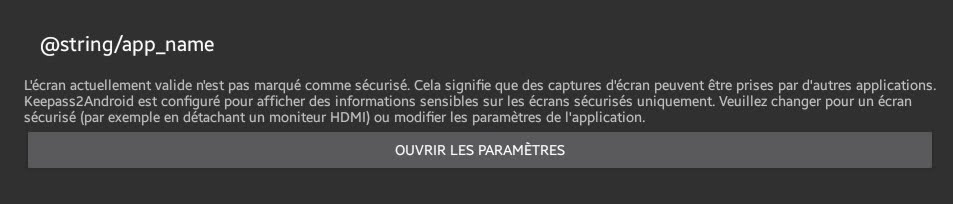
Full text:
L'écran actuellement valide n'est pas marqué comme sécurisé. Cela signifie que des captures d'écran peuvent être prises par d'autres applications.
Keepass2Android est configuré pour afficher des informations sensibles sur les écrans sécurisés uniquement. Veuillez changer pour un écran sécurisé (par exemple en détachant un moniteur HDMI) ou modifier les paramètres de l'application.
(sorry my setup is in French, Google translate should give approximately equivalent English error text)
Pressing button _"ouvrir les paramètres"_ ("open settings") opens Keepass2Android settings, but I'm unable to find which setting I have to change.
 gpion
on 23 Feb 2020
gpion
on 23 Feb 2020
I'm unable to find which setting I have to change.
Found, this has to be unchecked:

BTW you should really reconsider adding app language selection as requested here: #201
That would really help users with non English default languages to do better reports
gpion
on 23 Feb 2020
I'm unable to find which setting I have to change.
Found, this has to be unchecked:
This actually doesn't make any difference for me (Galaxy Tab S6 in Dex mode)...
 Schwefelholz
on 29 Feb 2020
Schwefelholz
on 29 Feb 2020
I got it working on DeX once I enabled DeX Developer Options...
Schwefelholz
on 1 Mar 2020
I have found that if you are using an external display for DEX (tested with my Galaxy Tab S6) you CAN open Keepass2android on the "internal" display and use the copy paste feature to enter information into the DEX screen. as you can use "phone" apps on the main device screen while DEX runs on the external screen (at least on the TabS6)
finndo77
on 26 May 2020
S20 Ultra Exynos, Android 10, One UI 2.1
Dex Developer Options turned on.
Disabled Protect Data Display (K2A Settings > Display > Protect Data Display)
K2A still won't launch in Dex mode on external display.
Error - "Keepass2Android cannot run in Samsung Dex. Try running in phone mode."
 TraderDom
on 3 Jul 2020
TraderDom
on 3 Jul 2020
Related issues
 wikholm
·
4Comments
wikholm
·
4Comments
 madjo80
·
5Comments
madjo80
·
5Comments
 Erwyn
·
4Comments
Erwyn
·
4Comments
 Sveninndh
·
6Comments
Sveninndh
·
6Comments
 ghost
·
3Comments
ghost
·
3Comments
Most helpful comment
I got it working on DeX once I enabled DeX Developer Options...