Google's Pagespeed Insights complains about the number of DOM elements on my pages. There are usually more than 1,000 which appears to be the trigger for the message.
For example, given the simple base and exponent expression, 5^3, there are 17 spans created, 3 of which have class "mord" and 2 of them repeat the class "mord mtight".
<span class="katex">
 <span class="katex-mathml">
  <math>
   <semantics>
    <mrow>
      <mstyle scriptlevel="0" displaystyle="true">
       <msup>
        <mn>5</mn>
        <mn>3</mn>
      </msup>
     </mstyle>
    </mrow>
    <annotation encoding="application/x-tex">
      \displaystyle{5}^{3}
    </annotation>
   </semantics>
  </math>
 </span>
 <span class="katex-html" aria-hidden="true">
  <span class="base">
   <span class="strut" style="height: 0.864108em; vertical-align: 0em;">
   </span>
   <span class="mord">
    <span class="mord">
     <span class="mord">
      5
     </span>
    </span>
    <span class="msupsub">
     <span class="vlist-t">
      <span class="vlist-r">
       <span class="vlist" style="height: 0.864108em;">
        <span class="" style="top: -3.113em; margin-right: 0.05em;">
         <span class="pstrut" style="height: 2.7em;">
         </span>
         <span class="sizing reset-size6 size3 mtight">
          <span class="mord mtight">
           <span class="mord mtight">
            3
           </span>
          </span>
         </span>
        </span>
       </span>
      </span>
     </span>
    </span>
   </span>
  </span>
 </span>
</span>
The following appears to produce the same result, but has been stripped of (seemingly) redundant spans:
<span class="katex">
 <span class="katex-mathml">
  <math>
   <semantics>
    <mrow>
      <mstyle scriptlevel="0" displaystyle="true">
       <msup>
        <mn>5</mn>
        <mn>3</mn>
      </msup>
     </mstyle>
    </mrow>
    <annotation encoding="application/x-tex">
      \displaystyle{5}^{3}
    </annotation>
   </semantics>
  </math>
 </span>
 <span class="katex-html" aria-hidden="true">
  <span class="base">
   5
   <span class="msupsub">
    <span class="vlist-t">
     <span class="vlist-r">
      <span class="vlist" style="height: 0.864108em;">
       <span class="pstrut" style="top: -3.113em; margin-right: 0.05em;">
        <span class="" style="height: 2.7em;">
        </span>
        <span class="sizing reset-size6 size3 mtight">
         3
        </span>
       </span>
      </span>
     </span>
    </span>
   </span>
  </span>
 </span>
</span>
There are 11 spans now, a reduction of 35.3%.
For my own pages, I ended up replacing all this with just 2 DOM elements for such simple cases:
<span class="myClass">
 5
  <sup>
   3
 </sup>
</span>
I'm fully aware KaTeX needs to cater for a myriad different possible situations and it could well be a nightmare to do anything about this, but if one of the tools available can strip repeated spans that are not actually necessary, that would help reduce the number of elements on a page, and no doubt speed things up both at the processing level and DOM manipulation level..
 mbourne
All 6 comments
@mbourne I hear you. I am also having a Chrome performance problem related to the number of spans. There isn't an easy fix. When the current vertical alignment code was written, in PR #768, browser testing revealed some issues, especially in Safari. The work-around involved adding extra spans that probably look to be redundant.
I think there are two possible ways to achieve pretty large reductions in the number of spans:
- Replace the vertical alignment code, changing from table-cell CSS to flex box, as @kevinbarabash suggested in issue #1409. That hasn't been coded or tested and we don't know for sure that it will work.
- Websites could use KaTeX's MathML output instead of HTML. This one won't be feasible until after the Chromium MathML project is complete. That might be in August.
I'm very busy right now. I might be able to work up the flex box option sometime in March.
 ronkok
on 1 Feb 2020
ronkok
on 1 Feb 2020
Thanks @ronkok . Since flexbox is now pretty much universal (even Opera Mini joins the party) and MathML won't see adoption across all browsers for some years, I agree flexbox would be the way to go for now.
Thank you for all you do.
mbourne
on 2 Feb 2020
@mbourne I’ve spent a day working on a flexbox alternative for vertical alignment. I’m afraid the news I have to give you is bad. I am unable to write a flexbox solution for KaTeX vertical alignment.
KaTeX, of course, emulates TeX and TeX does vertical alignment differently than HTML. In TeX, one has access to the height and depth of each character. TeX vertical alignment, given two strings of text, specifies the gap between the top of the highest height and the bottom of the lowest depth.
HTML instead stacks line boxes. I’ll skip leading for this explanation, because I can set leading to zero. Given zero leading, a line box extends from the bottom of the font’s descender to the top of it’s ascender. The ascender and descender are constant for an entire font. They don’t vary by character. Of course, if a line box contains characters of varying fonts and font sizes, then it also contains various ascenders and descenders.
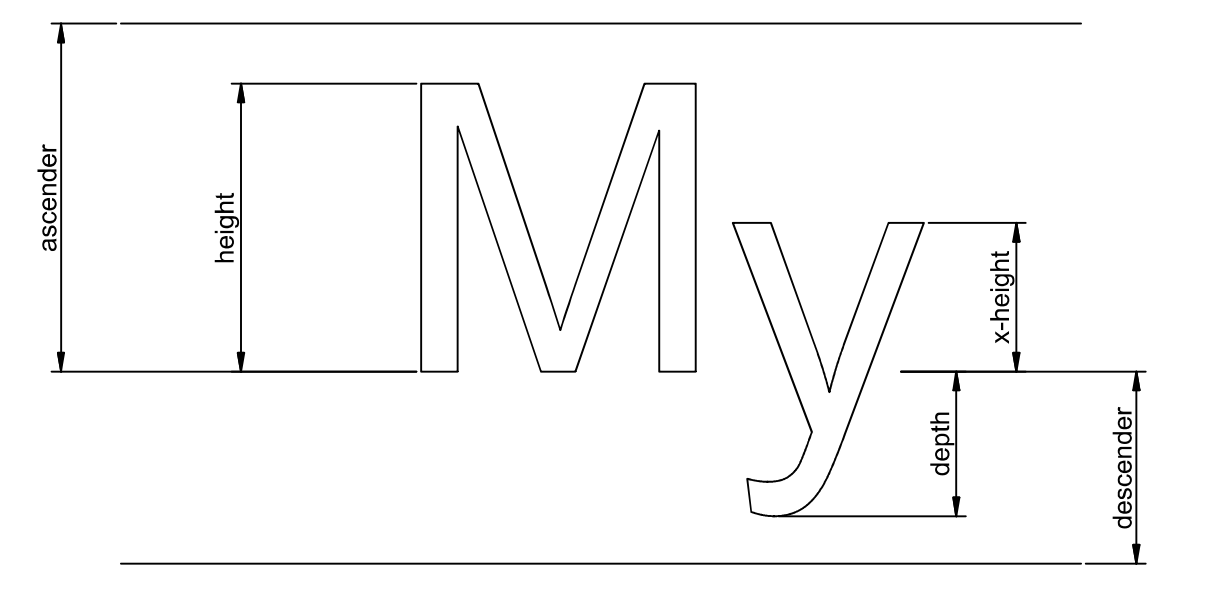
So in order to stack line boxes in a flexbox and do it in a way that satisfies TeX layout definitions, I would have to find a way to keep track of the difference between line box geometry and individual character heights and depths. And I would have to carry that information along as a string of characters changes font and font size. It’s more than I have signed up to do.
KaTeX’s current vertical alignment doesn’t stack boxes. Instead it sets baselines by offsetting each row from a point located outside the entire block. It’s really quite clever. But, as you have noted, it does generate a lot of spans.
It’s a pity. The flexbox option really reduce the number of visible elements in the DOM. That would have improved performance. I wish I could have made it work.
ronkok
on 6 Feb 2020
@ronkok Thank you for your efforts! I hesitated for a few days to see if anyone else weighed in, but seems everyone's busy.
A possible easy win might be those class="mord" spans. I'm not running the absolute latest CSS, and in my version there are 2 cases of .mord+.cancel-lap.
But in the version in the https://katex.org/ sandbox, I can't find .mord anywhere in the style sheet.
So if it is no longer used, perhaps they could be cut out? Or if it is still used, in those rare(?) instances where there's a .cancel-lap involved, only then add the .mord spans...?
mbourne
on 11 Feb 2020
I can't find .mord anywhere in the style sheet.
KaTeX used to set horizontal spacing via a quite complicated set of CSS rules. One rule for when a mord was adjacent to a mrel. Another rule for when a mord was adjacent to another mord. And so on.
KaTeX now sets those spaces with inline styles. But it still uses each atom's classification as mord, mrel, mbin, etc. It's just that the Javascript is reading those classifications, not the CSS rules.
It may be possible, as you suggest, to eliminate some of the mord spans. But it will have to be careful, line-by-line work. The cost-to-benefit ratio is a lot higher than what I was hoping for when I started looking at flex box. I might get to it, but it won't be soon.
ronkok
on 11 Feb 2020
One of the reasons for switching to handling the spacing in JavaScript was to eventually support \setlength. Introducing span elements in between the other elements simplified the code. We could look at changing things to add inline styles to the content containing spans using numeric values as suggested in the original post and that would still allow us to support \setlength in the future.
 kevinbarabash
on 8 Mar 2020
kevinbarabash
on 8 Mar 2020
Related issues
 msridhar
·
3Comments
msridhar
·
3Comments
 HughGrovesArup
·
4Comments
HughGrovesArup
·
4Comments
 pyramation
·
4Comments
pyramation
·
4Comments
 OisinMoran
·
4Comments
OisinMoran
·
4Comments
 StaloneLab
·
3Comments
StaloneLab
·
3Comments
Most helpful comment
@mbourne I’ve spent a day working on a flexbox alternative for vertical alignment. I’m afraid the news I have to give you is bad. I am unable to write a flexbox solution for KaTeX vertical alignment.
KaTeX, of course, emulates TeX and TeX does vertical alignment differently than HTML. In TeX, one has access to the height and depth of each character. TeX vertical alignment, given two strings of text, specifies the gap between the top of the highest
heightand the bottom of the lowestdepth.HTML instead stacks line boxes. I’ll skip leading for this explanation, because I can set leading to zero. Given zero leading, a line box extends from the bottom of the font’s descender to the top of it’s ascender. The ascender and descender are constant for an entire font. They don’t vary by character. Of course, if a line box contains characters of varying fonts and font sizes, then it also contains various ascenders and descenders.
So in order to stack line boxes in a flexbox and do it in a way that satisfies TeX layout definitions, I would have to find a way to keep track of the difference between line box geometry and individual character heights and depths. And I would have to carry that information along as a string of characters changes font and font size. It’s more than I have signed up to do.
KaTeX’s current vertical alignment doesn’t stack boxes. Instead it sets baselines by offsetting each row from a point located outside the entire block. It’s really quite clever. But, as you have noted, it does generate a lot of spans.
It’s a pity. The flexbox option really reduce the number of visible elements in the DOM. That would have improved performance. I wish I could have made it work.