Karabiner-elements: Switch left_ctrl and fn on K380 cause f5 key not working
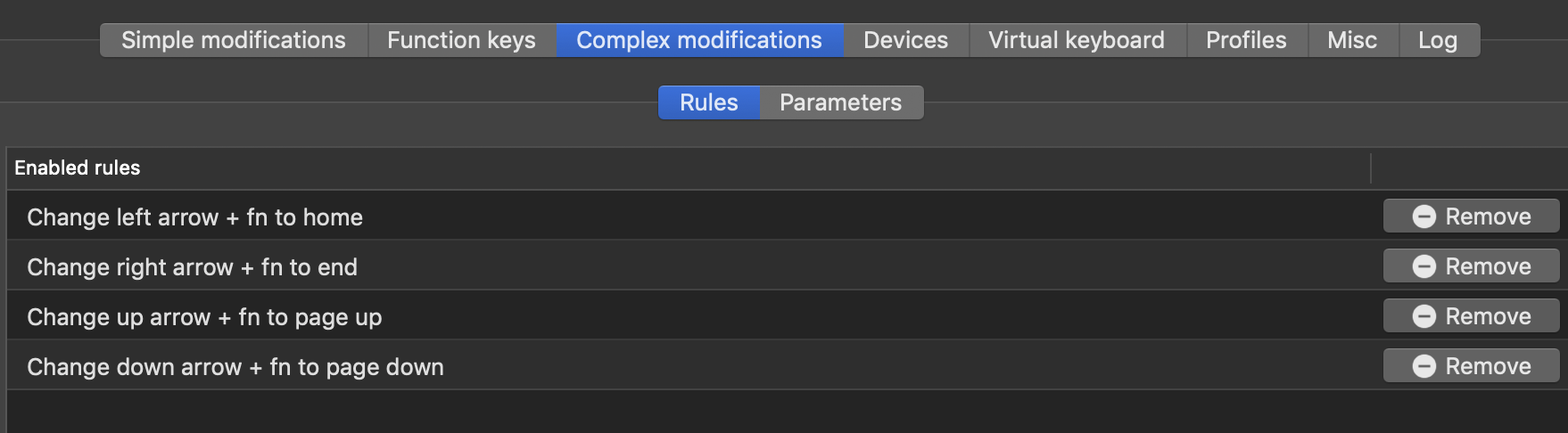
Karabiner-Elements is a great tool to remap the keyboard. I used a configuration from an online tutorial and set the home and end key on the K380 keyboard.
The original configuration is this.
{
"global": {
"check_for_updates_on_startup": true,
"show_in_menu_bar": true,
"show_profile_name_in_menu_bar": false
},
"profiles": [
{
"complex_modifications": {
"parameters": {
"basic.simultaneous_threshold_milliseconds": 50,
"basic.to_delayed_action_delay_milliseconds": 500,
"basic.to_if_alone_timeout_milliseconds": 1000,
"basic.to_if_held_down_threshold_milliseconds": 500,
"mouse_motion_to_scroll.speed": 100
},
"rules": [
{
"description": "Change left arrow + fn to home",
"manipulators": [
{
"from": {
"key_code": "left_arrow",
"modifiers": {
"mandatory": [
"left_option",
"left_shift"
]
}
},
"to": [
{
"key_code": "home"
}
],
"type": "basic"
}
]
},
{
"description": "Change right arrow + fn to end",
"manipulators": [
{
"from": {
"key_code": "right_arrow",
"modifiers": {
"mandatory": [
"left_option",
"left_shift"
]
}
},
"to": [
{
"key_code": "end"
}
],
"type": "basic"
}
]
},
{
"description": "Change up arrow + fn to page up",
"manipulators": [
{
"from": {
"key_code": "up_arrow",
"modifiers": {
"mandatory": [
"left_option"
]
}
},
"to": [
{
"key_code": "page_up"
}
],
"type": "basic"
}
]
},
{
"description": "Change down arrow + fn to page down",
"manipulators": [
{
"from": {
"key_code": "down_arrow",
"modifiers": {
"mandatory": [
"left_option"
]
}
},
"to": [
{
"key_code": "page_down"
}
],
"type": "basic"
}
]
}
]
},
"devices": [
{
"disable_built_in_keyboard_if_exists": false,
"fn_function_keys": [],
"identifiers": {
"is_keyboard": true,
"is_pointing_device": false,
"product_id": 45890,
"vendor_id": 1133
},
"ignore": false,
"manipulate_caps_lock_led": false,
"simple_modifications": []
},
{
"disable_built_in_keyboard_if_exists": false,
"fn_function_keys": [],
"identifiers": {
"is_keyboard": true,
"is_pointing_device": false,
"product_id": 636,
"vendor_id": 1452
},
"ignore": false,
"manipulate_caps_lock_led": true,
"simple_modifications": []
}
],
"fn_function_keys": [
{
"from": {
"key_code": "f1"
},
"to": {
"consumer_key_code": "display_brightness_decrement"
}
},
{
"from": {
"key_code": "f2"
},
"to": {
"consumer_key_code": "display_brightness_increment"
}
},
{
"from": {
"key_code": "f3"
},
"to": {
"key_code": "mission_control"
}
},
{
"from": {
"key_code": "f4"
},
"to": {
"key_code": "launchpad"
}
},
{
"from": {
"key_code": "f5"
},
"to": {
"key_code": "illumination_decrement"
}
},
{
"from": {
"key_code": "f6"
},
"to": {
"key_code": "illumination_increment"
}
},
{
"from": {
"key_code": "f7"
},
"to": {
"consumer_key_code": "rewind"
}
},
{
"from": {
"key_code": "f8"
},
"to": {
"consumer_key_code": "play_or_pause"
}
},
{
"from": {
"key_code": "f9"
},
"to": {
"consumer_key_code": "fastforward"
}
},
{
"from": {
"key_code": "f10"
},
"to": {
"consumer_key_code": "mute"
}
},
{
"from": {
"key_code": "f11"
},
"to": {
"consumer_key_code": "volume_decrement"
}
},
{
"from": {
"key_code": "f12"
},
"to": {
"consumer_key_code": "volume_increment"
}
}
],
"name": "Default profile",
"parameters": {
"delay_milliseconds_before_open_device": 1000
},
"selected": true,
"simple_modifications": [],
"virtual_hid_keyboard": {
"country_code": 0,
"mouse_key_xy_scale": 100
}
}
]
}
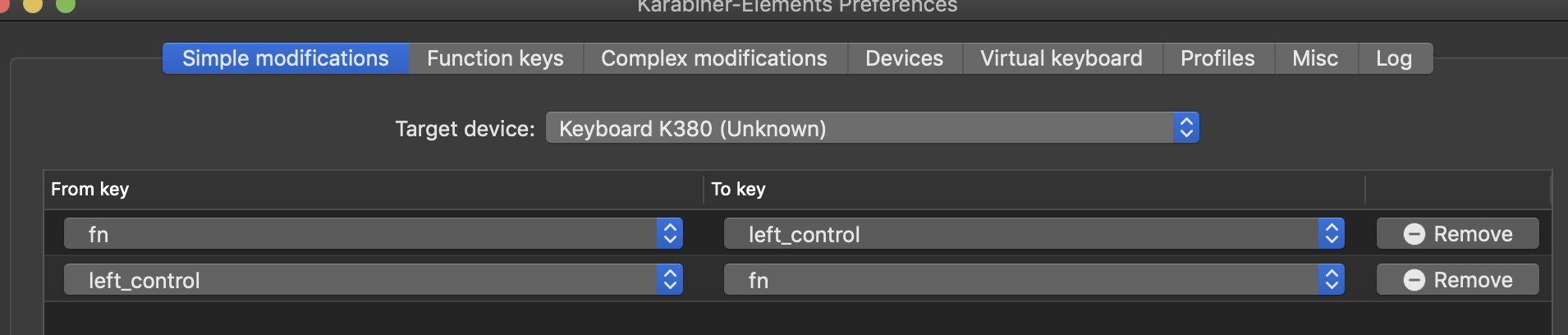
Then because the fn key and the left ctrl key are placed in a different order with MacBookPro, so I try to switch these two keys on K380. But after I set the simple modifications, the function keys, for example, f5 is not working as usual. But fn + f5 is working as f5.
By the way, this option is not working. I still have to press fn + f5 to perform f5.

 Seraphli
All 4 comments
I'm not sure what exactly you mean, but you can't map the fn key on the K380. It doesn't send a key code to the OS when it's pressed.
 sn0wyfall
on 28 Jun 2020
sn0wyfall
on 28 Jun 2020
I'm not sure what exactly you mean, but you can't map the fn key on the K380. It doesn't send a key code to the OS when it's pressed.
But you have a fn key on a MBP. And after I switch left_ctrl and fn key, I can press left_ctrl+left_arrow for home key.
Seraphli
on 29 Jun 2020
Yeah, that's because on the internal MacBook keyboard the function key send a keycode to the operating system. However, the function key on external keyboard generally don't do this. See this for more information. That also means that any modification you make with the function keys will not show up. You can test this as well in karabiner event viewer—they won't show up, which I know as I have the same keyboard. Just like the yellow f1, f2, f3 keys won't show up as they don't send a code to the OS (which I dislike about this keyboard). Unfortunately this also means that you can't remap it. If you install the Logitech Options software, you'll see no option to remap the fn key to something else, either, which is unfortunate.
My suggestion would be to switch the keys on your MacBook and get used to the layout, so that you can use your K380 and your internal keyboard the same way, since you can't change the layout on the K380. Or you can use control + arrow keys to do what you want, because the OS will never know you're pressing the fn key on the external keyboard. Or use Command + arrow keys which I think give similar behavior.
sn0wyfall
on 29 Jun 2020
Okay, thank you for clarifying this.
Seraphli
on 30 Jun 2020
Related issues
 surfingoz
·
3Comments
surfingoz
·
3Comments
 LittleNewton
·
3Comments
LittleNewton
·
3Comments
 rkusa
·
3Comments
rkusa
·
3Comments
 Fengur
·
3Comments
Fengur
·
3Comments
 Ox0400
·
3Comments
Ox0400
·
3Comments
Most helpful comment
Yeah, that's because on the internal MacBook keyboard the function key send a keycode to the operating system. However, the function key on external keyboard generally don't do this. See this for more information. That also means that any modification you make with the function keys will not show up. You can test this as well in karabiner event viewer—they won't show up, which I know as I have the same keyboard. Just like the yellow f1, f2, f3 keys won't show up as they don't send a code to the OS (which I dislike about this keyboard). Unfortunately this also means that you can't remap it. If you install the Logitech Options software, you'll see no option to remap the fn key to something else, either, which is unfortunate.
My suggestion would be to switch the keys on your MacBook and get used to the layout, so that you can use your K380 and your internal keyboard the same way, since you can't change the layout on the K380. Or you can use control + arrow keys to do what you want, because the OS will never know you're pressing the fn key on the external keyboard. Or use Command + arrow keys which I think give similar behavior.