Karabiner-elements: Caps Lock LED Not Working (macOS Mojave beta)
Hi,
I have looked through closed issues that look like similar problems to what I'm experiencing, but the fixes in those tickets have not solved the problem for me.
I am using Karabiner-Elements 12.1.0 and while it is running my caps lock LED on my MacBook no longer lights up while it's enabled (it still functions normally though, I just can't tell visually when it's on).
This doesn't appear to be to do with my configuration (as I renamed ~/.config/karabiner to ~/.config/karabiner.backup). Though may have to do with me running the public beta version of macOS 10.14 Beta (18A336e) which may have changed the APIs.
Thanks for the great utility - has let me resurrect my otherwise broken function keys.
 jamesstidard
All 74 comments
Just started the public beta of macOS Mojave 10.14 Beta (18A336e), and am also experiencing the same caps lock led issue when running Karabiner-Elements.
Also thanks for the tools! It really helps fix the middle-mouse issue in 3d apps.
 jamesrobinsonvfx
on 30 Jul 2018
jamesrobinsonvfx
on 30 Jul 2018
Same problem here with DP 6, magic keyboard. The key does work just fine, but the LED does not work anymore if the keyboard is enabled for karabiner modifications. And, like the others said: Thanks for this tool, it's in my Top 3 list of tools that I NEED to have on my Mac to be productive :-)
 Gaulomatic
on 8 Aug 2018
Gaulomatic
on 8 Aug 2018
I'm facing the same problem. The caps lock light doesn't work when I have Karabiner enabled. Updated to Mojave Beta few days back.
 lordalbus
on 9 Sep 2018
lordalbus
on 9 Sep 2018
Same
 ancientbag
on 25 Sep 2018
ancientbag
on 25 Sep 2018
I would like to add that the caps lock LED doesn't work in the recently released (non-beta) macos mojave when Karabiner is enabled.
 johnslemmer
on 25 Sep 2018
johnslemmer
on 25 Sep 2018
Same - Caps-lock key on neither MacBook Air nor Das Keyboard (with Karabiner) light up since I installed Mojave.
 ghost
on 25 Sep 2018
ghost
on 25 Sep 2018
Same here, in Mojave stable build.
 oscargong
on 25 Sep 2018
oscargong
on 25 Sep 2018
same issue, Mojave 18A391
 willihangga
on 26 Sep 2018
willihangga
on 26 Sep 2018
+1 here
 rbgarga
on 26 Sep 2018
rbgarga
on 26 Sep 2018
I subscribe. I am having the same issue, stable MacOS release.
 sergiuiacob1
on 26 Sep 2018
sergiuiacob1
on 26 Sep 2018
Would be great if people could put a 👍 on the issue rather than commenting, it's annoying for those subscribed to the thread for status updates.
 stefee
on 26 Sep 2018
stefee
on 26 Sep 2018
Same error. Before gone here, I think it's macOS mojave issue.
 bachden
on 30 Sep 2018
bachden
on 30 Sep 2018
Same here. I just thought only a Mojave issue, but I saw this and quitted Karabiner-Elements, the LED started working and is still not working while running Karabiner-Elements again.
 catforce
on 1 Oct 2018
catforce
on 1 Oct 2018
This might be a different issue, but I'm on a 2018 MBP on High Sierra, and recently my caps lock light has started to "flicker". After I type a shortcut including any of cmd, ctrl, or option, the light turns on for a second and then goes off. I think it's also tied to a brief period where my mappings are disabled, but it's hard to be sure.
 mwean
on 2 Oct 2018
mwean
on 2 Oct 2018
+1 here
 seansix
on 3 Oct 2018
seansix
on 3 Oct 2018
+1
 kxalex
on 4 Oct 2018
kxalex
on 4 Oct 2018
Hey peeps, if you're here to add +1 please don't add a new comment.
Instead, add 👍 to the first comment.
Please only comment if you have additional information about the issue. Every new comment sends those of us subscribed to the thread a new email, and we don't want a bunch of +1's. Thanks!
 jakebathman
on 4 Oct 2018
jakebathman
on 4 Oct 2018
Subscribing to updates
 Averethel
on 17 Oct 2018
Averethel
on 17 Oct 2018
Subscribing to updates
No need to comment, just click the "Subscribe" button on the right, near the beginning of the issue page.

 chrstphrchvz
on 17 Oct 2018
chrstphrchvz
on 17 Oct 2018
+1 here, few seconds ago i updated macbook pro (mid 2015) from 10.13.6 (HighSierra) to 10.14 Mojave and capslock light doest work anymore
 barisbora
on 22 Oct 2018
barisbora
on 22 Oct 2018
I fixed this issue at the latest beta version. (v12.1.51)
You can get it from "Check for beta updates" button.
https://pqrs.org/osx/karabiner/document.html#check-for-updates
 tekezo
on 24 Oct 2018
tekezo
on 24 Oct 2018
Confirm that it’s working, great job.
 blesio
on 24 Oct 2018
blesio
on 24 Oct 2018
@takezo this latest version also works to I disable the capslock delay?
 gstvomacedo
on 24 Oct 2018
gstvomacedo
on 24 Oct 2018
Awesome, works great now
 przemekgithub
on 24 Oct 2018
przemekgithub
on 24 Oct 2018
The LED works fine, but the CAPS LOCK delay still persists. A fix would be appreciated soon. Thanks
 harvas77
on 24 Oct 2018
harvas77
on 24 Oct 2018
Confirmed working. Thank you Fumihiko for the update! You’re awesome!
On Oct 24, 2018, 6:37 AM -0500, harvas77 notifications@github.com, wrote:
The LED works fine, but the CAPS LOCK delay still persists. A fix would be appreciated soon. Thanks
—
You are receiving this because you are subscribed to this thread.
Reply to this email directly, view it on GitHubhttps://github.com/tekezo/Karabiner-Elements/issues/1502#issuecomment-432620968, or mute the threadhttps://github.com/notifications/unsubscribe-auth/AB04VTUSyMkEIEc46mBoG21lUkvRNxxoks5uoFD6gaJpZM4VbXUB.
 ChrisWeiser
on 24 Oct 2018
ChrisWeiser
on 24 Oct 2018
All you that confirmed working, you have an Apple keyboard?
I asking because in my case it is still does not working :(
I have a non Apple USB keyboard (Leopold FC750R)
 a-triant
on 24 Oct 2018
a-triant
on 24 Oct 2018
I tested on internal keyboard on the 2018 MacBook Pro with Mojave beta
blesio
on 24 Oct 2018
All you that confirmed working, you have an Apple keyboard?
I asking because in my case it is still does not working :(
I have a non Apple USB keyboard (Leopold FC750R)
I can confirm that this bug was solved in the latest beta release. It works on my laptop and with an external keyboard (WASD keyboard).
 ElDeveloper
on 24 Oct 2018
ElDeveloper
on 24 Oct 2018
For me it behaves weird, sometime the led turns off and on by itself :/
 epadillac
on 24 Oct 2018
epadillac
on 24 Oct 2018
Works great now on my Magic Keyboard Space Grey. There is little delay though sometimes, but that's not a big deal. I also tested my (very, very) old Apple Keyboard (the one that is so heavy that you can kill someone with it) - works as well.
Gaulomatic
on 24 Oct 2018
I was too fast to confirm this is working fine. It does, but not always. Seems that Caps Lock does not always turn on, sometimes I need to press it twice.
blesio
on 24 Oct 2018
I was too fast to confirm this is working fine. It does, but not always. Seems that Caps Lock does not always turn on, sometimes I need to press it twice.
But then again I might have an issue with the Caps Lock button, seems that by disabling and removing the app I still have the same behavior. Oh well....
blesio
on 24 Oct 2018
Thanks for the answers!
Also I don't know if it matters I have a Mac Mini, while mostly have Macbook's as I see.
Have tried many times restarting, uninstalling, unplugging the keyboard, nothing helps, the LED light remains OFF all the time while I press the Caps Lock button.
Also I have noticed that, if I quit the Karabiner then the LED light working again, and if I leave the Caps Lock with the LED ON, and start again the Karabiner, then the LED remains always ON while I pressing the Caps Lock button.
a-triant
on 24 Oct 2018
Today I have updated to 12.1.53, the Caps Lock LED still does not work, same as wrote in previous message.
a-triant
on 25 Oct 2018
I was too fast to confirm this is working fine. It does, but not always. Seems that Caps Lock does not always turn on, sometimes I need to press it twice.
I still have that, but that is not related to this issue or to Mojave, as I already had that with earlier versions. Sometimes, pressing capslock simple doesn't work at all, sometimes the led blinks with the all-caps keys presses.
 bobvandevijver
on 25 Oct 2018
bobvandevijver
on 25 Oct 2018
Installed the beta and the capslock light does not come on with DasKeyboard (non-Mac version). Still running High Sierra 10.13.6 (IT has not approved Mojave yet).
 JohnPeacockMessageSystems
on 26 Oct 2018
JohnPeacockMessageSystems
on 26 Oct 2018
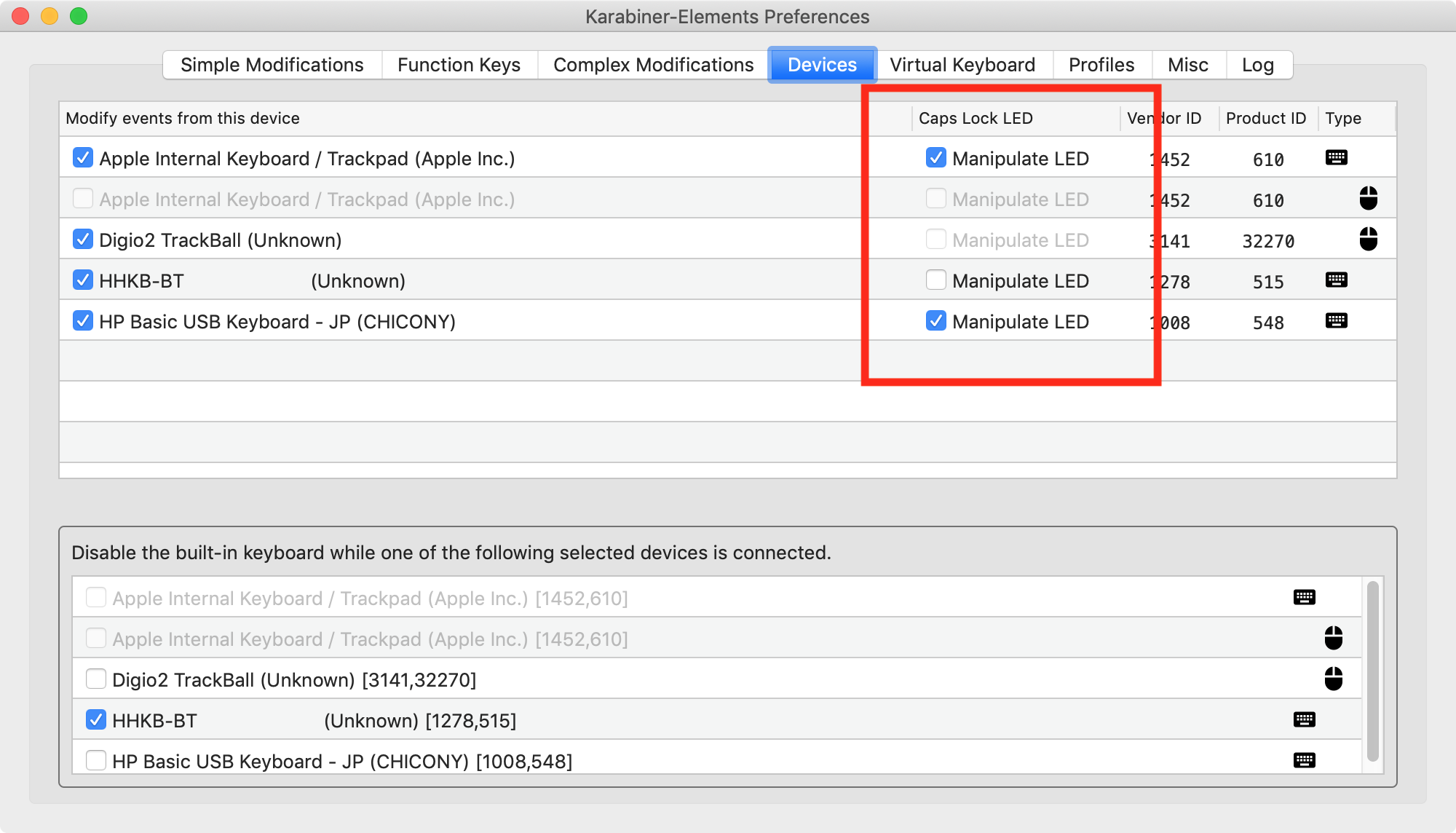
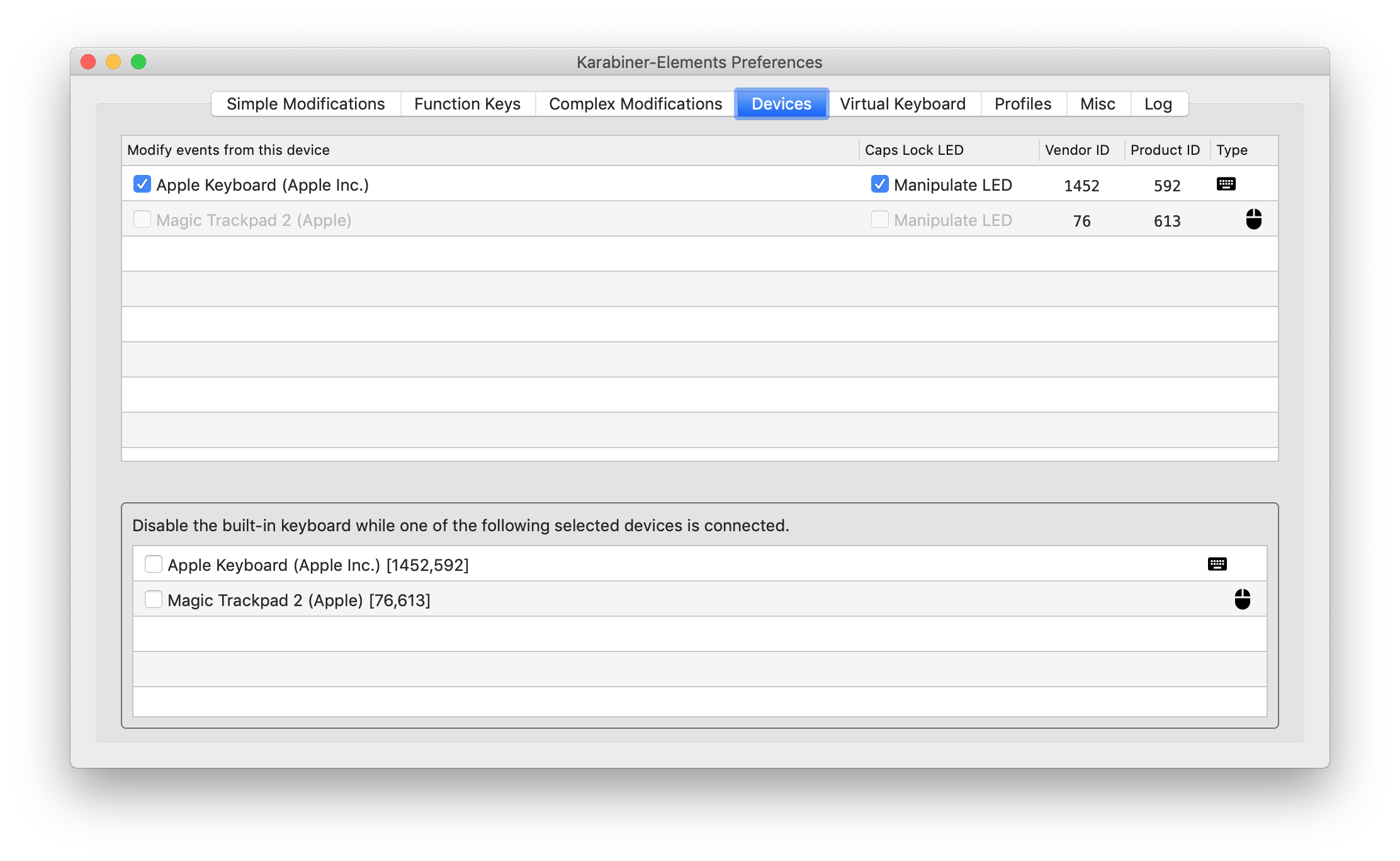
You have to enable LED control manually on Devices tab if you are using non-Apple keyboard.
tekezo
on 26 Oct 2018
@takezo will you add back the option of capslock delay?
gstvomacedo
on 27 Oct 2018
@takezo I ticked the box but LED still not working, I'm using the microsoft ergonomic keyboard
 hihell
on 28 Oct 2018
hihell
on 28 Oct 2018
Issue was resolved for me in 12.1.55 update.
 vermi
on 29 Oct 2018
vermi
on 29 Oct 2018
The LED works fine, but the CAPS LOCK delay still persists.
I am experiencing not a delay per se, but a missed press from time to time.
 pravic
on 16 Nov 2018
pravic
on 16 Nov 2018
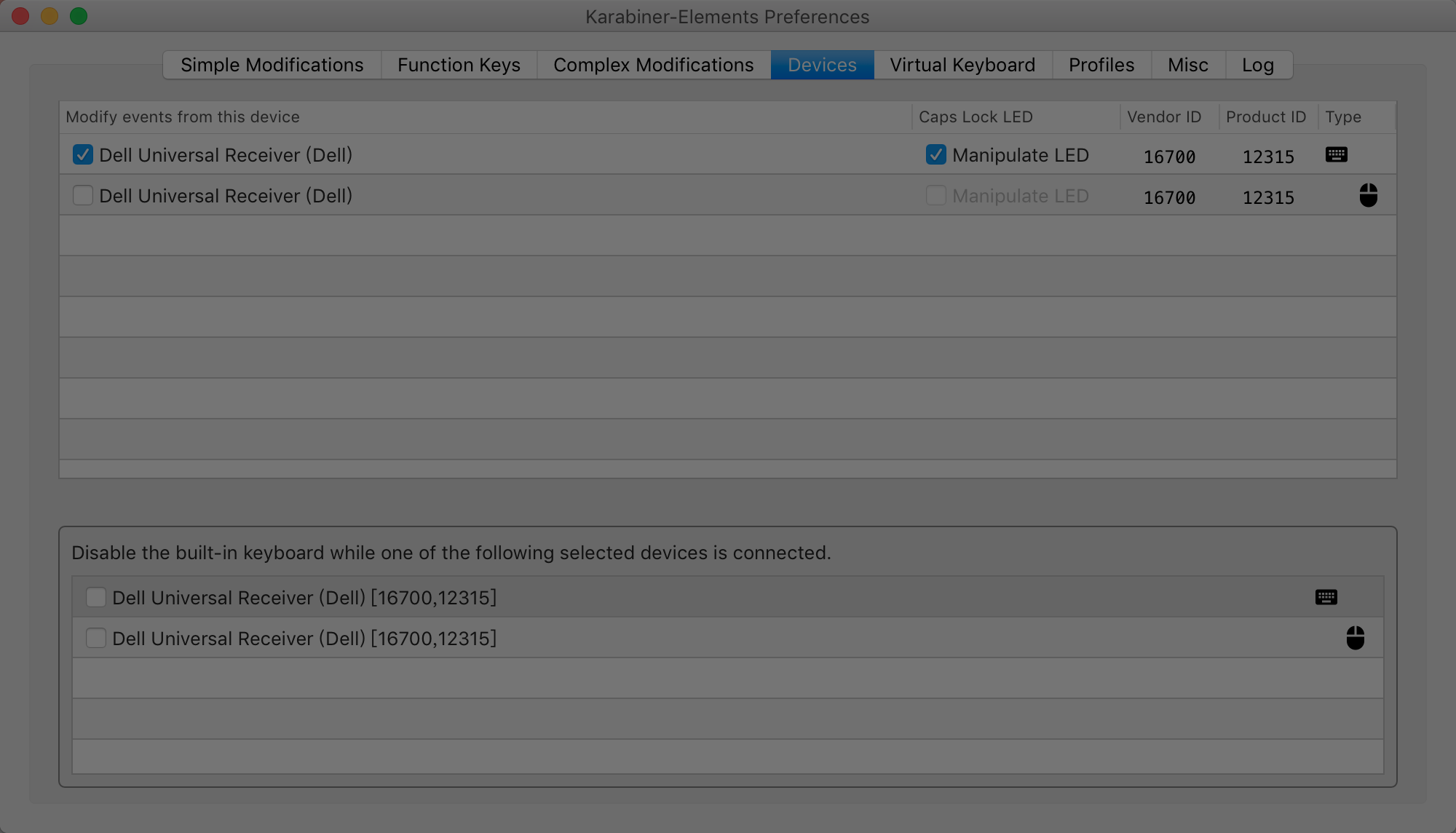
i have dell km 717 keyboard but caps lock led don't light,how to do?
 ilovebamboo
on 18 Nov 2018
ilovebamboo
on 18 Nov 2018
I have a Filco Convertible 2 TKL keyboard, and Caps LED doesn't work on Mojave and Karabiner 12.1.56.

 msogrin
on 19 Nov 2018
msogrin
on 19 Nov 2018
The Caps LED lights after clicking the Caps button, but all the complex modifications don't work while the LED is lighting.
 momodupi
on 22 Nov 2018
momodupi
on 22 Nov 2018
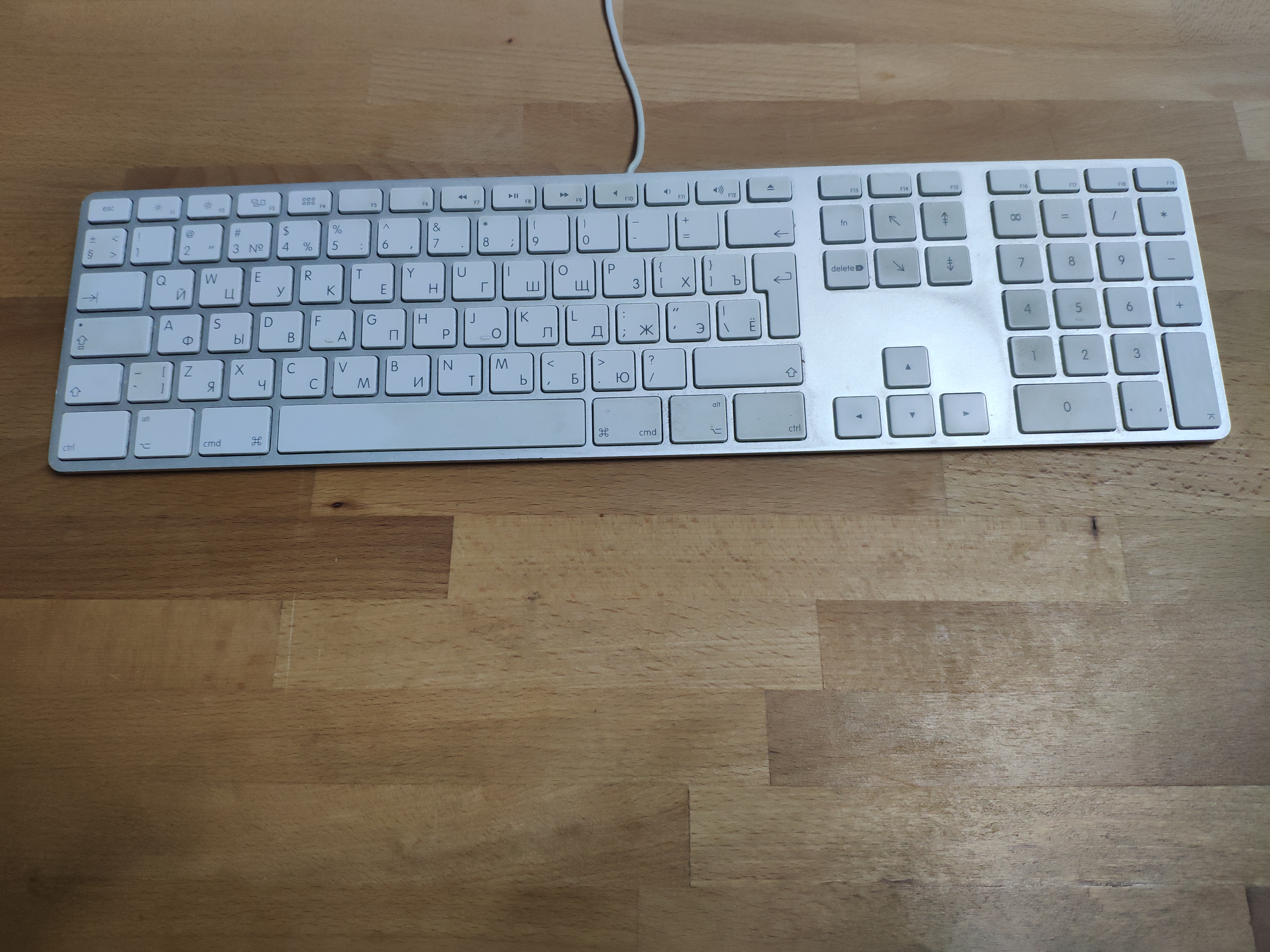
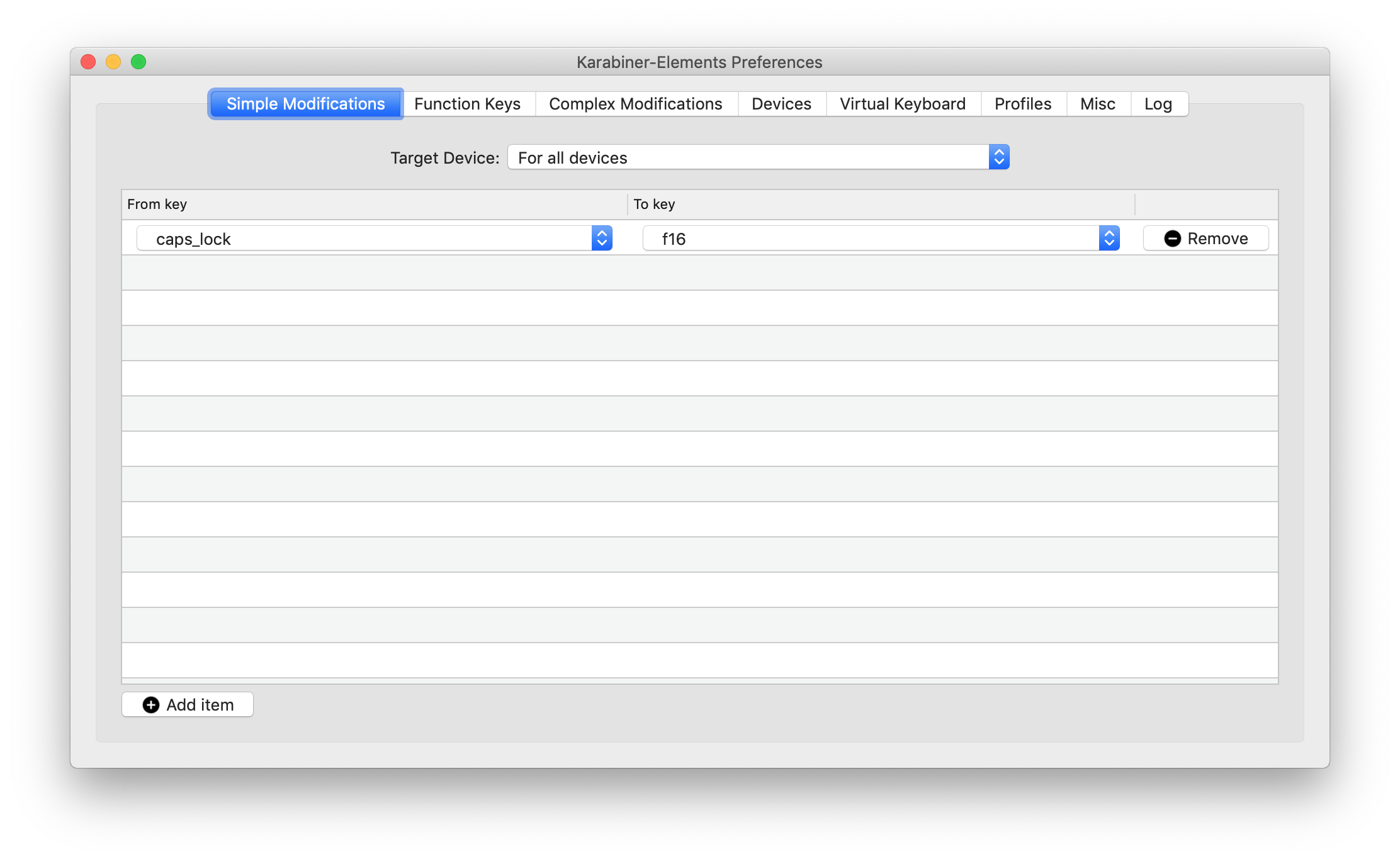
I have apple usb keyboard, Mojave and 12.1.56 version (beta) and my caps lock led don't work.
 n1x0id
on 27 Nov 2018
n1x0id
on 27 Nov 2018
Same issue for me with Mojave. I thought it is a macOS problem. I'm using the Macbook Air's builtin keyboard.
 clarkwang
on 28 Nov 2018
clarkwang
on 28 Nov 2018
I have apple usb keyboard, Mojave and 12.1.56 version (beta) and my caps lock led don't work.
Similar situation, but the keyboard has the italian layout.
The 12.1.56 beta version fixed the issue for me.
Cheers!
 silviorelli
on 30 Nov 2018
silviorelli
on 30 Nov 2018
Had the same. New Beta Krabinier Elelments fixes that issue
 Reconed
on 15 Dec 2018
Reconed
on 15 Dec 2018
I fixed this issue at the latest beta version. (v12.1.51)
You can get it from "Check for beta updates" button.
https://pqrs.org/osx/karabiner/document.html#check-for-updates
In fact I had to upgrade from 12.1.55 to beta 12.1.56 and now it works again
 andgineer
on 16 Dec 2018
andgineer
on 16 Dec 2018
Apple Extended Keyboard with iMate on Mojave (10.14.2) with Karabiner-Elements (12.1.57) Caps Light does not work.
 alxgarza
on 22 Dec 2018
alxgarza
on 22 Dec 2018
Me too, Caps Lock light was lit up, now does not go on at all
 jonobrown
on 11 Jan 2019
jonobrown
on 11 Jan 2019
I have the latest version (12.1.0) and using the internal keyboard, but the Caps Lock LED doesn't turn on and off.
Upgraded to Mojave uninstalled the old Karabiner and installed fresh one.
 nikolaydimitrov
on 11 Jan 2019
nikolaydimitrov
on 11 Jan 2019
FYI, this is fixed in the beta version 12.1.59 for me, using Macbook Air.
To upgrade to the beta version go to Preferences => Misc => Check for beta updates (right side button).
 quackenbush
on 11 Jan 2019
quackenbush
on 11 Jan 2019
@quackenbush thanks a lot! Didn't think about beta. Works now!
nikolaydimitrov
on 12 Jan 2019
God bless whoever fixed this.
The bug was really annoying.
 iofik
on 12 Jan 2019
iofik
on 12 Jan 2019
Upgraded to Karabiner 23.1.59 and it is still not working for me. Caps Lock Led is always off.
alxgarza
on 15 Jan 2019
I have tried all combinations and the leds don’t work.
This is my curren configuration:
On Jan 19, 2019, at 11:02 PM, Jaehong Park notifications@github.com wrote:
I was having the same issue. For me, I unchecked [Apple Internal Keyboard / Trackpad] and now the caps lock light toggles.
https://user-images.githubusercontent.com/19990742/51435508-709db300-1c2d-11e9-85b1-0034ce392855.png
—
You are receiving this because you commented.
Reply to this email directly, view it on GitHub https://github.com/tekezo/Karabiner-Elements/issues/1502#issuecomment-455838164, or mute the thread https://github.com/notifications/unsubscribe-auth/AOWCYYLJNOF0s2HNGTOLiSaeiqQc_xAQks5vE_iBgaJpZM4VbXUB.
alxgarza
on 21 Jan 2019
Go to Karabiner-Elements>Preferences>Devices and turn off Manipulate LED and Apple Internal Keyboard for the default keyboard.
Or Update to the beta version of Karabiner
 DarinDev1000
on 29 Jan 2019
DarinDev1000
on 29 Jan 2019
Just got the 12.2.0 update today and this is fixed. Thank you!
I wish that I had found this issue before and got in on the fix in beta months ago.
 Splaktar
on 6 Feb 2019
Splaktar
on 6 Feb 2019
It is still not working on Apple Extended Keyboard with iMate on Mojave (10.14.3) with Karabiner-Elements (12.2.0) Caps Light does not work. And Caps do not say do not work. Even thou the cap_lock event is showing in the event window.
alxgarza
on 6 Feb 2019
I have a Filco Convertible 2 TKL keyboard, and Caps LED doesn't work on Mojave and Karabiner 12.1.56.
It is still not working with version 12.2.0.
msogrin
on 7 Feb 2019
Caps lock works with Mojave 10.14.2 (18C54) with Karabiner-Elements (12.2.0)
 muthukumarn
on 11 Feb 2019
muthukumarn
on 11 Feb 2019
It does not work with all keyboards.
alxgarza
on 11 Feb 2019
This issue has been automatically marked as stale because it has not had recent activity. It will be closed if no further activity occurs. Thank you for your contributions.
![stale[bot] picture](https://avatars3.githubusercontent.com/in/1724?v=4&s=40) stale[bot]
on 12 Apr 2019
stale[bot]
on 12 Apr 2019
I have a Filco Convertible 2 TKL keyboard, and Caps LED doesn't work on Mojave and Karabiner 12.1.56.
Still doesn't work. Karabiner 12.2.11 is installed now.
msogrin
on 15 Apr 2019
This issue has been automatically marked as stale because it has not had recent activity. It will be closed if no further activity occurs. Thank you for your contributions.
stale[bot]
on 14 Jun 2019
bump
 ejjoo
on 14 Jun 2019
ejjoo
on 14 Jun 2019
I have Filco Majestouch 2, still not working. version 12.5.0 and Mojave 10.14.5
ejjoo
on 14 Jun 2019
Upgrading from Karabiner 12.1.0 to 12.5.0 fixed this for me, but it didn't fix another (related?) issue I've been having: _sometimes_, I have to hit Caps Lock twice before it will toggle on. This isn't just the light, but the actual "typing in uppercase" functionality, too. It seems completely random whether it will take two or one keypress to enable Caps Lock.
Is anyone else experiencing that? I couldn't find any other Karabiner bugs on that issue...
 peterflynn
on 28 Jun 2019
peterflynn
on 28 Jun 2019
This issue has been automatically marked as stale because it has not had recent activity. It will be closed if no further activity occurs. Thank you for your contributions.
stale[bot]
on 27 Aug 2019
after upgrade to Catalina, same happened here.
Reset NVRAM or PRAM on your Mac
got fixed after repeat the process for second times
 no7dw
on 12 Oct 2019
no7dw
on 12 Oct 2019
After upgrade to Catalina, caps lock LED was always on.
After reset NVRAM once, got fixed.
 fxh90
on 19 Oct 2019
fxh90
on 19 Oct 2019
Running a few QMK keyboards on a hackintosh and none of them have working caps LEDs under the latest Catalina public release, reset nvram a few times and still no change. Ticked LED box in Karabiner off and on, neither seemed to make any difference. LEDs work in Windows.
 tominabox1
on 19 Oct 2019
tominabox1
on 19 Oct 2019
Related issues
 willisworley
·
3Comments
willisworley
·
3Comments
 krasnovpro
·
3Comments
krasnovpro
·
3Comments
 rkusa
·
3Comments
rkusa
·
3Comments
 aniude
·
3Comments
ghost
·
3Comments
aniude
·
3Comments
ghost
·
3Comments
Most helpful comment
I fixed this issue at the latest beta version. (v12.1.51)
You can get it from "Check for beta updates" button.
https://pqrs.org/osx/karabiner/document.html#check-for-updates