Karabiner-elements: How to map key to non-deadkeys version using Karabiner Elements?
I use a US International keyboard (normal US layout + deadkeys), and I would like to use Karabiner Elements to map a key to the "non-deadkeyed" version of another key, so I can use it without the extra Spacebar hit. This is what I have so far in my src/json/personal_kbdluv.json.erb:
    {
        "description": "Post grave_accent_and_tilde if Caps Lock is pressed alone, left_shift if held down.",
        "manipulators": [
            {
                "type": "basic",
                "from": <%= from("caps_lock", [], ["any"]) %>,
                "to": <%= to([["left_shift"]]) %>,
                "to_if_alone": <%= to([["grave_accent_and_tilde"]]) %>
            }
        ]
    }
That is, I want my Caps Lock key to spit out or ~ (with Shift). With the code I have so far, the behavior is the same as pressing the normal/~ key. What do I need to change? Thank you!
(Cross posting from SO in case someone here can provide help. Sorry if this is not the right place.)
 kbdluv
All 5 comments
I was gonna ask nearly the same question. I'm on a germany keyboard layout, and the backticks as well as the tilde key are configured as dead keys (they need an extra spacebar hit). I just want to map them to be non-deadkeys.
 23tux
on 3 Jan 2018
23tux
on 3 Jan 2018
I'm using Finnish keyboard layout and resolved this by making a new keyboard layout with Ukelele where I removed all the dead keys from default symbol keys: bactick, tilde etc. Now I can map the keys just how I want.
 plehton
on 9 Jan 2018
plehton
on 9 Jan 2018
This issue has been automatically marked as stale because it has not had recent activity. It will be closed if no further activity occurs. Thank you for your contributions.
![stale[bot] picture](https://avatars3.githubusercontent.com/in/1724?v=4&s=40) stale[bot]
on 10 Mar 2018
stale[bot]
on 10 Mar 2018
Sorry to revive this old thread....
but SO link above was nixed and can't get this to work properly.
First, thank you so much for Karabiner. It is an awesome tool, (albeit a little difficult to configure).
I'm on a scandiavian keyboard (Norwegian - macOS 10.15 (latest beta) - Apple Magic Keyboard (non-keypad, but affects all macos versions and all Mac keyboards.
Backtick
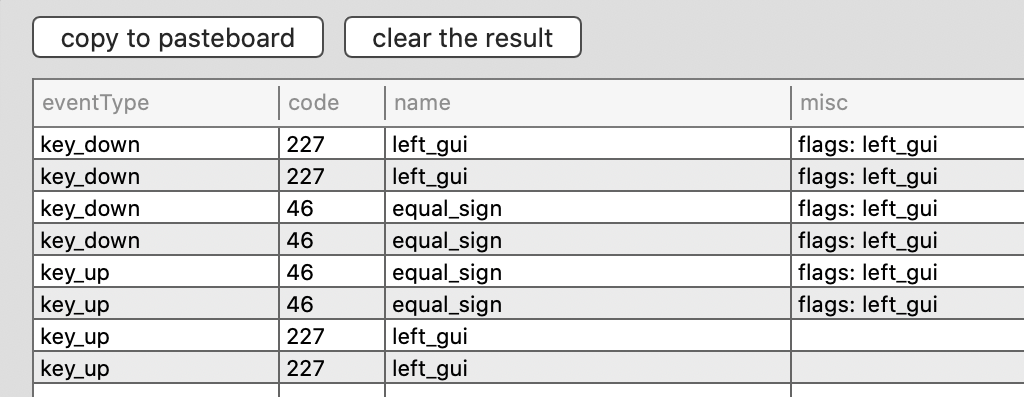
K-Eventviewer outputs code 46 equal_sign when hitting they backtick key alone.
When pressed alone, backtick is a dead key. To get backtick, you must use option + backtick (and in these days with so much Markdown around, it's getting increasingly painful!)
Eventviewer outputs key_down 46 equal_sign flags: left_alt on hitting option + backtick simultaneously, in addition to the modifiers up/down: (And why do everything appear twice? I have a Logitech G Pro USB-Mouse (with Logitech G Hub software):
I can't find any complex modifiers to exchange these two 'functions' on the same physical key. Is it possible?
Tilde
It is even worse getting to type tilde. The tilde character is on a key the eventviewer reports as 48 close bracket, also a dead key. Hitting option + tillde is a third dead key. To get tilde, you must use option + tilde and then hit space. carpal tunnel song playing in the far distance
Questions
Did anyone successfully create some sort of modifier or other solution to remap these dead keys somehow, to make them dead only with modifier or otherwise if the dead keys must continue to be ... dead?
Is it possible to create more dead keys somehow, like some sort of vim-mode, on Scandinavian keyboards?
Extra: config
  "input_source": {
        "input_source_id": "com.apple.keylayout.Norwegian",
        "language": "nb"
    },
    "system_preferences_properties": {
        "keyboard_types": [
            [
                {
                    "country_code": 0,
                    "product_id": 49285,
                    "vendor_id": 1133
                },
                40
            ],
            [
                {
                    "country_code": 0,
                    "product_id": 10203,
                    "vendor_id": 5824
                },
                40
            ]
        ],
        "scroll_direction_is_natural": true,
        "use_fkeys_as_standard_function_keys": true
    },
    "variables": {},
    "virtual_hid_keyboard_country_code": 0,
    "virtual_hid_keyboard_keyboard_type": "ansi"
}
 haakonstorm
on 6 Sep 2019
haakonstorm
on 6 Sep 2019
Has anyone found a solution to this? I would also like to remap dead keys to their non-dead versions, especially the backtics on a German keyboard.
 fiedl
on 18 Oct 2019
fiedl
on 18 Oct 2019
Related issues
 DanweDE
·
3Comments
DanweDE
·
3Comments
 surfingoz
·
3Comments
surfingoz
·
3Comments
 impala75
·
3Comments
impala75
·
3Comments
 willisworley
·
3Comments
willisworley
·
3Comments
 baurmatt
·
3Comments
baurmatt
·
3Comments
Most helpful comment
I was gonna ask nearly the same question. I'm on a germany keyboard layout, and the backticks as well as the tilde key are configured as dead keys (they need an extra spacebar hit). I just want to map them to be non-deadkeys.