Karabiner-elements: Modifier keys (Cmd, Option / Alt, Shift) aren't registered when used in combination with function keys
When using IntelliJ IDEA and the built in keyboard, modifier keys aren't registered when used in combination with function keys. I have set the MacOS System Preference to always show function keys when using IntelliJ (System Preferences > Keyboard > Shortcuts > Function Keys).
However, when I attach my external keyboard (a Kinesis Advantage), the modifier keys register and the corresponding feature is activated (e.g., find usages on a method).
Many useful keyboard shortcuts make use of modifier keys + function keys, so this severely degrades use. I've tried this with my custom in addition to with the default karabiner.json and it occurs with both.
One way this can be observed is to:
- open the App settings (
Cmd ,), - type
keymap - click the icon to the right of the search box in the keymap area also on the right to open the
Find Actions by Shortcut - Press
cmd,option, orshift(or even all three together) + afunction key - observe that only the function key shows
Modifier keys in combination with other keys work correctly.
Environment:
- Karabiner Elements 11.3.0
- MacBook Pro with Touchbar
- MacOS Sierra
- IntelliJ 2017.3 Ultimate Edition (though I imagine this will occur with the Community Edition as well)
 zimmermatt
All 16 comments
I have the same issue - using Eclipe :-)
I tried also to fiddle around with the function keys setting - without any success. Only closing of Karabiner helps to use combinations like ALt+F7. It also doesn't matter which keyboard layout is selected in Karabiner or macOS.
I have a touchbar - perhaps there is an issue in combination with it?
 Jeetah
on 9 Dec 2017
Jeetah
on 9 Dec 2017
Same here. I can confirm Karabiner is causing the issue. Can't decide which is worse -- living without IntelliJ shortcuts or living without Karabiner shortcuts :(
 githorse
on 19 Feb 2018
githorse
on 19 Feb 2018
If someone knowledgable can help me set up running and debugging locally (e.g., which sub-apps to run, where I might set a breakpoint, etc.), I can possibly help fix this. I was able to compile it locally and open it in XCode as a start. I'm guessing someone knowledgable of the code will have an intuition for where to start.
zimmermatt
on 30 Mar 2018
Same here
 issei-m
on 6 Apr 2018
issei-m
on 6 Apr 2018
Same for me. Worked well on MacBook without touch bar. But on MacBook with touch bar modifiers keys are ignored.
 MyDogTom
on 20 Apr 2018
MyDogTom
on 20 Apr 2018
Ok, after investigating, I've found two ways to fix that.
Fix 1. enable unknown device

Fix 2. (or rather workaround) map function key to number
https://pqrs.org/osx/karabiner/help.html#touch-bar-function-keys
@zimmermatt Does that works for you as well?
MyDogTom
on 20 Apr 2018
Nice! Thanks for digging in @MyDogTom!
Fix 1 works for me.
Fix 2 didn't. I had the config to always show function keys set. I turned that off and tried again with no luck.
zimmermatt
on 20 Apr 2018
This issue has been automatically marked as stale because it has not had recent activity. It will be closed if no further activity occurs. Thank you for your contributions.
![stale[bot] picture](https://avatars3.githubusercontent.com/in/1724?v=4&s=40) stale[bot]
on 19 Jun 2018
stale[bot]
on 19 Jun 2018
touch 1160
to keep it open...
zimmermatt
on 20 Jun 2018
This issue has been automatically marked as stale because it has not had recent activity. It will be closed if no further activity occurs. Thank you for your contributions.
stale[bot]
on 19 Aug 2018
In my case enabling the unknown device did not solve, but then I noticed the setting "Use Fn keys as standard function keys was enabled" and when I disabled that, all was good.
 geowyn
on 24 Jan 2019
geowyn
on 24 Jan 2019
Fix #1 worked for me.
 nils-tekampe
on 6 Feb 2019
nils-tekampe
on 6 Feb 2019
Really annoying. Like how they just close issues because there's nothing more to say about it.
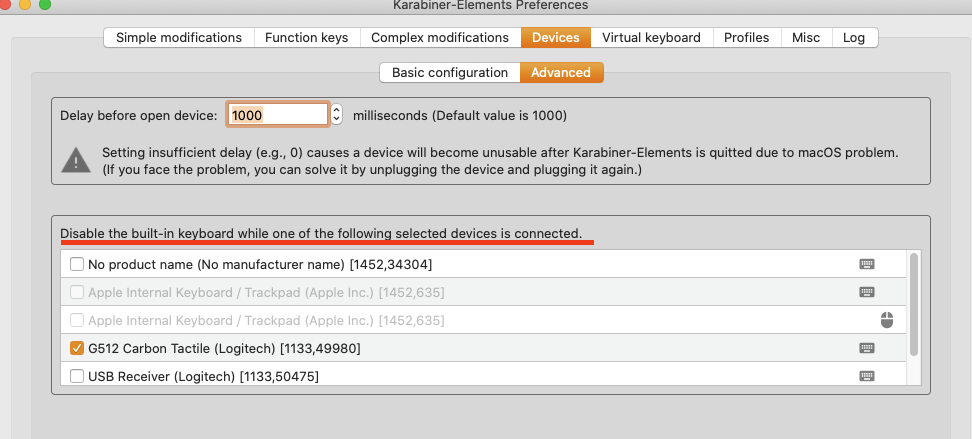
It's still broken. The suggestions do not work for me at all.
This works for me tho with external keyboard:
 b-hayes
on 9 Dec 2019
b-hayes
on 9 Dec 2019
Fix 1 from @MyDogTom works for me, after quit & reopen Karabiner Elements.
 cakraww
on 16 Jan 2020
cakraww
on 16 Jan 2020
Fix 1 doesn't work in an apps where you chose to have functional keys in the Touch Bar by default. This is super annoying and is not a proper fix. This issue should really be re-opened!
 bigunyak
on 11 Mar 2020
bigunyak
on 11 Mar 2020
Only thing that "works" for me is to "User all F1, F2, etc. keys as standard function keys"
But then I lose the default mac shortcuts like brightness, volume etc.
The moment I close karabiner, the function keys work exactly like expected. I can change volume, and when I press shift+F6 for example, intellij editors recognize it as a regular shift+F6 press.
I think this should be re-opened.
 Bonemeijer
on 10 Apr 2020
Bonemeijer
on 10 Apr 2020
Related issues
 rkusa
·
3Comments
rkusa
·
3Comments
 krasnovpro
·
3Comments
krasnovpro
·
3Comments
 aniude
·
3Comments
aniude
·
3Comments
 KyleAtDND
·
3Comments
KyleAtDND
·
3Comments
 impala75
·
3Comments
impala75
·
3Comments
Most helpful comment
Ok, after investigating, I've found two ways to fix that.

Fix 1. enable unknown device
Fix 2. (or rather workaround) map function key to number
https://pqrs.org/osx/karabiner/help.html#touch-bar-function-keys
@zimmermatt Does that works for you as well?