Karabiner-elements: Modifier keys do not work in IntelliJ IDEA OS X
IntelliJ IDEA 2017.1.5, OS X 10.12.4. Cmd, Opt, and Shift do not properly invoke function key commands in the IntelliJ editor.
MacBookPro13,3, TouchBar model, using built-in keyboard.
E.g., Opt-F7 in my IntelliJ is bound to "Find Usages," but fails to do anything. Cmd-F6 when on a method name should invoke "Change Signature," but instead invokes F6, "Move."
 jingibus
All 24 comments
I have not had the same experience, all my IntelliJ bindings continue to work.
If you post your karabiner.json, I could try it to see if I have the same issue.
(btw, i'm not associated with this project in any way, just a fellow user)
 jvinding
on 20 Jul 2017
jvinding
on 20 Jul 2017
It's not the case for all keybindings. Cmd-O works, Cmd-, works.
karabiner.json:
{
    "global": {
        "check_for_updates_on_startup": true,
        "show_in_menu_bar": true,
        "show_profile_name_in_menu_bar": false
    },
    "profiles": [
        {
            "complex_modifications": {
                "parameters": {
                    "basic.to_if_alone_timeout_milliseconds": 1000
                },
                "rules": []
            },
            "devices": [],
            "fn_function_keys": {
                "f1": "display_brightness_decrement",
                "f10": "mute",
                "f11": "volume_decrement",
                "f12": "volume_increment",
                "f2": "display_brightness_increment",
                "f3": "mission_control",
                "f4": "launchpad",
                "f5": "illumination_decrement",
                "f6": "illumination_increment",
                "f7": "rewind",
                "f8": "play_or_pause",
                "f9": "fastforward"
            },
            "name": "Default profile",
            "selected": true,
            "simple_modifications": {
                "caps_lock": "escape",
                "left_command": "left_command",
                "left_option": "left_option"
            },
            "virtual_hid_keyboard": {
                "caps_lock_delay_milliseconds": 0,
                "keyboard_type": "ansi"
            }
        }
    ]
}
It all still works for me with that json, what version of Karabiner-Elements are you using?
jvinding
on 20 Jul 2017
0.91.9
jingibus
on 21 Jul 2017
Sorry, but I don't think I'm able to help you.
jvinding
on 21 Jul 2017
It's only the function keys that are misbehaving.
Are you on a MBP touchbar?
jingibus
on 21 Jul 2017
no, i'm on a 2013 MBP
jvinding
on 21 Jul 2017
Hmm. Shall I revise the description in the issue, then?
jingibus
on 21 Jul 2017
I'd advise including as much relevant info as possible, including the the computer's model, OS version, keyboad type (if no the built-in keyboard), etc
jvinding
on 21 Jul 2017
Found a workaround here: https://github.com/tekezo/Karabiner-Elements/issues/595
If I turn off Expanded Control Strip, things work again.
jingibus
on 21 Jul 2017
I'm currently using version 0.91.10 and Command+Function key isn't working, no matter what the "Touchbar Shows" setting is. It is seen by app as just the function key on its own.
 sw9
on 25 Jul 2017
sw9
on 25 Jul 2017
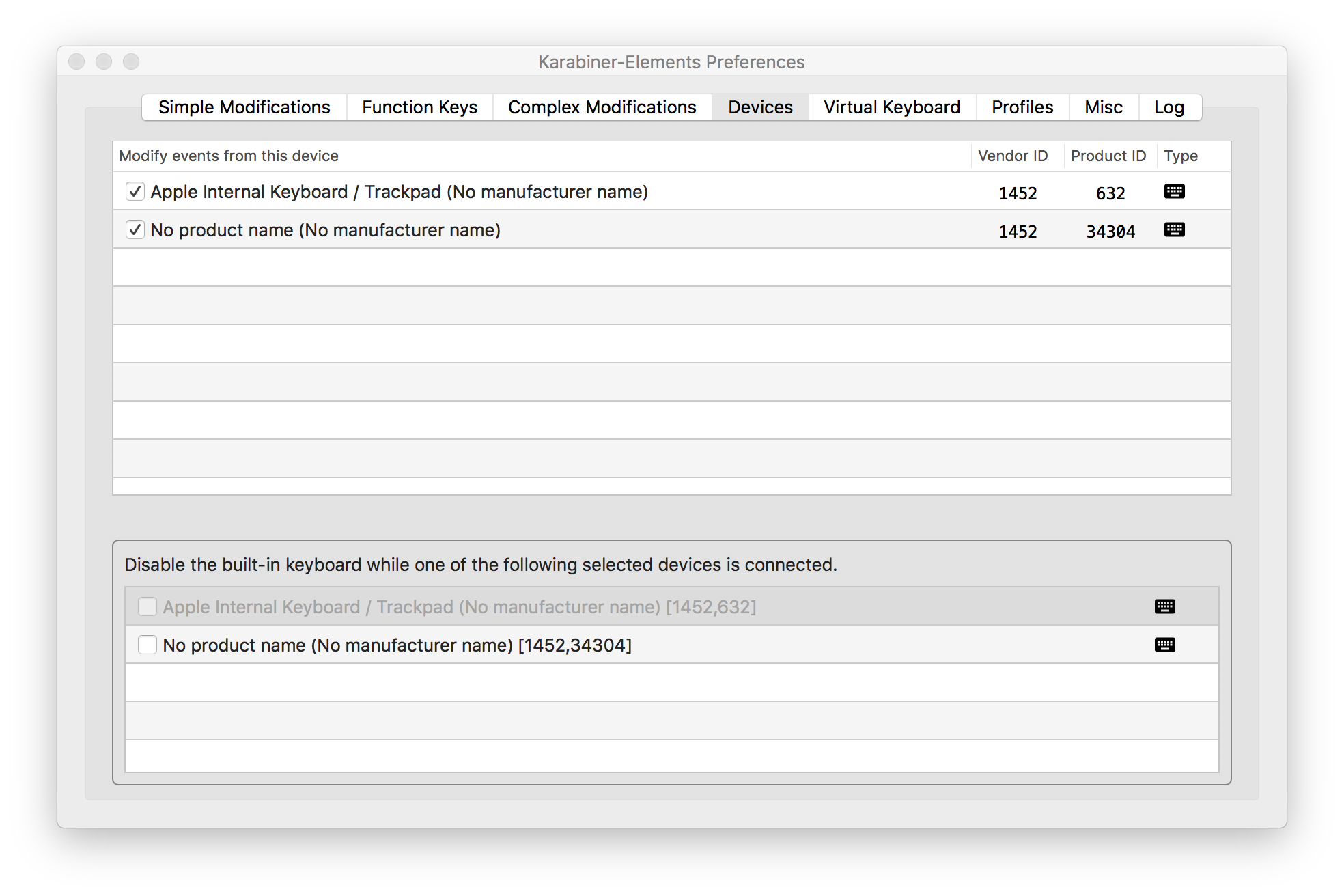
In 0.91.13 I met similar problem. If I turn off support Apple Internal keyborad then hotkeys works. I think problem inside karabiner
 ufian
on 16 Aug 2017
ufian
on 16 Aug 2017
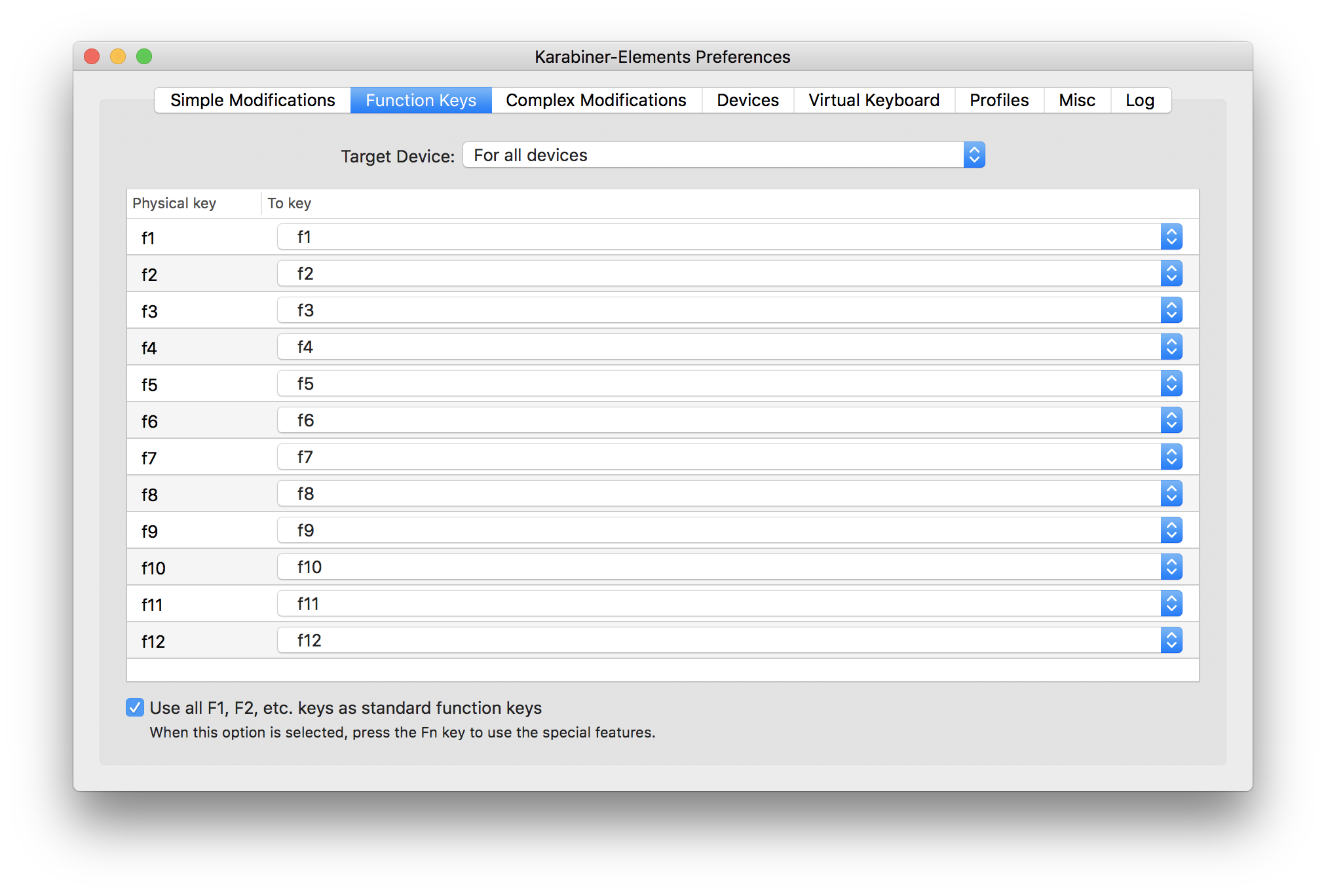
I found decision for Idea products. With this settings shift+Fn keys works
ufian
on 18 Aug 2017
I have tried all of the above suggestions, with no luck. I use these shortcuts (e.g. Shift+F6 and Ctrl+F5) more than my caps lock = backspace, so for now I have to uninstall Karabiner Elements.
Please let me know when this is fixed 📞 🌮
@lindsaymarkward
 lindsaymarkward
on 6 Sep 2017
lindsaymarkward
on 6 Sep 2017
@lindsaymarkward If you'd like to be notified of changes to this ticket, you can hit the "subscribe" button on the right side of the page - will send you an email every time something changes
 jklp
on 7 Sep 2017
jklp
on 7 Sep 2017
I have same problem: F keys are not working (basically I'm not able to debug using the keyboard when karabine is opened). After configuring karabine-elemnts to use home/end keys, the home/end keys also stopped working inside of IntelliJ :(
Is there a way to configure karabine act just when you are focusing certain applications?
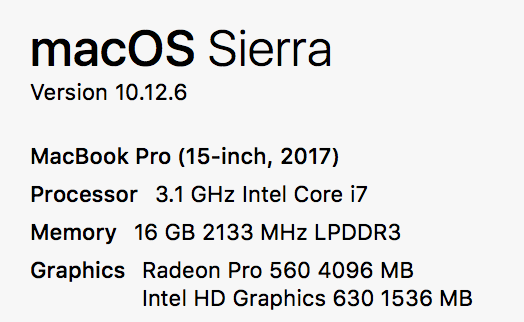
I'm on MacBook Pro with touchbar (if that makes any difference).
 renannprado
on 24 Oct 2017
renannprado
on 24 Oct 2017
This issue has been automatically marked as stale because it has not had recent activity. It will be closed if no further activity occurs. Thank you for your contributions.
![stale[bot] picture](https://avatars3.githubusercontent.com/in/1724?v=4&s=40) stale[bot]
on 4 Mar 2018
stale[bot]
on 4 Mar 2018
I have a new MBP and can now confirm that this is still an issue
jvinding
on 4 Mar 2018
ufian's workaround works, but this certainly needs addressing in the app itself!
 NightMachinary
on 22 Mar 2018
NightMachinary
on 22 Mar 2018
I had the same issue and the solution was to just uncheck the internal keyboard under "Modify events from this device" in the Devices tab of Karabiner (12.0.0).
 robfletcher
on 1 May 2018
robfletcher
on 1 May 2018
This issue has been automatically marked as stale because it has not had recent activity. It will be closed if no further activity occurs. Thank you for your contributions.
stale[bot]
on 30 Jun 2018
bump so stale bot doesn't close it.
jvinding
on 2 Jul 2018
There is a good solution here.
You have to apply the one from @mutantcornholio and @kasecato
 baharestani
on 3 Jul 2018
baharestani
on 3 Jul 2018
This issue has been automatically marked as stale because it has not had recent activity. It will be closed if no further activity occurs. Thank you for your contributions.
stale[bot]
on 1 Sep 2018
Related issues
 willisworley
·
3Comments
willisworley
·
3Comments
 chaucy
·
3Comments
chaucy
·
3Comments
 Fengur
·
3Comments
Fengur
·
3Comments
 krasnovpro
·
3Comments
krasnovpro
·
3Comments
 Ox0400
·
3Comments
Ox0400
·
3Comments
Most helpful comment
I found decision for Idea products. With this settings shift+Fn keys works

