Karabiner-elements: Extend the "fn" with function keys feature
Would it be possible to extend the "fn" with function keys feature to other keys? That way we could create "fn"+"any button" to "some other button".
In my case that would be:
"fn"+"j" : "keypad_1"
"fn"+"k" : "keypad_2"
"fn"+"l" : "keypad_3"
...
Please?
The worst missing element in a MacBook is the numpad.
 pvandewalle
All 24 comments
I fully agree about the importance of this element...
The best solution I found yet is to use Keyboard Maestro, although they don't allow to use the fn key and it does not work for passwords.
 Lismont
on 8 Jun 2017
Lismont
on 8 Jun 2017
+1
I desperately need this functionality for use with 3D CAD software, currently having to use a clunky external keyboard which is not a viable solution when I am away from my office.
 DiegoDesigns
on 9 Jun 2017
DiegoDesigns
on 9 Jun 2017
DiegoDesigns
That's exactly why I need it. I'm a Vectorworks user, I suppose just like you...
pvandewalle
on 9 Jun 2017
@pvandewalle Yes I am also a VW user and thus the requirement ..
I have found a work around using Apple's inbuilt "App Shortcuts" facility to create the keypad when using VW.
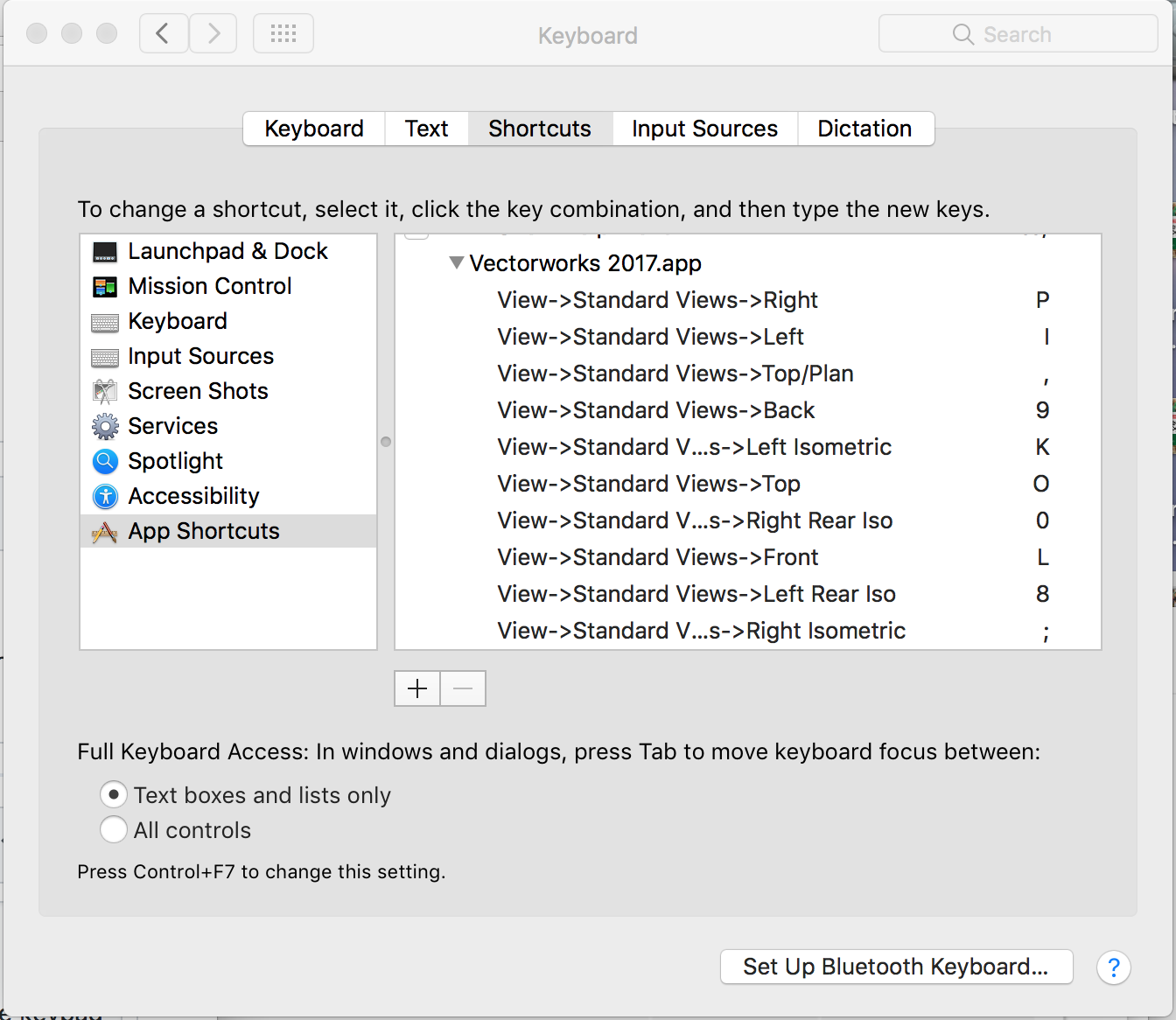
To set it up you have to write the path to the menu function separating the menu levels using " -> " a hyphen and forward arrow.
DiegoDesigns
on 13 Jun 2017
My workaround is by using Keyboard Maestro. One can choose to use the ctrl button with another button to get keypad strokes. So now ctrl+j is keypad 1 and so on.
Works fine in every software tested so far.
pvandewalle
on 14 Jun 2017
this will map fn+j/k/l/u/i/o to 1/2/3/4/5/6 -
https://www.dropbox.com/s/jkcbfx7om18w0d8/mini_numpad.json?dl=0
 steveseldon
on 10 Jul 2017
steveseldon
on 10 Jul 2017
Thank steveseldon. Sorry for the basic question, but where should I put the file to add this new map to Karabiner-Elements?
Lismont
on 10 Jul 2017
Actually I found a solution (I just placed the code in the complex_modifications_rules_examples.json. But I have another problem: for the moment, I need to press the Shift key in addition to the number to appear because if I press only on fn, it is the symbols and not the numbers which are inserted... Any idea how I should modify the code in order to get the numbers directly by pressing the fn key? Huge thanks.
Lismont
on 10 Jul 2017
So here is the code that is working for me. I also added the 0 on the bottom under the 1 since this is what I am used to on numeric keyboards.
`{
"title": "mini_numpad",
"rules": [
{
"description": "Change fn + j/k/l/u/i/o to Numpad",
"manipulators": [
{
"type": "basic",
"from": {
"key_code": "j",
"modifiers": {
"mandatory": ["fn"],
"optional": ["any"]
}
},
"to": [
{
"key_code": "1",
"modifiers": [
"left_shift"
]
}
]
},
{
"type": "basic",
"from": {
"key_code": "k",
"modifiers": {
"mandatory": ["fn"],
"optional": ["any"]
}
},
"to": [
{
"key_code": "2",
"modifiers": [
"left_shift"
]
}
]
},
{
"type": "basic",
"from": {
"key_code": "l",
"modifiers": {
"mandatory": ["fn"],
"optional": ["any"]
}
},
"to": [
{
"key_code": "3",
"modifiers": [
"left_shift"
]
}
]
},
{
"type": "basic",
"from": {
"key_code": "u",
"modifiers": {
"mandatory": ["fn"],
"optional": ["any"]
}
},
"to": [
{
"key_code": "4",
"modifiers": [
"left_shift"
]
}
]
},
{
"type": "basic",
"from": {
"key_code": "i",
"modifiers": {
"mandatory": ["fn"],
"optional": ["any"]
}
},
"to": [
{
"key_code": "5",
"modifiers": [
"left_shift"
]
}
]
},
{
"type": "basic",
"from": {
"key_code": "o",
"modifiers": {
"mandatory": ["fn"],
"optional": ["any"]
}
},
"to": [
{
"key_code": "6",
"modifiers": [
"left_shift"
]
}
]
},
{
"type": "basic",
"from": {
"key_code": "7",
"modifiers": {
"mandatory": ["fn"],
"optional": ["any"]
}
},
"to": [
{
"key_code": "7",
"modifiers": [
"left_shift"
]
}
]
},
{
"type": "basic",
"from": {
"key_code": "8",
"modifiers": {
"mandatory": ["fn"],
"optional": ["any"]
}
},
"to": [
{
"key_code": "8",
"modifiers": [
"left_shift"
]
}
]
},
{
"type": "basic",
"from": {
"key_code": "9",
"modifiers": {
"mandatory": ["fn"],
"optional": ["any"]
}
},
"to": [
{
"key_code": "9",
"modifiers": [
"left_shift"
]
}
]
},
{
"type": "basic",
"from": {
"key_code": "m",
"modifiers": {
"mandatory": ["fn"],
"optional": ["any"]
}
},
"to": [
{
"key_code": "0",
"modifiers": [
"left_shift"
]
}
]
}
]
}
]
}
`
Lismont
on 10 Jul 2017
I still have the same question. I understand the way the json file can be odified. But how can one implement that modifications to Karabiner Elements?
pvandewalle
on 10 Jul 2017
Hello pvandewalle, in the "Complex Modifications" tab, you need to remove the complex modification ("Change fn...") and then add it again. It will take your modifications of the json file into account.
Let us know if this solved your problem.
Lismont
on 11 Jul 2017
I was looking for a way to make an embedded numeric keypad, and here it is! Thank you all for the great code!
I've however one question: is it possible to use the Control key as a modifier, instead of the fn key? I know that the Control key is linked by Apple to some default actions (that I've not been able to overwrite with alternative codes in the DefaultKeyBinging.dict file).
Paolo
 ptram
on 14 Jul 2017
ptram
on 14 Jul 2017
Hi Paolo, did you try to replace all "fn" keys in the code above with CONTROL_L ? I guess it should work...
Lismont
on 15 Jul 2017
Lismont, thank you very much for you hint. I'll try it under my Sierra partition (I'm under Yosemite as the main system, waiting for a replacement of Karabiner before upgrading).
ptram
on 16 Jul 2017
I saw that the code has to be added to the 'complex_modifications_rules_examples.json' file... Where is that file??????
pvandewalle
on 16 Jul 2017
@pvandewalle Library/Application Support/org.pqrs/Karabiner-Elements
Lismont
on 16 Jul 2017
Lismont, I'm not sure I understand how I can load, and where I should put the .json files containing my scripts. If put in the Library/Application Support/org.pqrs/Karabiner-Elements/ folder, I can't see how to import them.
I'm sorry if this is already covered in the official documentation, but I couldn't find it. I've also some problems experimenting for long, since I work in Yosemite, and KE can't run on it. So I have to reboot each time I have to try it.
Paolo
ptram
on 17 Jul 2017
Hi @ptram, as indicated above, you should copy-paste the code into the complex_modifications_rules_examples.json file. For my part, I first deleted the code included in this file, then I pasted mine. Then, in the settings of Karabiner-Elements, you have to delete the existing complex modifications, and then you will be able to reimport them.
Lismont
on 17 Jul 2017
Hi Lismont, thank you very much, it was not totally clear to me on the first read.
As for your issues with having to press the Shift key in addition to the fn-key, I have a similar problem: when I use a custom made keyboard layout, with the virtual numeric keypad accesses with the Control key, some keys do not work if only the Control key is kept pressed. I have to also keep the Option key presses (not tried with the Shift).
Apple messed everything, in these years.
Paolo
ptram
on 17 Jul 2017
I finally got it working, but...
OK, it doesn't seem to work on azerty keyboards.
I really need it to become the NUMPAD keys. Just a link to the 1-9 key above the letter keys won't do the trick for me. My main software makes a difference between the numpad keys and the number keys on top of the keyboard...
pvandewalle
on 17 Jul 2017
Great. Strange because I managed to make it work on an bépo keyboard (I guess we could also be writing in French here ;))
Lismont
on 17 Jul 2017
@lismont: I see you're stated in Brussels. I'm living near Brussels too.
Did anybody find the name for the keypad keys. Is it something like "keypad 1"?
pvandewalle
on 17 Jul 2017
Hmm for my part, as you saw in the code above, I juste use the numbers as key_codes.
Belgium rocks ;)
Lismont
on 18 Jul 2017
This issue has been automatically marked as stale because it has not had recent activity. It will be closed if no further activity occurs. Thank you for your contributions.
![stale[bot] picture](https://avatars3.githubusercontent.com/in/1724?v=4&s=40) stale[bot]
on 4 Mar 2018
stale[bot]
on 4 Mar 2018
Related issues
 surfingoz
·
3Comments
surfingoz
·
3Comments
 Fengur
·
3Comments
Fengur
·
3Comments
 chaucy
·
3Comments
chaucy
·
3Comments
 aniude
·
3Comments
aniude
·
3Comments
 LittleNewton
·
3Comments
LittleNewton
·
3Comments