Kap: Is dimming the screen counter-intuitive?
General comment on the new V3 UX. Only me thinking out loud .
STEPS
- Launch Kap from the menu bar
- Screen becomes opaque.
But, it's the _screen_ where I want to make my selection with the cropper tool - and Kap just made it harder by turning the brightness down - on the very area I need to work.
Is it a big deal? Not really. Just feels a bit strange.
 steveharman
All 4 comments
I've thought a lot about this, in a sense it is counter intuitive. We started off without dimming the screen, and the problem was that people struggled to see the cropping tool and accurately place the edges of it above what they wanted to record. What we could do is look into an even more subtle overlay, one that's almost completely transparent.
 skllcrn
on 5 Oct 2018
skllcrn
on 5 Oct 2018
I think you've nailed it @skllcrn Having the recording area highlighted by the copper too is really neat, it's probably just the level of opacity of the remaining screen which is the issue (currently too dark) .
steveharman
on 5 Oct 2018
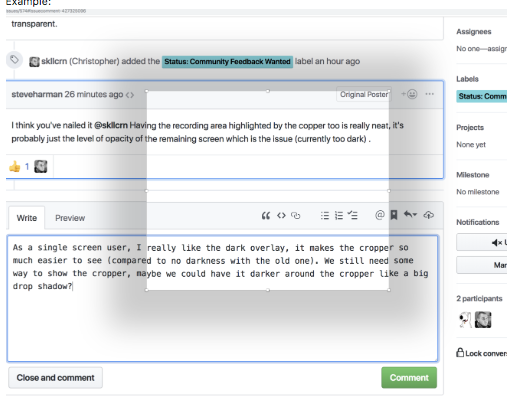
As a single screen user, I really like the dark overlay, it makes the cropper so much easier to see (compared to no darkness with the old one). I get that it is confusing/counter intuitive if you have multiple screens. We still need some way to highlight the cropper, maybe we could have it darker around the cropper like a big drop shadow?
Example:
 albinekb
on 5 Oct 2018
albinekb
on 5 Oct 2018
Not a bad idea @albinekb, e.g.:
box-shadow: 0 20px 40px 0 rgba(0,0,0,0.20);
And have that on a overlay at 0.10 or 0.20
background: rgba(0,0,0,0.10);
skllcrn
on 5 Oct 2018
Related issues
 Qix-
·
3Comments
albinekb
·
3Comments
Qix-
·
3Comments
albinekb
·
3Comments
 xenio
·
4Comments
xenio
·
4Comments
 benlumia007
·
3Comments
benlumia007
·
3Comments
 Glutnix
·
3Comments
Glutnix
·
3Comments
Most helpful comment
Not a bad idea @albinekb, e.g.:
box-shadow: 0 20px 40px 0 rgba(0,0,0,0.20);And have that on a overlay at
0.10or0.20background: rgba(0,0,0,0.10);