I just installed using brew cask install kap or any other way, i keep getting
Record Error
could not start recording within 5 seconds.
then i get this
Unhandled Promise Rejection
Error: Call `.startRecording()` first
    at Aperture.stopRecording (/Applications/Kap.app/Contents/Resources/app.asar/node_modules/aperture/index.js:141:13)
    at EventEmitter.<anonymous> (file:///Applications/Kap.app/Contents/Resources/app.asar/dist/renderer/js/main.js:207:39)
    at Generator.next (<anonymous>)
    at step (file:///Applications/Kap.app/Contents/Resources/app.asar/dist/renderer/js/main.js:39:191)
    at file:///Applications/Kap.app/Contents/Resources/app.asar/dist/renderer/js/main.js:39:437
    at Promise (<anonymous>)
    at EventEmitter.<anonymous> (file:///Applications/Kap.app/Contents/Resources/app.asar/dist/renderer/js/main.js:39:99)
    at EventEmitter.stopRecording (file:///Applications/Kap.app/Contents/Resources/app.asar/dist/renderer/js/main.js:223:20)
 benlumia007
All 3 comments
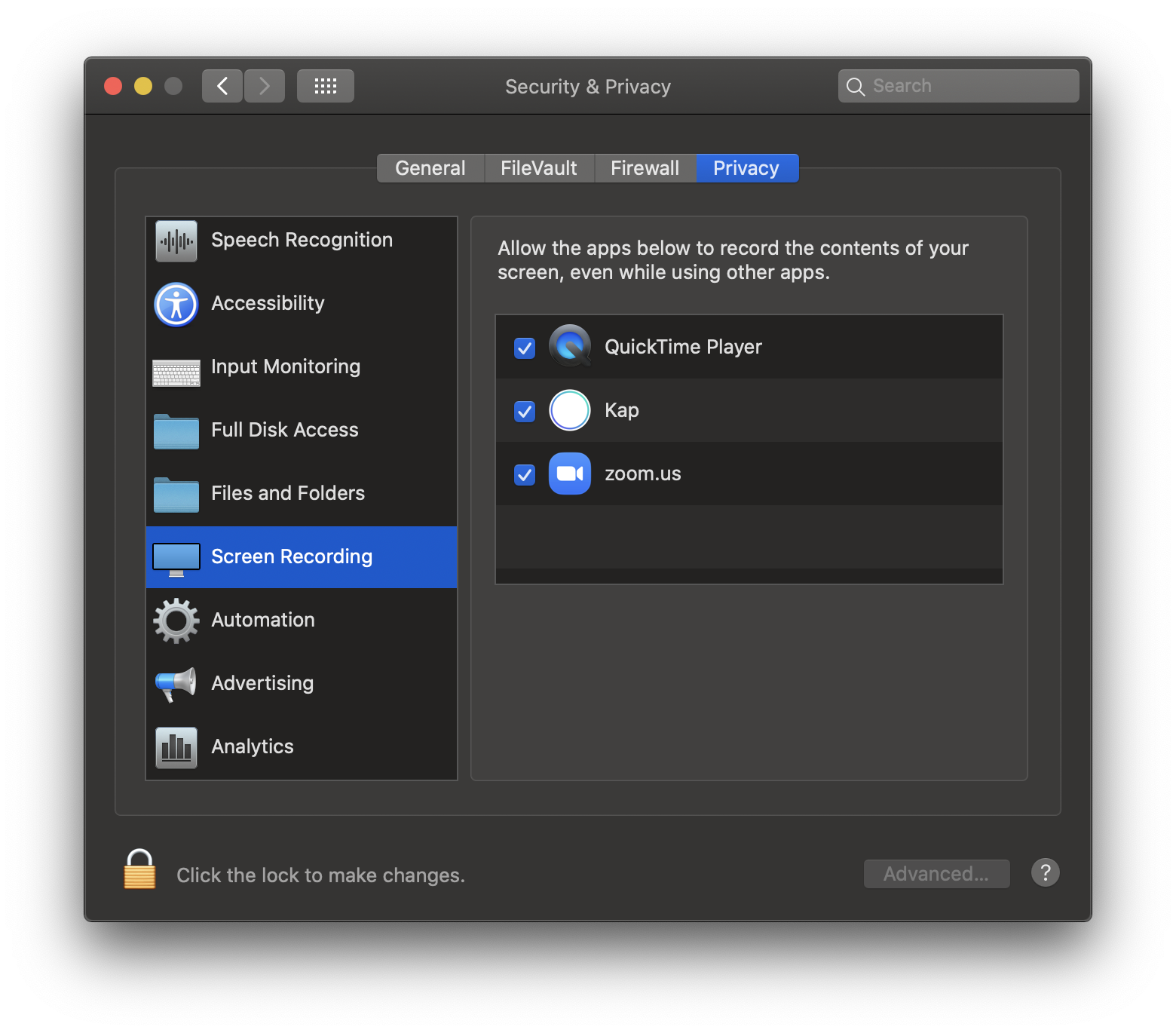
I got it working. Catalina asked me to give Kap access to screen recording. I first clicked it away, then I had to look for it in the preferences -> Security & Privacy -> Screen Recording
 StefanScherer
on 5 Nov 2019
StefanScherer
on 5 Nov 2019
then i don't know if its still a bug, but is it documented :D
benlumia007
on 5 Nov 2019
😄1
We're working on finding a way to check and point you to the settings when the permissions is not there, instead of failing silently 👍
These permissions are new in Catalina, so there's not a lot of documentation around them yet
 karaggeorge
on 5 Nov 2019
karaggeorge
on 5 Nov 2019
👍1
Was this page helpful?
0 / 5 - 0 ratings
Related issues
 albinekb
·
3Comments
albinekb
·
3Comments
 felixdorner
·
3Comments
felixdorner
·
3Comments
 danielbachhuber
·
3Comments
danielbachhuber
·
3Comments
 rgbkrk
·
4Comments
rgbkrk
·
4Comments
 sindresorhus
·
3Comments
sindresorhus
·
3Comments